


Marc
Invision Community Team
-
Joined
-
Last visited
Everything posted by Marc
-
No, these would always need to be accepted
-
We're on it :) Thanks
-
You would be very very incorrect in that belief :)
-
Yes, the above is the only method you need to do this.
-
As with any other software, we simply have different tiers at which we sell different items. It isnt a self-hoster thing. This is not available to all cloud users either.
-
^ its in relation to this
-
Click the plus, then click on "Wrap in box". Click for more
-
When you say half way, is it the first comment?
-
Thanks Michael. I have taken a look at that, and now moved it to a ticket so we can look into this further. Someone will be in contact as soon as possible
-
An example member where you have seen this issue, so I have one to follow through and see whats happened
-
Please provide an example name, and I can take a look
-
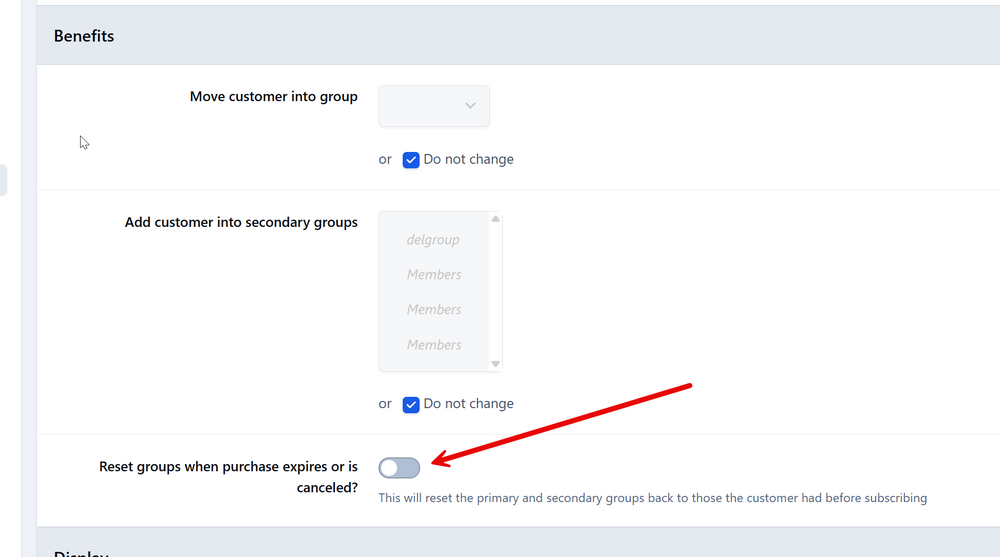
There is. This is what you would need to have switched on to have them moved back to the gropu they were in
-
Looks like you are on feature trial for that item till 22nd of this month, which is why you will see them. Every setting you get on 30 day trial. If you do want to set them up and have a play, you can see them on members>Assignments. It should actually show its on trial, but seems its not showing that. Will get that reported as a bug
-
Sorry to hear you feel its confusing. Please let me explain the situation there: When a user registers, they have no usergroup. Therefore the only group that they can be added to is "members" initially, unless that is changed. When you delete a group and they have to be put somewhere, the very same applies. This we would call the default group, because this is exactly what it is. "a selection automatically used by a program in the absence of a choice made by the user" - Ref https://www.merriam-webster.com/dictionary/default Certainly not trying to be combative in any way, but unfortunately the assumption you have that its incorrect in any way, isnt actually correct there. Of course, we always try to help :) Thats what we're here for
-
This is not something a cloud customer could set up, no.
-
Assignments is available only on business and above
-
Just so you are aware in case it comes up in future, that is what your default group means.
-
Im not sure what else we can give you here. If you delete a group, and its a members main group, they will be moved to the group people are in when they register originally
-
-
You shouldnt need to, no
-
They would be moved back to the default standard group if you delete the main group they are in
-
I can hear that gif lol
-
You would create a new theme in the admin CP, then just switch to it yourself at the bottom of your site, rather than switching everyone to it
-
Have a go at this on a default unaltered theme, and if in pages, also on a default template set. Its likely this that is causing you issues here. If you are then still having problems, please let us know
-
Are you referring to being in that forum?





