aia
Members
-
Joined
-
Unfortunately, it does not. I hope it will be fixed before the release.
-
No, IPS previously asked testers not to share their demos publicly, but they are constantly sending invites, so just wait and you will probably get yours very soon.
-
Does it allow restricting only external images without affecting other external embeds? If not, I hope this improvement will be made ASAP.
-
Can we disable image embedding (currently known as 'Insert image from URL') from third-party domains using this feature? As part of the solution to this problem.
-
I'm ready.
-
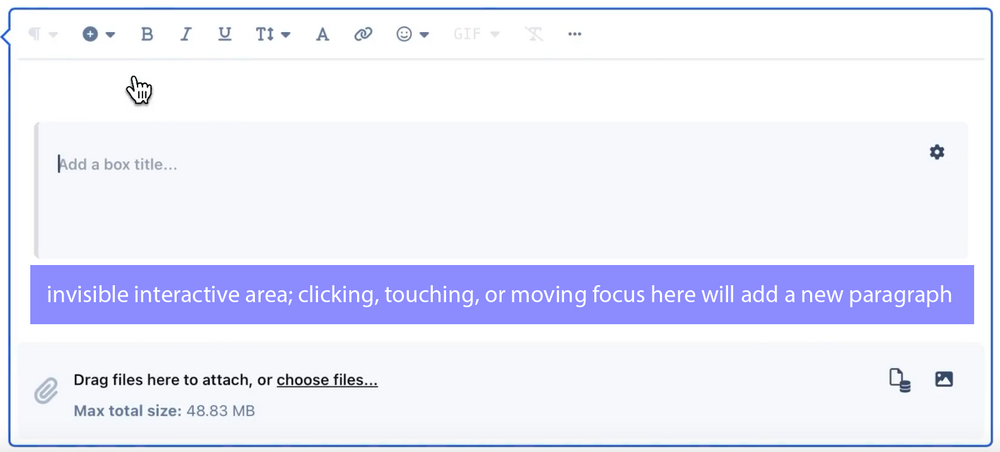
@Matt Finger, again, we're talking only about one region below the entire content (not "every block"), so everything you've mentioned is not relevant to the suggestion. The implementation of the interactive area exactly as it was described in the suggestion will only improve UX and won't affect anything else in any way.
-
Exactly the same as already implemented. My suggestion is for improvement, not replacement. The main idea of the interactive area is to prevent people from getting stuck in a state where they are unable to add a new paragraph at all (which happens quite often in CKE now) or are forced to look for unintuitive buttons on other elements (as implemented in IC5). When they can start typing into a paragraph with just one click in the same intuitive zone, regardless of the contents, they are no longer stuck. They can move blocks wherever they want after adding new paragraphs, etc.
-
Yup, a must-have feature. I implemented it myself in the current CKE, and I hope IC5 will allow doing it too. Or, even better, it will finally include it for all IC5 users
-
It seems you misinterpreted my suggestion. You 'don't agree' with something weird that you came up with yourself because I never said to do that. I would not agree with that either I only suggested adding one interactive area, which allows typing in the paragraph only upon interaction, and nothing like what you described. In this implementation, it does not have any of the drawbacks you imagined.
-
Those elements are not intuitive for inexperienced users (i.e., almost all users). It would be much more intuitive and easy to use if there were an area where users could click to start writing in a new empty paragraph. This area should always be placed right after the existing content in the editor: If this is implemented, even inexperienced users won't get stuck in a state where they can't add a new line and don't know where to search for a button to do that.

-
It's worth remembering that its behavior could be adjusted for specific regions such as Pages, while global defaults could follow best practices.
-
It's important not only for SEO but also for accessibility, especially for screen reader users. The usage of more than one H1 tag is considered a bad practice for a reason, as highlighted even in MDN docs. By the way, Google isn't the only search engine in the world. I know it's (almost) not the case in the US, but other countries also exist on this planet.
-
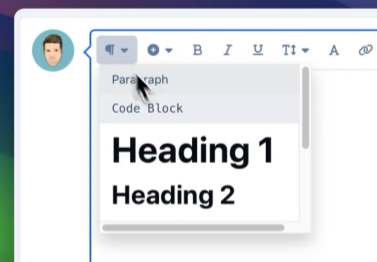
H1 must be removed from this menu. Also, its insertion should not be triggered by just one "#" symbol (Markdown). Each page must have a unique H1.