Maxxius
Members
-
Joined
-
Last visited
-
-
-
 Maxxius reacted to a blog entry:
Invision Community November: auto-split large topics, welcome email customization and more
Maxxius reacted to a blog entry:
Invision Community November: auto-split large topics, welcome email customization and more
-
-
@Matt this reminds me of an old feature request from years back.. - is it possible to different add sidebars PER FORUM? As opposed to in IPS 4 once you add a sidebar in topic view of any forum is what you will get in topic of every forum topic.
-
There is a solution though it's not gonna work in bulk but rather individual statuses. https://www.sosinvision.com.br/index.php?/file/146-convert-status-updates-to-topics/
-
I think is a matter of time. its just good UX plain and simple. 🙂
-
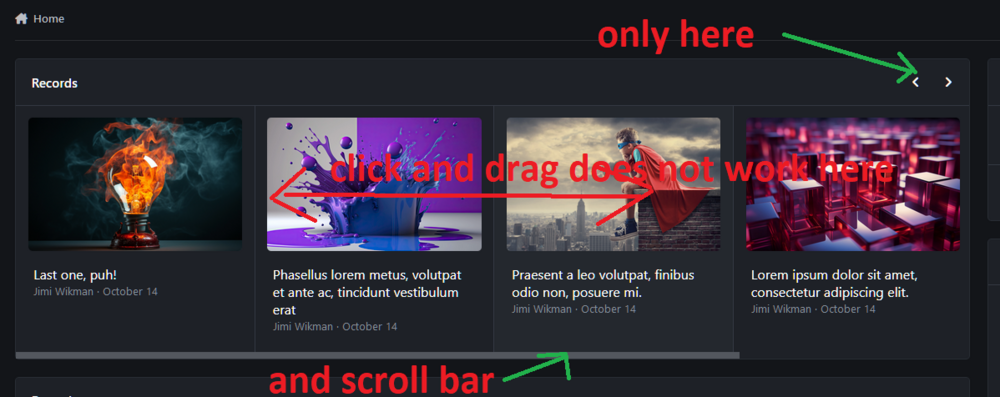
First of all its the first time I hear of this horizontal scrolling with shift key after using a computer for 23+ years 😄 And its a very poor slow and jittery solution at that. I will never use it. And you can't expect a regular user to know that trick. I agree buuuuut you already cannot select anything anyway. Check out the short video. I was unable to select any text. https://i.imgur.com/t3Fyjm0.mp4 - https://imgur.com/t3Fyjm0 And that's what I'm talking about is right there - https://wpcarousel.io/wp-carousel-free-demo/
-
I have a Razer mouse where you can tilt the scroll wheel left / right but it does nothing. Any how that's not the point. Would you consider adding so that everyone can drag it which every direction we want while holding a left click on it? That would make browsing these carousels so much faster and convenient.
-
Hey guys, are there any plans to make this area to be draggable while holding left click? So inconvenient to click on small arrows or that narrow scrollbar.