


Marc
Invision Community Team
-
Joined
-
Last visited
Everything posted by Marc
-
Please could you let me know what you are seeing in your system logs?
-
Please ensure you are adding things you are seeing to the bug tracker
-
There are no further additions to 5.0.0 that are not already in the latest beta. We are feature locked for that version now. Of course there will be many many more updates to come 😊
-
Please post any bugs within the bug tracker, rather than in here. Just need to ensure we keep track of them, and they will get lost in a topic :)
-
Thank you for that :)
-
We are unable to renew them indefinitely. Its because it was on the original alpha testing. I have moved it on a few days, but I do need to stress, if you want anything keeping on there you would need to ensure you have what you need straight away.
-
Please check you server error logs and let us know what is showing up there. Also, when you say you get 504, is that after completing the upgrade, or are you not getting that far? Thankyou for letting us know. Could you please confirm, did you continue from where you left off after uploading, or was it a restore and reupload?
-
Note, the issue on that one, was the path for PHP sessions on PHP was incorrect. What PHP version are you using, and have you just changed?
-
Please ensure all access details on file are up to date, and I can take a look to see if I can see whats happening there
-
When I've done this before myself, I've made a copy, updated links etc, but only copied the latest monthly folder, accepting that will result in some links being broken on the test instance.
-
When you do the same with this site, what happens?
-
If you want to make things as smooth are possible, then yes, getting ready in advance by moving them all would be a good step. In terms of costing, thats something you would need to go through with backblaze. We are unable to provide specific costings for external providers
-
Please add the 'refresh' part there as a bug, as that should probably happen
-
To be more specific, you are translating strings in the format menutab__{application}_icon, where {application} represents the name of the application. So, for example, menutab__cms_icon defaults to "file" , which corresponds to the fa-file icon in the acp menu. If you change the translation to something like "something", it results in fa-something, which of course isnt a font awesome icon
-
I believe Matt meant provide details prior to running the upgrader
-
Restore first of all, and check if you actually have the table before you begin the upgrade. Then, as terabyte mentioned, you want to start the upgrade after adding the table at that point
-
I will see if I can get someone to take a look to see if we can see whats happening. But please bear in mind, its a beta. While I understand what you are personally using the beta process for, its for testing, and some things will take priority over others. You’re certainly not being ignored 🙂
-
I have extended for a short time, however you will need to ensure you back up anything you need as we wont be able to renew those for much longer
-
You would add your own CSS for this. You can use something like this. Although I wouldnt suggest having a blue and red background 🤣 /* Light */ html[data-ips-scheme="light"] body { background-color: blue; } /* Dark */ html[data-ips-scheme="dark"] body { background-color: red; }
-
What version of safari is it you are using?
-
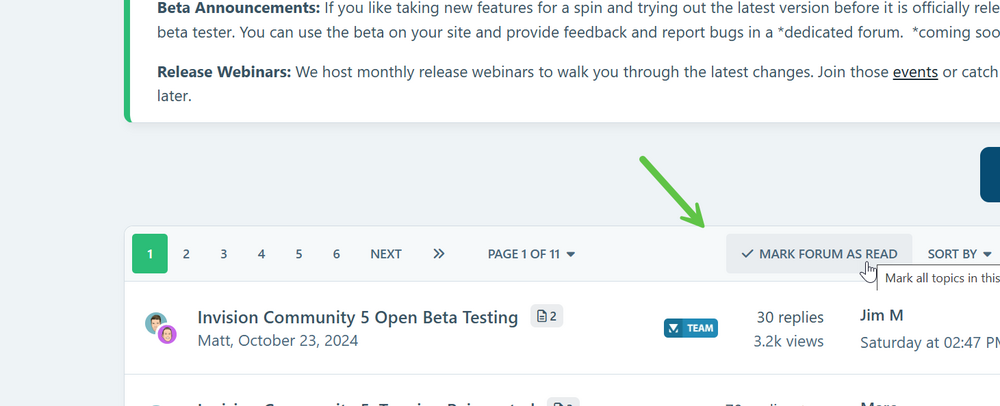
Thats within each forum
-
Thanks for letting us know. We’re taking a look at that They are retained so that the data is retained for upgrading to applications written by the authors. If you no longer wish to have them at all, I would advise removing them prior to upgrade
-
Some of these may well be intentional, as the site is actually a mix of more than one site. Will let Ehren reply more, but I suspect this may be the case
-
Reported this internally. Thank you
-
Im not seeing any issue with loading the editor in safari. The only difference in dark mode is the CSS. Are you checking on this site or another?





