

Everything posted by Matt
-
Source mode isn't possible in v5 due to how modern editors manage text. It's not like the old days where it markup was thrown around it and called it good. What do you need to do that requires source mode? With the new editor in v5 you can add new functionality (and button based styles) still. Why would anyone do that?
-
Yes. Custom emojis are still available. But only for you, no one else.
-
Not every function Tiptap supports will make it to our editor. It can do tables, but there's a lot of scaffold needed. We need UI to add/remove rows/columns etc. I'm sure it'll mature as 5.0 develops.
-
Thanks! It's all @Matt Finger's hard work. I'll let him answer these questions.
-
It's worth remembering that the same editor can be used for Pages.
-
Not always the case. I presume you mean for SEO purposes, but we've moved on a lot from the days where a two H1 tags would confuse the billion dollar AI driven company called Google. Google: "Our systems do not have a problem with multiple H1 tags"
 Forum moderation management used to be straightforward. It was commonplace to assign a moderator to a single forum. They would be responsible for enforcing the rules, removing spam and generally modelling the behaviour you wanted to see within your community. As community management has matured and moderators are tasked with roles based on knowledge, help and support, there is a need for more nuance in managing topics within your community. For example, you may have specialists or teams of specialists who help answer questions about development, sales, or support. Topics that require this help may be posted anywhere within your community. Indeed, this feature was inspired by a need in our own support community to ensure customers get the right help from the right team member. We have questions on feature sets, purchasing, and support requests, each requiring a different team member. It is not enough to hope that the right person sees the topics; they must be assigned to ensure excellent service. What are the benefits of this feature? The ability to assign a topic to a single moderator or a team of moderators ensures that each topic gets the best outcome regardless of where it was posted. Having topics assigned helps moderators deal with issues quickly, as there's clarity over which moderators should handle the topic. It also helps keep your community team accountable by having the ability to monitor their workload and get statistics on the time it takes for your team to reply. These statistics also help the community lead assess quality control. How do you use this feature? There are two ways to assign a topic to a moderator or team of moderators. You can assign a topic when replying to it or do it from the topic's action menu. Once assigned, the assignee can review their assigned topics via the Moderator Control Panel and see which are assigned to them via the list of topics. Each moderator will receive a notification informing them they have a new assignment. Those with permission to assign topics to others will see all the assigned topics and who they are assigned to when reviewing the list of topics. The Admin CP contains a list of all assigned topics and also allows you to create and manage teams of moderators, such as "Sales Team" or "Developers." Finally, once the topic has been managed successfully, the moderators can remove themselves from the assignment completing the task. Assigning a specific topic to a single person or team in a busy online forum is a strategy that can enhance the effectiveness of the forum's management. It promotes efficiency, expertise, consistency, and accountability, which are vital for maintaining a vibrant and respectful online community. We hope you are looking forward to this feature and look forward to any comments you may have.Forum moderation management used to be straightforward. It was commonplace to assign a moderator to a single forum. They would be responsible for enforcing the rules, removing spam and generally modelling the behaviour you wanted to see within your community. As community management has matured and moderators are tasked with roles based on knowledge, help and support, there is a need for more nuance in managing topics within your community. For example, you may have specialists or teams of specialists who help answer questions about development, sales, or support. Topics that require this help may be posted anywhere within your community. Indeed, this feature was inspired by a need in our own support community to ensure customers get the right help from the right team member. We have questions on feature sets, purchasing, and support requests, each requiring a different team member. It is not enough to hope that the right person sees the topics; they must be assigned to ensure excellent service. What are the benefits of this feature? The ability to assign a topic to a single moderator or a team of moderators ensures that each topic gets the best outcome regardless of where it was posted. Having topics assigned helps moderators deal with issues quickly, as there's clarity over which moderators should handle the topic. It also helps keep your community team accountable by having the ability to monitor their workload and get statistics on the time it takes for your team to reply. These statistics also help the community lead assess quality control. How do you use this feature? There are two ways to assign a topic to a moderator or team of moderators. You can assign a topic when replying to it or do it from the topic's action menu. Once assigned, the assignee can review their assigned topics via the Moderator Control Panel and see which are assigned to them via the list of topics. Each moderator will receive a notification informing them they have a new assignment. Those with permission to assign topics to others will see all the assigned topics and who they are assigned to when reviewing the list of topics. The Admin CP contains a list of all assigned topics and also allows you to create and manage teams of moderators, such as "Sales Team" or "Developers." Finally, once the topic has been managed successfully, the moderators can remove themselves from the assignment completing the task. Assigning a specific topic to a single person or team in a busy online forum is a strategy that can enhance the effectiveness of the forum's management. It promotes efficiency, expertise, consistency, and accountability, which are vital for maintaining a vibrant and respectful online community. We hope you are looking forward to this feature and look forward to any comments you may have. View full blog entryWe looked at Quill, but no.Kind of. @Matt Finger is working hard on it as we speak. I don't want to say too much but we did a lot of research and picked the best solution in terms of development, stability and future functionality. More news soon. It's probably one most have never heard of but it is used widely. If anyone is worried about us using Froalo or TinyMCE, don't be. 😅New feature blog early next week. 🤔👀📰➡️👤It's all honoured, so if the member doesn't have access to that database as they would normally, then they won't be able to add the categories. Does your logged in member have permission to view the database?
 Finally, one of the most requested features for clubs in Invision Community is coming with our March 2024 release: Pages databases in Clubs. You may be surprised to see a new feature being introduced for Invision Community 4 during our flow of news for Invision Community 5, but as we're committed to Invision Community 4, we wanted to continue to bring optimizations and improvements to the platform. What is the benefit of this new feature? Clubs enable communities to host multiple micro-communities with many benefits. Clubs allow more specialized and focused discussions on specific topics. This can lead to higher-quality content and a deeper exploration of niche subjects that may get overlooked when posted on a busy forum. Clubs also offer the ability to tailor the community experience based on the needs of that community. That customization is what this feature focuses on. Pages is a powerful application that allows truly custom layouts for content areas. Simply by adjusting templates, you can create a news feed layout (it is what we use for this news blog area!) or something even more customized to your needs. The March 2024 release allows you to create Pages database categories directly inside clubs, including custom fields and templates. How does it work? Setting up your Pages database to allow clubs to use categories is simple. Simply allow categories to be created within clubs when creating or editing a database. Once that is done, club owners can add a Pages database category to their club in the same way they can add topics, galleries, etc. Once the Pages database category has been added, you can then add content as you would any other club area with the added features of Pages, including custom templates and custom fields. This example club uses a custom Pages database listing template to show the articles in a custom format along with custom field data. Likewise, viewing an article in this example club showcases the use of custom templates to present the content differently from the standard topic templates Invision Community uses elsewhere. Allowing Pages database categories inside clubs brings the opportunity for more complex custom areas making use of multiple custom fields along with truly custom layouts using templates. This is a great way to bring additional areas, such as news articles, into your club areas to compliment discussions. We hope you enjoy this feature, and if you have any comments, please leave them below!Finally, one of the most requested features for clubs in Invision Community is coming with our March 2024 release: Pages databases in Clubs. You may be surprised to see a new feature being introduced for Invision Community 4 during our flow of news for Invision Community 5, but as we're committed to Invision Community 4, we wanted to continue to bring optimizations and improvements to the platform. What is the benefit of this new feature? Clubs enable communities to host multiple micro-communities with many benefits. Clubs allow more specialized and focused discussions on specific topics. This can lead to higher-quality content and a deeper exploration of niche subjects that may get overlooked when posted on a busy forum. Clubs also offer the ability to tailor the community experience based on the needs of that community. That customization is what this feature focuses on. Pages is a powerful application that allows truly custom layouts for content areas. Simply by adjusting templates, you can create a news feed layout (it is what we use for this news blog area!) or something even more customized to your needs. The March 2024 release allows you to create Pages database categories directly inside clubs, including custom fields and templates. How does it work? Setting up your Pages database to allow clubs to use categories is simple. Simply allow categories to be created within clubs when creating or editing a database. Once that is done, club owners can add a Pages database category to their club in the same way they can add topics, galleries, etc. Once the Pages database category has been added, you can then add content as you would any other club area with the added features of Pages, including custom templates and custom fields. This example club uses a custom Pages database listing template to show the articles in a custom format along with custom field data. Likewise, viewing an article in this example club showcases the use of custom templates to present the content differently from the standard topic templates Invision Community uses elsewhere. Allowing Pages database categories inside clubs brings the opportunity for more complex custom areas making use of multiple custom fields along with truly custom layouts using templates. This is a great way to bring additional areas, such as news articles, into your club areas to compliment discussions. We hope you enjoy this feature, and if you have any comments, please leave them below! View full blog entryWe have a few more things to announce, but we're just finalising our internal reviews. I want to do a status update on v5 early next week and outline the next steps.I'll DM you the answer.Already in, but we've not spoken about it yet.
 You won't be able to place ads anywhere on the Live Topics UI. The advertisement system has had an update for v5, but I don't think we've spoken about it much. I think I spent more time making up fake adverts than writing about it.
 The specifics are to be determined, but it will be part automated, part manual most likely.Another Invision Community 5 blog is on its way right now. There's been a lot going on, but we're waiting for a few things to be finished before we can show it off. We're currently revamping the theme resources UI, lots of Pages things in progress including a brand new easy page builder along with QA of what's already been added.If you are interested in switching in the future, just let us know. We can help you get your data migrated. We're fully booked this side of Christmas and New Year is already busy for self hosted to cloud conversions but we'll always do what we can to help. It is indeed. 🙂
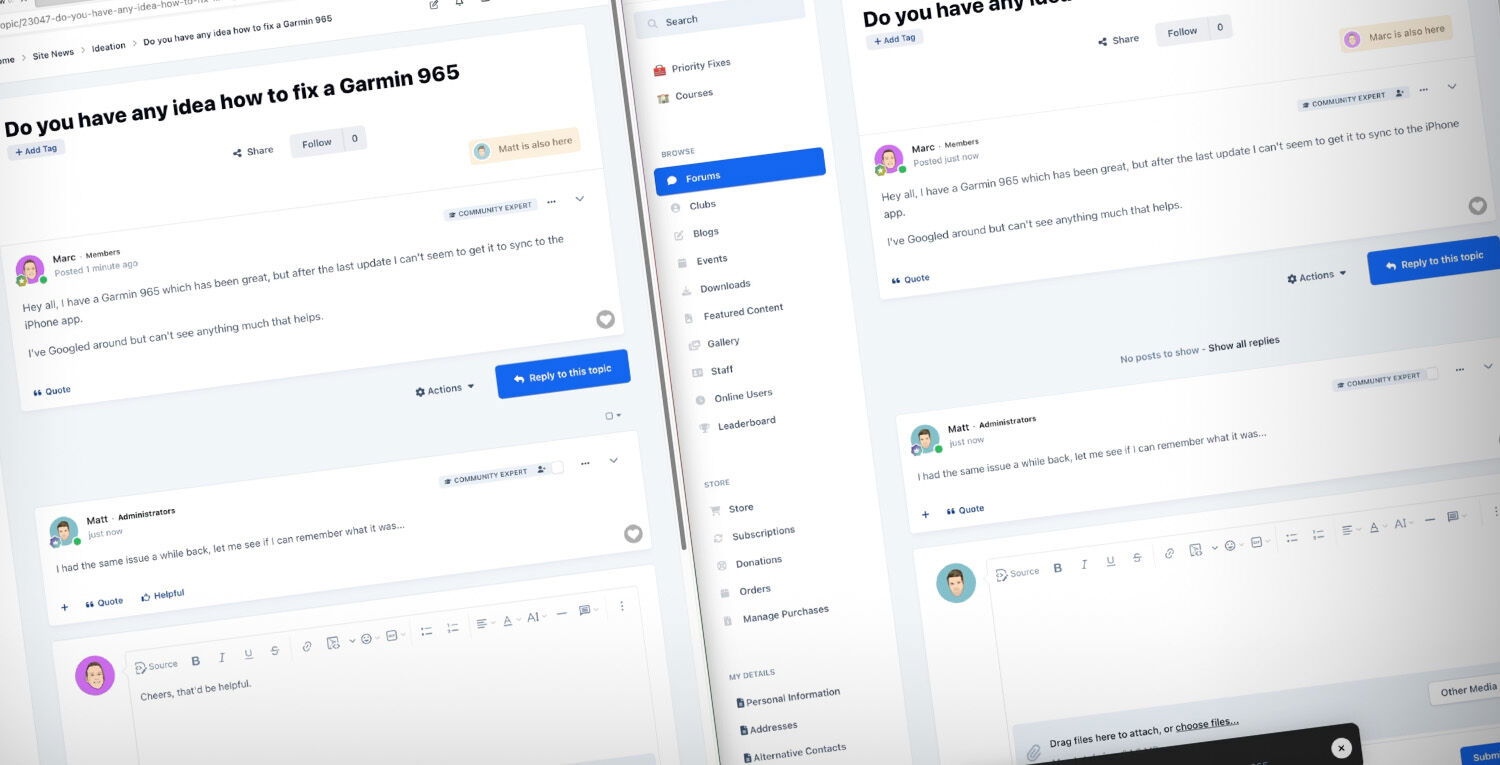 Bring your community to life with the latest live community features coming to Invision Community 5. Last year we introduced new features that immediately showed who was currently reading a topic and who was replying. This feature leveraged new technologies to connect members with each other instantly. In this blog post, we'll delve into the latest live community features for Invision Community 5 and explore how they enhance our sense of togetherness within our communities. We'll examine how these features instantly notify us about new events, updates, or interactions and how they contribute to a shared sense of presence. These features go beyond the static posts and comments we've grown accustomed to and introduce a real-time element. Whether you're part of a support community, a gaming forum, or a professional network, these features will have you feeling like you're interacting with other community members simultaneously, fostering a strong sense of shared experiences. Posting We've all been involved in a busy topic where you're keen to see what replies your latest post has. Select packages on Invision Community 4 can see who is active on a topic and who is typing, but you have to hit refresh to see the new posts added to the topic. If you're anything like me, then you hammer refresh until something new appears. With Invision Community 5, this is no longer a problem. As you interact with a topic, new replies are automatically added to the topic without needing to refresh. This one feature brings the conversation to life, and you get a real sense of other members interacting with the topic at the same time as you. Reactions Did you drop a razor-sharp GIF or post something applause-worthy? Watch as others react to your content in real time with Invision Community 5. There's no need to refresh or return to the topic later to see who enjoyed what you wrote. Getting rewarded for your content is gratifying and encourages you to post more and show your appreciation for other's content via reactions. Notifications Notifications have long been a valuable way to be notified when anything important happens in your community. It may be that someone has quoted your content, tagged you in a post or started a new topic in a forum you're following. With Invision Community 5, you can watch the notification count rack up in real time, alerting you to new events that you may otherwise miss as they happen. We hope that you've enjoyed reading about these new features and look forward to them coming to select packages for Invision Community 5. They provide a sense of togetherness and immediacy, making it feel like we're interacting with fellow community members simultaneously. We're keen to hear what you think, please leave a comment below. The features discussed in this announcement will not be available for Invision Community Classic. Click here to learn more about switching to our platform to get this and other benefits.Bring your community to life with the latest live community features coming to Invision Community 5. Last year we introduced new features that immediately showed who was currently reading a topic and who was replying. This feature leveraged new technologies to connect members with each other instantly. In this blog post, we'll delve into the latest live community features for Invision Community 5 and explore how they enhance our sense of togetherness within our communities. We'll examine how these features instantly notify us about new events, updates, or interactions and how they contribute to a shared sense of presence. These features go beyond the static posts and comments we've grown accustomed to and introduce a real-time element. Whether you're part of a support community, a gaming forum, or a professional network, these features will have you feeling like you're interacting with other community members simultaneously, fostering a strong sense of shared experiences. Posting We've all been involved in a busy topic where you're keen to see what replies your latest post has. Select packages on Invision Community 4 can see who is active on a topic and who is typing, but you have to hit refresh to see the new posts added to the topic. If you're anything like me, then you hammer refresh until something new appears. With Invision Community 5, this is no longer a problem. As you interact with a topic, new replies are automatically added to the topic without needing to refresh. This one feature brings the conversation to life, and you get a real sense of other members interacting with the topic at the same time as you. Reactions Did you drop a razor-sharp GIF or post something applause-worthy? Watch as others react to your content in real time with Invision Community 5. There's no need to refresh or return to the topic later to see who enjoyed what you wrote. Getting rewarded for your content is gratifying and encourages you to post more and show your appreciation for other's content via reactions. Notifications Notifications have long been a valuable way to be notified when anything important happens in your community. It may be that someone has quoted your content, tagged you in a post or started a new topic in a forum you're following. With Invision Community 5, you can watch the notification count rack up in real time, alerting you to new events that you may otherwise miss as they happen. We hope that you've enjoyed reading about these new features and look forward to them coming to select packages for Invision Community 5. They provide a sense of togetherness and immediacy, making it feel like we're interacting with fellow community members simultaneously. We're keen to hear what you think, please leave a comment below. The features discussed in this announcement will not be available for Invision Community Classic. Click here to learn more about switching to our platform to get this and other benefits. View full blog entry