

Everything posted by Matt
-
See my post above. I think there's a little confusion over the tag conversion process. All 'closed' tags admins have created are converted over. We then offer to convert the top 25 user created tags over, as well as any per forum/category tags.
-
To be clear, all "closed" tags created are converted. These are the tags you set up as an admin. The 25 number is based on the top "open tags" that members have created.
-
That's correct. That's why we're here talking about it. We made decisions, and then adjust as needed based on feedback. However, I'm not sure that use of tags is mainstream. It's unusual to have 1000 tags, and the application is niche. But this is an open conversation.
-
We picked a number, if people need more then we can convert more. What we don't want to do though is set people up to fail by converting over hundreds of tags because it's likely you'll never get round to setting them up and managing them properly.
-
1) Each tag must be created in the AdminCP (Content Discovery > Tags). It's a bit like the current "closed" system where you have to add the tags manually if you want your community to use them. 2) No, this was a strong part in the new system; if it is going to work, it must be universal. To start omitting tags from some apps, some forums, etc weakens the entire system. This is a way to bring content across your community into one place. If you need tags like status labels (open, fixed, etc) then I would recommend a Pages database and custom fields. Think of it like organising your house. You have a lot of things that can be hard to find (I know I had a charging cable here somewhere...) so you buy 10 large plastic crates and organise everything into those boxes (electronics, clothes, toys, cables, etc). You label each crate and it's now easy to find what you want. Need a charging cable? Open the cables box. Need to find your Gameboy (it's 1999 in my head) then go to the electronics box. It's easy. If you then added a bunch of rules on top (blue cables can't go into any box, orange toys can't go into the toy box) then you break that simple and strong organisation. Likewise, if you chose instead to buy 500 small lunchbox sized boxes and put one item in each, then you have changed nothing, objects are still impossible to find and are not in the same place.
-
A lot of decisions to make. Why do you have 60,000 tags? How do they benefit your community?
-
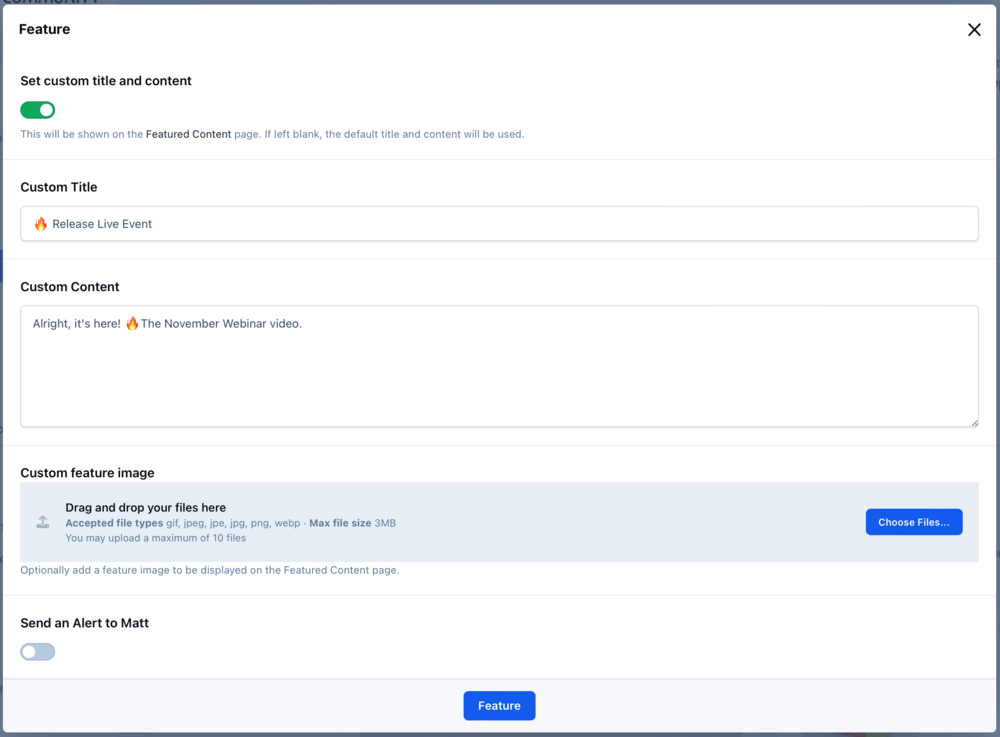
1) The top three items are from the normal "Featured Content". Oh, actually, we haven't spoken about that much have we. So we merged "featured" and "Our picks" into one thing. The old "feature" didn't really do much apart from allow you to filter in a widget and show a featured block above the content. This new page is much simplified. You can still feature replies and show the post at the top of the topic as you can now. I should probably do a blog on all the other stuff we did but haven't spoken about. 🫠 2) Right now, all tags but I think it would be nice to have a toggle in the AdminCP form to determine this. 3) Yeah, nice idea. We'd need to be careful with Pages collisions. 3) Um. We can add a bunch of hook points ads can use on that page. Absolutely. It offers another way to categorise content across all apps within the suite which was the primary point - we wanted a way to bring all that content into one place and have it all look universal. It will require some thought and it works best with fewer tags, not more. If you have 100+ tags then it's not as effective. Ideally you want broad tags rather than narrow tags. It uses the standard autocomplete form widget which will offer a search box if there's more than N items (can't recall offhand what that is) I think we will need to add some bulk tag management in some form. Right @Esther E.? 😅 It still lives in another branch. I'll be updating the alpha site soon.

-
Added a note on your account, thanks! 😂
-
I'm unsure how you've drawn that conclusion, I've explained the next steps and why we're doing it that way. It won't be "another year or so" before downloadable betas are available. Current status: The tagging blog has just been posted (it takes a fair while to get the videos and other assets together 😅 ) We found a few issues in v5 with IN_DEV off, which have been fixed this week and just need reviewing and testing. It's likely the limited alpha demo system will be ready next week now. I'll keep you updated.
-
 Invision Community v5 takes a fresh approach to tagging and content discovery. It overhauls the concept to bring content across different sections together with a beautiful new tag page. Tagging is a powerful concept but underused with Invision Community 4 due to overly complex interfaces in different areas of the suite, a confusing open tagging model option and no real benefit in content discovery beyond a simple list of content items. A driving force behind Invision Community 5 is the question of how we can help time-pressured community members find the content that most interests them. Invision Community has robust taxonomy through forum and category structures, but what about content in less visible areas such as Blogs, galleries or Events? How can we bring those together to homogenise the type of content and focus on the content itself? Taxonomy via tagging across all applications in the community suite is the answer. However, we needed to re-approach how tagging was implemented in the Invision Community to bring our new vision to life. Out with the old The current tagging system is implemented loosely, allowing open tagging, which is more akin to hashtags than high-level taxonomy. Allowing forums, albums, and blog categories to define their own tags turns tagging into more of a status label, which does nothing to help bring disparate content together. In with the new With a new focus on taxonomy and content discovery, we set about rebuilding tagging for Invision Community 5. The UI to tag items is the same, but now each defined, globally available tag has its own page with cover image and ability to feature items within that tag page. A uniform approach to different content items in the UI breaks down the barrier between content types and focuses solely on the content. Tags featured on its page are automatically displayed on the community Featured Content page. Finally, tags can now be followed, allowing your community to get a daily or weekly digest of all new tagged items, bringing people back to read more of the content they love. Let’s take a closer look In Invision Community 5, all tags are defined in the Admin Control Panel. The ability to use open tagging and per-node tags has been removed, but don’t worry—the upgrade system will offer conversion for those tags. Once defined, the tags are available for all content types and feature on a dedicated new tag page. This page features cover photos and more information on the tag via a description. Content from across your suite will be displayed on this page. If a single piece of content has multiple tags, it will appear on every relevant tag page making it easy to have content in multiple areas. If you want to permanently or temporarily feature individual content, perhaps your latest news or product release, you can do so right from the tag page. Featured content will show on the community’s Featured Content Page. Blurring the lines Now that we have an attractive and focused page for each tag, we can start to blur the lines between applications and, indeed, forums and categories, offering a new way to organise content. For some communities, the need for multiple forums to categorise content is diminished, and instead, tagging can be used to separate and find content from across the community. Tags can be featured in the menu system, offering new ways into your community for new visitors, regular community members, and even those who visit daily. Invision Community 5 is fearless in challenging past decisions or streamlining features to make them stronger and more focused. Our new approach to tagging takes a vague and underutilised concept and pushes it front and centre in any content strategy. How will you use it in your community?
-
Invision Community v5 takes a fresh approach to tagging and content discovery. It overhauls the concept to bring content across different sections together with a beautiful new tag page. Tagging is a powerful concept but underused with Invision Community 4 due to overly complex interfaces in different areas of the suite, a confusing open tagging model option and no real benefit in content discovery beyond a simple list of content items. A driving force behind Invision Community 5 is the question of how we can help time-pressured community members find the content that most interests them. Invision Community has robust taxonomy through forum and category structures, but what about content in less visible areas such as Blogs, galleries or Events? How can we bring those together to homogenise the type of content and focus on the content itself? Taxonomy via tagging across all applications in the community suite is the answer. However, we needed to re-approach how tagging was implemented in the Invision Community to bring our new vision to life. Out with the old The current tagging system is implemented loosely, allowing open tagging, which is more akin to hashtags than high-level taxonomy. Allowing forums, albums, and blog categories to define their own tags turns tagging into more of a status label, which does nothing to help bring disparate content together. In with the new With a new focus on taxonomy and content discovery, we set about rebuilding tagging for Invision Community 5. The UI to tag items is the same, but now each defined, globally available tag has its own page with cover image and ability to feature items within that tag page. A uniform approach to different content items in the UI breaks down the barrier between content types and focuses solely on the content. Tags featured on its page are automatically displayed on the community Featured Content page. Finally, tags can now be followed, allowing your community to get a daily or weekly digest of all new tagged items, bringing people back to read more of the content they love. Let’s take a closer look In Invision Community 5, all tags are defined in the Admin Control Panel. The ability to use open tagging and per-node tags has been removed, but don’t worry—the upgrade system will offer conversion for those tags. Once defined, the tags are available for all content types and feature on a dedicated new tag page. This page features cover photos and more information on the tag via a description. Content from across your suite will be displayed on this page. If a single piece of content has multiple tags, it will appear on every relevant tag page making it easy to have content in multiple areas. If you want to permanently or temporarily feature individual content, perhaps your latest news or product release, you can do so right from the tag page. Featured content will show on the community’s Featured Content Page. Blurring the lines Now that we have an attractive and focused page for each tag, we can start to blur the lines between applications and, indeed, forums and categories, offering a new way to organise content. For some communities, the need for multiple forums to categorise content is diminished, and instead, tagging can be used to separate and find content from across the community. Tags can be featured in the menu system, offering new ways into your community for new visitors, regular community members, and even those who visit daily. Invision Community 5 is fearless in challenging past decisions or streamlining features to make them stronger and more focused. Our new approach to tagging takes a vague and underutilised concept and pushes it front and centre in any content strategy. How will you use it in your community? View full blog entry
-
Tables are on the roadmap. Perhaps not for v5.0 but we want to support them.
-
Yes this. I stated the reasons for this in my post. We're still building the back-end services to support building and releasing v5 as we'll need to keep building and releasing v4 also. We need different endpoints for licensing, bulletins, etc. Waiting for that to be done will just delay testing further and there's a lot to test.
-
As we find ourselves with our toes over the precipice of June; signalling the half way point of the year, I thought it's a good time for an update. Apologies southern hemisphere. Invision Community 5 has been in alpha testing for a while, and a small group have found a good number of bugs, and offered their thoughts and suggestions, some of which we've implemented. During this time we've wrapped up the new editor, a boat load of UI improvements and more. We are now ready for the next stage, which is to give our alpha testers their own Cloud v5 to test with. This opens up testing for the Admin CP, and all areas without using developer mode. v5 has a lot of changes to how CSS, JS and resources are managed. They are now built when we build the apps, and should never need rebuilding. We also store compiled templates now, so lots of slow eval() calls are no longer needed. In brief testing locally, it has made the entire platform super-fast. We are choosing to use a Cloud v5 to test with, rather than a traditional download for two reasons. The first is that using our hosting platform means we don't have to chase down issues with PHP, MySQL and unix versions which can be time consuming in the early stages. The second is that we're still writing the new build code, so we can't actually produce a versioned zip just yet. 😂 But fear not, downloadable versions will be coming at some point. We're aiming to have this alpha demo system ready next week, so if you want to help alpha test, drop a comment below. I want to keep the first round (1-2 weeks) fairly small or it becomes overwhelming sifting through the feedback and bugs but please do register your interest. In terms of functionality, we're wrapping up the tagging changes; I'd expect a blog on that next week. The final parts of the Pages app are coming together. We even tested an upgrade of this site to v5 to see how the Pages built pages looked, and much to all of our relief, it looks great with just a few CSS classes needing updating. It's been a long journey - and a little longer than we'd first hoped but we're getting closer to betas when the fun really starts. We're really proud of v5 and we hope you like what we've created.
-
Invision Community v5 will come with a voucher for this* * this is a joke
-
I think it's worth waiting until you can use it. Then get feedback from your members. I'm sure it actually works better than you imagine and that it's quite intuitive. If you have a reason to use source code beyond fixing CKEditor issues, please let us know and please be as specific as you can which will really help, for example "Embed other sites" is less helpful than "I have a separate website, and I want to bring blog articles into my posts at around 600px high with a scrollbar".
-
This is a different problem completely though and not related to alpha testing a new version of an existing product where our customers who run forums know their users pretty well. Those that are posting that our way is bad and they have a better idea should probably wait until they've tried it. The alternative is no arrows or spaces or anything, just like v4 and most people have somehow managed to drag themselves from their primordial soup to figure out how to bash a keyboard in an astethitcally pleasing way enough to leave messages on Invision Community 4.
-
Well... that's... somewhat niche.
-
1) The embed system works as it does in v4. 2a) Mentions work as you'd expect 2b) Just paste the link in as you'd do with v4. Well, you're wrong but I appreciate you taking the time to share your thoughts.
-
No disrespect, but you've made several leaps of assumption. 😂 Our alpha testers are customers, some self-hosted, some with the cloud platform from all walks of life. They are not picked because they are tech savvy or knowledgable. They are picked because they are articulate, but beyond that they have no special skills. They are your peers.
-
With v5, you can probably save a lot of hassle and just use the backticks to generate inline code. Either way, applications have a framework to add new editor functionality, including buttons. CleanShot 2024-05-21 at 10.29.11.mp4
-
What do you need to embed, can you show us a screenshot? I'm not even sure the functionality even exists in TipTap, or any other editor. It's way too early to tell. We've not even released v5 yet, so making determinations about which method is better is premature.
-
How about adding a line before?
-
Our alpha testers who helped with feedback on this feature disagree. I don't agree that adding newlines before and after each box is a great idea. It'll lead to posts with extra whitespace if you forget to go back and remove them. Keep those reasons for using source mode coming. To re-iterate that we're not removing it because we've taken an Ivory Tower approach, it's just that it's not possible with modern editors (even CKEditor 5) due to how they see nodes/styles/marks. Also, it's 2024 - if you need to embed JS and custom iFrames into a post, then perhaps we can find a better solution. Pages will likely have more flexibility (although still no direct 'edit the source HTML of this editor').
-
As above, source mode has been removed. Modern editors (all of them) manage markup differently. If you added something the editor couldn't handle via HTML, then it would just remove the unsupported code when you hit edit. Source mode was added back when we had BBCode and it was.. less than perfect in how it handled it, so it allowed admins to go in and edit it to fix it. Likewise, CKEditor was such a pain to write plugins for, it was easier to just say "oh, use source mode to add stuff". Tiptap is much easier to develop for. What do you use source mode for?