Ocean West
Clients
-
Joined
-
Last visited
-
-
I have a staycation coming up so I'd like to kick the tires of 5.1
-
-
I am curious if I have an affiliate member who is setting up an event is it possible for us to setup a new payment gateway like Stripe and use their account so any purchase go directly to them and doesn't have to process with my Stripe. would be a nice feature if site admins do have Apple Developer Account. As it's already required to use Log In with Apple.
-
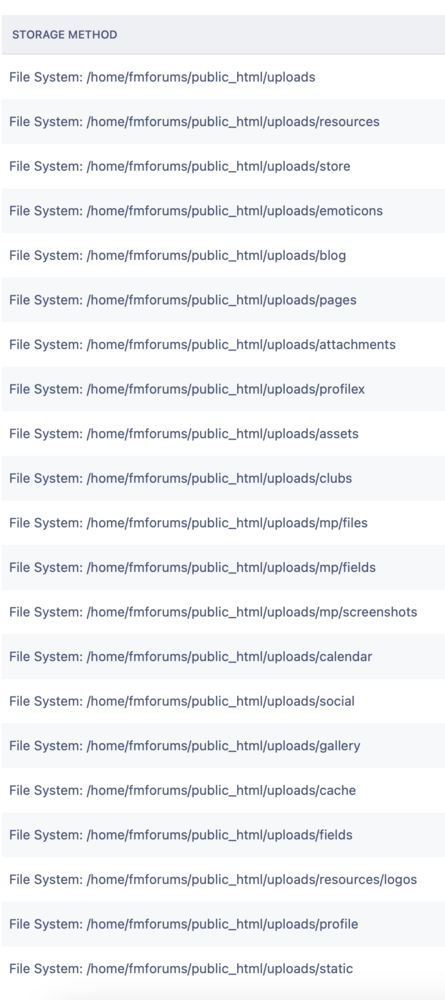
Sorry late to the topic, this is my config currently I don't mind everything going to uploads. In the past when I had to look at specific attachments related to a particular app it made it much easier to download that directory offline and find the items in the date stamped folder much easier then pulling down the entire dataset. Ideally if that was automagically handled I wouldn't mind. How is the change going to happen and should I make changes now prior to upgrade to v5? Could one app be targeted for S3 or is it all or nothing? I am also too curious about BackBlaze B2 just started using it for many other projects. I would like to know if based on the current size of our uploads folder is there some very basic cost estimator, that you could surface to make an informed decision before moving. - nobody wants to get a billing surprise.
-
I am seeing a 500 error on the preview site.
-
Cohesiveness. Either a navigation link or a redirect forum in the index - yea yea I bookmarked it already just helps when my caffeine levels wain.
-
Can we add this link as a main navigation menu item?
-
Another feature that would be awesome - a way to reuse blocks from one page to another page. If you spend time adding blocks and dialing in the settings to the Forum Index but you may want that same set of widgets on the Blog you have no choice but to start all over - If settings are not identical the presentation may cause distraction, people will notice and not make the site feel cohesive. In my mind If I am on the blog index there was an object on the left to drag and drop (existing configured blocks ) I drag to the target well - some interface that will show a card and allow me to pick existing configured blocks that are already present on other pages which appear in this target well. Perhaps some mechanism that knows that the blocks configured here are shared on other pages, If I modify a setting on one page an option to update these settings on all other pages that share this collection of blocks. 🙏
-
Along with @Joel R suggestions - I would like (some) blocks (the first sections under pages) to have a temporal option - when they go live and how long they live or if they only need to be active during a specific scheduled repeating time. Sometimes we may need to prep stuff that is embargoed and want to get it setup prior for it to go live at a future date and time. Example I have a third party who has a daily broadcast stream I would like for their feed to appear when they are online. But that block disappears after the stream.
-
That was very poetic - awesome job. https://suno.com/song/2c3a30e9-d29d-4a81-8c6b-1e0745594c5a https://suno.com/song/cb2063a0-531a-437c-8e77-11eafcd748b4
-
I would be honored to be included.
-
i would like to see for advertisement items to have an upsell option to add specific banners that can be included with the site email.
-
It's been so quiet any more teasers or show & tell?
-
Now once a set of elements are dialed in and you think your style is the cat's meow could we some how export the recipe for others to import? So others with more time on their hands could produce a full set . I am curious where the permissions level exist for these styling and theming changes so that if I wanted to hire a designer to edit my site they would have an account have restricted access limited to such tasks not other data schema schema.
-
So how does this affect how and where we place custom ads? The docs explicitly call for editing templates.
-