


Charles
Management
-
Joined
-
Last visited
Everything posted by Charles
-
Marketplace authors have known about this change for a while now and some are looking to create their own Marketplace-like web site. It sounds like a promising project and they are welcome to talk about it here.
-
This topic only applies to those on our cloud services. As we prepare to launch improved spam management, we are also making changes to traffic control. We have many tools in place to stop malicious traffic on our network. These tools stop day to day bad actors and can also handle situations where we get a huge flood of traffic in a denial of service attack. It is always a balancing act to stop bad traffic while allowing good traffic. There have been some situations where real users were getting blocked because they were getting caught up in a suspicious IP range, for example. When you were caught in a block, all you got was a permission denied page and that was it. This is what we want for bad bots or attacks, but for real people that is no help. So today we are launching a new system where you will be presented with a captcha (or similar) challenge to bypass a bot-focused block. This will allow you, and your visitors, to continue browsing your community if you are caught in a block you should not be in. It also lets our firewall and other systems learn and do a better job of blocking bad traffic while allowing people in. Please let us know if you experience any issues, inability to access a community, or you are prompted more than once for the challenge to access. In normal operations, you should really never get the challenge prompt so please also let us know if you see it more frequently.
-
Olivia's definition of a "few" is interesting 😉
-
Actually, cloud clients have a very low usage of Marketplace. People do on cloud do not tend to "tinker" quite as much and just get on with their community.
-
We are not open sourcing anything.
-
We are working on spam prevention improvements and hope to have them out in the next release or two.
-
Low news now is good news for later 🙂
-
-
Sure. Basically, when we think Daniel, we think llamas.
-
Funny you say that. Holidays are always busy in terms of attacks and such. For example, we always make a point to keep a close watch on Christmas Day as there is always something.
-
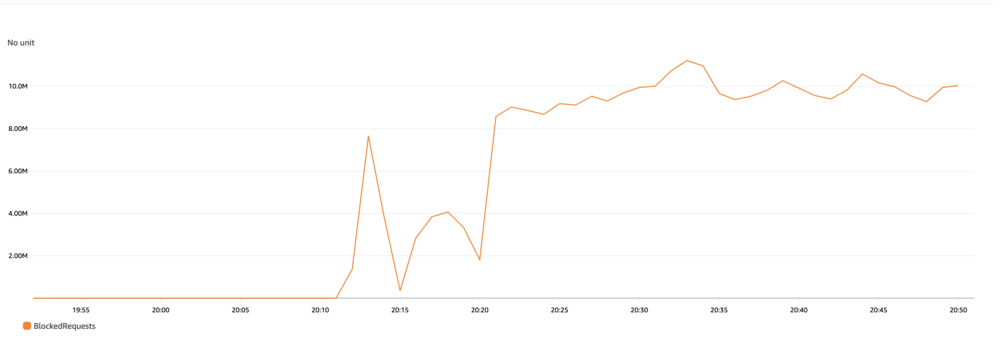
I know many of you are very curious how our cloud services work and how we manage things when we service thousands of Invision Community-powered sites on our platform. I am writing this quick post because I just got an alert from our monitoring systems and signed on to see what was happening. We use AWS WAF with both managed rules and our own, custom rule sets. With those both combined, we are able to filter a lot of malicious traffic. Sometimes people do attempt a direct attack on one of the communities we host. That is what is going on today. As I am typing this, our WAF setup is blocking 10 million requests per minute on our network. Yet, even with that huge amount of inbound traffic, our actual operations are not impacted at all. This is one of the advantages of a robust network backing your community. I just thought I would share because 1. our monitoring summoned our team to look at "abnormal traffic" and 2. I thought you might find this interesting.
-
Courses is available on the following packages: Creator Pro Team Business Enterprise Courses is not available on: Beginner Creator Classic (self-hosted) Feel free to reach out about upgrading your services. You can PM me or contact sales 😀
-
In that case you would want to put those services in your third-party list if you are concerned. We are looking into opt-in third party loading in a future improvement to privacy controls though. It's an ongoing project 😀
-
Courses is available on the following packages: Creator Pro Team Business Enterprise Courses is not available on: Beginner Creator Classic (self-hosted) Feel free to reach out about upgrading your services. You can PM me or contact sales 😀
-
Yes, you can choose to anonymize content. In fact, that is what I recommend to clients 🙂
-
Totally feel where you are coming from but it's only a handful of people panicking over nothing. The vast majority of people pay attention to their own communities, not what is going on here 🙂 We expect it will calm down when people see that Classic is not going away. Also, as people understand cloud and Classic are different product lines it will be clearer. The next several months of additions will be available on both cloud and Classic lines too.
-
Full information:
-
We have not posted anything formally, but you are free to create your own LMS if you like.
-
We are removing support for plugins and instead you should use the applications system. Applications are more flexible than plugins and easier to manage. Any existing plugins can easily be ported to applications and we encourage third-parties to start the process as soon as possible.
-
The friendly URL (FURL) system is highly recommended currently and will be required in Invision Community 5. All Cloud clients automatically have FURLs enabled automatically so there is no change for those communities.
-
The profile status updates system is a holdover from decades ago and will be removed in Invision Community 5.
-
New date ... Join us for our April release Live Topic!
-
until
New date ... Join us for our April release Live Topic! -
Sorry about that. We weren't ignoring you 🙂
-
There is a minimum term of these services since we are doing quite a bit for you 🙂





