


My Sharona
Clients
-
Joined
-
Last visited
Everything posted by My Sharona
-
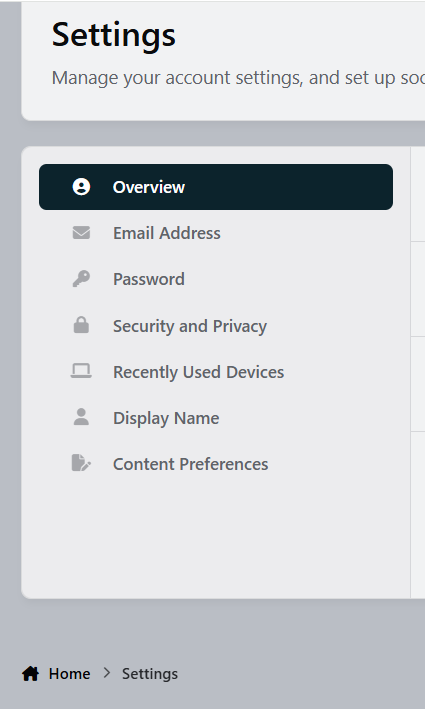
I have looked there, what am I missing? None of those containers contain an ability to edit ones status as a Community Expert. Apologies if I am just not seeing it.
-
Where did this setting go? Previously, I have used it to turn off being a Community Expert but cannot find it now. A member has inquired how to turn it off and I am unable to instruct. Thank you.
-
Ahh... I'm an idiot. Because of the required process here, initially, Albums are set to hidden. After the proper processing, they can then be made viewable. I simply forgot to make the Album viewable by everybody. Some Mondays are a bit tougher to get going than others. 😅 Apologies for the false alarm.
-
I do believe I'll need to start a ticket then. I have a few different "Image Feeds" and some are visible to user groups that have proper permissions and others on the same page are not viewable to those same groups. Thank you.
-
Can someone please help me to understand where the permissions are for widgets? Specifically, Gallery > Image Feed. TYIA
-
https://www.awesomescreenshot.com/video/43977030?key=30c8c64fcd1f60ec757377dfd0c2d23f Here as well as both of my communities. Other members have reported this condition as well.
-
When creating a new post, the editor, as per usual, automatically places the blinking cursor in the text box so all you have to do is begin typing. However, if you quote a post, that function is now gone and you have to click into the open space before typing. It's a bit of hassle on desktop but workable. On a mobile device if a user doesn't understand the new arrow at the bottom of a quote to place a new line, it is almost impossible to click into open space to begin a response. This is quite problematic. Often text will end up in the quoted portion.
-
I don't know that you want to run Ad Sense auto ads on IPS.
-
ACP > Page Management > Databases > [Specific] Database > Display You can also override the Database defaults at the Category level.
-
I just tried copying a java script in one window and dragging it to the Raw HTML Block and it did paste it. However, it added a, $0 to the end of the code. Not sure what that's all about. Anyhoo, if I can drag and drop, that works for me. Again, thank you.
-
I do apologize for my ignorance here. I checked my site settings in Chrome and it is enabled. I can paste java here in this editor... but I apparently I'm not getting something and do not understand, so lets just forget it. Thank you anyways.
-
I dunno, I did not disallow the action previously. Being that I can paste anywhere else within Chrome, with the sole exception of the places mentioned above, could it be something else?
-
Sure, thanks. I have various different JavaScripts that I utilize throughout my site. I can copy that code from any place that provides it, Yet when I try to paste it into, a Raw HTML Block, within the Page Editor on the front end, or any of the various places hmtl is allowed on the back end, it doesn't work. I give a right click and a dialogue box opens that allows me to Paste, but when clicking Paste, nothing happens. This was not a problem in v4.
-
Previously, with v4, in places where html is/was allowed, one could copy/paste. With v5, it appears that copy/paste is no longer allowed. Is there a reason for this? It would be a great time saver to be able to copy/paste. Thank you.
-
Use the Alert function.
-
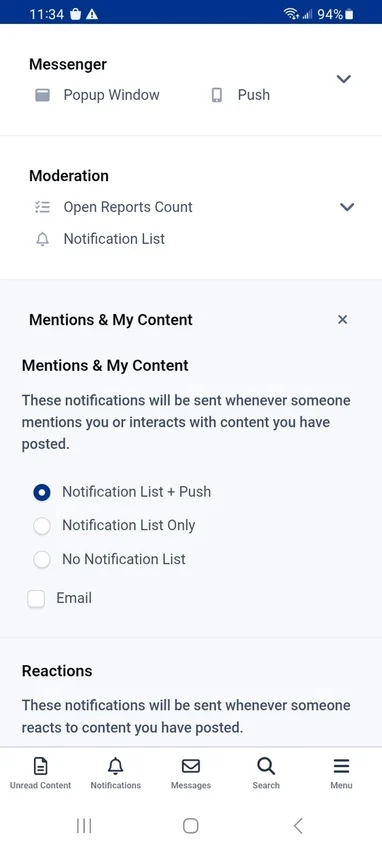
Enabled. No notifications...
-
This has done nothing to fix the issue.The two members accounts that were promoted, via the system, have not visited in 2 and one half years and 5 months, respectively. Since I stopped manually moving yesterday, no other accounts have been promoted via the rule. It is not.I have setup a new Group Promotion. I started moving some members manually (because I was trying to help) but noticed that one account was moved by the software, so I stopped doing it manually. Since that time (a few hours ago) there has only been one other member promoted.Notifications enabled per device, Android/Chrome, notifications are not coming through.I want to be on record as saying, I really despise this new editor. It causes me nothing but fits.If you are able to alter the blocks in an unaltered theme, they should translate over to the theme you are using there.No worries. Mine was set to drop in Oct. I have however upgraded. I would just like to say as well, that I truly appreciated the grace of having been allowed on a legacy plan for as long as I was. Much appreciated.I thought Oct was the drop dead date for Legacy(?).




