My Sharona
Clients
-
Joined
-
Last visited
Everything posted by My Sharona
-
Thank you my good man! Will give it a go over the next few days or so.
-
Is there something I can add to the </> Custom CSS area that will allow me to add a background image to the Header area in the Theme Editor, instead of only being able to choose a color? TYIA
-
The introduction of the "Sticky" sidebar was greatly appreciated. It helps in a myriad of ways. One of them being that it helped to balance the page when the sidebar was not as long as the main column. Conversely, it would be nice if there was the option for the same condition of the main column. Sometimes it is desirable for the sidebar to be longer than the main column and when one has this condition, it would help the balance of the page if the main column was able to be "sticky." Thank you for your consideration.
-
Does this functionality exist?
-
Do we have an anticipated date for the IPS5 Guides to be published?
-
I am referring to the real url of a page I have created. Apologies for my noobishness.
-
What is the proper appendage for a Page? https://www.WEBSITE.DOMAIN_EXTENSION/index.php?WHAT_GOES_HERE? Thanks!
-
I assume your are referring to @Sigmatica(?). I have had multiple tickets on this issue.
-
I have an issue that may be related. I still have albums that say there are "0" images in them, but there are obviously many within them. This has been going on for some time. It would be nice to get it resolved at some point.
-
Pages > Page Management > Blocks > Create New Block.
-
Would love to get a better timeline when this version will be available to the community at large. This would lend towards the ability to make plans.
-
Thanks Marc, appreciate the direction. 👍
-
Language strings maybe?
-
Didn't there used to be a place in the ACP where you could change wording for a particular term used? I thought it was "Phrases" or some such. Anyhoo, it's been awhile since I have used it and I can't find it now. Can someone direct me to the appropriate area to do so? Thanks!
-
Is it just me that doesn't think this is the right behavior? I mean, the block is entitled, Who's Online. Shouldn't it accurately show, who's online without having to tap into the (See full list) aspect? Thanks.
-
Yeah, I don't know. I can be seeing it and there are members being shown on it's face, go to another page and all of a sudden noone is online. Click into it and there are still peeps online so I'm not sure how caching would come into play here.
-
Many times, the Who's Online block will show no one online, stating that, There are no members online. However, if you click into the See full list function, you will see that indeed there are peeps online. While not critical, it would be nice to see this ironed out. Thank you.
-
I like it... a lot. Hopefully this is all part of an upcoming release you mentioned.
-
It is definitely sporadic. It'll happen quite often when it does and then goes away for periods of time.
-
Okay, thank you for the explanation. I am glad to hear that the .18 (database files) update was not applied automatically by IPS. I know v5 is supposed to be quite a bit more stable from version to version but, I guess there is still a possibility of a version breaking something (customizations).
-
Okay so... The security aspect has been applied but the actual x.x.18 version has not? Apologies for being apparently dense this morning. Still working that first cuppa.
-
So... just because the update has been applied, that means it is not actually installed? It sounds like that is what you're saying here...
-
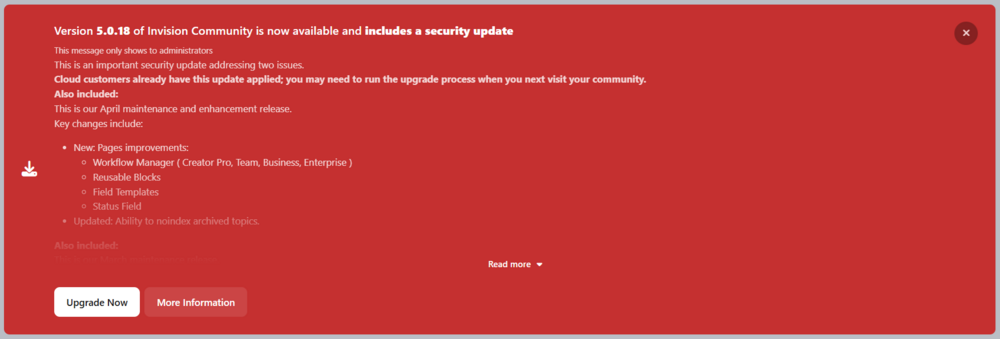
It says that it has already been applied to Cloud customers. If that is so, then why am I seeing the update prompt with an option to upgrade? See the above...
-
Umm... what's this all about? .18 with no announcement here?
-
This would help when one wants to run an advertisement, inside of an Article. Or... pretty much anywhere the Editor is used. Most sites that present articles have adverts in the middle of the article's text and it helps to get the impressions that are important. Thank you for your consideration.