


I_cant_Swim_
Clients
-
Joined
-
Last visited
-
There isn't. There used to be, but maybe it was wonky (as in inaccurate). Submitting a ticket works fine, though.
-
We have a few skins we made with the editor, but they've been running without issue for months. Otherwise, no third party stuff running. We did have a problem that the latest update wouldn't install, but you fixed that for us.
-
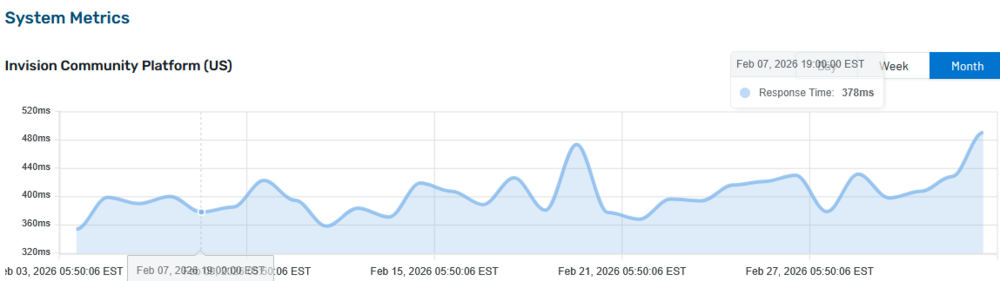
Hi, many of our members have seen the following message, that spontaneously pops up as the browser seems to refresh the page. This can happen every few minutes! Looking at the system metrics page, I see this: So there's been an increase in response time over the last days. Are the two events linked? What can I do about it?

-
-
@Marc Thank you, Marc. It worked now.
-
-
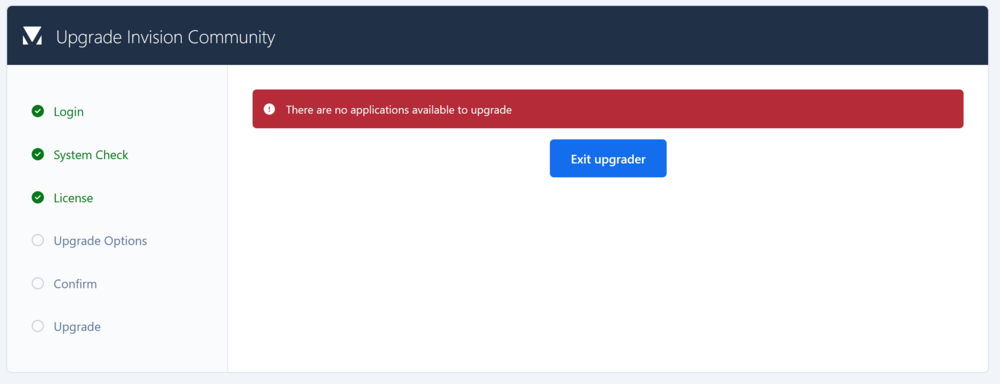
Hi, I got the notification that Version 5.0.16 of Invision Community was available, but it (appears to) fails the installation (tried twice today). After running from the update link, I get this: and my homescreen still says the update is available. Help appreciated.
-
I have a creator license for v5. Does that allow me to save posts as articles? if I go to Pages>articles I get this: What I'd like to do is use the pages to call member-generated articles from. I used a text version of v5 a few weeks ago and did not encounter this problem. An I doing something wrong?

-
How do I add an icon for the Category section type? for Discussions, it's not an issue through the Forums settings in AdminCP. The anchor pic was used for Discussion sections, but Category sections don't allow this? Where is the icon placeholder (blue) set?






