Gary
Clients
-
Joined
-
Last visited
Everything posted by Gary
-
Pinch and a punch for the first day of the month. Upgrading via the AdminCP went through perfectly. No errors or issues on my end. Love your work Invision Community! 🎉I've said it before and I'll say it again, great work @Jimi Wikman! It's a great walkthrough and sheds some light on the endless possibilities of Invision Community.The alpha site was to preview the new version of Invision Community. I can only assume that once v5 is released, the alpha site will be taken down. This is the official forum for Invision Community. It would make sense for discussion, bug tracking and other v5 subjects to be located. Having said that, I have seen Invision Community staff on both.The search function can quite easily solve this, but not everyone uses it. Showing results for 'beta download link'. - Invision Community In this club, under the Beta Information tab, there are clear instructions on how to get your hands on the beta. I personally think it is unrealistic to provide a means of answering every single "common" question. Let's say there is a page dedicated to FAQs that come up all the time on Invision Community. By the time the content is written, the page would go on and on. Interest would be lost because there is too much reading. People would choose to post up a topic instead of visiting that page; we're back to square one. Not to mention the Help Guides... Sort of related to the above... Searching the community for an existing topic or discussion about it using relevant search terms. Topic creators can mark a post as the solution, which gives any new readers to that topic a clear button at the top of the topic to go to the solution. The Invision Community team, as a whole, are always on top of things. The support team address the day-to-day questions and queries that pop up with the software and would be aware of how often the same questions come up.Hi @Monkos, This is only for Beta 2. v5 is not released yet. Please keep in mind that upgrading to any beta software is risky and can cause issues in a live environment or community. I would suggest getting a test community first and transition over once you’re sure everything will function correctly.That's good news! At least there is a way to get things back on track instead of losing it altogether. Best of luck.There is always a chance of things not working on communities, especially when upgrading to alpha or beta versions on your production site. If you have an established community that has been running for a long time, it is not ideal to upgrade until at least a release. I only upgraded my community as it is new and very vanilla, with no addons or modifications. There is a strong recommendation of not upgrading on the Beta Information tab of this club for production instances of Invision Community. I do hope you manage to get the issue resolved though. Losing any amount of stream of revenue is not ideal in any case.It looks like the whitespace issue has been fixed in Beta 2! 🎉 I noticed there wasn't a topic reported on the tracker about it, but you can now find it below.The Beta 2 update, actioned from within the AdminCP only (no manual uploading of files required), went smoothly without hitting any issues or errors. Nothing negative occurring on my community either. The errors showing up in my System Logs from my previous post have also been reported as bugs.
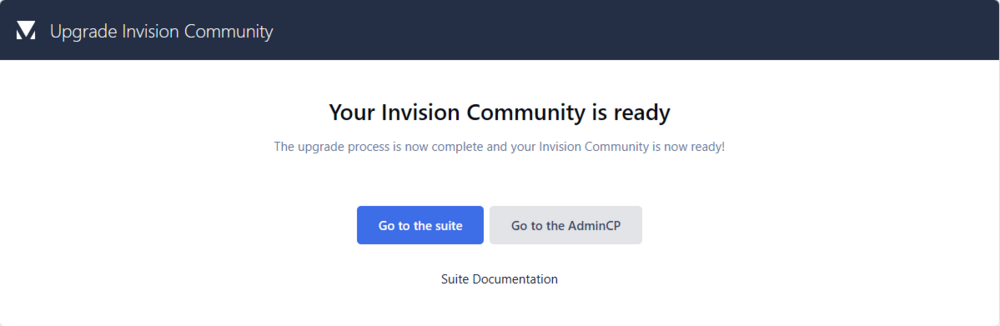 Like a glove! The update went through smoothly without a hitch.
Very well done everyone. The more I use v5, the more excited I get!The only thing I'm noticing at the moment are numerous errors in my System Logs. They're occurring on a daily basis and seem to be the same error, over and over. I believe the team are aware of these, so I'm going to wait until the next update before investigating further. 👌
Like a glove! The update went through smoothly without a hitch.
Very well done everyone. The more I use v5, the more excited I get!The only thing I'm noticing at the moment are numerous errors in my System Logs. They're occurring on a daily basis and seem to be the same error, over and over. I believe the team are aware of these, so I'm going to wait until the next update before investigating further. 👌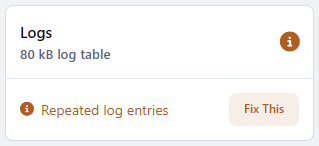 I'm quoting this again for those that may have missed it regarding a fix for the problematic images in topics and posts. The team are aware of it, and will no doubt get it fixed fairly quickly considering it is impacting community content.These communities are looking awesome everyone, well done! 🎉Thanks for sharing! 👌 My community is new, and it wasn't hard for me to make the decision to upgrade even if it is the first beta. I thought I'd kill two birds with one stone and help the team out with ironing out any upgrade issues that came along with v5. If you have a larger community or one that has been established for a long period of time, I would hold off until the majority of these early bugs are fixed.Hi @Mike Gholson, Not yet. It has been reported and hopefully will be fixed in the next beta. I have left one problematic topic active on my community but edited the rest to display correctly. It’s just a matter of editing the topic/post, removing the image and adding it in again (it still shows up in the uploaded area when you edit that topic/post).Hi @Atomic Kurt, You can find the ModeratorCP by clicking on your display name in your community. The AdminCP does not give you access to the ModeratorCP. It provides additional information about moderator actions that have occurred by providing logs and activity.Did you try any of the fixes mentioned in this topic? Others have had similar issues but the fix wasn’t as easy as it was for me. Is this a fresh install or an upgrade from an existing installation of Invision Community?I’ll send you a private message now, thanks Matt.Thank you very much, @Jimi Wikman. A great video showing some of the many features v5 has to offer community managers. 👌Did you clear your system caches in the AdminCP as well? The promoted.php file is all I had deleted before my site started working again. The database record I was advised to delete was for another issue.Have a look in the below directory on your server. applications/core/extensions/core/FrontNavigation/Promoted.php Let me know if it’s not there and I’ll jump on my PC to locate it.There is a file named ‘promoted.php’ in your directory. If you delete that file, your site should come online. I recommend renaming that file to ‘promoted.php.disabled’ before deleting to confirm whether your site works or not. If clear your system caches in the AdminCP after that, you should be all set.So, the issue with the missing forum icons and menu icons, well, you've gotta set the Font Awesome icons first don't you? 🤐 To fix the menu icons - AdminCP -> System -> Site Features -> Menu Manager -> Edit -> Choose your icon and save To fix the forum icons - AdminCP -> Community -> Forums -> Forums -> Edit -> Choose your icon and save Spacing with the editor; I assume this is just what happens when moving between CKEditor to Tiptap. Not a major concern and you can just edit the topic/post, but the images not showing is being looked into. Can I just say the more I use v5, the more I love it! I know I've said it a hundred times before, but well done everyone. I'm so excited to see everyone's communities with the new and powerful suite of tools at their disposal. 🥳