Everything posted by Michael R
-
I have a Topic Feed widget set up to show "hot topics" It looks great when the topic has an image. Not so much when there isn't one, though. Is there a way to replace the icon with a different image?

-
I was thinking something a little simpler. When I am ready to publish an article, it would be nice to have the option to send it to our official Facebook page. That would help bring our Facebook followers back to the site to read the article. I know I can share the post after it is published, but it defaults to my personal FB profile and there is no way to choose a specific managed FB page.
-
Is there any way to automatically post a snippet of a forum topic or article to social? Right now, I am posting a link on our official Facebook page to articles or hot topics on our site. It would be nice to have an option, when posting, to send an excerpt to my social sites -- especially for our exclusive content.
-
Wow! Very nice!
-
Sweet! Thank you!
-
-
Thank you. Where do you allow custom permissions on the database level? I have gone through every setting in my articles database, but I can't find custom permissions
-
I thought so, but I do not see where to do that. When I edit the Category, there is no option for permissions.
-
I want to offer exclusive articles to specific groups. My plan is to create a separate page for this content. I know I can restrict access at the page level. What I need to know is whether I can restrict access at the category level within the Articles database. Right now, I have one Articles database with multiple categories. If I create a new category for exclusive content, can I limit access to that category only? Or do I need to create a separate Articles database for the exclusive content? If a new database is required, can existing articles be moved from one database to another? Thank you!
-
Hey all, I've been playing around with image and topic feed widgets on my site and cannot figure out what the Offset setting does. No matter what I change it to, I do not see a difference in the feed. I assumed it was used to give more room to the first image or post in the feed, but I do not see a difference, no matter what I set the Offset or Area Layout to. Thanks for the help!
-
I know I can have events appear annually, but is there a way to create a post along with it? For example, this is the post we made yesterday. Ideally, I would like to have this post every February 1.
-
Sorry for the vague title. Wasn't sure how to phrase what I want to do. Is there a way to post recurring events automatically? I want to create a calendar of (specific) historic dates and have the system create a post automatically. I know there is at least one third party app out there that pulls from Wikipedia, but I am looking to have only events specific to our community. And by using the calendar, I could set it to post annually. Thanks for any help!
-
I suppose, but they would still have to switch to the Forum view to see that. Unless I made that default- which I don't want to do. Members seem to like the Home page we have set up. Unfortunately, the majority of my members are older and want it to work like Facebook.
-
Perfect! Exactly what I was looking to do! Thank you!
-
I would say 90% of my members never click on Forum view. They generally just click on What's New (unread content). We get a lot of replies to posts, but only a we new topics. I am constantly instructing members on where and how to do this. I think it would be helpful for my members if they had access to Start New Topic at the top of wherever they are.
-
Is there a way to add the Start New Topic button to the top of my page? Or to my Home page?
-
Got it. So, to edit the table of contents, I need to edit the page editor because that's where you edit the content. That's not confusing at all...
-
Okay, I give up. In the Page Editor the Table of Contents widget says exit the Page Editor to edit the Table of Contents.
-
Sent it in PM
-
Sorry, an example of a member or subscription?
-
Already on...
-
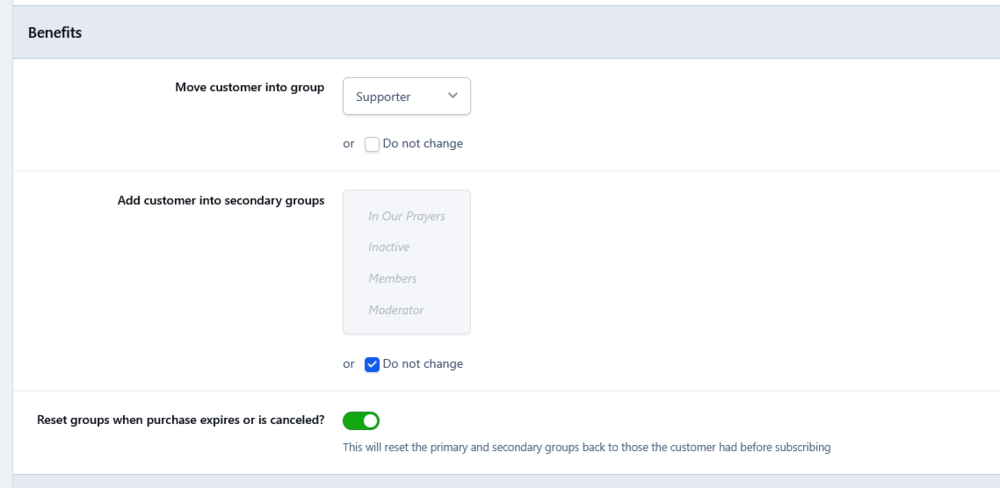
I have several subscription plans set up on my site. 10-day, 30-day, 90-day, 1-year, and lifetime. I have set it up that when a member subscribes they move up to the Supporter level with access to other features, etc. I've set all the renewal terms to be the same as initial (except my lifetime subscription). So far so good. The initial subscriptions seem to be working fine and when it comes up to renew, that works also. But I am noticing that folks that do not renew are not pushed back to the initial member status. Also, in the Subscribers view, I am only seeing 3 Lifetime subscribers. I do not see any other subscribers (90-day, yearly, etc.) listed. I know I have them because I can see who paid in PayPal. Am I using this correctly? Is there a setting I am missing to get them to move back to the initial member group? Thanks for any help! p.s. It would be nice to have a more tools to analyze subscription status and activity. I had to do a lot of detective work going back and forth with member/customer screens and PayPal. Seems like this could be a lot simpler if it was accessible in the admin. My $0.02...
-
How do you set a default profile photo Sorry for being dim on this, but what exactly do you upload to resources? File format? Size? File name?
-
I created an Alert for a specific group. In the message area, I include a link to a specific forum (I want them to post an introduction). The Alert pops up okay, but clicking on the link just dismissed the Alert window. It does not take the user to the link. Is there a setting to click through?
-
Thanks for all the help everyone! Is there a way to update my old Articles page? https://www.clausnet.com/articles/ Or do I just create a new Articles page and attach the database that contain the articles?