Dreadknux
Clients
-
Joined
-
Last visited
Everything posted by Dreadknux
-
So… what do we think this will be? The clue is pretty cryptic. New user profile features? Photo recognition stuff? Dynamic floating heads appearing on the front end? 😛 Looking forward to hearing more about it!
-
Thanks for the feedback - I get what you're saying about no follow-up comments on those topics but they did get a fair number of positive reactions from other Invision Community clients (the Pages one received 7) so I think that counts for something? I don't think these are ideas that would only benefit me, but I understand that you would probably like to see lots of activity in a topic before wanting to comment on it. Fair enough.
-
As it happens, I'm quite interested in this feature. My community admins are looking to use Twitch/YouTube streaming and it would be handy to have that pushed to our community directly so they don't have to go off-site to view it. I know ultimately that, with this specific update, I could just use my own coded solution to embed a livestream video onto my community homepage or something, but that's not really the point. It's just nice that there's a baked-in solution that's being worked on. So it's not that I'm not interested in this feature. It's the fact that it's locked to specific customers - in this case, those only on subscription/enterprise plans. This has been happening a lot lately. But while the 'live view' stuff could be explained away by using AI/server-side tech, I'm wondering what it is about this particular feature that is keeping it locked to hosted plans only at this time? I understand if you want to put a priority towards those who are paying you hosting $$$, so that they get these cool new features like, a few months ahead of self-hosted customers. You might want to road-test/beta-test them in the field, or whatever. But it would be nice if self-hosted customers could get these features as well. Some transparency on that would be appreciated. It's also great that you're having lots of conversations with the larger-brand customers, and I'm sure their feedback is being responded to in a very speedy fashion (as it should be). It would be nice if IPS could also afford to at least acknowledge some of the suggestions made on your own forums (even if such suggestions are not in the current pipeline, just an acknowledgement that it's something they will or won't do). LEGO might think they're being listened to, but as a customer of nearly 20 years I'm not feeling it quite as much.
-
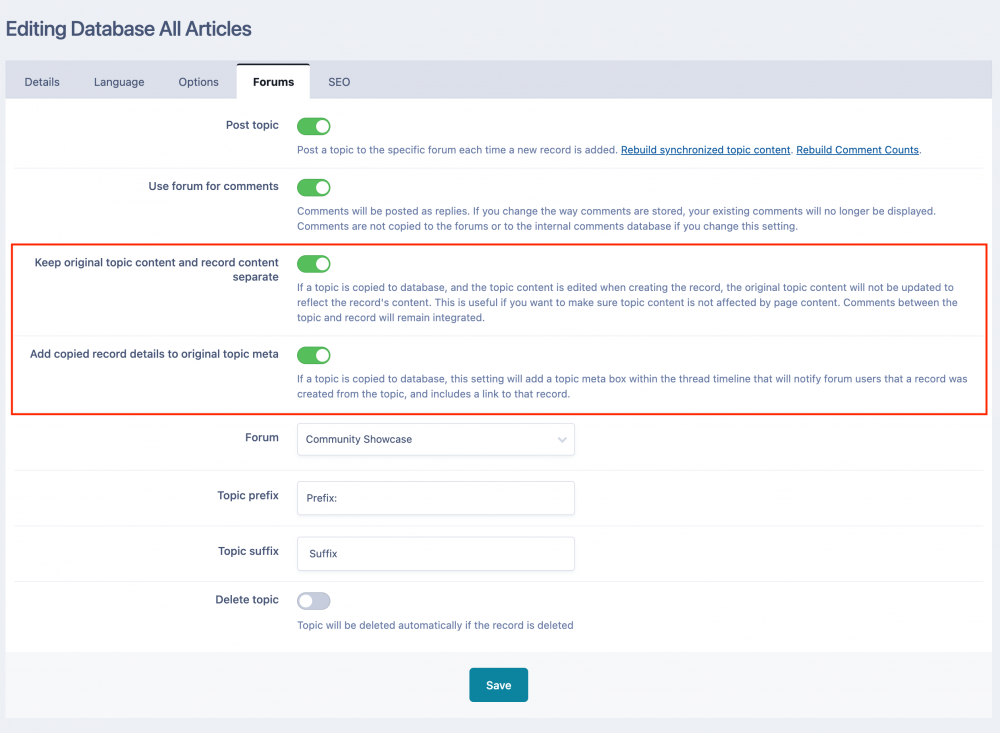
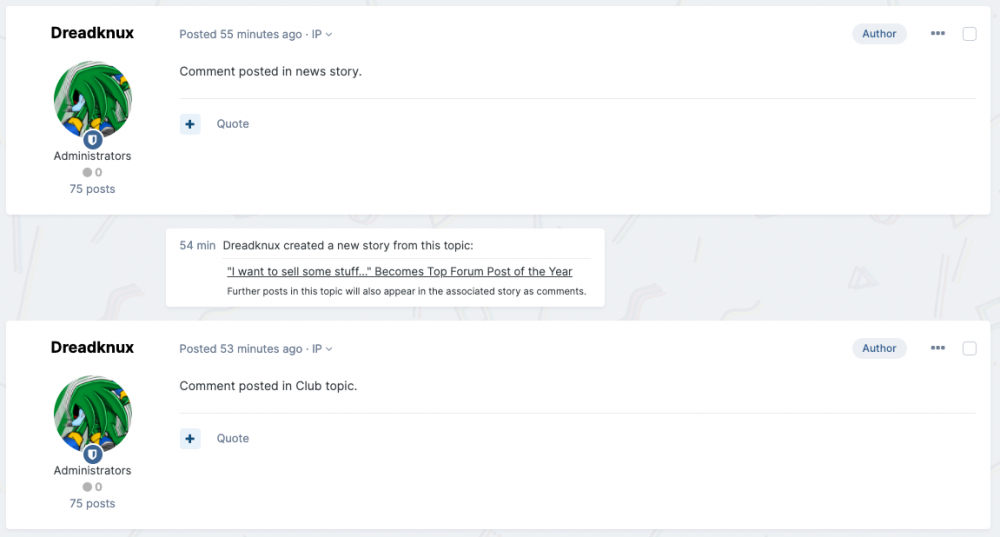
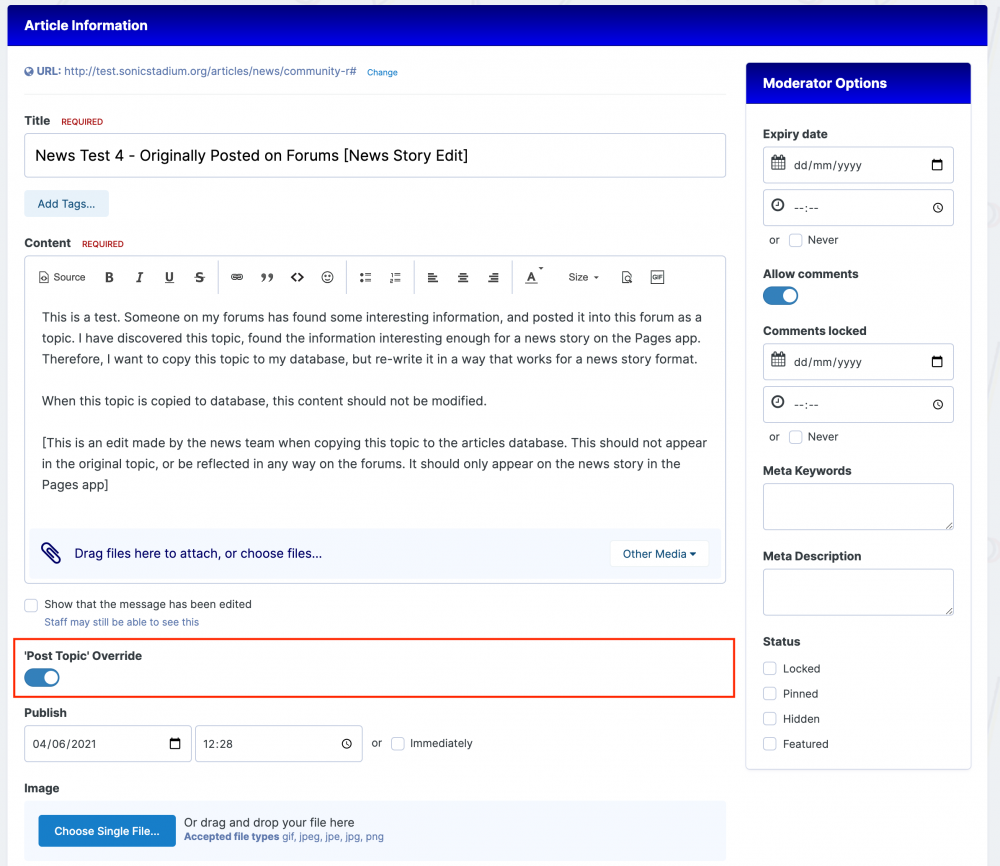
Some smaller (but useful!) suggestions I've made in the past: Allow Multiple Categories to be assigned to a Page record Options to change URL slug format on a database level (by [YYYY]/[MM]/[record_slug] for example) Remove the "-r" at the end of a record's URL by default (this one is really annoying) Allow Page Categories to be set in Menu Manager Ability to pull records from multiple databases in Widgets/Blocks/Loops But in particular, I'd like to throw in a more inspired idea. I'd like InvisionCommunity to really focus in on the relationship between Pages and the Core community. @Jordan Invision I enjoyed reading about how you were able to migrate your news/blog into the core InvisionCommunity software to great benefit, so I figure you might appreciate this suggestion as well. I think it would really help integrate the two apps together and encourage community activity/contributions. 🙂 The concept is to improve the 'Copy to Database' feature. Let's say that I run a movie news website/community. Oftentimes, the community will post (and react to) a piece of movie news (a new trailer or celebrity interview) as a Topic in the Forums, before the admin's staff writers get a chance to write a story about it. To avoid duplication of content, Copy to Database can be a powerful tool - admins can import a user's existing topic to a 'news' record in Pages. But there's a problem; by doing this in the current InvisionCommunity system, you either destroy the original community user's content (if your site editor writes new content when Copying to Database) or you create a duplicate topic in a different forum to where the original Topic lives, creating redundant content (which will return duplicate results in searches). This can be alleviated in three major improvements to the system: ------------------------------ Step 1: New AdminCP Settings to 'Keep Original Topic Content' & 'Add Post Meta' When Copying to Database The above image is a mock-up of two new options that could be implemented into the AdminCP. The first makes sure that any content in the original topic/post is not modified in any way when an admin Copies the content to Database - even if the admin decides to write entire new content for the news story. Why would someone want to rewrite a topic's content when importing to Database, but keep the topic itself the same? An admin may wish to simply unify Page comments and Topic replies, and keep the tone of both separate It gives the freedom to reword the information in the original topic to reflect the site's "house style" of writing, while keeping the topic's original informal tone It helps to acknowledge the community source of any resulting story (and avoid annoying the community by "censoring/deleting" their posts)... ...which can open the community up to special rewards for helping contribute to the site blog, via custom Achievements or Badges Step 2: Add Post Meta Related to Step 1, there could be additional post meta produced when an admin Copies a Topic to Database (which can be toggled on or off). A mock up of what that might look like is above. The post meta could be situated relative to the exact time an admin takes the Copy to Database action, or it could sit at the top of a Topic much like the Recommended Posts might do. Having this feature will make the community feel like they are contributing to the overall site/blog and that their content is getting noticed. Step 3: 'Post Topic' AdminCP Options Override in Page Creation Form If an admin creates a new article in Pages, they will often want to have that story re-posted as a Topic in a designated forum. That's where the AdminCP "Post Topic" settings come in real handy. But if that same admin wanted to create an article using Copy to Database, they may not wish to have an additional Topic created. They might think that the existing Topic - and all the comments/replies that may exist in it - is enough. Unfortunately, in InvisionCommunity's current setup, if you set your database category's "Post Topic" settings, it's everything or nothing. You can't tell InvisionCommunity to NOT post a topic on the odd occasion, if you do not want it to. That's where this Topic Override option comes in. Set at the per-post level, this gives admins the freedom to choose on an article-by-article basis if they want an associated topic to be created when the article is published. ------------------------------ I appreciate the open ears and eagerness to hear feedback! 😄 🙏