


Dreadknux
Clients
-
Joined
-
Last visited
Everything posted by Dreadknux
-
If you're talking about the 'Theme' dropdown, I believe that menu disappears completely if you offer only one Theme to users. To do that, you'll need to go to AdminCP > Customisation > Themes and from there click 'Edit' on every theme that you don't want to make available, and under 'Available for' make sure you uncheck all boxes (or click 'None') and hit 'Save'. Once you only have one Theme that users can select, that dropdown will disappear.
-
I did edit my robots.txt with some of my highest-trafficking content from the Wordpress so that was covered, but generally I had little time to fully set redirects up (and got spooked when reading that you apparently shouldn't have too many redirects set in your robots.txt for whatever reason). Long term, I know you have that SEO app and I'd like to explore using that app to clean things up (maybe when I upgrade to v5). As for the other direction, I moved my old Wordpress to an 'archive.' subdomain instance and used a plugin to automatically redirect users who click certain links to go to the relevant page/story on my Invision Community site. I haven't fully moved all my archive content from the WP to Pages yet so that's been a good solution for me. Many thanks Marc! It took some getting used to (including losing some features of the Wordpress post editor) but we have styled it out well I think :) And although I'm excited for v5 and future updates to that, even v4 has been surprisingly versatile for what I've needed it to do. Very pleased with the results!
-
I made this move a couple years ago to keep things integrated - some SEO wobbles (which is to be expected) as it took a while for Google to stop looking at my old Wordpress instance in favour of my Invision Pages app but once that was done it was plain sailing. Genuinely haven't looked back since. :)
-
Thanks for sharing, I'll keep it bookmarked but for now I think I've made my peace with Status Updates going completely and want to explore how my community interacts with the site without them... but if I hear too much complaining I may run to something like this for protection! 😂
-
So glad to see this get to the finish line. You guys have done an amazing job, thank you for all your hard work and for inviting me to road-test the alphas and betas with you. I'm probably a few months away from upgrading yet (I need a solution regarding Status Updates data retention/conversion [as well as give my community enough notice that it's going bye-bye] and am going to wait and see if some of the custom apps I have here will be carried over to V5) but I have been running the beta on a test instance and genuinely cannot wait to get it deployed on my community. I really think doing so will kick off a new era for my community in terms of activity and activity. Thanks again Matt and all at IPS!
-
Seeings as we're (seemingly) inches closer to a final release for 5.0.0, wanted to just check in on this @Matt and get your thoughts on this and whether it is possible? If it's not something in the scope of 5.0.0, that's fine as I don't plan on upgrading for a couple months yet (lot of testing to do, particularly with custom CMS Pages...) but if there's an idea of implementing something, no matter how basic it is, knowing when that might drop would be helpful for me in order to make the jump to v5. :)
-
Turns out it is something on my end (thanks for confirming, Matt!), PWA needs HTTPS (my test install is on just HTTP), so it just opens in a regular browser when that happens. Mystery solved! :)
-
Seems to work properly. I suppose it is an issue with my specific install. Not sure what it might be though...
-
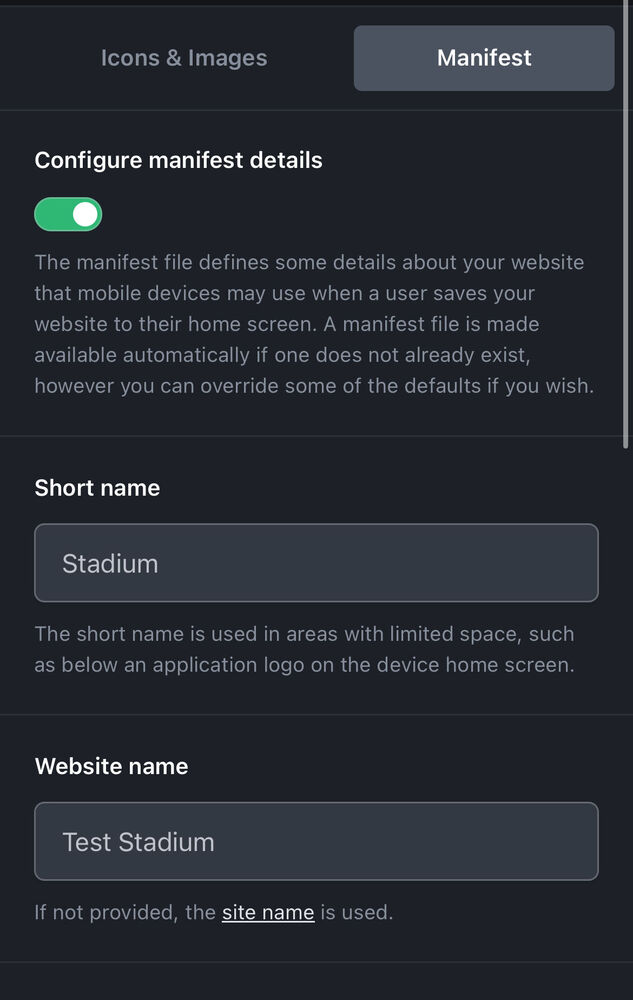
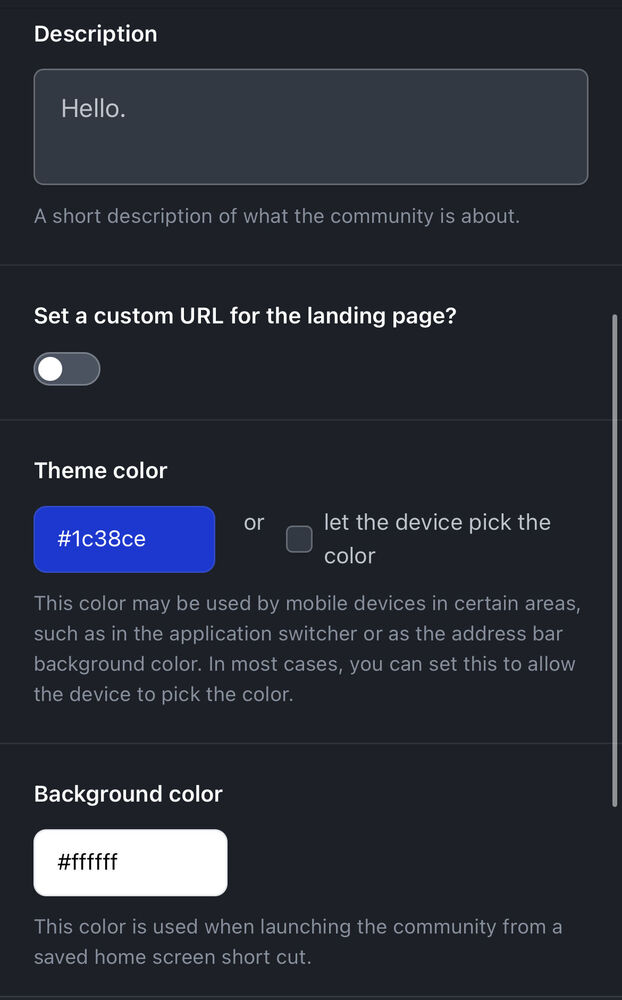
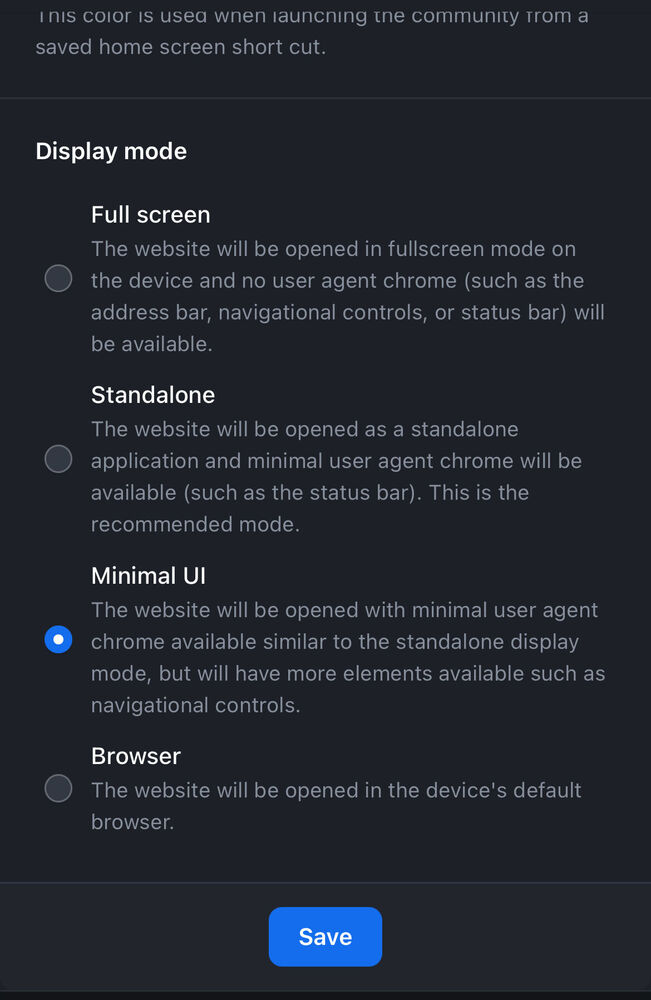
Not sure if this is a bug within v5, a bug within iOS, or just something I'm doing that I'm missing some steps on... but I'm trying to set up a PWA on my test v5 site and the resulting app icon on my Home Screen is just opening up a tab in Safari, rather than acting as its own independent app. Doesn't seem to be happening on my live v4 site, so definitely something unique to v5. Steps to replicate: Visit my test v5 site homepage Click Share icon on iOS Safari > Add to Home Screen Click resulting app on Home Screen Safari app loads up These are the options I have set on my test instance re: manifest.
-
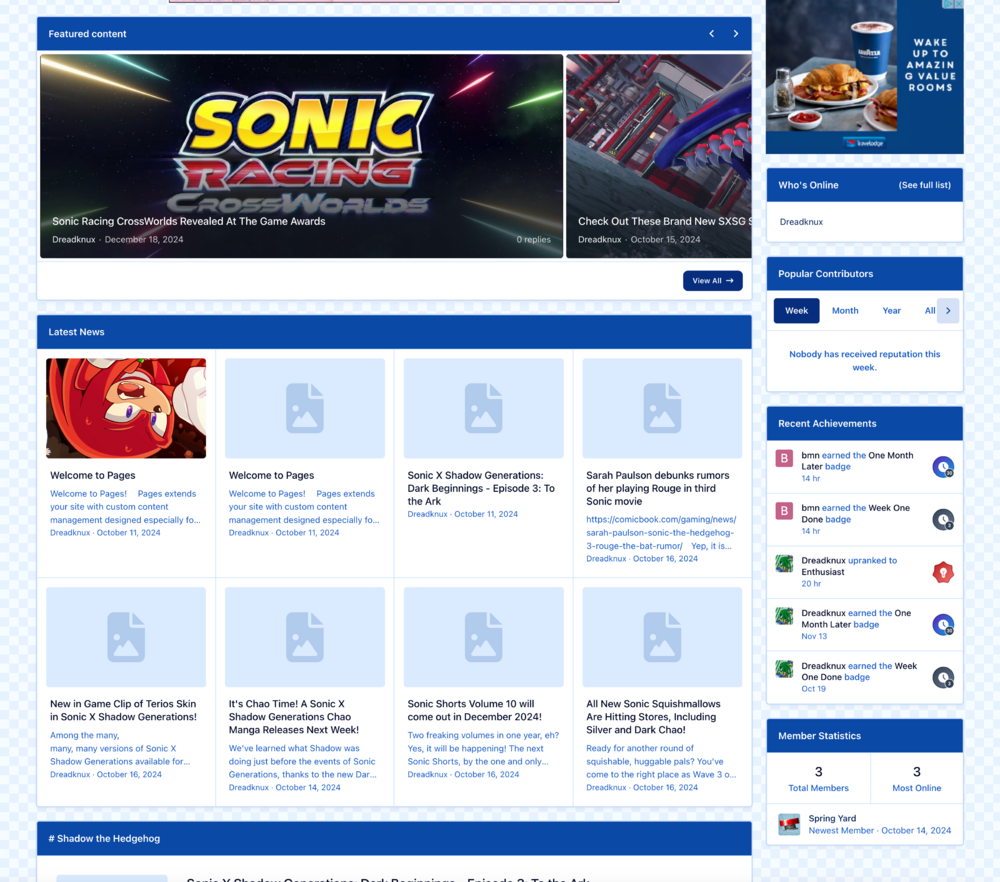
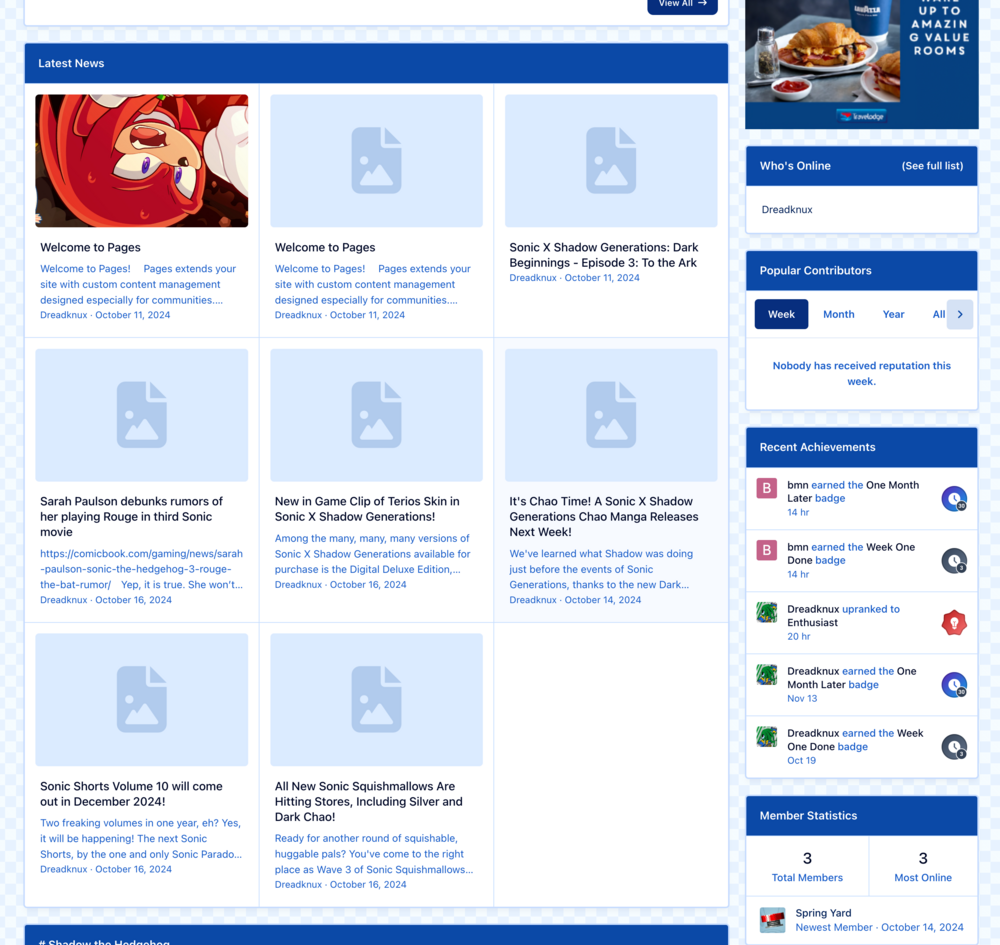
Loving the progress made on the V5 Beta, guys! I'm having a lot of fun with it, my plan is to look at what the first version looks like and maybe test some upgrades on a staging site before deploying the live site upgrade in the Summer (I'm guessing V5 will be out by the Summer... right? :D) Anyway, this isn't really a bug but more of a small suggestion based on my random fiddling around with widgets and whatnot. I've noticed that the Tag Widget block asks you to set a specific number of items in the Options dropdown. I currently have it set to list 8 items, which looks great on desktop on a certain size... but when I draw down the browser window you end up with a gap in some of the grid-based modes (Grid, Wallpaper, etc). Logically it makes sense, because I set 8 items to appear rather than 9... but it would be cool if there was a way to deal with that extra space somehow on smaller windows. Just to show you what I mean - here's a Tag Widget with full browser window width (see "Latest News"): And here's that same widget when the browser window is scaled down a little bit: I'm probably asking for impossible things here, and it's not a huge deal in the cosmic scale of things, so it's not an entirely serious request... but, I AM a bit bored today, so I figured I'd throw it out there. What do you guys think? 😄
-
Random question: is this dynamic depending on what theme colours are set in V5's Theme Editor? I imagine as-is the seven colour options work well with the default light/dark colour scheme, but if I then customised the V5 theme to have a blue background as the light theme and a dark red as the dark theme... would those seven colours dynamically change to be compatible with the tweaked colour scheme, or would an admin need to make further customisations to ensure compatibility?
-
The only problem with the V5 widget solution is that you can't place a TOC within the content area itself. It currently can only be positioned in the sidebar (best position but not always useful contextually; ie on mobile devices where it will display at the very bottom of a page) or in some other widget space above or beneath the actual content, which makes it kind of useless for most use cases. Allowing for a TOC to be placed as an in-content box similar to the floating/wrap-around box in the current post editor is really the ideal solution, and I would like to support the OP's suggestion here.
-
Love that you can set up widgets dedicated to Tags, but a shame that you can't set the design to be 'Carousel' style... at least out of the box (i.e. using Page Editor). I figured it was because such a design was simply not supported/coded in yet, but I realised that all I need to do is add "ipsData--carousel" to the "ipsData--widget-tags" UL class, and it dynamically sets it to the way I'd love to see it! So the facility is there, it's just not accessible on the front-end yet..? Is there a reason why I can't set a Tag Widget to be a carousel from the Page Editor yet? I'm guessing there are maybe some bugs that need testing before you guys fully allow admins to take advantage of it, but I am just curious.
-
Many thanks @Matt!
-
"But when will then be now?" "SOON."
-
Yeah, I just don't like the blur at all and want it removed entirely. 🙂 That's why I decided not to post a bug topic, technically this is about a design choice. 😄
-
I've been a bit pre-occupied with work lately to stay on top of Beta updates (sorry), but just caught up and installed B4 and noticed a change in how the text-against-image areas on Wallpaper widgets have been handled... I can't say I'm a fan. ^ It doesn't look very nice really. Look at all that fog around the text, smudging the background image up to the halfway point. Is there a chance we can switch this back to the way it was (or maybe revert this with custom CSS somehow)? I much preferred how it was handled before... now it just kind of looks like someone's opened a tub of vaseline over my screen, my eyes are going blinking crazy just looking at it 🙃
-
Yeah, that's a nice solution for people who want to save specific statuses, but that's not gonna work for me, lol. Trying to archive 13+ years worth of status updates one by one will take me an ice age. 🙂 Hopefully the solution Matt proposed could be looked into as I can definitely work with something like that.
-
This is a welcome upgrade to the moderation features of the suite, thank you for the hard work on this. I especially like the Approve/Reject system, as we often get reports from users who are simply reporting something they disagree with/are mad about which doesn't actually break any community rules, so we can formalise this in our workflow now by rejecting the complaint.
-
That could work, yeah! I was thinking, personally, that each status update would be its own topic in a specific forum (rather than a single topic for all of one user's statuses) and every status update comment would translate to a (quoted) reply within that topic. But I'm happy for a solution like you suggested as well, it might actually be cleaner that way! Let me know if something like either of the above is possible at all on the Invision side. Thanks @Matt! 😀
-
Hi guys (Sorry for cross-posting, I didn't realise that the old topic I asked about this was in the now-closed Alpha Club) As we're in Beta phase, I wanted to raise this topic again and see if there has been any more thought given to this? It'd be great to keep an archive of status updates somehow instead of simply disappearing them; if there's no plans then I'll need to look into a third party solution, so it'd be good to know the first-party plans so I can arrange things on my side accordingly. Thanks!
-
Are you able to clarify this? I downloaded the Beta 2 zip from AdminCP (for some reason the FTP credentials I was putting in wasn't working and leading to errors), but I downloaded I guess the 'delta' zip (with not all the files, just those needed for the upgrade) and manually uploaded them to my FTP. The upgrade seemed to work, but I haven't tried the frontend yet for fear of losing data as per this thread. Is there another method I should download and manually upload Beta 2, or have I done it correctly as you described?
-
Loving the Beta, but I'm not clear to use it for my public site right now. There are some things that I need before I move forward: - Clarity from IPS on how Status Updates will be treated post-upgrade (ideally would like the ability to convert to topics as discussed with Matt, but if no plans I may need to wait for a third-party solution) - Third Party Apps: Member Shop and Profile Gift V5 support (current dev has abandoned it so waiting to see if someone else will pick it up or if I need to ask a third party to build a custom solution) - A few feature tweaks and design issues that will likely be addressed in RC or 5.1+ releases - Testing 'converting' old V4 theme designs to V5 (which will likely take time on my side), playing around with theme hooks etc to do so. For new communities or those completely staring over I think even in Beta V5 is in a good place for general use though.
-
Loving the tag widgets (as I mentioned in another topic 🙂) and have some suggestions for improvement... but will leave those for a future point release before discussing those, as there's one particular issue that I think needs more urgent attention. Please see: Flagged as not a bug, but would like to file a request to change the way this works because it doesn't make for a great user experience on the front end, in my view. To the point where it might even prevent me from using these tag widgets at all, which would be sad because these widgets are great. Thanks guys! 😊
-
No problem, happy to be of help! 🙂





