


Larry Kachadorian
Clients
-
Joined
-
Last visited
Everything posted by Larry Kachadorian
-
I seem to remember a similar request , but I can't find it... Is there a way to merge the second from top row of the desktop header cells so that an image will span across two or three... ie, across most of , or the entire body
-
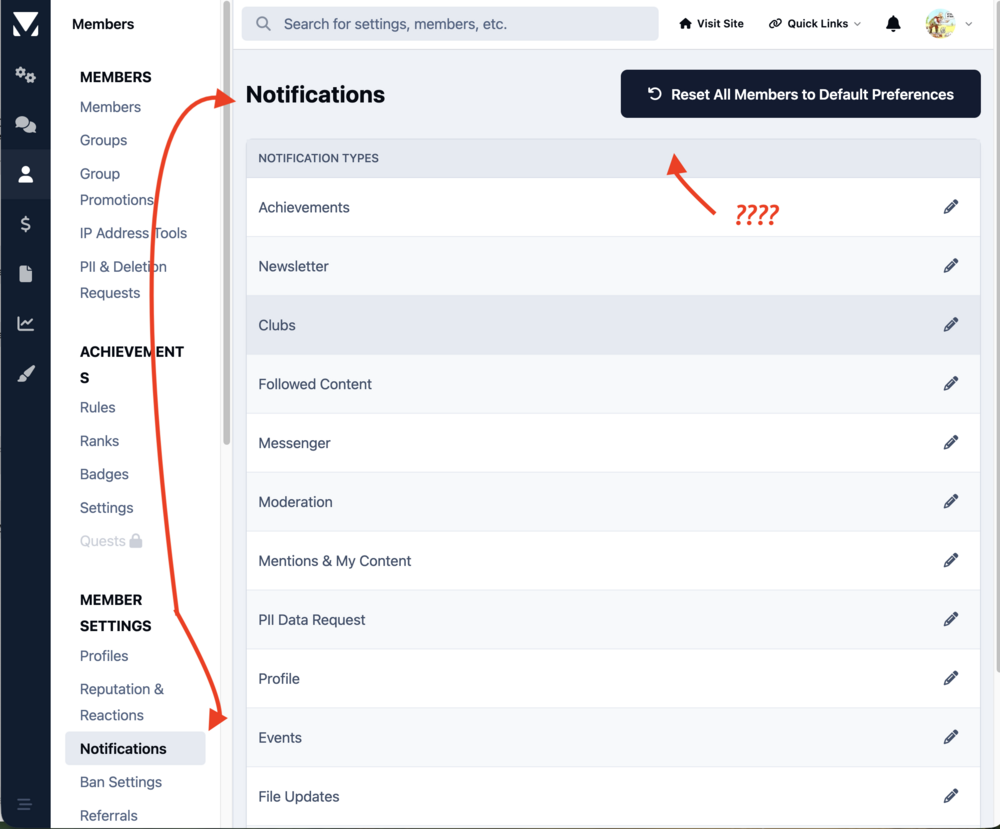
I'd be interested in knowing the parameters... The reason I ask is I have accumulated six pages of announcements so it's possible what's automatic is not working Darn did it again... It's Notifications
-
OK I'm sorry I don't see that... Possibly because this is a cloud account ?
-
OK don't know what I was thinking.. my bad ... it's not announcements, thanks Jim, it's personal Notifications
-
Is there a way to delete or at least prune the announcement list? For administrators or moderators , over time, it can become a very long list as well the older entries also become irrelevant
-
Currently the copy course option only copies the initial set up. There should be a method to copy the entire course including modules and instructions. The reason being it can be logical to expect additions or modifications to courses being made over time . To do this, you are editing the original course and if a mistake occurs then you have no recourse. Your hard work can be damaged by unexpected edits to the extent that is no longer usable or possibly you lose valuable modules and instructions. The ability to copy the entire course upfront provides a backup copy to restore .
-
There should be a method to resize courses custom images from the default to something smaller. If you have a small amount, the default size works well but as the number increases, smaller would be better.
-
Then I suppose I will change this to a feedback suggestion because if you have more than three or four it becomes tedious
-
Is there a way to resize all custom course images to something smaller than the default size ?
-
There needs to be a way to reduce or limit the number of entries in the what's new in clubs default area. It can grow to an unmanageable size which tends to defeat his purpose as well as create unnecessary scrolling
-
The widget should have the option to display vertically as well as horizontally
-
One: There should be a way to limit the total number of posts showing in the "what's new in this club" default section similar to the new post widget. There are times in which the display / list can be exceedingly and confusingly long. Two: More importantly... The first option of the manage forum menu is "topics" and it mis-labeled. It should be "forum" not only logically but easily confirmed by clicking on the button it creates for the first time and seeing the initial message. The intent obviously was a forum because it acts just like one with topics and responses. Unfortunately I cannot find that label in the translate language section for a quick fix.

-
Is there a way to limit the total number of posts showing in the "what's new in this club" default section ?
-
Thanks Jim, Most of our third-party apps have not been replaced with V5 compatible ... except for one which does have extensive data. So even deleting the former will not be a problem. However the other we will retain does have a V5 version Another question. I assume I can't upload a V5 version if I'm still on V4, consequently it will be disabled during the upgrade. This may have an obvious answer but I still need to ask. Is there any special procedure to upload a new V5 version to a disabled app ?
-
A question as to best practice when migrating. Should one delete third-party apps that will not work with V5 just prior to conversion or simply disable them? I realize for us Invision is saas but just checking to see if there's a preferred method. Any other tips?
-
Understand no guarantee ... but it does work perfectly thank you !
-
Is it possible to hide this message about withdrawing from a course ? The reason I ask is that we are using courses more for informational purposes rather than a traditional college or a vocational course. Users may people off by being told that they can never access if they choose the withdraw option. It seems that it's not really an issue if people just leave with the course unfinished as it shows a progress but users may not necessarily understand that.

-
There should be a way to re-order lessons within a module. If there is I've missed it. A new lesson is always placed at the end of the list. However as the creator of course you may not have the exact order correct first time through. Or you may have a new thought that you want to include in a new lesson that should come before or after another one.
-
It would be nice if the results of a poll could be offered in a standardized report which could be downloaded as a CSV. This would be extremely helpful to interpret and analyze larger polls with many questions.
-
Fabulous ! Thank you . Installed and works as expected.
-
Done, thanks
-
currently V5 displays there was an old 4.7 plugin that made it which we are still using until we convert Yes I know the other 2 options are available when clicking the ellipsis , but I have a very valuable member that I'd like to keep happy who prefers the much more direct 4.7 plugin version. Is there a way custom CSS can provide the same functionality for a version five theme ?


-
well, duh 🙂....how could I have missed that ?? Answer: For some reason every time I checked, I was only looking at Categories which do not have that option. Thanks

-
Where can the default forum icon in V5 be changed ? I've looked in ACP and see the color change ... only. Can't find it in Theme Editor either.

-
Any adverse effect if we delete individual profile items that may or may not contain data ? I want to clean up ancient, no longer relevant items prior to migrating to V5.







