


Interferon
Members
-
Joined
-
Last visited
Everything posted by Interferon
-
Or maybe never existed? We've had a lot of AI scrapers requesting nonsense URLs on our site.
-
It still takes several clicks and a scroll to the bottom of the page for one of the most frequently used controls.
-
I really dislike having this setting hidden away under several layers. I usually view in table mode and then switch to fluid when I want a quick overview of all the new topics. Being able to quickly toggle between those options is important to me. Effectively, hiding the setting away is disabling the user's ability to select a view, since it takes so much effort to get there.
-
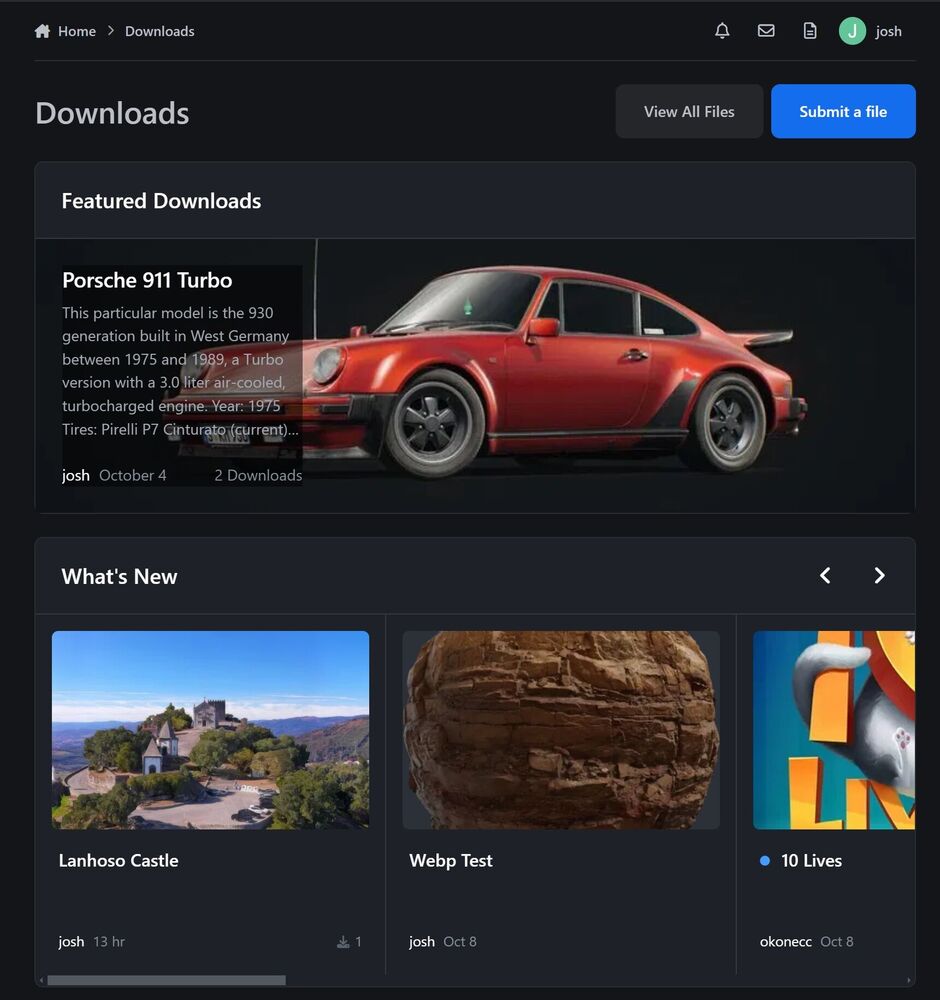
Alternatively, you could put the text in a row below the image. The point is, if something is "featured" you want to show it off more.
-
Right now, the featured download block shows an icon the same size as all the others, and assaults the viewer with a wall of text. The featured downloads block would look a lot better if you used a big image and a small block of text. The text block should have a dark margin around it, but I could not easily do this with CSS. You get the idea.
-
It took me a while to realize each line was rhyming. From now on, I demand all documentation and communication from IPS come in the form of a rhyming poem.
-
The front page of the downloads section looks better. Please try to make the categories view look less like a forum: They do not look good in IPB 4. This is what Apple is doing now. It looks slick:
-
A couple of times they touched on using IPB activity as data in an automated marketing campaign, like if they haven't logged in in a while, send out an email. I think there's a lot of potential there. If you can collect and analyze data from all IPB communities that opt into data collection, that could help you get an understanding of customer behavior and how to get them to buy products based on behavior.
-
I've experimented with video hosted on our own site, and I wouldn't really recommend it for anyone running a smaller community. What I saw was a few users uploading gigs and gigs of videos that were basically all the same thing, with few views, so I ended up paying month after month to store hours of videos that no one was watching. I got rid of this feature and my S3 bill dropped back down close to zero.
-
It was hard to read on the wide computer screen. I looked at some examples using a narrow vertical screen and I could read it faster. I think when your eyes are just moving vertically you can take it all in faster, but when I am going side to side I lose my place.



