

Everything posted by Matt
-
 We have announced a lot of new things coming soon with Invision Community 4.5. Most of these are pretty big new features worth a blog on their own. However, we've made a lot of smaller changes that may not deserve their own blog but still have a significant impact. Let's run through some of those. Performance Improvements For every major release, we take some time to run through the code and look at ways to make Invision Community run more efficiently. For Invision Community 4.5, we've made node forms, sitemaps and commonly run SQL queries more efficient, which is excellent news for you and your users who get reduced server load and a snappier community. TikTok Embed Although it confuses me greatly, TikTok has taken the internet by storm. We have added it to the embed list so pasting a TikTok share link automatically shows the video ready to play in the comment. A TikTok Upload Chunking Uploading large files can be tricky. Typically trying to push a large file to a server results in timeouts, memory issues and eventually frustration. We have added chunked uploading when using S3. Put simply; this uploads part of the file at a time to prevent memory issues and the server timing out waiting for the upload to finish. View Members by Rank Very recently, we were asked how you can view all members in the ACP of a specific rank. It turned out you couldn't. This quick change was added into Invision Community 4.5. Showing members with a specific rank in the AdminCP Download Statistics While Invision Community 4.5 has new and improved statistic displays, a common request was to be able to download the raw data. This is now possible. Export stats as a CSV Downloads In Invision Community 4.5, when you require approval of new versions of files submitted to Downloads, the original version will no longer be hidden from view. We've added a new flow for moderators to approve these new versions. Live Meta Tag Editor Invision Community 4.5 seemed like a great time to run through this feature and tweak the functionality to make it more useful. Now it's possible to remove default meta tags, and it's easier to remove custom tags. Closed Tag Autocomplete When using the closed tag system where a user can select from one of your preset tags, we have added a search box to make it easier to find a single tag from a list of potentially hundreds. EU Tax Support in Commerce Tax doesn't have to be taxing! But it generally is. Countries within the EU often have complex tax rates. Commerce now supports multiple tax rates for consumers, businesses and EU VAT-registered businesses. That concludes our mini round-up of all the things we've not talked about yet. Let me know which one you're looking forward to most!
-
 Invision Community introduced drag and drop widgets many years ago. These widgets allowed anyone to add blocks to existing views, and to build up entirely new pages. These widgets were great for quickly adding content to a page, but they weren't incredibly customizable. For Invision Community 4.5, we've added three new Page Builder widgets which allow you a little more control. For an overview of this new feature, please take a look at the video below. As you can see, these new widgets offer a lot of customization without the need to code any CSS or HTML. You can add background colours and images, adjust padding and borders and even add colour overlays right from the widget menu. The new Page Builder widget options Blandness be gone! Now you can let your creativity loose on your pages and all other views that have the drag and drop zones. I'd love to know what you think of this new feature; please let me know below!
-
 Managing a community as a team makes internal communication an essential part of its successful management. There are times where you want to leave notes for other staff on specific topics that you're watching. Perhaps a member is close to breaking the rules, or it might be that you want to keep the topic focused and on point so wish to split off-topic posts into a different area. Whatever the reason, Invision Community 4.5 adds the ability to leave private staff notes on topics. For some time, Invision Community has had the ability for staff to leave public notes. Now, in 4.5, staff can choose between public and private notes. This change was made based on customer feedback, so thank you! We do read and listen to all the feedback you leave. Who is looking forward to Invision Community 4.5? Let us know below!
-
 Invision Community has had different view modes for a good number of years. Forum grid view was added to create some visual interest when listing forums, and we've had expanded and condensed view modes in streams since they were introduced. We've taken both of these views a step further in Invision Community 4.5 Forum Grid View To create even more visual interest, the grid view now allows you to upload, or choose a stock image for the header. This instantly makes for a more dynamic and inviting forum list. The new grid view image headers You can choose an image from the Admin CP when creating or editing a forum. Choose a stock photo, or upload your own Topic List View For the topic list view, we have taken inspiration from our stream view options to introduce a new 'expanded' view mode, which displays a snippet of the first post. The new expanded topic list mode This immediately entices you to engage with the topic because you can read part of the post without having to click inside to see if it interests you. This is controlled via the Admin CP, where you can choose the default view, or turn off the new view completely. Other Changes You may notice a few other subtle changes in these screenshots. The first is that we now included the follower count as a metric on both the forum grid view and the topic expanded view modes. The number of followers is usually a good indicator of how others perceive the value of the content. A higher follower count generally means a more engaging topic or forum. You can also see that we've switched to a short number format to keep the displays clean. Instead of say, "2,483 posts", it will merely say "2.5k posts". Reducing visual clutter is always crucial to maintaining a clean user interface. We hope that you find these new view modes useful and that they make your community even more vibrant!
-
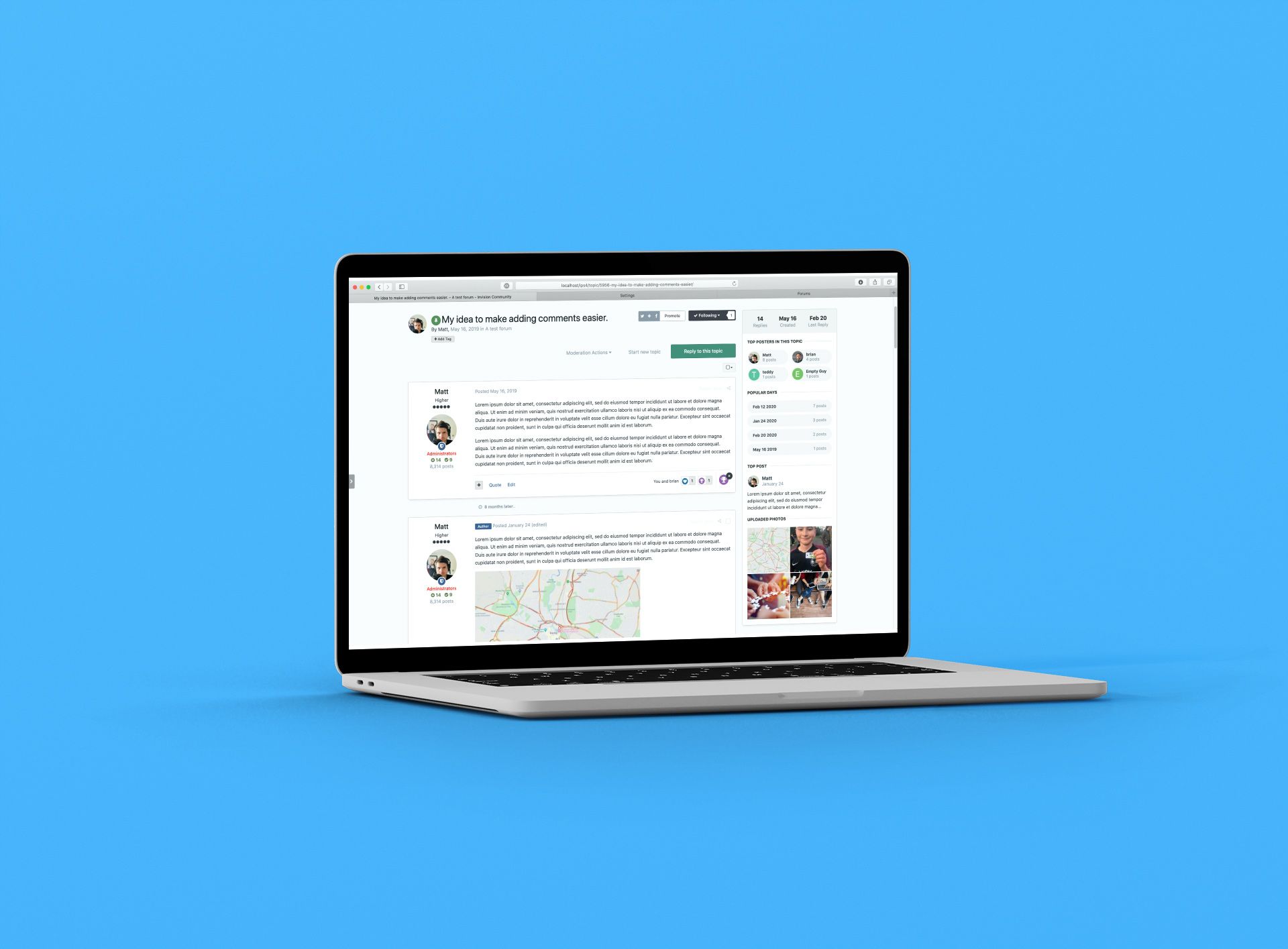 A topic is more than a collection of posts; it's a living entity that ebbs and flows over time. Evergreen topics can see month-long gaps between posts and longer topics spanning numerous pages can end up hard to navigate through to find useful content. With this in mind, we've added numerous improvements to the topic view to bring context and summaries key areas within the topic. Topic view updates Topic Activity The first thing you likely spotted in the above screenshot is the new sidebar. This acts much like a summary of activity within the topic. It very quickly lets you know how old the topic is and how long it has been since the last reply. This context is essential if you are unwittingly replying to an older topic. Most topics are driven by a handful of key members. The topic activity section shows you who have been most active, which may influence which posters you give greater authority to. Likewise, popular days lets you dig into the 'meat' of the topic which may have evolved quickly over several days. More often than not, a single post attracts more reactions if it is particularly helpful or insightful, and this is shown too. Finally, a mini gallery of all upload images allows you to review media that has been attached to posts. The topic activity summary under the first post This activity bar can be shown either as a sidebar or underneath the first post in a topic. If you enable it for mobile devices, then it will show under the first post automatically. The topic activity summary on mobile As with many new features in Invision Community, you have several controls in the Admin CP to fine-tune this to your communities needs. AdminCP settings Other improvements The eagle-eyed among you will have spotted a few other changes to the topic view. The first is the badge underneath the user's photo. The shield icon notes that this poster is part of the moderation team. Of course, this badge can be hidden for communities that do not like to draw attention to all their moderators. You will also notice that when the topic starter makes a reply to a topic, they get an "author" badge as their reply may carry more authority. When you scroll down a topic, it's not often apparent that there has been a significant time gap between replies. For some topical topics (see what I did there) this may alter the context of the conversation. We have added a little identifier between posts when a period of time has passed between posts. These changes add a little context to the topic to give you more insight into how the replies direct the conversation. The new topic activity summary gives you an at-a-glance overview of key moments and posters to help you navigate longer topics. We hope that you and your members enjoy these new features coming to Invision Community 4.5!
-
 We are currently living through one of the most turbulent times in history. A once-in-a-century pandemic has a grip on all of us. Whatever the outcome, come the end of the year, few of us are going to be the same again. We will have to sacrifice our personal freedoms, and some of us much more. Like you, I'm worried about my family, my friends and neighbours. I'm watching the news, scrolling through social media and consuming articles from scientists, scholars and doctors. The news coming out of Italy is truly heartbreaking. Doctors and nurses have to make life and death decisions daily as they wage war with the virus. Those of us in the UK and the USA are nervously watching the graphs climb in lockstep of Italy from just a few weeks ago. It would be easy to succumb to fear and withdraw completely. But as community leaders, we cannot. Let us take some inspiration from the brave people of Italy who have suffered much with an overstretched health care system and enforced quarantine yet still sing from their apartments in a display of resolve. In a time where we have to remain apart, we must come together. We have to keep showing up and leading. We must focus on what we still have and not what is being taken away. Now more than ever, we are needed to keep the world connected. To bring comfort; to support and to love each other. This year is going to test every one of us. But whatever comes our way, I know that we are stronger together. "Their faithful and zealous comradeship would almost between night and morning clear the path of progress and banish from all our lives the fear which already darkens the sunlight to hundreds of millions of men." Winston Churchill
-
 The news is currently filled with anxiety over coronavirus and workers are being encouraged to work from home where possible to limit or delay its spread. For many people used to commuting daily and working in shared offices, this is a huge upheaval which will take a while to adjust. How do you stay motivated and productive when you're not at your desk and held accountable by your colleagues next to you? Remote working has become popular over the last few years. The internet has transformed how we work, and improvements to connection speeds, authentication systems and cloud architecture make working home a viable alternative for many office workers. Working from home certainly doesn't suffer the same stigma it did years ago when it was synonymous with sleeping in late, daytime TV binges and excessive time in pyjamas. A good number of years ago, I was getting my hair cut. It was about 11 am on a weekday, and we had the usual small talk as she attempted to tame my unruly mop. The question I was waiting for dropped a moment later "so, is this your day off?" My reply was that I work from home so have some flexibility in my day. Usually, this gets a nod, and we move onto the weather. I'd not met this hairdresser before. She processed my reply, stopped snipping and locked eyes with me via the mirror. "Do you really work from home, or is that you don't have a job?" Fears over reduced productivity from remote workers have proved to be unfounded. A large-scale experiment was conducted with 16,000 employees of a Chinese call centre. Workers were randomly assigned to either work from home or at the office for nine months. The home workers enjoyed a 13% performance increase due to fewer breaks and sick days. At Invision Community we not only make a product designed to bring people together online, but a good number of us also work remotely. Our HQ is in Virginia, USA but we have team members in the UK, Europe and Australia. Remote working allows us to hire the best people we can find, and not just those who are within a few miles of our HQ. I spoke with our team to get their tips and strategies for working from home and still getting work done. Rikki, lead UI designer Get out of the house every day It's easy to fall into the trap of being a hermit for days on end. Particularly in the summer, I like to take a walk to get lunch every single day. It gives me a chance to get some fresh air, a little exercise and most importantly get away from my office properly (instead of just being in the next room, which doesn't feel like it's really taking a break). Don't take your work home downstairs with you Another easy trap to fall into is working every waking hour because you're always 'at work'. Set fixed work start/end times and stick to them. Leave your office at the end of the day and consider the work finished. If you do need to hop back to work later because something cropped up, go back to your desk to put yourself in work mode - don't be tempted to start working from the sofa. Olivia, Customer Success Manager Organize your workspace You may not be lucky enough to be able to repurpose a dedicated room in the house, but that doesn't mean you can't find a good spot to work from. Choose a place that is free of clutter and well lit. Organize your work I'm a big fan of to-do lists. Keeping my lists organized helps me stay on track and prevents me from drifting too far from what's important. I like the "To Do versus To Get Done concept." Organize yourself Plan in breaks away from your screen. There's always one more email to write, but setting times to take a break is vital to keeping your energy and focus. Working from home means that you cannot rely on others to remind you! Check-in often with teammates At Invision Community, we use Slack to keep in touch and recreate the 'water cooler' moments where we discuss our favourite TV shows, movies and more. Reframe "my office is always open" to "I'm always available for a call". Remind your colleagues often that they can start a voice call if they need to talk. Stuart, developer and migration specialist Minimize human distractions When you're working from home, it's easy to get distracted, especially by other people! Remind your family and friends that during your work hours you're working. As much as you'd love to spend the day drinking tea (or beverage of your choice) and chatting, you do have a job. Stuart's work area How we do it There's no doubt that we're fortunate to have a team that is self-motivated and responsible. Remote working can allow individuals to drift, and productivity suffers. We use a combination of software platforms and a few simple strategies to keep us all informed, organized and feeling part of a greater team. We use Slack to not only onboard new clients, but also to organize product development, feedback and support. These channels are well used, but without a doubt, our 'general' channel is used the most. This is where we hang out socially and chat during our breaks. It's easy to see this as unproductive or distracting, but I feel that it helps build us as a team and helps forge relationships with each other. We use a private Invision Community as an intranet hub which does the heavy lifting for organizing releases. It also acts as a repository for feedback, new feature ideas and development discussions. We encourage breakout groups to voice call to resolve hot topics and pressing issues. It's amazing what you can get done in a few minutes by voice. We hold a stand up voice meeting weekly where we organize the week, discuss anything pressing and run through development tasks. This call is developer-focused, but it's held company-wide, so it is inclusive. We try and avoid human information silos where possible. Daniel's workstation Above all, just keep talking It's just as important to share your personality as it is your work. Make sure you check in on quiet colleagues to make sure they're OK. Not everyone is super-chatty, and some prefer to switch off and focus. However, it's easy to feel a real sense of loneliness and isolation if you don't have a partner or family living with you. It's essential to put effort into maintaining relationships online. Working remotely means less interaction with your colleagues, and it's easy for multifaceted personalities to become a flattened disembodied persona online. Without the office 'vibe' and body language cues we often take for granted, it's easy to lose that personal connection. Build depth by asking how your colleagues weekends were. Ask about their hobbies and pets. Work at keeping a connection with the person behind the computer. In our team we have little sub-groups that focus on our hobbies. There's the running/workout club where we share our training plans and give each other virtual high-fives. I've actually found it easier to stick to a running plan knowing that my colleague is running too (and beating my times!). If you only take one thing away from this, maintaining strong relationships with your team is key! If your team isn't keen on video calling, then make sure you voice call regularly. I can't stress how important it is to verbally talk to your colleagues. We start each call off with some light hearted chat and listening to the inflections in other's voices and have them laugh at your silly jokes recharges your soul. Take advantage of technology Apart from using Invision Community as a hub and company-wide information repository, there's a lot of apps you can use to make your work time more productive and avoid the constant distractions partners and children rattling about the house can cause. I work from home and have two young children. School holidays can be challenging when the house comes alive during the day, and there's a constant stream of potential distractions. I use "focus music" with noise-cancelling headphones when I want to knuckle down and write code or blog articles. Right now, my kids are at school, and I'm listening to Metallica at an unreasonable volume through my Homepod speaker. For some reason, loud metal music helps me concentrate. There are only so many power chords you can take, and I've found Brain.fm to be very useful. Brain.fm uses "neural phase-locking" via music to help you focus. I have no idea what that means, but it does help me get into the zone on days where I struggle with productivity. I have the attention span of an anxious squirrel. It can take me a long while to get into the zone and mere seconds to pop back out. When I'm writing code, it's less of a problem. I just put on Brain.fm or some music, and I get lost in time and space as I build complex constructs in my mind before bringing it together in my code editor. However, when I'm writing articles, helping support, hopping between tasks, or doing general administration work, I rely on a Pomodoro timer. The idea is that you work in sprints of 25 minutes, followed by a short break, usually 5 minutes. You repeat this cycle four times and take a longer break. Many apps can track your time in this way, including web-based tools such as the amusingly named Tomato Timer. Using this technique helps me get into the flow by giving me "permission" to take breaks but only once the work block has finished. I might pop out of focus and think about checking up on our community or Facebook and get back to work when I realize I've still got 12 minutes of work left. Where I work. Can you guess my favourite TV show? Work/life balance doesn't exist You'll often hear people talk about their work/life balance. You are better off thinking in terms of work/life integration. Now, I'm not suggesting that you work all day and night. I'm not one of those "sleep when you're dead" people. I like to sleep. I have a partner and two kids I want to enjoy and passions outside of my computer (although my guitars are gathering dust again). The reality is that when your workstation is just a door away from the rest of your life, you're going to work outside of the traditional 9-5 routine despite how rigorous you may want to define a working day. This might be because you took the morning off to watch your kid's school play or you may have booked a haircut during the day as it's much quieter. My advice would be to look for pockets of time that won't impact the rest of your family or free time. I tend to earmark an hour once the kids have gone to bed as potential "work overflow" time. This allows me to integrate my work schedule with my home schedule without it taking over my life. Avoid Coffeeshops Working with your laptop in a coffeeshop is a massive cliché. Every single time I've walked into Starbucks, there have been dozens of people at tables squinting at laptop screens. It's an attractive idea. You get to mingle with fellow humans. You get a change of scenery and a decent cup of coffee. You also get a constant source of distractions, poor quality and insecure Wi-Fi and sideways glances from staff who'd love to free up your table. Also, what do you do with your laptop when you need a restroom break? Do you take it with you? What if someone sits at your table while you're gone? It's just not for me. Jim's work area Exercise and movement I won't lecture you about health and fitness, but I do want to highlight one downside of having no commute and office building to move through: being super-sedentary. If you used to clock up 10,000 steps walking to the train station, walking to your office and then clocking up steps as you moved between meeting rooms and social areas, then expect that number to drop sharply. There are days where my Apple Watch tells me I've done less than 1500 steps during the day. To combat this, I make time during the day to go for a walk or to exercise. I'm fortunate that I have a treadmill in the garage along with some weight lifting equipment. If you don't have any equipment, then a short walk is better than nothing. As a bonus, you'll get some fresh air and vitamin D from the sun. I also have a standing desk so that I can get on my feet during the day and an exercise bike I can use while working with the desk at its highest position. Find ways to incorporate movement into your day for your own mental and physical health. Conclusion Despite the many challenges working remotely can cause and the learning curve of taking your work home, the vast majority prefer to work from home. In a study of 100 remote workers, only six said they'd return to the office if given a chance. If you're new to working remotely, then there will be mistakes. There will be days when you feel that you've achieved very little and probably yearn for some human interaction and be told what to do next. It's all part of the process. Keep lines of communication open, check in on your colleagues and embrace the freedom working remotely gives.
-
 Invision Community has had a question and answer mode for a good few years now. This mode transforms a forum into a formalized way to handle your member's questions. Members can upvote answers, and the topic starter and your community management team can mark a reply as the "best answer". This is great when you want to add rigour to specific forums which encourage your members to find solutions. The existing "QA" mode But how about a way to mark a topic as solved without transforming the look and feel of the forum? We get asked this a lot. Happily, it's now a feature just added to Invision Community 4.5! Those with a long memory will recall we had something very similar way back in Invision Community 3. The new "mark as solved" feature This new feature allows the topic starter or your community management team to mark a post as the solution. This highlights the post within the topic as well as adding an icon to the listing views. The green tick notes that the topic has a solution In addition, it also increases the member's solved count, which is displayed under their name in the post and even in a draggable widget that shows members with the most solutions. We have also added a new filter to the existing post and topic feed widgets to allow only items with a solution to be shown, so you can create a "Recently solved" feed. The new widget Finally, a notification is sent to the author of the post that is selected as the best answer, so they're made aware that their helpful content has been spotted. Let your members know their content was useful We hope you enjoy these changes and look forward to allowing your community to find answers quickly, and to reward the members that provide them.
-
 Notifications are a crucial feature in enticing members back to your community to read updates and post their replies. It makes sense that there should be as little friction as possible when setting up notifications. We want to encourage members to enable notifications relevant to them. The current notifications form in Invision Community is functional but overwhelming and confusing for new members. Thankfully, we have simplified it to make it clear what notifications are available and which you have enabled currently. This new settings page also includes support for our new mobile app and links to remove all email notifications. Notification Emails Notification emails are essential to re-engage a member. However, we found that when the email contained all of the post content return visits were not as frequent because the email provided all the information the member needed. In Invision Community 4.5, we've added an option to truncate the content of the email to encourage curious return visits and to reduce the chance that a confused member will attempt to post a reply via the email! What does the rest say?! Download's Notifications To receive notifications of new file updates it was previously necessary to follow files. This meant that you would also be notified of reviews and comments even if they were of no interest to you. From 4.5 we have added a separate button (send me version updates) so you have more control over the notifications you receive. Send me version updates We've plenty of new features yet to announce for Invision Community 4.5, but improvements to common features make our lives a little easier and are just as welcome! Are you looking forward to finally making sense of notification choices? Let us know below!
-
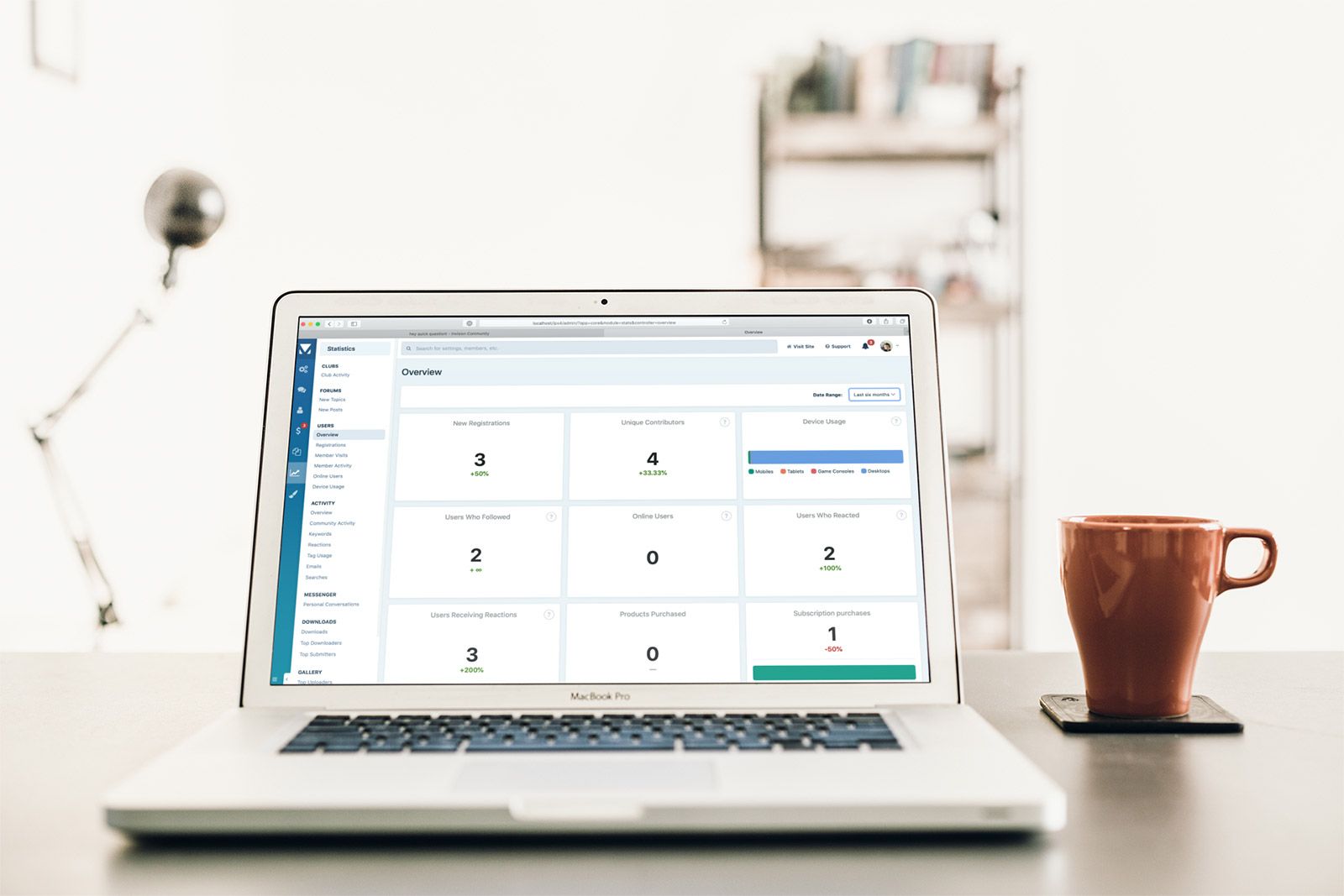 One of the benefits of using Invision Community as your community platform is that you control and own your data. There are several ways to review this data. One of which is via the Admin Control Panel which offers a suite of statistic views which helps to convert the raw data into something easily understood. However, it's not always easy to determine trends and community sentiment from these singular views. Invision Community 4.5 adds two new interactive views for user and activity statistics. This new 'overview' view not only shows you a snapshot of your community but also allows you to compare time periods. In the video, you can see that I select different date ranges, such as "three months". This shows you the data of that time period, and also compares it against the previous three months. In this example, you can clearly see that we have 50% more registrations and 33% more contributors compared to the previous three month period. Likewise, in this example, you can clearly see that we have a 1200% increase in reactions given with a clear breakdown of the type of reaction given to help understand community sentiment. These interactive displays automatically update, so if you are so inclined, you could leave the statistic pages open and watch as the data changes live. We hope that you find these new views useful in identifying trends and help to inform strategic decisions within your community.
-
 Invision Community has certainly changed a lot over the years as we've moved through major updates and large user interface changes. While large scale changes offer a dramatic difference, it is sometimes the smaller changes that bring the most satisfaction when using your community daily. This blog entry rounds up some of the UI improvements Invision Community 4.5 brings. Content View Behavior What do you want to happen when you click a topic link? Are you taken to the first comment, the last comment or the first comment you've not read? If you speak to 100 people, I'm pretty sure you'll get a good spread of votes for each. Invision Community has always offered subtle ways to get right to the first unread comment. Our infamous dot or star allows you to do this, but it is so subtle almost no one knows this. Invision Community 4.5 now allows each member to choose (with the AdminCP offering a default). Now everyone wins! Who Reacted? Invision Community has had reactions for a long while now. Although finding out who exactly reacted without clicking the counts has proved irksome. We've fixed that in Invision Community so simply mousing over the reaction icon reveals who reacted. Sign In Anonymously For as long as I can remember, Invision Community has offered an option to sign in anonymously via a checkbox on the login form. However, as we've added faster ways to log in via Facebook, Twitter, Google and more it's become less straight forward to ensure your anonymity. Invision Community 4.5 removes this login preference and moves it to your members' settings. Now your members can resume hiding as they move around your community across multiple logins. Resize Before Uploading One of the most popular requests we've had in recent times is to resize large images before uploading. It's quite likely that your giant full resolution image will be denied when attempting to upload, and it's a bit of a faff to resize it in a photo editor. Invision Community leverages the uploader's ability to resize before uploading, which makes it a much happier experience. Switch Off Automatic Language Detection Invision Community attempts to map your browser's user-agent to a specific language pack. When you visit a site, your browser lets the site know which language our browser is set to (often dictated by your operating system) and we use that to show you the correct language if the community you're visiting has multiple languages installed. However, it might be that you don't want this to happen because although your computer's OS is set to a specific language, it doesn't always follow that is the one you wish to use on a website. Invision Community 4.5 allows this automatic detection to be switched off. Quote Collapse We will finish with another popular feature request; the ability for long quotes to be collapsed, reducing the amount of scrolling one has to do. Quite simply, Invision Community collapses long quotes with an option to expand them to read the entire quote. Thank you to all our customers who have taken the time to leave feedback. As you can see, we do listen and action your feedback. Which change are you looking forward to the most? Let us know below!
-
 Although we continuously review security within Invision Community, a major release such as 4.5 allows us to be especially proactive when it comes to keeping your community safe. This blog entry outlines several enhancements to improve security in Invision Community 4.5. Password Handling Keeping your member's passwords secure is the simplest way to keep accounts safe and out of the wrong hands, so it makes sense to look at ways to ensure this doesn't happen. Invision Community already uses strong one-way hashing when storing passwords, which means that once the password is stored in the database, there is no way to know the plain text version. However, when creating a new member account via the AdminCP, a random password was created, and this was sent in the welcome email to the new member's email address. As of Invision Community 4.5, this no longer happens, and the new member is invited to create a new password when visiting the community for the first time. Part of your internal security procedures might be to force a reset of all passwords periodically. Invision Community 4.5 allows this on a per-member basis, or via a selection of filters to enforce a reset for many members at once. This clears out any stored password hashes and emails the affected members to remind them to set up a new password. AdminCP Security The Admin Control Panel contains the most powerful tools available to Invision Community. This is already a very secure area with a separate login with an option to add two-factor authentication to the login flow. Part of the session authentication has been a special key in the URL. While we have protection in place to prevent this special key being discoverable by a malicious user, there remains an incredibly remote theoretical chance that this could happen with a series of complicated steps. There was an additional annoyance that you are unable to share links within the AdminCP to members of your team due to the increased protection to keep URLs safe. As of Invision Community 4.5, we have removed the special key from the URL and moved it elsewhere in the session authentication flow. This means that it's impossible to fetch the special key via the URL and links can now be shared and will survive a login action. Text Encryption There are a few areas within Invision Community that we use text encryption to allow us to save data in the database in a format that is encrypted when saved and decrypted when read. This protects you in the incredibly remote event of your own hosting being compromised and your database downloaded (of course, our Community in the Cloud customers do not need to worry about this!) Invision Community 4.5 improves on this encryption by using PHP's built-in methods which give "bank-level" security to our encryption. Security is critical to the success of your community, and we are always proactive in improving security throughout Invision Community. Do you have any comments on this entry? Let us know below!
-
 We have come a long way since the late 90s when someone had the genius idea of using a small yellow smiling face image instead of the more common colon-bracket representation of a smiling face. In Invision Community, there are various places that photography can be used to create visual interest. From uploads in topics, to cover photos for blogs and members. The humble upload field has served these areas well, but sourcing images to use can be a pain; especially when you have to walk the minefield that is copyright and attribution. Fortunately, there are a few "CC0" online stock photo libraries that offer quality photography that requires no attribution and are not hampered by copyrights. One such library is the ever-popular Pixabay, which was established in 2012 and features a very powerful API. Pixabay has over a million images ready to use from llamas to sausages and everything in-between. Invision Community 4.5 now includes support for Pixabay which brings those images to your fingertips (or mouse pointer if you're on a desktop.) This video shows the feature in use. As you can see, not only can you upload into posts from the stock photo library, but you can also use it to add a cover image to your profile and blog entries. Finding quality photography has never been so easy! For those that love technical details, the stock photo picker is a programmatic option on the upload form field type making it very easy to add to your own code and apps. How will you use this new feature? Let me know!
-
This is a maintenance release to fix bug reports since 4.4.9.1.
-
 When the clocks strike midnight on New Year's Eve, we will enter the third decade of producing Invision Community. A lot has changed since we set up in 2002. Our team has grown and our product matured. In a world where online startups explode and die within a few years, we're something of an anomaly. We still have the same love and passion for creating the very best tools to build a community, and we have always ensured that Invision Community is in touch with modern demands. This decade has seen Invision Community go from strength to strength. In 2010 we were one of many forum systems catering to smaller niche audiences. In 2019 we're powering discussion for many international and well-known brands. Online habits may have changed in this time, and social media may have swallowed up smaller informal communities, but the need for independent community platforms remains strong. 2020 will see us release 4.5 which will bring another round of essential updates to existing features and a fresh batch of new features. But first, let us climb inside our Delorean, rewind the clock to 2010 and start from the beginning. As the sun rose on 2010, Bruno Mars was singing about parts of the human face in "Just the way you are", Katy Perry irritated Microsoft Word's spellchecker with "California Gurls", and CeeLo Green was trying to "Forget you" (at least in the radio edit). Christopher Nolan's boggled all our minds with Inception, James Franco lost the ability to clap in 127 Hours, and Colin Firth stammered his way through The Kings Speech. Steve Jobs unveiled the iPad to a collective snort, moderate derision and questions over just how useful a giant iPhone will be. President Obama, just a year into office warns of "Snowmageddon" that eventually dumps up to 40 inches of snow on the east coast of the United States. We lost comedy legend Leslie Nielsen (we'd never dream of calling him Shirley), and we gained a small child named Ryan who in just nine years would be earning $29,000,000 by opening boxes of toys on YouTube. 62% of us were using Internet Explorer to the chagrin of most web developers who wished that Chrome's 5% market share was more significant. Facebook celebrated its sixth year by reaching 400 million users (a far cry from the 2.5 billion it currently has). Twitter, just four years old hits 30 million monthly active users (and none of them talked about fake news). And how about Invision Community? 2010 We hit 2010 running by releasing numerous updates on IP.Board v3.1, including finally using long-established web standards, and share features now that "social networking is all the craze these days" noting that "friends and colleagues often share similar interests, after all." How innocent we all were in 2010. IP.Board 3.0 Back then, each product had its own name and release cycle. IP.Gallery's new features included being able to rotate images by 90 degrees. Honestly, people used to go crazy for this stuff. In May, we released a brand new application called "IP.Commerce". A few months later we renamed it "IP.Nexus" and years later, it was changed back to "Commerce". Naming things is hard. The announcement contained exquisite details such as "It's hard to say when it'll be available" and "we don't know how much it will cost". We were so sure that it would be accepted positively, we removed the ability to post comments to the blog entry. As summer turned to autumn and the end of the year loomed large, we released news about a significant update to Gallery called "IP.Gallery 4.0" which pre-dates Invision Community 4 and confused customers for years (so IP.Board 3 works with IP.Gallery 4, but IP.Board 4 works with Gallery 4?). Numbering things is hard too. The last blog entry was about an app called 'IP.SEO' that I had utterly forgotten existed. It was written by Dan who once locked Lindy out of his own datacenter, but we don't talk about that. I don't even remember this website 2011 Charles opens the year by managing expectations for IP.Board 3.2 by outlining our three key goals (promotion, usability and modernization). The last one was us removing the "back to top" button and then spending the next eight years explaining why we removed it. Our spam monitoring service processed 300,000 requests in the first two weeks of 2011. 30% of these requests were deemed to be spam and blocked (0.1% was probably an administrator registering 50 fake accounts before being banned from their own site). I posted about "exciting new technology" in our new "WYSIWYG" editor (although what you see is sometimes close to what you get) would be more appropriate but slightly less catchy. We spent the next eight years explaining why no one uses BBCode anymore to almost everybody. Brandon closed out the year with a blog promising "new toys" for IP.Content 2.3 (now called Pages, keep up!) which promises a "who's online" widget and a "shared media field" that was not only complicated to explain, but also use. IP.Board 3.2 in all its glory 2012 We start the year with news on IP.Board 3.3. This release was to feature essential updates such as the "Remember me?" checkbox on the login form and emoticons in signatures. Despite being constantly told that we don't take SEO seriously, we round up the latest serious SEO changes including tags, soft 404s and micro schema. We also celebrated our tenth year in business. Something terrible must have happened to one of our competitors because we asked if you'd like to switch to IPS. The year ends with IP.Board 3.4 being released for beta testing. This being a rare year where we release two major versions in less than 12 months. 2013 Brandon has eight coffees and tries to explain what it's like to be a developer: "us developers are a strange bunch. We have a lot of crazy thoughts that just don't make sense to anyone else. Our brains are wired differently. We get from point A to point B by going around point Z and bouncing off point M first.", he closes the blog entry by urging you to ignore us. The big news is that work on 4.0 is officially underway! Don't get too excited, releasing two major versions in 2012 clearly fatigued us as "IPS Community Suite 4.0" is not released until June 2015, over two years later. 4.0 was our first complete rewrite in years. We threw out all our stable and tested code and started over with an empty editor. It was a vast undertaking that consumed us completely. The result was worth it as we had a new modern framework that still serves us today. But we're getting ahead of ourselves a little. Back in 2013, Mark talks about trees. Not the kind you find laying around in forests, but rather the programmatic type. It's just a way for Mark to show off how beautiful his code is. IP.Board 3.4 still gets many updates (along with IP.Gallery, IP.Blog, IP.Content, IP.Downloads and IP.Address (ok that last one was made up)). We spend the year talking about various new things in 4.0, including a new-new editor and various special features (and no one noticed we started calling it "IPS Social Suite 4.0" - it just rolls off the tongue!) I introduce the new theme engine for 4.0, and this time, my code is not deleted by Mark (true story). 2014 We didn't know it at the time, but 2014 was not the year that IPS Social Community Suite 4.0 (naming things is hard) will be released. Still, Rikki talks enthusiastically about "extending JS controllers and mixins" a way of coding so complex, to this day you can count the number of people who truly understand it on one of Rikki's fingers because it's only Rikki that understands it. Determined not to be outdone in the confusing customers' stakes, I go on about how important it is to convert your database to UTF-8 when upgrading from 3.0. As 2014 neared its inevitable end, we did manage to put up a pre-release testing site and release Beta 1 a release so unstable; it makes the current political climate look absolutely peachy. IPS Community Suite 4.0 (Preview) 2015 Finally, the year that 4.0 is to be released! We released six betas and a few release candidates before nervously hovering over the 'release' button (actually it's a collection of git commands and 'to the letter' instructions I ignore). After a year of training customers to call our forthcoming release "IPS Social Suite 4.0," we release it as "IPS Community Suite 4.0". Lindy writes a lengthy blog article that sounds like a cross between a technical discussion of the Brother 8987-A printer and an award acceptance speech. Quite frankly, after nearly two years of development, we're just relieved to have finally released it. The year is spent refining and fixing 4.0 and culminates in the news of 4.1, where we add activity streams and a menu manager. We also talk about the new-new-new editor. December 16th marks the time that IP.Board 3.4 officially dies as we declare it "end of life" and no longer support it. That shiny new release we were excited to talk about in 2012 is finally put out to pasture. The last we heard, IP.Board 3.4 moved to a farm and is doing well. 2016 Now that IP.Board 3.4 is end of life; we do the sensible thing and make a few minor IP.Board 3.4 releases to improve security. IPS Social.. sorry, Community Suite hits version 4.1.17 (confusing Lindy) before the year is done with many new improvements, including embeds, warning notes and the new leaderboard. We're still mostly undecided what to call the product, so we avoid trying in all our blog entries. In fact, looking back, it's quite remarkable how often we changed the name of our product. You'd be forgiven for thinking that it was a robust and well-considered attempt to prevent Google from serving up relevant search results and to confuse potential customers. We find time to update our own website and introduce a new developer's area. 2017 Barely 16 days into the new year, and we release news of the two-factor authentication feature added to IPS Community Social Invision IP.Board Suite 4.1.18. When spring has sprung, Charles drops the news that we're working on 4.2, the main feature being a screenshot of the Admin CP log in. We promise that you will love it and that it will be released mid-2017. Updates come thick and fast. Calendar event reminders, content messages, recommended replies, letter profile photos device management and delayed deletes all make the blog. Still not convinced that people take us seriously when we say we're committed to SEO, we post about more SEO improvements. This time, we talk about implementing JSON-LD, rich snippets, pagination tags and more. We also squeeze another one in about the new-new-new-new editor. We overhaul our own blog (using Pages because that's how we roll) and I start a hilarious series of blog entries where I troll our own team. Everyone including me loses interest early on in 2019. During April, we do the sensible thing and change the name of our product once more. IPS Community/Social Suite 4.1 is out, and Invision Community 4.2 is in. Just to recap: IBForums > IPB > IP.Board > IPS Social Suite > IPS Community Suite > Invision Community. You're welcome search engines! As promised, we release Invision Community 4.2 around the middle of the year. Well done, everyone! We finally hit a release date! As is now tradition, we end the year with news of our next big release Invision Community 4.3 (and tease the new emoji feature). We also calm nerves about Europe's endless fascination with regulation (it's this kind of joke that caused Brexit you know) and wrote up a guide on GDPR. 2018 Phew. We're almost there, dear reader. If you skimmed through most of the blog to this point and expected me to finish with a bang, you'll be disappointed. We start 2018 at full speed releasing feature news on Invision Community 4.3 including emoji, OAuth, community moderation, REST API, subscription manager, announcements and more. Oh and we hit our sweet sixteenth birthday in February! We release Invision Community 4.3 in April to rapturous applause after a short beta testing period. We all agree that 4.3 was a great stable release which instantly makes the developers nervous. Towards the end of the year, we announce that work has begun on Invision Community 4.4. We talk about new features such as GIPHY integration, AdminCP notifications, Post Before Registering, Commerce Updates and more. Still not sure if we care about SEO? Well, how about another blog entry on SEO? The only thing missing this year is a new update on our editor. 2019 And we arrive back home in 2019. A week into January and I pull the massive twist that we're using Invision Community 4.4 on our own community. It's not quite up there with "Bruce Willis is a ghost" though. In March we write up a case study on The Trevor Space, an LGBTQ charity set up to prevent suicide and to provide crisis intervention. TrevorSpace commends Invision Community for allowing anonymity online which isn't possible with social media. Rikki drops a bombshell in September when he announces that we're actively working on native iOS and Android apps for Invision Community. Apparently mobile is a thing now. November starts a series of blog entries talking about our new upcoming release, Invision Community 4.5. We talk about the Admin CP overhaul, Club Pages, RSS Feed Improvements and Club improvements. And here we are. Right up to date. This decade may have only taken us from IP.Board 3.1 to Invision Community 4.5, but it really has seen a massive change in the company we are, and the industry we are in. We have seen the inception, rise and stumble of social media. While it's true that forums are no longer the preserve of Star Trek fans obsessing over continuity errors and informal communities have been absorbed by Facebook and friends, spaces that you completely own to host discussions are still very much in demand. Invision "Chameleon" Community in 2019 Over the past year or so we've seen a sustained rise in the demand for independent communities. Brands especially like that you own your data and can use it to gain insights into customer habits. Just this year, we've launched communities for LEGO, HTC, Sage, Mattel, Gibson Guitars, Squarespace, and many more. We are constantly evolving Invision Community (assuming we stick with that name) to be at the very centre of your online presence. We have tools to add discussion comments to any page of your site, to embed widgets with a few lines of code. We want to showcase your community throughout your site by adding multiple touchpoints to take your customers on a journey with you. Our native apps will offer new and exciting ways to interact with a community via new interfaces. As we move into our third decade, I can only see a resurgence for independent communities as we tire of the crushing intrusion of social media. We give away so much of our attention, time and information for very little reward. We have never been more divisive and fiercely tribal. It's time to come back together to discuss a topic with care and thoughtfulness. It's time to allow our personalities to take a back seat and let considered discussion live again. And we'll be here doing what we have always done; creating the very best community platform possible. I'd love to know when you joined us on this crazy ride. Was it before or after 2010?
-
 Almost every single day, we receive feedback on our popular clubs feature. Some of the requests are big in scope, and some a little smaller. Following on from our previous blog entry for Club Pages, we’re pleased to announce a collection of smaller, but no less useful improvements. Improved Map Display The Clubs location map better shows where local clubs are A small but useful change to the clubs map means the view is now centered and zoomed around available clubs. Previously the map would show a world view even if all of the clubs were located in a concentrated geographical area. Member Tab A commitment to privacy always influences our development decisions, and this is true in clubs as well as other areas. It is now possible to set who can view the club member list on a per club basis. Clubs can be set to show the member list to everyone, only to club members or only to club leaders and moderators. You can now decide who can see your club Club Widgets A common request for clubs is that widgets should be able to display content from within clubs. With 4.5, this is now possible and allows you to better bring attention to your club content from anywhere in your community. Content widgets can now show club specific content Some people wanted to control where widgets would show more finely. This wasn’t previously possible, but now it is. When adding widgets to a page, you can now set whether you want it to appear everywhere, everywhere except clubs, or only in clubs. Join Requests Club leaders can invite members who they believe will enjoy their content to join. Likewise, members can request to join a club that is not open for all to join instantly. For a site with a lot of clubs, this could mean that you are invited to many clubs or find that your pending request goes unnoticed. Your member can quickly manage their pending invites Members can now cancel pending requests themselves quickly and easily from the Club homepage. Clubs are becoming an increasingly popular part of Invision Community and really helps foster a sense of involvement. We are always interested and surprised by the variety of ways this feature is being used. Let us know how you’re using clubs in the comments and keep the great suggestions coming!
-
 You'd be forgiven for thinking that RSS feeds belong in some bygone era of the web where Netscape was king and getting online meant listening to your modem scream at your phone line. There's certainly a lot of newer web technologies to share data, but the venerable RSS feed still has a place. Invision Community has supported RSS feed importing and exporting for a very long time now; however, it has been restricted to just Forums and Blogs. Importing an RSS feed is a simple way to populate content on your community. It's even a great way to share content to and from your site without creating blocks or writing custom code. Invision Community 4.5 now centralizes RSS feed importing, so it is available for Forums, Blogs and Pages. You can now choose to import an RSS feed to any Pages database. Better yet, there is now full support for image enclosures. RSS feeds have a special tag to note that the feed entry has an attached image. Lots of RSS feeds use this, such as the NASA Image Of The Day feed. Until now, this image has just been silently discarded. Now, it is imported as an attachment (so it can be moved around in the post or Pages entry). If the Pages database you are importing to has record images enabled, you can optionally import the enclosure as a record image which some template sets can use as a header image, just as our blog here does. But what about exporting enclosures? Happily, Invision Community 4.5 can now export the main content image of an item as an enclosure. This certainly makes the Gallery RSS feed export a lot more useful! While these updates are not revolutionary, they certainly make RSS feed importing and exporting much more useful. We've been asked to support RSS feed importing into Pages for quite a while now. What do you think of these changes? What will you import into your Pages databases?
-
Version 4.4.9 is a maintenance update to fix critical issues reported since 4.4.8.
-
Version 4.4.8 is a maintenance update to fix critical issues reported since 4.4.7.
-
 If you're reading this blog, then it's likely you already have a community and have been running it for some time. I'm going to go further and say that you've done all the right things; you've set it up correctly and themed it, so it matches your site. Once you have built your community and watched it spring into life, it's easy to think that you have done all you need to do. However, there are three simple things that you're probably not doing that is curbing your potential growth. Promote your community No matter how well you have set up your community, if you're not regularly promoting it, then you are limiting your potential audience. Look for ways to promote your community to a new audience. If you regularly write blog posts or a newsletter for your existing customers, then make sure you write about your community and encourage people to join. If you have a presence on social media, then share links regularly. Even adding a link to your community in your existing email signature will catch a few more clicks. Get creative! One community owner I know went through Apple's rigorous verification process to post quality articles from their site to Apple's News app. Why not sign up to HARO (Help A Reporter Out). This is a free email sent daily that contains requests from reporters looking for sources to quote in articles. The email is broken up into sections so that you can find relevant stories for your niche. It's a very simple way to get quoted in other publications with a link back to your site. Think about how you can promote your community to a wider audience. Post great content Do you take the time to create great content and post it to your community regularly? By great content, I mean a piece that encourages in-depth discussion, shows that you are a leader in your niche and sets the tone for the rest of your community. With the rise of social media, we're often fed a diet of disposable content such as "Motivation Monday" which may generate likes, but it does nothing to connect with your audience. You could use the Blog app, the Pages app or post in the relevant forums within your community. Try and encourage discussion and ask them to share their thoughts and experiences too. People love to share what they do and talk about their experiences, so it shouldn't be hard to get people active on your topic. Reward contributors Way back in the dark ages, a high post count was the only badge you needed to show others that you were to be feared and respected. I still remember joining some communities in the early 2000s and was in awe of members with 10,000+ posts. In today's more sophisticated times, we need a little more to keep us involved. There are a lot of tools you can use to reward your members. The simplest is the group promotion tool which automatically moves members based on specific thresholds. You can give your members elevated permissions or special badges to show to others that they are more experienced. If you have a more active community, you could consider rewarding your most engaged users with a prize. This prize could be a free subscription, a discount code for your products or even a small Amazon gift voucher. These are just a few things that you can incorporate into your workflow to help further build your community. I'd love to hear your tips too, please share them below!
-
 Security should never be an afterthought. Don't wait until an attack has compromised your site before you take action. All too often, site owners consider increasing their security only when it's too late, and their community has already been compromised. Taking some time now to check and improve the security of your community and server will pay dividends. In this blog, we run down 8 ways that you can protect your community with Invision Community. We go through the security features you may not know about to best practices all communities should be following. 1. Set up Two Factor Authentication Invision Community supports Two Factor Authentication (2FA for short), and we highly recommend making use of this feature for your users, but especially for your administrative staff. 2FA is a system that requires both a user's password and a special code (displayed by a phone app) that changes every few seconds. The idea is simple: if a user's password is somehow compromised, a hacker still wouldn't be able to log in to the account without the current code number. You may already be familiar with 2FA from other services you use. Apple's iCloud, Facebook and Google all offer it, as do thousands of banks and other security-conscious businesses. Invision Community supports 2FA via the Google Authenticator app (available for iOS and Android) or the Authy service, which can send codes to users via text message or phone call. You can also fall back to security questions instead of codes. You can configure which members groups can use 2FA, as well as requiring certain groups to use it. Recommendation: Require any staff with access to the Admin Control Panel or moderation functions to use 2FA. This will ensure that no damage will occur should their account passwords be discovered. Allow members to use 2FA at their discretion. 2. Configure password requirements The password strength feature displays a strength meter to users as they type a new password. The meter shows them approximately how secure it is, as well as some tips for choosing a good password. While you can leave this feature as a simple recommendation for users, it's also possible to require them to choose a password that reaches a certain strength on the meter. Recommendation: Require users to choose at least a 'Strong' password. 3. Be selective when adding administrators Administrator permissions can be extremely damaging in the wrong hands, and granting administrator powers should only be done with great consideration. Giving access to the AdminCP is like handing someone the keys to your house. Before doing so, be sure you trust the person and that their role requires access to the AdminCP (for example, would moderator permissions be sufficient for the new staff member?). Recommendation: Don't forget to remove administrator access promptly when necessary too, such as the member of staff leaving your organization. Always be aware of exactly who has administrator access at any given time, and review regularly. You can list all accounts that have Administrative access by clicking the Administrators button under staff on the Members tab. 4. Utilize Admin Restrictions In many organizations, staff roles within the community reflect real-world roles - designers need access to templates, accounting needs access to billing, and so forth. Invision Community allows you to limit administrator access to particular areas of the AdminCP with the Admin Restrictions feature, and even limit what can is done within those areas. This is a great approach for limiting risk to your data; by giving staff members access to only the areas they need to perform their duties, you reduce the potential impact should their account become compromised in future. Recommendation: Review the restrictions your admins currently have. 5. Choose good passwords This seems like an obvious suggestion, but surveys regularly show that people choose passwords that are too easy to guess or brute force. Your password is naturally the most basic protection of your AdminCP there is, so making sure you're using a good password is essential. We recommend using a password manager application, such as 1password or LastPass. These applications generate strong, random passwords for each site you use, and store them so that you don't have to remember them. Even if you don't use a password manager, make sure the passwords you use for your community are unique and never used for other sites too. Recommendation: Reset your password regularly and ensure you do not use the same password elsewhere. 6. Stay up to date It's a fact of software development that from time to time, new security issues are reported and promptly fixed. But if you're running several versions behind, once security issues are made public through responsible disclosure, malicious users can exploit those weaknesses in your community. When we release new updates - especially if they're marked as a security release in our release notes - be sure to update promptly. Invision Community allows you to update to the latest version via the AdminCP. You no longer need to download a thing! Recommendation: Update to the latest version whenever possible. Remember, with Invision Community's theme and hook systems, upgrades to minor point releases should be very straight forward. 7. Restrict your AdminCP to an IP range where possible If your organization has a static IP or requires staff members to use a VPN, you can add an additional layer of security to your community by prohibiting access to the AdminCP unless the user's IP matches your whitelist. This is a server-level feature, so consult your IT team or host to find out how to set it up in your particular environment. Recommendation: Consider IP restriction as an additional security layer when you are not able or willing to use 2FA. 8. Properly secure your PHP installation Many of PHP's built-in functions can leave a server vulnerable to high-impact exploits, and yet many of these functions aren't needed by the vast majority of PHP applications you might run. We, therefore, recommend that you explicitly disable these functions using PHP's disable_functions configuration setting. Here's our recommended configuration, although you or your host may need to tweak the list depending on your exact needs: disable_functions = escapeshellarg,escapeshellcmd,exec,ini_alter,parse_ini_file,passthru,pcntl_exec,popen,proc_close,proc_get_status,proc_nice,proc_open,proc_terminate,show_source,shell_exec,symlink,system Another critical PHP configuration setting you need to check is that open_basedir is enabled. Especially if you're hosted on a server that also hosts other websites (known as shared hosting), if another account on the server is comprised and open_basedir is disabled, the attacker can potentially gain access to your files too. Naturally, Cloud customers needn't worry about this, we've already ensured our cloud infrastructure is impervious to this kind of attack. Recommendation: Review your PHP version and settings, or choose one of our cloud plans where we take care of this for you. So there we go - a brief overview of 8 common-sense ways you can better protect your community and its users. As software developers, we're constantly working to improve the behind-the-scenes security of our software. As an administrator, there's also a number of steps you should take to keep your community safe on the web. If you have any tips related to security, be sure to share them in the comments!
-
Version 4.4.7 is a maintenance update to fix critical issues reported since 4.4.6.
-
 The term "flame-wars" was coined way back in the 1970s when computer scientists talking in the first electronic discussion boards noticed that here was "an escalation of critical comments and an increase in the frequency with which people would respond with short negative messages." For anyone that has ventured into the comment section of Youtube, read Twitter for more than a few minutes or frequented active forums will know that our behaviour hasn't improved. Sherry Turkle, Ph.D., a psychologist and professor at MIT, conducted hundreds of interviews over 15 years and found that "we allow ourselves behaviours online we never would in person." These interactions aren't just restricted to strangers on social media as Turkle notes that "we do things online that hurt and damage real relationships". Why is this? Tom Sander, executive director of the Saguaro Seminar project on civic engagement at the Harvard Kennedy School, explains that having the ability to be anonymous "can be a real attraction if no one knows you have a drinking problem or depression. The Internet can be useful in allowing people to anonymously 'come out' about their problems and get support. But it is also an Achilles heel. If people don't know who you are, you are much more likely to say things in a nasty or snarky tone. In general, we invest less in our reputation in online groups because it is easier to exit them and join other groups. In real space, if you don't get along with your neighbour, you're less likely to say something really nasty, because moving out of town is costly." A lot of toxicity is from those who just like hearing themselves talk, or feel better when they put others down. Some people think they are clever and witty by using sarcasm and pointing out the flaws in another's argument. Here's a few ways to manage negativity in your community. Model your ideal behaviour The simplest and most effective way to manage negativity in your community is to be the behaviour you seek. Ensure your replies and friendly and polite. Be fun where appropriate and learn about your regular members. Make sure your team is visible and post regularly so the community feels well run and someone is on hand to deal with issues when they arise. Your community will follow suit and replicate your behaviour. When your community is positive and helpful, toxicity and negativity find it very hard to get a foothold. Your members will weed it out and correct those members for you. Have clear guidelines Socious's Senior Director of Community Management, Katie Bapple advises moderators not to be impulsive when dealing with toxic members. "Controversial community members should not be dealt with compulsively; have reasonable guidelines and policies in place that draw a clear line, so you know when it's been crossed." A clear and well-written community guidelines document won't stop trouble from occurring, but it will provide your team with clear boundaries and protocols to follow. Have a light touch with moderation tools It's easy to reach for the moderation tools when you see toxic or very harmful posts in a topic. It only takes a few clicks, and you can remove it from view and pretend it didn't happen. However, much like a child trying to get his parent's attention, the more you try and silence them, the louder and more insistent they will be to get heard. They'll very likely return more inflamed and vitriolic than before. Unless the content crosses the boundaries you have set for your community; it is often more productive to post a polite reply gently guiding the discussion back on track and thank contributors for their input so far. If this doesn't de-escalate the situation, then: Make it private Open a dialogue with the offender to try and calm the situation. Often this act alone makes the member feel valued and transforms them into a happy and productive member of the community. Just remind them of the boundaries set out in your community guidelines. At least you will stop the member from continuing to post in public areas and derailing topics. Use the appropriate moderation tool Invision Community is packed with tools to help manage toxicity and negativity. However, reaching right for the ban button may not be the best course of action. Consider a warning, which the member must acknowledge before posting again. Keep it friendly and polite and to the point. If the behaviour continues, then consider a short term block. Often an enforced 48 hours away from the community is enough to regain some perspective. Don't assume it'll go away The truth is people love drama, and most people are drawn towards negativity. We can't help but look when we come across a vehicle accident, and sadly, it's largely the same in a community. It might be tempting to keep on scrolling and hope that it all sorts itself out. Likely, it won't, and intervention will be required. That might be a polite, friendly reminder to get the topic back on track, or contacting the member in private. Either way, the best approach is to nip it in the bud with a light touch before it spins out of control, and more forceful action is required. You can't please everyone It should be a last resort, but your community may not be a good fit for everyone. If that is the case, then you can consider a permanent ban, or demoting the member into a read-only member group. Ultimately though negativity and toxicity are pretty rare in an upbeat and productive community. Most quarrels are fixed quickly, and it's rare to find a troll determined to corrupt your community. Identify your boundaries and educate your community on what is not acceptable and be proactive when issues arise, and you'll keep sentiment positive. If you run your own community, I'd love to know what tips you can share on dealing with negativity and toxicity. Let me know below.
-
 When your customers buy or use your products, they will have many questions. They may have issues using the product, or they may have requests for future versions based on their needs. Managing and responding to those questions and requests quickly increases conversion, satisfaction and the likelihood or purchasing again. The statistics back this up. There is no doubt that unless you have a support community for your brand, you are not delivering the best experience for your customers and risk losing them to competitors that do. Building a support community around your product or service will positively drive your business across all departments from product development through sales and into customer support. Let's break it down and look at the key benefits for each department. Customer Service Encouraging your customers to visit your support community is the simplest way to reduce the cost of supporting your product or service. Creating a self-help culture allows other more experienced customers to offer assistance and troubleshoot any problems they have. 73% of customers fall in love with a brand because of friendly customer service representatives.** Quite often, new customers encounter the same issues that would flood customer support if they were all channelled to your support desk. For example, consider a company that produces an internet-enabled smart device. Less technically savvy customers will likely contact support to troubleshoot initial connectivity issues which can quickly be resolved by peers in the support community. These questions and answers form a crowdsourced knowledge base that will allow customers to help themselves without any intervention from your team. Furthermore, these questions will feature in external search results, driving more traffic to your site. Sales The primary purpose of your community may have initially been to help support your customers, but it quickly becomes a valuable resource to help drive sales. Your support community will be a relaxed place where customers talk to each other honestly and openly. They will be less inhibited than they would if they were talking to your sales agents. Customers might be discussing a need for more functionality that you have in another product or service. Your sales team can move these conversations from the community to your CRM to curate new sales leads. 72% of customers will tell 6 people or more if they have a satisfying experience. - Esteban Kolsky Customers that have had positive interactions with their peers and members of your support team will become advocates for your brand. They will help sell your product over social media and among their friend circles. Given than 90% of customers are influenced by a positive review when buying a product*, having brand advocates is critical to your growth. Marketing There are several costly routes to learning about your customers and their wants and needs. You can conduct external surveys, or pay for research groups to look at your products and offer feedback. 56% of customers don't mind sharing their personal information in exchange for better service.** The most effective method is to look at your community. Your customers will be posting their thoughts daily. They'll tell you exactly how they use your products, offering you valuable insight into the problems they are solving with your product. This information should be used as the basis of new marketing campaigns. Project Development Your support community is a direct line to your customers. You no longer need to use external tools and services to determine which features you should add next. You'll be told directly! 55% of customers are willing to spend more money with a company that guarantees them a satisfying experience.** You'll find that some feature requests bubble up regularly. These are the ones you will want to move to your product roadmap. Invision Community allows you to segment your community into private areas for beta testing. Your developers can interact with this group to work directly with your customers to shape new functionality. Harnessing analytical data will inform development decisions. Invision Community can track keywords in user-generated content. If you have released a new feature, you can track how often it is mentioned in conversations to monitor its uptake. 52% of customers believe that companies need to take action on their feedback.* Setting up your Invision Community Now we've looked at the compelling reasons you should create a support community around your products, let's take a look at how to set up your Invision Community. Support Desk Invision Community has a fully-featured built in support desk functionality. Commerce has all the features you need, including multiple support desk categories, reply by email, pre-written reply templates and private notes. However, if you already use another support desk such as Zendesk then our API tools mean that Invision Community can integrate with your existing support flow seamlessly. Keyword Tracking Invision Community allows you to track how often specific words or phrases. This is useful to monitor which of your products are trending or monitoring uptake on new features. To set this up, visit the Statistics section of the Admin CP. Question and Answers To formalize a support or ideation area within your support community, Invision Community offers a Question and Answer forum type. Question and Answer forum types allow your members to post questions and enable other members to upvote the questions and replies. Your support team can also flag specific responses as the "best answer" which turns historical questions into a crowdsourced knowledge base. Showcasing Great Content Invision Community has several tools to highlight great customer-created content. You can pin topics, and feature specific replies within those topics. You can also convert posts into new articles within a formal knowledge base or blog to further help your customers find the right answers to their questions. Extensibility Invision Community has OAuth and a REST API out of the box. This means it's trivial to extend Invision Community to work within your existing flows. Integrate Invision Community to your SalesForce CRM and Zendesk support systems seamlessly. Create a federated search to integrate your external knowledge base with client-generated knowledge. The options are limitless, and we can take care of any custom integrations for you. If you have any questions, please let me know below, or contact us to see how we can help you harness the power of community for your business. * https://www.customerthermometer.com/customer-service/customer-service-and-satisfaction-statistics-for-2019/ ** https://www.qminder.com/customer-service-statistics/
-
 I've said before that when I visit a new website, I often look for a link to their community. It's not uncommon for some brands to have a link to their Twitter account and Facebook page, with a hashtag they'd like you to use when discussing their products. That is an audience, not a community. A true community encourages group conversation and empowers people to contribute ideas, promotion, content and support. A community gives its members a true sense of belonging and more importantly it provides a sense of identity. A community is an ongoing dialogue between you and your customers. It allows you to nurture and grow relationships far beyond what is possible with a hashtag on Twitter. Now consider an audience. Let's say you and 500 other people go to a venue to watch a stand-up comic perform. There may be a little interaction between the comic and the audience, but you are there to be quiet and listen. When the show is over, you go home. Now imagine that instead of going home after the show, you all spend a while talking about the show and the comic. You talk about which bits you enjoyed and which bits made you laugh the most. You compare this comic with other favourites. You share video clips and jokes. This is a community. An audience will follow you and consumes what you broadcast, but it is a one-dimensional relationship. Consider the case of Lush Cosmetics, who earlier this year removed their Facebook Group and replaced their community with a Twitter feed and an app "where the latest digital experiments unfold". I feel this is a missed opportunity to bring customers together to talk about Lush products, share tips, reviews and builder a stronger relationship with Lush. I've also seen startups trying to build a community on Instagram with a hashtag. They tend to search popular hashtags in their business niche and attempt to befriend individuals who are active with those hashtags intending to broadcast their information. This is all fine, but they are just curating an audience. A community is more than a list of followers, and it's impossible to control what content is tagged with hashtags. Just ask McDonalds who quickly realised this with their 'McDStories' campaign. What do you think? Let me know below.