Daniel F
Clients
-
Joined
Everything posted by Daniel F
-
 Our June release of Invision Community introduces several new improvements for your community to increase privacy controls and consent of personally identifiable information. In today's digital age, privacy and the protection of personally identifiable information (PII) have become increasingly important. By incorporating improved privacy and PII data features into Invision Community, we are creating a more secure and inclusive environment within your community. In this blog post, we will take a quick look at what PII is, and the new features Invision Community has to improve privacy within your community. What is PII? PII, or personally identifiable information, refers to any data that can be used to identify, contact, or locate an individual member. When users sign up and visit your community, they may provide various types of PII, either voluntarily or as required by the platform's registration process. For example, an email address is required to complete the registration, and in some cases and IP address may be logged to authenticate a session, or to provide some context to the person posting content. Invision Community introduced new data control tools in a previous release, so let's take a look at the improvements coming in our June release that improves cookie management, IP address management, PII data requests, and the right to be forgotten. PII Data Request and Right to be Forgotten Your members now have the ability to request their Personally Identifiable Information (PII) data directly from their account settings page. Upon submitting a request, administrators will receive a notification alerting them to the new inquiry, where they can choose to either approve or deny it. If approved, the member will be notified and provided information on how to download their requested data. Additionally, members now have the option to request account deletion. After submitting this request, they will receive a confirmation email to verify their intent. Once confirmed, the request is forwarded to administrators, who can then decide whether to approve or reject the account deletion. IP Address Management Invision Community has had tools to prune IP addresses within a timeframe for a while, but we have conducted a thorough evaluation of the data framework in Invision Community to ensure that all recorded IP addresses are systematically purged according to the designated timeframe. Cookie Management Empowering members to control which cookies are stored is an important aspect of fostering trust and security within an online community. By granting users the autonomy to manage cookie preferences, you demonstrate a commitment to respecting their privacy and protecting their personal data. This level of transparency not only helps build a strong sense of trust between the community and its members but also helps with compliance, ultimately contributing to a more engaging and responsible user experience. The Invision Community cookie consent page has been revamped and now displays a list of essential cookies. Visitors have the option to opt out of non-essential cookies for a more customized browsing experience. Additionally, we've introduced a new feature that allows for the inclusion of an optional third-party Cookie Description on the cookie consent page, further enhancing transparency and user control. We trust that these enhancements to privacy and data collection practices will simplify compliance with various regulations and, most importantly, ensure that your community members feel secure and well-protected while engaging with your platform. The features and changes presented here are available in the following packages: Beginner Creator Creator Pro Team Business Enterprise These features are also available in the Invision Community Classic (self-hosted) product. If you do not see your product or package listed, please contact us to talk about upgrading your Invision Community.
 -
Our June release of Invision Community introduces several new improvements for your community to increase privacy controls and consent of personally identifiable information. In today's digital age, privacy and the protection of personally identifiable information (PII) have become increasingly important. By incorporating improved privacy and PII data features into Invision Community, we are creating a more secure and inclusive environment within your community. In this blog post, we will take a quick look at what PII is, and the new features Invision Community has to improve privacy within your community. What is PII? PII, or personally identifiable information, refers to any data that can be used to identify, contact, or locate an individual member. When users sign up and visit your community, they may provide various types of PII, either voluntarily or as required by the platform's registration process. For example, an email address is required to complete the registration, and in some cases and IP address may be logged to authenticate a session, or to provide some context to the person posting content. Invision Community introduced new data control tools in a previous release, so let's take a look at the improvements coming in our June release that improves cookie management, IP address management, PII data requests, and the right to be forgotten. PII Data Request and Right to be Forgotten Your members now have the ability to request their Personally Identifiable Information (PII) data directly from their account settings page. Upon submitting a request, administrators will receive a notification alerting them to the new inquiry, where they can choose to either approve or deny it. If approved, the member will be notified and provided information on how to download their requested data. Additionally, members now have the option to request account deletion. After submitting this request, they will receive a confirmation email to verify their intent. Once confirmed, the request is forwarded to administrators, who can then decide whether to approve or reject the account deletion. IP Address Management Invision Community has had tools to prune IP addresses within a timeframe for a while, but we have conducted a thorough evaluation of the data framework in Invision Community to ensure that all recorded IP addresses are systematically purged according to the designated timeframe. Cookie Management Empowering members to control which cookies are stored is an important aspect of fostering trust and security within an online community. By granting users the autonomy to manage cookie preferences, you demonstrate a commitment to respecting their privacy and protecting their personal data. This level of transparency not only helps build a strong sense of trust between the community and its members but also helps with compliance, ultimately contributing to a more engaging and responsible user experience. The Invision Community cookie consent page has been revamped and now displays a list of essential cookies. Visitors have the option to opt out of non-essential cookies for a more customized browsing experience. Additionally, we've introduced a new feature that allows for the inclusion of an optional third-party Cookie Description on the cookie consent page, further enhancing transparency and user control. We trust that these enhancements to privacy and data collection practices will simplify compliance with various regulations and, most importantly, ensure that your community members feel secure and well-protected while engaging with your platform. The features and changes presented here are available in the following packages: Beginner Creator Creator Pro Team Business Enterprise These features are also available in the Invision Community Classic (self-hosted) product. If you do not see your product or package listed, please contact us to talk about upgrading your Invision Community. View full blog entry
-
You have to add the page to the home screen to get support for push notifications
-
It changed my email flow.. LESS EMAILS in my mailbox! :D
-
Have you enabled Push on the fronted( account settings - Notifications)
-
Once the user added the community to his home screen and gave permissions for push notifications, it's treated like a real app and notifications are treated like any other IOS notification. They disappear once clicked and you can use all the OS features like Focus to control what appears when, and configure everything under the IOS Settings > Notifications https://support.apple.com/en-us/HT201925
-
Sorry, you're right, this requires the parse_mobile_..... method to work! I'll see if we can simplify this, I don't think that we really need it for simple PWA notifications.
-
That's the actual footage of me after the first successful push notification. And Stu was such a party crasher with his "welcome to 2018... I have them already working for years" comment:D
-
It's just a new "way" to deliver the notification. As long as the Notification extension doesn't explicitly disallow Push via the config (that's the 'disabled' bit in the config array) and their browser supports it, they can use it.

-
What are you missing most?
-
 We love talking about our big new features, such as GraphQL and Live Topics, but we also like to shine a light on some of the smaller updates we've made to existing applications. In this blog, I'll take you through a few changes to the Download app and an update on our various API integrations. Downloads After the success of the Events and Gallery refreshes, we've brought some of those changes over to the Downloads application. Our Invision Community March '23 release will feature subtle theme updates to bring the Downloads app more in line with other applications. In addition, we have also added a grid mode for files. As in other areas of the platform, you can allow your members to choose their favourite view, which is remembered on subsequent visits. A long-awaited request by our Marketplace Contributors was to delete their pending version updates. The good news is that our March release now allows this! API News Invision Community benefits from several API services, including REST, GraphQL and webhooks. Our March release brings some improvements to GraphQL, including the ability to query for clubs and members. We have also enhanced the webhook for clubs which now returns information about the club itself. While we're on the subject of webhooks, we have created a new webhook that is triggered via Downloads when a new pending version is approved. I hope you find these updates useful. I'll be posting some more in our developer's blog on GraphQL, including some simple javascript examples to show you how easy it is to query for data and insert it into the templates without needing to edit templates.
 -
You can literally use the pages app to create it.
-
 We are excited to announce that the Invision Community GraphQL API is now available. This blog takes you through what GraphQL is and what makes it better than existing APIs present in Invision Community. It does get a bit technical, but you don't need to be a developer to appreciate how GraphQL will make life easier for those that do develop. What is GraphQL? GraphQL describes itself as a query language for APIs that gives clients the power to ask for precisely what is needed and nothing more. GraphQL was created by Facebook in 2012 and is now an open-source project governed by the GraphQL Foundation, which operates independently of Facebook. What makes GraphQL better than existing REST APIs? GraphQL has several advantages over the existing REST API present in Invision Community, and these include: Flexibility: GraphQL allows clients to request only the data they need, reducing over-fetching or under-fetching data. Getting data from a REST API often means receiving many fields and values you don't need to complete the operation you're creating. Versatility: GraphQL can query multiple databases or APIs, making it a more versatile solution than REST, which often requires multiple endpoints for multiple data types. Strong Typing: GraphQL has a robust type system, making it easier to understand the capabilities of an API and catch errors early in the development process. Better Performance: By allowing the client to request only the data it needs, GraphQL can improve the performance of an application compared to REST, which often returns more data than necessary. Easier to evolve: The schema-based nature of GraphQL allows for more straightforward and less-breaking changes to the API compared to REST. Let's look at an example You're building a dashboard that uses Invision Community data for your Node.js application that shows the latest topics, latest registered members and calendar events. With the REST API, you need to make three requests to get all the data you need. With GraphQL, you can fetch the exact data you need with a single request. Modern Web Development GraphQL is now the standard for modern web development, including building mobile apps. A modern web app has a "front-end" and a "back-end". The front-end refers to the user-facing part of the web application. The front-end is typically written in client-side languages such as HTML, CSS, and JavaScript and is responsible for rendering the user interface and handling user interactions. It communicates with the back-end to retrieve and display data. The back-end refers to the server-side part of the web application. The back-end is typically written in server-side languages such as PHP, and is responsible for performing business logic, managing data, and serving API responses to the front-end. Using GraphQL as the interface between the front-end and back-end, the development and deployment of each component can be done independently, improving the overall efficiency and scalability of the application. At Invision Community, we know that some clients use REST to pull data from Invision Community for use in bespoke web and mobile apps. So we hope you're even more excited about the possibilities with GraphQL. A list with all currently available queries, mutators and data types can be found in our developer documentation section. Extending Invision Community Functionality Of course, you also have full access to the GraphQL API in the Invision Community framework, so you can use GraphQL inside your controllers to run your queries, which has the advantage that you won't need to worry about future changes to the API. In addition, we have also created a GraphQL template plugin, which can be utilized inside templates to fetch any data. This is a more technology-heavy blog than usual. The main takeaway is that we continue to invest in ways to allow your Invision Community data to be used by your own applications. GraphQL makes that job a lot easier and much more efficient. Let me know if you have any questions!
 -
From my own experience it depends on the setup. There's probably no usage if you're ONLY using forums, but once you use also other content types, it can really help a lot to "categorize" all the different stuff. I'm also not a fan of allowing people to create their own clubs, instead they can request one which is a just a custom form with a title, description and "internal explanation" field and it's an administrator/moderator privilege, to control this which really helps to avoid the mess.
-
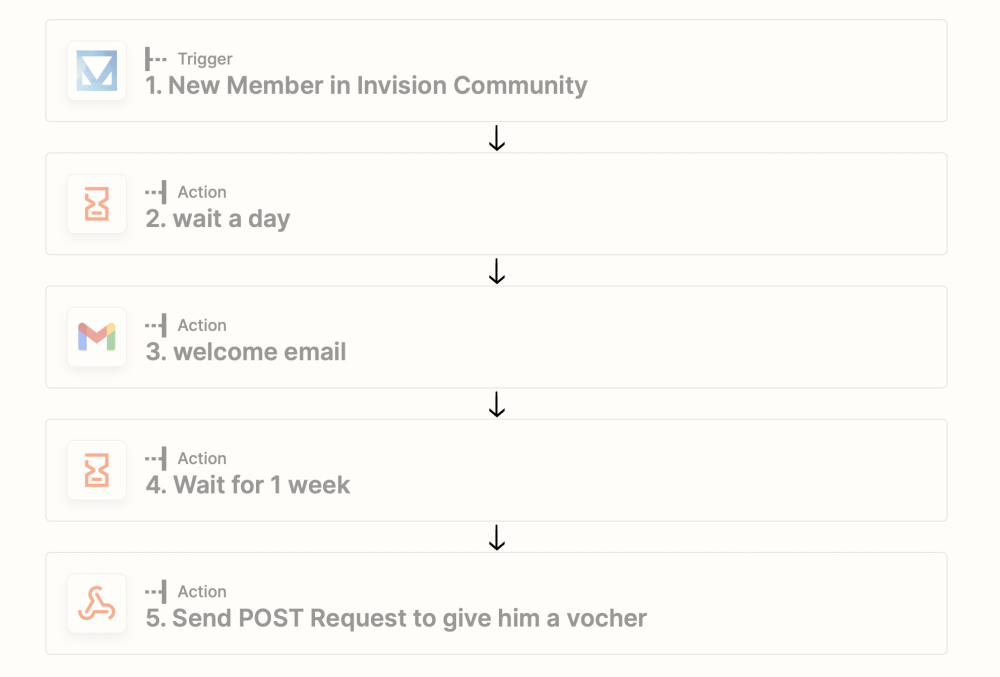
If you're NOT interested into complex mail campaigns via mail chimp and co, you can utilize the built in Zapier features to create an onboarding email process. Here's an example zap: When a member registers, I use the Zapier Delay feature to run the next step delayed instead of immediately, which is really handy. Member registers => wait a day and send an email, then wait another week and run the other stuff.
-
I was much faster and it was easier to read on my mobile phone.
-
I have my cup, so if you want,
-
I have updated the dev guide with some additional information, so any 3rd party devs which are interested into utilising this in their applications and plugins should already be able to implement this on their own to have it ready once 4.6.10 is here
-
 Webhooks allow other services and applications to stay in sync with your community data or to perform an action after a specific event occurs in your community. Webhooks are a performant alternative to continuously polling for changes to the IPS REST API. For example, a webhook can notify your service when a new topic is created so that your app can perform then any further actions. Webhooks can also be used to connect your community with Zapier, IFTTT or Integromat, so that any event which is covered by webhooks can trigger any further actions. Common webhook use cases Sync your member base with 3rd party newsletter lists Sync your Event RSVP with your Online Ticketing System Update your inventory after a purchase was made You can find the webhook functionality in the AdminCP, under the API section. There is also a useful webhook reference built in. Setting up a webhook Setting up a webhook is straightforward. Log into your AdminCP, then navigate to System > API. The target URL would be defined by the application you wish to fire events to. For example, in Zapier, you can set up a trigger to listen for a webhook event via a custom URL. Once you have entered the URL, simply check which events you'd like to fire to that URL. Zapier will ask you to test the URL, so to do this simply invoke the action which fires the webhook event, such as creating a test topic. Documentation If you are looking to add webhook events into your own custom code and applications, please see our documentation here. Webhooks will be implemented in 4.6.10 and will be enhanced frequently.
 -
Yea, I've experienced this too, but I think that there's a lot of potential for a brand new community, and that's also what I'm going to do with my new project. Instead of creating separate forums, downloads, courses and classified categories for each topic( handled via self coded separate applications) , I'm going to create clubs acting as containers, which contain the specific discussion forums, but also the related downloads, courses and classified categories. So there won't be a stand alone landing page for all downloads categories or courses at all, instead literally everything is going to be part of a club. This should be a funny experiment.
-
The URL won't change when you move a node or it's content into a club or vice verse.
-
I wear few different hats so here's my list: As user definitely the Activity Stream Subscriptions. As Community Admin/Consultant nothing beats this years Zapier/Webhook implementation and I'm really excited about the yet to come stuff.🤐 As Community Owner it's really tricky to pick a favorite feature ( I tried already once:D ) I'm very happy with our progress this year. The 4.6 release was really amazing and full with new features. Especially some minor enhancements like the "Solved content" enhancements were a welcome addition.
-
No, but I've picked your ticket and we'll get this fixed for you:)