


David N.
Clients
-
Joined
-
Last visited
Everything posted by David N.
-
Yes, there are other unread topics inside the forum, on the same page or another page, but the specific topic that is displayed in bold is a topic I've read. In that case, I would expect the name of the forum to be bold, but not the name of the topic, just like in grid view?
-
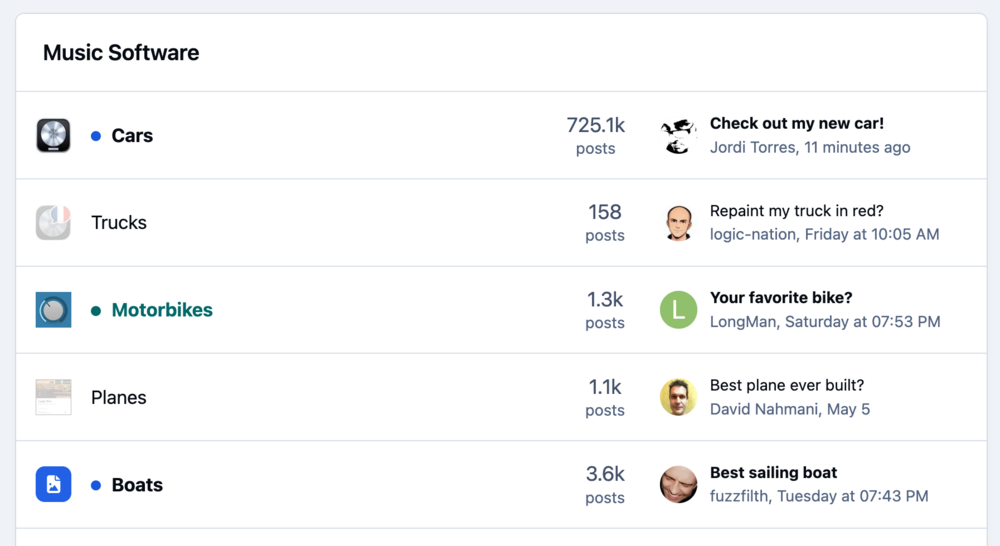
In v5, the most recently active topic remains bold in table view even after viewing it when there's at least one other unread topic in the same forum. Default Invision theme, no custom CSS. This issue occurs only when Table view is selected for the Forum index (in Theme Editor > Page layout). Other Forum index views work as expected, that same topic is not bold when switching to those other views. For example here, after I read the topics Check out my new car Your favorite bike? Best sailing boat These topics remain bold on the forum index as you can see below, even though I've read them. In the topic list inside the forum, everything works as expected. For example if I click "Cars" to enter the Cars forum, I can see that "Check out my new car!" is not bold in the topic list.
-
Just upgraded to v5, now typing :) no longer auto-completes to an emoji? Is there a way to recover that feature? Thanks!
-
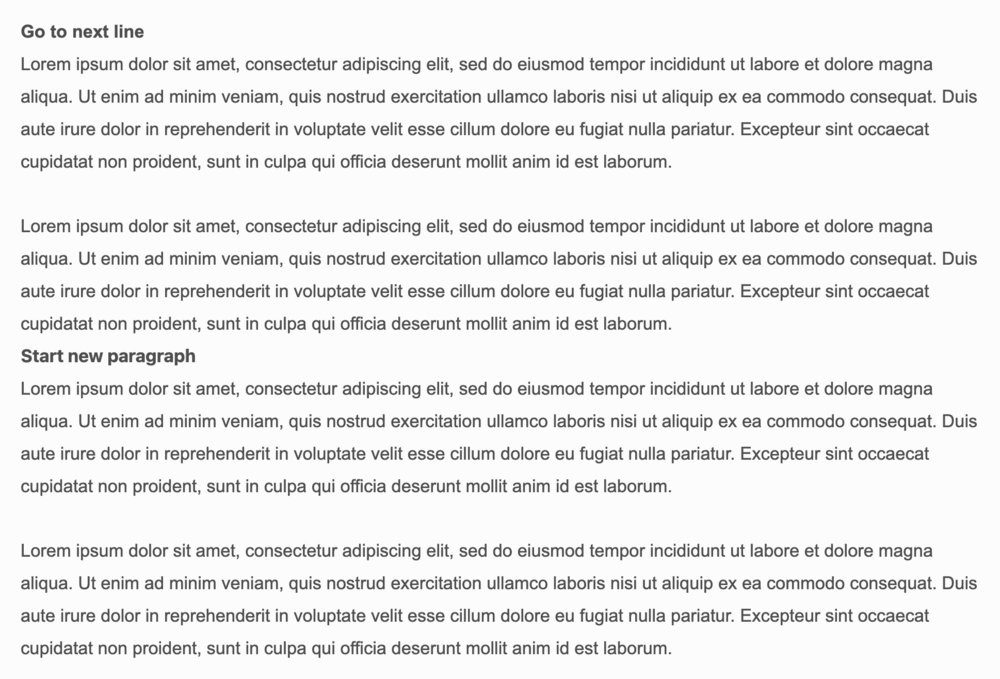
I don't understand the distinction between the two settings here under ACP > System > Settings > Posting & Editor > Content > Return Key Behavior. I tried the same sequence (paste one lorem ipsum paragraph, press return twice, paste the same paragraph again) with both settings and got the same results in both cases. I inspected the HTML produced with dev tools and see the same HTML structure of one paragraph with lorem ipsum, one empty paragraph, and one paragraph with lorem ipsum. What am I missing?

-
I had included tailwind css on my forum pages, and it was doing css reset that was responsible for links missing the underline text-decoration. I removed tailwind, and everything is now back to normal.
-
Just updated to v5 and I noticed that all links in posts and signatures look just like plain text, even though they're fully functional. No underline, no color. Is there a way to style links in v5 or should I create custom CSS for them? Let's try one, see how it looks here: https://example.com Alright so at least here it's underlined and has a different color. Not sure why it doesn't on my site. 🤔
-
I found the solution in that post:
-
Thank you. I've added the following CSS and that seems to work. .ipsPageHeader--topic-list + * .ipsTags { display: none !important; }
-
Just upgraded to v5 and I need to figure out how to add my ad script to the <head> element of the html of my theme? Thank you!
-
In v5, when viewing the list of topics in a forum, how do I remove the topic preview pop-up when hovering the topic title?
-
In v5, when viewing the list of topics in a forum, how do I hide the tags from being listed below the topic titles?
-
I definitely agree! That is a feature that would be really useful to me to. Search for all the topics that have a specific tags and move them to a new forum.
-
I agree that it would be nicer if: There was a way to log in to the community from the home page The main menu (Platform/Solutions/Enterprise/Resources...) wouldn't be nudged by the additional buttons in the community. A consistent navigation menu placement across all pages is generally considered standard UI practice. My usual workflow to access this community is: Type the letters "IN" in my browser menu bar, which autofills to "invisioncommunity.com", Press Return, Click Resources, Click Support Communities, Click Forum. It would be nice to streamline this workflow. I know I could use bookmarks but I'm a keyboard-focused user, I rarely use my mouse, I just type in the first few letters of the site I intend to visit.
-
Ok thank you.
-
Is there a way to hide specifics forums for members that belong to a group? For example, hide foreign language forums from members who belong to the 'English-forum-only' group?
-
Yes, that's an option however having the script still triggers their big 'Manage Your Privacy' modal that grays out the rest of the screen to require user consent for cookies etc, which I'm trying to avoid for a cleaner frictionless experience. I'll head to the Ideas and Requests forum then!
-
Ok, understood, thank you.
-
Is it possible to change the theme used by the "Events" pages and the "Live Topic"? My main theme has a javascript for ads in the header and I would like to use a custom theme that doesn't have the ads for "Events" and "Live Topic" pages. Thanks!
-
I don't even see a "Join" button, just a "Start Event" button. I ended up creating an Event, selecting RSVP, and linking it manually to the Live Event, so that people can register to the live topic. I wish RSVP was an option when I create a Live Topic and have it create its own event.
-
I see, thank you Marc.
-
Thank you, that was the part I was missing. Ok so I've created a new group allowed to host Live Topics, and I've added that member to the group. I see that I can assign him as a co-host and as a moderator of the Live Topic event. I guess I'm not sure what assigning him as a co-host does exactly?
-
I'm doing a live topic with another member of my forum (it's an interview). He's a regular member, not a moderator. I would like to add him as the co-host but when I try I get an error saying he can't be a co-host. Is there a way to make him a co-host without him belonging to the group "Moderators"? Once he's a co-host, will he be able to moderate the chat (mainly add questions to the Main Questions area?
-
I'm still in v4. I am scheduling my first live topic event, I remember that originally people had to register to the live topic and then they would get a reminder etc.... I can't figure out how to do that? Or is it no longer a thing?
-
Gatorade: https://fieldhouse.gatorade.com/ Lego: https://lan.lego.com/ Squarespace: https://forum.squarespace.com/ Sony: ? Gibson: https://forum.gibson.com/ Mattel: https://community.creations.mattel.com/ Corsair: https://forum.corsair.com/forums/
-
I for one am looking forward to all of this, especially the major new release later this year, but also the documentation and new site. :)




