peter gariepy
Clients
-
Joined
-
Last visited
-
-
-
That was it. NordVPN
-
See images BTW: Same problem here. See the image. NOTE: had the same problem here.


-
when responding to a post... I cant add an attachment... if I go back and edit the post, I can add an attachment. Is there a setting I'm missing? https://forums.aaca.org/topic/462507-age-is-just-a-number

-
Add to wish list? :) Would be a huge help when reorganizing topics.
-
I have a "General - buy/sell" forum. I've created a new forum call "Ford Model A - Buy/Sell" If I search for "ford model a" in the "General - buy/sell" I find 1000s. How can I move all the found topics to the new "Ford Model A - Buy/Sell" forum in bulk? https://forums.aaca.org
-
Yes please. Please review my system logs. forums.aaca.org
-
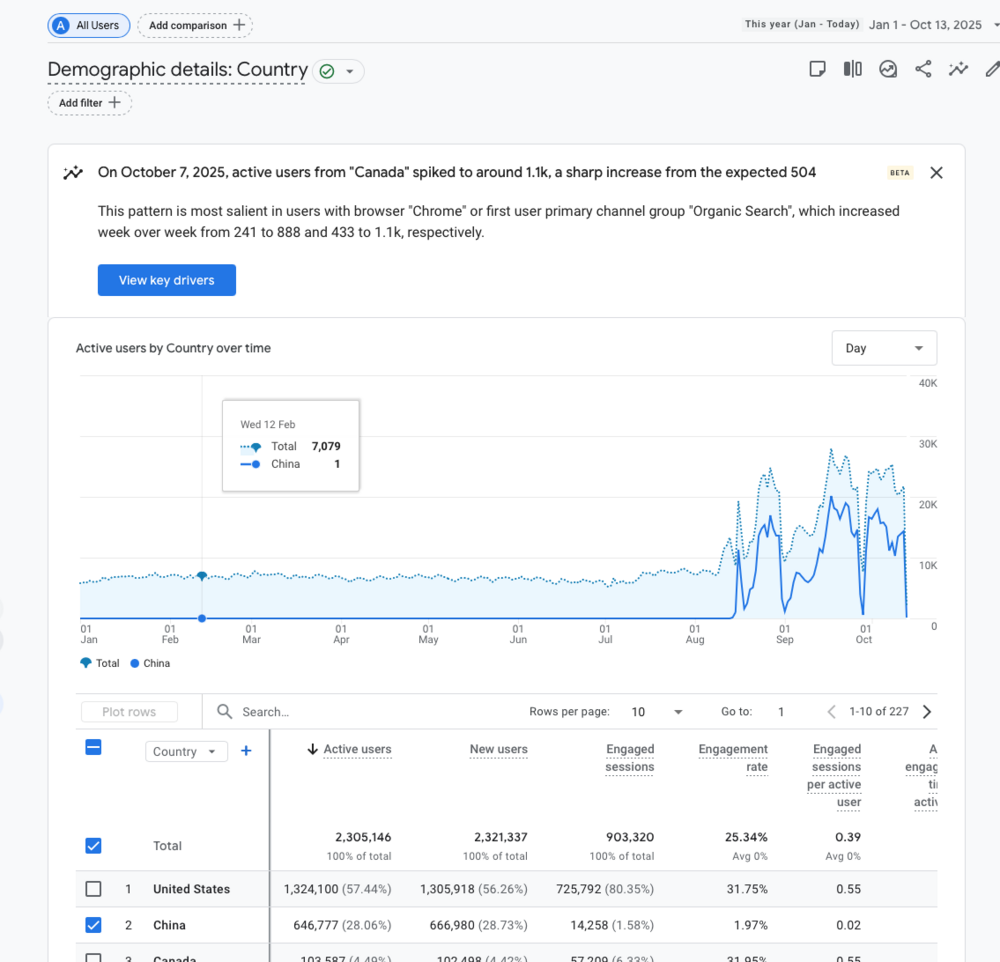
Jim, no such ticket. (that I can see) Regardless... the china issue is resolved. Whats up with the system log spike?
-
Jim, sorry. I don't recall a ticket on this. Where do I find it? Curious why it materialized suddenly in Aug? Google changes how it measured? I've also recently seeing more system errors. Any feedback?

-
I don't recall exactly when I migrated to 5.x, but this china traffic spike may coincide with the change? (I could be wrong)
-
Since august my traffic from china has skyrocketed. How can I block it completely?
-
I'm a driver. Popping the hood to "tune" the language is new to me... but I'll give it a try. :)
-
works great. Thanks. Followup: When a user who has restricted private messages attempts to send a private message... he gets this dialog box. Where can I edit the text?

-
how? Example: Restrict sending PMs until the've posted more than 10 times. thought it was in groups, but dont see it.
-
For example: Free text ads, but charge for photo ads?
-
Scammers are prolific. I'd like to put a warning message in ALL private messages. Something like below. Possible? How? A Message from the AACA Forum Admins: Scam Prevention! Stop most scams in their tracks by doing your due diligence. A phone call, more photos, or even a video call can prevent the majority of scams.