


David N.
Clients
-
Joined
-
Last visited
Everything posted by David N.
-
You can use your browser's dev tools to copy my custom CSS from my site. Ok I'll make it easy: li[data-ips-hook="navColumnItem"]:nth-child(6) span:nth-child(2)::after { content: "Pro"; display: inline-block; background: #FFB343; padding: 2px 5px; font-size: 10px; text-transform: uppercase; border-radius: 4px; color: black; font-weight: bold; margin-left: 10px; letter-spacing: 0em; } li[data-ips-hook="navColumnItem"]:nth-child(5) span:nth-child(2)::after { content: "New"; display: inline-block; background: #00cc66; padding: 2px 5px; font-size: 10px; text-transform: uppercase; border-radius: 4px; color: black; font-weight: bold; margin-left: 10px; letter-spacing: 0em; } There may be a more elegant selector than li[data-ips-hook="navColumnItem"]:nth-child(), which breaks the relationship if you edit your menu, but this is just something I quickly hacked to see what it would look like.
-
I agree, that would be great! 🙂
-
THANK YOU! 😄
-
Love the pun!! 🤣 Is it possible to renew my beta community? https://x332394.invisionservice.com/
-
That worked! Thank you! 🙂
-
@Marc now my beta community is no longer available. Is there any chance it can be restored and updated to beta 7?
-
Thank you Marc.
-
I'm using it on the Cloud.
-
I've tried about 6 or 7 times at different times of the day and always get that same error.
-
When I try upgrade from Beta 5 to Beta 6, I get the following error:
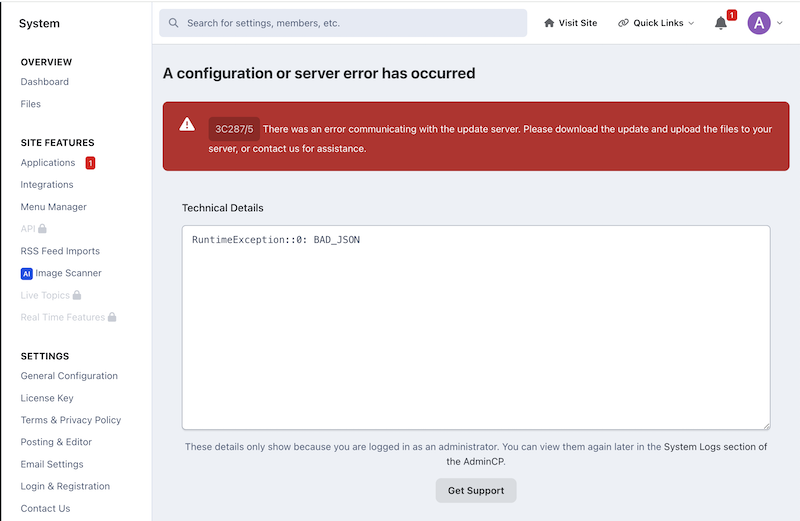
-
I just tried to update my Beta demo to v5 and am getting the following error:

-
Ok thanks!
-
So my beta version is not available, can it be renewed? Thanks! https://x332394.invisionservice.com/
-
I had a look in my ACP but couldn't find it, where do you turn that feature on or off? Thanks! Whoops, found it: ACP –> Members —> PII & Deletion Requests —> click Settings button at the top right.
-
At the bottom of the Dormant Account Login Notification email it says If you no longer require an account at Invision Community, you can request account deletion.
-
It's MJ bad.
-
That's a feature I had been meaning to suggest but been too busy, guess I didn't have to, since you've read my mind. 😅 Honestly great thinking there. Thanks!!
-
I thought that as I had updated to the beta version this was no longer an alpha site but a beta site, I guess not. Too bad, I've lost all my customizations. 😞
-
Is it still possible to renew my beta site? https://z331502.invisionservice.com/
-
Mac keyboards don't have a home button. One could use the fn key in combination with the left arrow key, but most users don't know that.
-
The video is great. Thanks a lot for your contribution @Jimi Wikman - much appreciated! 🙂
-
Have been spending more time with the Page Editor and I have to say it's quite fantastic. Thanks to everyone who worked on it for making our lives easier. Creating a web page used to be like this: Now it's like this:


-
Thanks a lot @Jimi Wikman - very helplful. 🙂
-
@Matt did mention a one-off script/tool that would do that pre-upgrade here. To me that would be necessary as I've spent an insane amount of time tagging posts.
-
It works!! Thanks so much @Jimi Wikman 😄







