


Como
Clients
-
Joined
-
Last visited
Everything posted by Como
-
Further to the above: Is there a URL/filter for combining multiple usergroups? From my above post: A URL which do the following, but combing multiple groups? If I can combine the three usergroups, I think I should be able to achieve my goal using just HTML and CSS.
-
-
Any idea of when it will be 'closed'? 🙃
-
The problem appears across browsers for me. And videos displayed for me at an MP4 test. https://www.tekeye.uk/html/html5-video-test-page Confirmed - this worked for me too using Firefox.
-
v5 Cloud Hi all, I wish to create a member directory which will display three related usergroups: the full list for each usergroup; and a list of just those from the selected usergroup who are logged in. The expanded options would be like this: Combined directory (Groups 1, 2 & 3) All Logged in Group 1 All Logged in Group 2 All Logged in Group 3 All Logged in I expect there will be a dropdown with: All, 1, 2, 3. And a toggle button for Complete directory and Logged in. I know the correct URL call for a usergroup: xxxxx.xxx/search/?&type=core_members&joinedDate=any&group[1]=1 And for those from a group who are online: xxxxx.xxx/online/?filter=group_2 But I do not know how to put it all together. Another approach would be to display all members belonging to each group with a toggle to prioritize those who are logged in. I expect bespoke directories like this could be useful for many communities where members within groups would benefit from easily finding each other. Yes, I can do this just with links to each of the six options (without the combined directory), but that's much less useful. Maybe someone here has already created something similar to this. Thanks everyone.
-
I guess so. I have no idea why though. What type of videos are they? I'll test it out if I can to confirm.
-
I just took a closer look. In Firefox, it reports no suitable mime type. I don't have an unusual system here - and I experience no problems with videos elsewhere - except, I am using a Win 10 machine. I don't know if that is relevant and helps.
-
Heads-up: the PWA videos do not load. Tested in Edge, Firefox and Chrome. And, since I just noticed this, a bug in the above highlight-quote. The link is not preserved.
-
This does not work for me, @Jim M. It appears to disable the Contact Us page and I get an error. Presumably, this option is intended for a bespoke Contact page or third-party system. But my method seems to be working as I had intended.
-
Thanks, @Jim M. I somehow managed to miss that. Thank you.
-
I managed to resolve this. If anyone else needs to do somethign similar, this is what I did. ACP > Customization > Themes > 'Theme Designer: Templates' (dropdown for the theme where you need to edit the menu) > create new template Type: Hook Hook Application: System System: front/global/footer Hook type: I selected 'before the closing tag' HTML: <li><a target="_blank" href="https://xxxxxx.xxx/contact/">Contact Us</a></li> Edit the the web page address and text to suit in the above Add CSS to hide the original 'Contact Us'... /* Hide fooeter 'Contact Us' popup link - replaced with link to web page */ .ipsFooterLinks > li:nth-child(3) { display: none; }You might need to change nth-child to another value. If you open Inspector, right click the opeing <li> item you wish to hide, scroll to Copy and select 'CSS Selector' (this was in Firefox - I think it varies a little between browsers). I think that's it.
-
If no else is experiencing this, then I guess it must be. I'll try it out with another email client when I have some time. Thanks.
-
No, I haven't tested it in another email client. Too busy to do that right now. But I do not usually experience problems like that. I'll try to get to it soon, but it will not be today. Just to add - and make clear - it displays like that when I hit reply. It is fine before then. Second edit: I think it obvious, but just in case, I edited the image to redact my details.
-
Hi, From the footer link, how would I have Contact Us go to the actual webpage rather than generate a popup? Stripe requires that I include additional contact information to the Contact page to conform to their requirements. I did this via the page editor, but the changes do now affect the popup form. Alternatively, is there a way to add content to the popup form? That might work even better, but either solution will do.
-
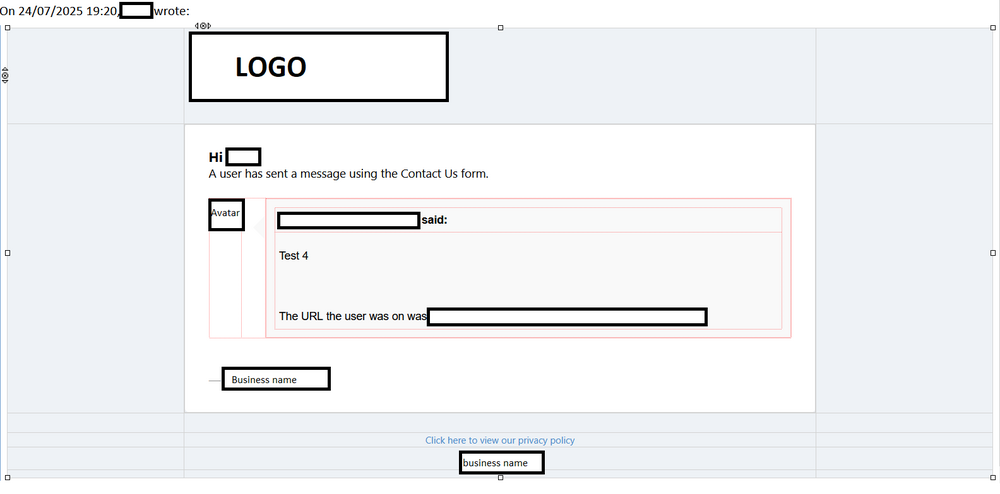
Hi @Marc I had a bit more of look ingot this. Some types of messages from Invision are displayed as plain text when I reply. The Contact Us form (and other type of notification - I forget which now) display like that. All display as rich text when I receive them. But that reply looks very messy to me. Why is the table structure displayed? Is this inevitable for some reason?
-
v5 - Cloud Hi, I am testing out the contact us form and the email it sends out is just terrible. Is this peculiar to Thunderbird (but I have no other email which looks like this), or something I am missing with my website configuration? Further, 'Click here to view our privacy policy' in the footer is in active. Thanks.
-
I thought it worth double-checking. 🙂 Thanks, @Marc.
-
Hi Jim, I assume this does not relate to my particular situation; rather, you refer to the specific problem of disabled payment options appearing at the front end. I managed to remove the stuck (cancelled) test subscription from my account via the ACP. But I still had to delete the subscription option so that it still did not appear on the front end for my account. Disabling the subscription option did not work. As far as I can tell - without making a purchase - live mode works. Clicking a subscription option takes me to the screen to add a credit card. But I will hold off launching until tomorrow, allowing Invision a chance to look at this. Besides, today is bad day for me to launch. Thanks.
-
Hi @Jim M I've set up the live payments, added the keys, etc. And I've disabled the original, test payment method. However, the stripe test payment method is still displayed to me along with the new payment in Subscriptions > My Details > Payment Methods when I go to add a card. This seems to be incorrect behavior. Please confirm.
-
I wished to perform some additional tests before going live (since it has been two months since I tested). But I'll do as you suggest. As I expected. Thank you for confirming.
-
Hi @Jim M I've checked things over more carefully now. The keys, webhook endpoint, and signing secret all match. The 5 required events match. I tested using Stripe's on-site Command Line Interface - it reported no problem. I've looked through the logs at Stripe and I see two endpoint failures (charge.succeeded) for today. They appear to indicate a 500 error. These coincide with my use of Stripe's CLI. Without making any edits (all the details are correct), I (desperately) just tried re-saving website Stripe Sandbox - no joy. This appears to be a problem with the endpoint at my website. Would I be correct in assuming that nothing will be done to address this until Monday? I had planned to launch yesterday, and I will now have wasted weekend on top of that. Thanks.
-
Hi Jam. I'll try that in the morning - it is late evening here now. I did wish to perform some more last minutes testing, since it has been a couple of months. I might create new test keys first and see if that makes a difference. Good night.
-
Hi @Jim M. I cannot determine the cause of the problem. I am using (and have been using) Stripe test mode. It was all working before, now, nothing. However, for testing, I had my (test) subscription renew every two days. The last successful (test) subscription payment was June 5th. On June 6th, I upgraded to v5. The next due payment (June 7th) did not occur, and no payments have occurred since then. I have to assume this is associated with the upgrade to v5, as I made no changes at Stripe or changes to payments at my website.
-
OK. I'll check all that. Thanks, @Jim M.
-
Hmm. That's untidy. I have tested using my own account, and a disabled subscription (the one to which I was subscribed) remains on view the front-end subscriptions page. On a somewhat related item, subscription testing has stopped working and I do not know why. I've been caught up with other things, have made no changes at Stripe or at my forum, and the test subscriptions stopped occurring a few weeks ago. I cannot re-subscribe. Test mode was/is still enabled at Stripe. The error message: None of that is the case (or should not be the case at least) since I've made no changes. Any ideas?


