


Marc
Invision Community Team
-
Joined
-
Last visited
Everything posted by Marc
-
There is no license associated with this account, and I am unable to replicate this. Please ensure you have this email added as an alternative contact if your license is under another email address
-
Its not something we have available on version 5 as of yet, but I can certainly see your point. Please bear in mind, we wont often reply to all suggestions, but we do read them all and take notes on things that could potentially be added in future releases. Of course, this is going to be only the first rendition of the new tag system, so Im sure there will be updates to that along the way
-
On the first question, it depends on what you set up. You can actually do either. If you just select this then it is any new content item (not replies/comments, but the content item itself) If you wanted to limit it to only one area at any point, you could do, by selecting the "Add a location condition" option, and choosing the content item needed What kinds of things were you thinking of? Correct on both 🙂


-
I use snagit https://www.techsmith.com/store/snagit?utm_source=google&utm_medium=cpc&utm_campaign=20656219147&utm_content=157033822040&utm_term=snagit&gad_source=1&gclid=CjwKCAiA9bq6BhAKEiwAH6bqoHGzXToCNDSir8sExeSdyvgSySO6-8pblp7kOgLD0zJVTZ0KD95YCRoCMHIQAvD_BwE Oh, unless you mean the profile photos. If so, Im not sure. @Matt had them done at some point back when I had hair. So must be a while ago 😄 Actually if you zoom in, you will realise why it looks to have a white line on it
-
No problem 🙂
-
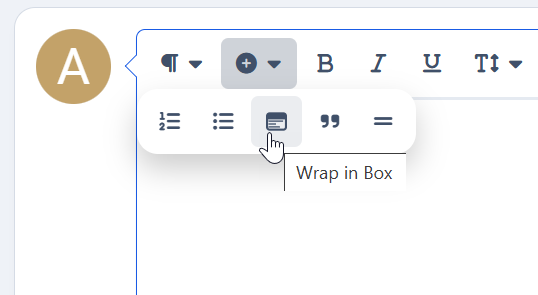
You would add a box, as shown here Then once added, you can choose if you wish for it to be expandable or not

-
If we knew the answer to that question, we would be able to reproduce it^ this is why he is the designer lol@Ehren may be your best person to answer this, but that is certainly the way I would probably have gone about itThis isnt something I have any information I can share on currently. Please note, if there has been feedback given on this, that isnt a guarantee we will add itSorry, this is my confusion here. We support only s3 at present. Our cloud environment does indeed use it, and its likely we will on other environments in the future, but currently you will have issuesIts often not as simple as that, due to the way they are developed and what they use (they use features on our cloud network, not just on the core software)There isnt at present. The only block we have like this would be the recent events blockI can see later whats setup differently on ours to see if there is anything obvious there. The only thing that stands out in your pictures is I would have selected "S3 compatible". Have you checked your logs, as mentioned above?I feel you may be misunderstanding my message above. All our cloud environment runs with backblazeWe use this ourselves for everything, so we know backblaze works or all of our cloud environment wouldnt work. The only reason you would get those errors is if permissions are incorrect on your backblaze. Have you checked system logs? In terms of the first one, its worth noting that tasks to move things work with traffic. So no traffic, no movementAh. There is indeed no endpoint for that at present. You can see any existing endpoints in v5 in the admin CP in the API sectionI've passed this on to a developer to look intoWe would not look to ensure compatibility for a new version of PHP until release. While I would expect we will support it, that version has been released for 9 days. 6 of those days have either been weekend or public holiday. I think its safe to say we don't know fully yet 😄You mean the record image? If so, yes you can upload thatThere is no functionality within the software to do this at present.As mentioned by Matt above, the limited selection is an intentional change within the platform.Without seeing exactly what your blocks do, its not possible for me to say for certain what you would need to do. What I can say is if it needs javascript only, you could probably do it in template hooks I suspect. If its PHP itself that you need, then you will need to create an application to add those blocks.You would need to await someone resolving the bug at this point. We're unable to resolve issues on a case by case basis at this point in the beta process






