Ryan Ashbrook
Invision Community Team
-
Joined
Everything posted by Ryan Ashbrook
-
Yes, because this is a major upgrade - a lot actually happens behind the scenes as well. Once you upgrade to 5, you'll be able to upgrade via the Admin CP like normal. Only this one time is it initiated via the client area.
-
If you're moving from v4 to v5, you would do this in your Client Area > Manage Purchase: https://invisioncommunity.com/clientarea/
-
They are still there, under Developer Resources in the footer. https://invisioncommunity.com/developers/api-reference/
-
Only members with permission to create live topics (as defined by the Livetopic Host Groups setting under Smart Community > Live Topics) can be assigned as a co-host. Take care adjusting this, as it would mean any member in the selected groups can create a live topic whenever they like.
-
The only modifications we have here are some internal tools that the team uses (and even those are being gradually phased out and replaced with native alternatives). Everything else is done using vanilla software.
-
This is a bug - I've submitted a fix for this.
-
Right now, this is by design so would be a feature request. What you can do is, though, before deleting the content, you can send an Alert to the user explaining why the post was rejected. You can then optionally allow the user to reply to that alert via personal message if they have any further questions. You can do this by hovering over their username, and then click Send Alert under the Moderator Tools menu.
-
I've created a ticket for you on this.
-
No, if you are not seeing the update banner yet, then you can initiate the upgrade via your Admin CP > Get Support.
-
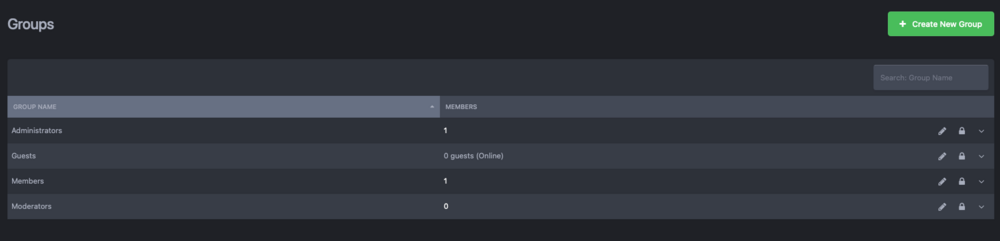
I can confirm that reordering groups in v4 was not a feature. Can you perhaps take a screenshot of the page you're referring to, to make sure we're on the same page?
-
ACP > Customizations > Languages > Translate. Look for frontnavigation_forums and adjust it there.
-
Fixed.
-
On Cloud, whatever that setting is set to will be used as the Reply-To email address. So, if someone tries to reply to an email sent from the community, it will be sent to that address instead of the noreply address.
-
Yes. 🙂
-
-
-
This should be fixed now.
-
I've moved this to a ticket to check on this.
-
You need to either wait for the update check task to run, or manually check for updates under ACP > Applications.
-
Fixed.
-
Existing trials created before today will not be updated, however new trials moving forward will use 5.0.0.
-
Naturally.
-
For version 5, these will now be available in the download dialog.
-
It was definitely a while ago, because mine is long again lol
-
Download should be available now.