




Matt
Management
-
Joined
-
Last visited
Everything posted by Matt
-
What is Zapier? Zapier is a no-code solution to connect your Invision Community with other apps, such as Mailchimp, Google Docs, Facebook, Twitter and more. It allows you to trigger actions when new content is added to your Invision Community, and allows Invision Community to trigger actions when other apps receive data. For example, you may choose to add a newly registered member to a Mailchimp list, or send an alert to Slack when a topic is added in a specific forum. This guide will take you through the simple steps of setting up Zapier and your Invision Community and look at creating your first action. Setting up your first Zap The first thing you will need to do is register an account with Zapier. Once you are logged in, you can either search for "Invision Community" or head there directly with this link to view which triggers and actions are available. Searching for Invision Community Invision Community at Zapier Let's set up a test Zap. For this test Zap, we're just going to populate a Google Sheets spreadsheed with new post information. The first step is to search for Google Sheets in the "Do more with Invision Community" section. Scroll down until you see the section where you can select the trigger for Invision Community and action for Google Sheets. Finding Google Sheets Once you have chosen your two apps (Invision Community and Google Sheets) your can choose which action to take. Each time a post is added, add a new Google Sheets row You'll get a little preview of what the Zap will do. Click through the "Get Started" button. The first step is to connect your Invision Community. It's time to connect your Invision Community Clicking "Connect" will load a new window asking for your community URL and API key. The connection window Enter the URL as requested. The API key is located in your AdminCP > System > Community Enhancements > Zapier. Zapier in the Community Enhancements section. Locating Zapier in your Admin CP Clicking Enable shows the URL and key. The Zapier URL and API key Paste these details into the connection window. Entering the details, then hit "Yes Continue" Success! Now ensure you click the radio button to select this community. Select this newly connected community On the next screen, you can choose the criteria for allowing this post content to be shared with Google Sheets. I've chosen to only allow visible posts to be shared The next step is to go through the set up flow with Google Sheets. This flow is very similar to the the flow when setting up Invision Community. Authenticating with Google Once you have both apps connected, you can choose which spreadsheet to use. Selecting a spreadsheet Then, you can select which data to send across. I'm choosing to send the author's display name, the date and time of the post, the post URL and the post HTML content. Select the data you want to share You get a chance to name the Google Sheet columns differently from what's suggested. The final preview To test the Zap, Zapier pulls a post so you can see if the integration is successful. The Zap test Hitting "Send test" should result in success! You'll get a chance to look at the new spreadsheet. The magic of Zapier If it all looks good, proceed and ensure the workflow is enabled. And there we have it! Each time a post is made on the community, Zapier will send that across to the Google Sheet.
-
 I'm thrilled to introduce the newest member of team Invision Community. You may recognise Jordan from his photo as he's been an active member of our community as BreatheHeavy. Jordan has been running his site BreatheHeavy.com using Invision Community for nearly a decade. Jordan's official title is "Community Advocate" which means that he will be working very closely with our community to guide and curate feedback, assist with support questions, to help educate and inform and to bring you news of the latest developments being cooked up by our development team. Jordan says: Your feedback, ideas and questions matter. I've spent the last decade discovering what it means to be a community leader in my own Invision Powered community, BreatheHeavy. Community building is an ongoing journey that's taught me invaluable lessons, namely the importance of absorbing feedback from the community then taking decisive action. I'm excited and honored to share that insight with the Invision Community. My new role is designed to shed light on what Invision Community members (that's you!) want and share it with the team. I'm looking forward to getting to know you! We're very excited to start a new chapter within Invision Community to improve communication, engage more Invision Community owners and make the most of the excellent feedback we receive. You'll be seeing more of Jordan on the forums in the coming days.
 -
-
 Invision Community is growing! We're currently recruiting three new roles, one full-time and two part-time. Applications are now closed, thank you to all those that applied. We'll be going through them over the next few weeks. It's been a very busy year for all of us at Invision Community and our continued success means that we're looking to expand our team even further with three new roles to fill. Invision Power Services, Inc. is behind the leading community software platform, Invision Community. Our tailored solutions serve clients of all sizes, from smaller communities to the world’s biggest brands. We are looking to kick start 2021 with a tight-knit customer-obsessed support team to build a positive support culture for our clients. All roles are fully remote-working. Customer Service Superstar We are in need of a full-time Customer Service Superstar, a new position within the company. You are solution-driven, customer-obsessed and passionate for cultivating a positive support culture for our clients. The person in this role: Answers client questions in a public-facing forum. Triages client requests to developers according to our processes. Deescalates problem or potential problem communications. Advocate for customers to our development team. Is comfortable with technology and willing to learn our platform. Why should you apply? You are a Customer Service Star - solution driven when helping clients. You are confident in conversing via forum style, public-facing support. You can clearly communicate both in writing and verbally. We primarily provide customer service in English. You see opportunity to streamline improvements to help our team better serve our clients. Excited about interacting with our clients within our community to build a vibrant support culture. You work well with a team remotely. You are personally organized, suited to excel in a remote work environment. Part-Time Community Support Assistant We are looking to add two part-time community support assistants to our growing team. You are self-motivated and focused on helping customers with support enquiries. Your role will be in assisting customers via a public-facing support forum. Ideally, you will have customer support experience, be familiar with our community platform and comfortable with technologies such as FTP, Amazon S3, PHP and MySQL. Work Location: Our company is headquartered in Lynchburg, Virginia with staff located around the world. These positions are remote working. Interested? Share your resume and characteristics that make you the best fit for this role. Please include your available work hours (timezone). As we are open to both entry-level and experienced applicants, you may choose to include a desired starting salary based on your own evaluation of your relevant skillset and experience. Apply now! Applications are now closed, thank you to all those that applied. We'll be going through them over the next few weeks.
 -
 Wouldn't it be great to know if a staff member had replied to a topic before you clicked to open it? When you're scanning a list of topics, knowing which have had a reply by a member of the community team can help decide which to read. Currently, you need to open the topic and scan the posts to see if there's a reply from the team. Happily, in our next release, we've made it clear which have had a reply by a member of a specific group. You can specify which groups to show as having replied via the Groups form in the Admin CP. The per-group setting in the Admin CP You can select to detect the group based on the member's primary group, secondary group or both. When viewing a list of topics, you will see a badge showing that a member of that group has replied. This simple feature will make it easier to highlight when important replies have been made to topics, which is a great addition for forums using the new 'solved' feature. Let me know below if you'll use this new feature and what you'd like to see in the future.
 -
-
We are pleased to announce that Invision Community 4.5 is now available and packed with new features, enhancements, and even a new look! Major New Features / Enhancements - New Front-End Design - AdminCP Dark Mode - Site Statistics, Search Insights, and Club Statistics - Marketplace now built into the AdminCP - Mobile App for iOS and Android (Beta) - Zapier Integration for Invision Cloud Communities In addition to these new enhancements, there are countless other additions and improvements. Check out our product blog to see what we have been up to. Before Upgrading Before proceeding with your upgrade, please note that all third party resources are disabled during the upgrade process. We strongly recommend ensuring that all of your installed applications, plugins and themes have Invision Community 4.5 compatible updates available to allow continued use. Please see the full release notes for other important changes, feature removals and deprecations.
-
 One of the most commonly asked questions we get is how to ensure your new community launch is successful. You may think that if you have the right features with the correct configuration, success is guaranteed, but it requires more than that. Way back in the early 2000s when the internet was in its infancy, there was an explosion of new communities. If you had some webspace, a little technical knowledge and a forum script you were almost guaranteed to attract people into your community. These days it takes a little more work to get your new community off the ground. There’s a lot of books and resources out there to help, but focusing on your purpose, value, and emotion will give you a bright star to sail by. Purpose The purpose of your community should be very clear from the first visit. You want your new visitors to instantly understand the reason your community exists and the benefit they will get from it. This can be implicit with a short written mission statement at the top, or it can be through robust visual design and structure. When launching a new community, aim to be as specific as possible with your purpose. You can always broaden when it grows. This may go against your instinct to cast a wide net to catch as many people as possible, but resist that temptation! For example, a community focused on fitness has a vague purpose. Fitness is a broad topic, and there are many niches inside of it. This could be anything from losing weight, to running faster to increasing the weight on a barbell. Narrowing the focus to running helps a little, but there’s a lot of space in that field. You have marathon runners, ultra runners, Sunday park joggers and everything in between. A better starting point for a community may be “Run your first 5k”. This instantly makes it very clear to your audience that you intend to help new runners develop their ability enough to finish a short race. The sense of purpose is clear, and it is easy to know what to ask of this new community and the benefit you may get. Asperger Experts has a strong design and mission statement above the fold, which makes its purpose clear from the first visit. Asperger Experts Make your purpose very clear and don’t be afraid to niche down to a specific area, to begin with. Value The earliest communities allowed people from all around the world to gather and talk. Anyone who had the technical skill to host a community could be virtually guaranteed members and just being able to meet was all the value needed. We now live in more sophisticated times and crave more than facilitation. Your community needs to add value beyond companionship and knowledge. One of the simplest ways to give value to your members is through sharing your expertise. A steady flow of written articles or videos gives your members a reason to come back. IG, a fintech company use their expert articles to draw their audience back to their community to contribute. IG is a known leader in their field, so their blog is a real draw for those investing in the markets. IG.com Never post for the sake of it, always inform, educate or entertain your community. Emotion At the heart of every conversation is emotion. We pride ourselves on being logical and thoughtful creatures, yet our emotional brain responds first and makes a judgement often subconsciously. Setting the pitch and tone of your community is critical from its earliest days. As the community manager, you get to define the tone by modelling the behaviour you want to see in your own content. Some communities do well with dark humour and snark; while others require positivity and fun. “Humans are herd animals. We want to fit in, to bond with others, and to earn respect and approval of our peers. Such inclinations are essential to our survival. For most of our evolutionary history, our ancestors lived in tribes. Becoming separated from the tribe—or worse, being cast out—was a death sentence.” - James Clear Hang out where your audience hangs out and develop your tone so that it resonates with your community. Starting a community is a rewarding experience, but you need to do more than just open your doors to ensure a successful launch. Checking to make sure your site has a strong purpose, that you offer value to your members and the emotional pitch is right will set you on the right course.
 -
 Moats have been used for centuries as a way to defend a building from potential attack. A flooded ditch around a castle is a great way to make it harder to be taken. You can't push battering rams against walls, and neither can you dig under the castle. Quite frankly, a moat is a pretty decent deterrent when there are plenty of other castles to pillage. What does this mean for your business? A community can be an economic moat, or in more simple terms, your competitive advantage. When your product or service is surrounded by an engaged community that feels invested in your brand, you'll be able to resist challenges from competitors looking to tempt your customers away. Humans are social creatures, and we love seeking out and joining a tribe that aligns with our values. The intangible value of belonging creates a sense of momentum for your brand and helps champion it to others. The statistics back this strategy; 88% of community professionals said in a recent survey that community is critical to their company's mission and 85% said that their community has had a positive impact to their business.[1] Your competitive advantage One of the cheapest ways to create momentum for your product is to build a community around your startup. A community is much more than a one-time marketing campaign and can help you throughout your company's life cycle if you take the time to grow it right. [2] Creating a buzz around a product can take a lot of time, effort and money. Traditionally, this buzz would be created with a mixture of videos, websites, influencer reviews, and heavy advertisement spends across multiple channels, including social media. Your community can create a shortcut and reach an audience without those costs and increase the chance of your product being shared virally. Your community creates a bond over a shared interest that continually re-enforces loyalty to your brand. This creates a personal investment which makes it less likely your customers will try a competitor. Put simply, if a company can move from just shipping a product to building a community, it can benefit from several competitive advantages such as: Engaged members help acquire new members, lowering the cost for customer acquisition. Increased customer retention through community loyalty. Members won't want to abandon the community they enjoy. Reduced support costs as members support each other. This benefit forms a loop that generates more value as the community grows. Brand building Another area of opportunity for social marketing is "brand building" - connecting enthusiastic online brand advocates with the company's product development cycle. Here, research becomes marketing; product developers are now using social forums to spot reactions after they modify an offer, a price, or a feature in a product or service. Such brand-managed communities can have real success. One well-documented example is IdeaStorm, Dell's community discussion and "brainstorming" website, which saw a measurable increase in sales following its launch, by providing a forum for meaningful dialogue and "to gauge which ideas are most important and most relevant to" the public. [3] By creating a community around your product or service, not only do you create brand advocates, but you also gain powerful insights into what your customers want through research which drives marketing. Consumers today crave a stronger bond with brands. It's no longer enough to give them a customer support email address and a monthly newsletter. They want a much more in-depth interaction with the company and other users of the product or service. One tactic for success is for brands to move away from the hard-sell to instead embrace the notion of "co-creation". This means moving beyond "old-school" approaches to website advertising to embrace the principles of relationship marketing - building virtual environments in which customers can connect with each other to share insights and relevant information. To capitalise on currently available opportunities, marketers need to find or establish real brand communities, listen to them, and then create special programs and tools that will empower potential and existing community members, rewarding existing consumers and eliciting behavioural change from potential consumers. [3] Evernote, the note-taking app, is a great example. Their lively community encourages customers to interact directly with staff, post their wish-lists for future versions and learn more about what happens behind the scenes. The community creates evangelists for Evernote and makes it harder for competitors to gain a foothold with a potent mix of dialogue, access to other customers, transparency from the brand and many opportunities for co-creation of content. Co-creation fundamentally challenges the traditional roles of the firm and the consumer. The tension manifests itself at points of interaction between the consumer and the company where the co-creation experience occurs, where individuals exercise choice, and where value is co-created. Points of interaction provide opportunities for collaboration and negotiation, explicit or implicit, between the consumer and the company. In the emergent economy, competition will center on personalized co-creation experiences, resulting in value that is truly unique to each individual. [4] In simple terms, a community allows your customers to feel closer to your brand and the products you sell. What are you waiting for? Nearly 80% of founders reported building a community of users as important to their business, with 28% describing their moat as critical to their success.[1] Our team at Invision Community has over two decades of community building experience and are trusted by brands of all sizes. Whether you have an existing community, or you're taking your first steps to create your own, our experience and expertise will guide your success. [1] https://cmxhub.com/community-industry-trends-report-2020 [2] https://viral-loops.com/blog/your-company-needs-a-pre-launch-campaign/ [3] https://www.researchgate.net/publication/268200746_Social_media_and_its_implications_for_viral_marketing#read [4] https://www.cs.cmu.edu/~jhm/Readings/Co-creating unique value with customers.pdf
 -
 If you're preparing to upgrade to Invision Community 4.5, there's now an easy way to test it out. We have updated our Invision Community demo system to use Invision Community 4.5! This is a quick and easy way to take 4.5 for a test drive and test all the new functionality before making your upgrade plans. Taking out a demo is very simple, just head over to our demo sign up page, follow the instructions and within a few minutes you'll receive your own private demo log in. We'd love to know what you think! Please let us know in the feedback forum.
 -
 Conspiracy theories have roots in the 19th century and have been popular for decades. Until recently, conspiracy theorists have lived in the margins. They are often convinced the earth is flat, Lee Harvey Oswald didn't act alone, and the moon landings were faked in a Hollywood sound stage. More recently, with 9/11 and the coronavirus pandemic, these conspiracy theories have become more mainstream, with celebrities and politicians sharing them over their official social media channels. From the evil machinations of Bill Gates, the rise of QAnon, to the conflation that 5G is responsible for spreading coronavirus, it's hard to ignore the impact they have in creating misinformation which undermines attempts at effective communication from governments and public health bodies. Despite reams of facts, logic and critical thinking, those that follow conspiracy theories will not be budged from their positions. They trust their sources implicitly, and a mountain of research disproving the argument does not interest them. The number of people that succumbs to these narratives grows every day. When you consume the content shared by the primary sources of this misinformation, it's easy to see why. Conspiracy theories are created and shared in a way that is engaging and irresistible to many seeking stability in a confusing world. Whatever your position is on these conspiracy theorists, you can leverage these tactics to make your own content more engaging and shareable. Lesson 1: Make it emotive Human beings have two distinct and independent thinking centres in the brain. One works on emotion (the limbic system) and the other on logic (the neocortex). The emotional brain works much faster than the logical brain. It is what has kept us alive as a species. If you hear a loud bang, your emotional brain processes this first and triggers the urge to move before your logical brain kicks in and deduces the bang was from a book expertly pawed from its shelf by your cat. The emotional brain is continually processing the world, and even though it's part of you, you do not have much control over it. Your logic brain, however, works on facts, truths and analysis. When you watch harrowing whistleblower testimony telling of their suffering in a conspiracy theory video, your emotional brain is powerfully stirred. It's why challenging conspiracy theorists who are emotionally committed to the point of view with just logic often fails. The emotional commitment is incredibly powerful, and when you challenge them, the logic brain is short-circuited, and the emotional brain becomes defensive. In fact, the more logic and evidence you provide, the more the emotional brain digs in and refuses the new evidence. How can you use this to your advantage? Work on creating an emotional response with your content. Don't purely rely on facts and logic to persuade your audience. Try and evoke an emotional reaction through imagery, metaphors and similes. President Obama was a powerful orator and used emotion often to create a strong message. When he spoke of investing in education, he invokes emotion by saying "We believe that when she goes to school for the first time, it should be in a place where the rats don't outnumber the computer." Lesson 2: Tell a story Conspiracy theory videos don't just reel off a list of events and facts, they tell a story. Some of the more complex theories are akin to a sprawling TV series with several characters linked by circumstance. Humans have always been curators of stories. From religious texts to morality fables, we learn and process the world through stories. Stories are memorable. Most adults can recite fairytales read to us when we were children. Use a story to link together critical points within your content. Consider how "Gamification has been proven to make communities more sticky and encourage more engagement" reads compared to "It was 3am, the flicker of the TV set was the only light in the room. My palms, slick with sweat, fought to keep the controller sticks moving. Even though I had a 6am start, I couldn't put the controller down. I had to finish the quest and collect the reward. Your community is no different." Take your reader on a journey, and they're more likely to finish your content. Try and make it personal. When we read, we always try and put ourselves in the shoes of the author or the protagonist. Stories and emotion go hand in hand. Recently, the Huffington Post ran a story with the headline "One death a minute" which is a very emotive and powerful alternative to the raw fact that 1,461 Americans lost their lives to COVID-19 on the 29th July. Lesson 3: Make it easy to consume A key strength for any content creator is to know when to create long-form content and snackable content. A single meme is more potent than 300 links to PubMed. A single YouTube video can be more persuasive than an expert in her field. Conspiracy theory creators use over-simplification to reduce a complex issue into an easily digestible entertaining snack. A meme generally contains a single idea that is easy to grasp and engaging. You don't have to work very hard to understand it, your visual brain processes it in 1/10th of a second, and it triggers a moment of delight. Infographics and memes are often smart ways to create an entrance to your content. If an image containing a straightforward idea from a more complex piece of content is digested quickly, it can leave your audience wanting more, and therefore more likely to involve themselves in your more complex work. When creating long-form content, consider the use of iconography, infographics and photography. Visuals help us remember and understand content quickly. I could say that 63% of this blog was written on an iPad, but a piechart would make this easier to process and more memorable. No tin foil hats required Creating compelling content is key to building your community. Your content sets the tone, helps drive re-engagement and positions you as a key expert in your field. Using the techniques many conspiracy theory creators use to spread their narratives will help your content be more memorable and shareable A well-created story with emotional cornerstones made more accessible by key points simplified into snackable quotes or images will help your content find a wider audience, whether you believe Neil Armstrong landed on the moon or not.
 -
 We've been on a little journey together since we announced the first Invision Community 4.5 feature way back in November 2019. The first feature we announced was a revamped Admin Control Panel interface which created more visual space and brightened it up. Actually, we made it so bright that the first feature request was to add a dark mode (which we did). In the space of three short months, we had spoken about Club improvements, invites and referrals, RSS feed improvements, blog categories, the simple stock photo picker, search insights, security enhancements, user interface updates, new statistic views, and notification improvements. Most will agree that March and April seemed to last months, thanks to a global pandemic. We used these extra days to talk about marking posts as a solution, topic view summary, Zapier integration, forum view updates, post-installation onboarding, private staff notes, page builder widgets, theme designer improvements, a new default theme, language system updates and everything else we missed. We have also revamped the front end user interface to modernise the look and feel but also to introduce new CSS frameworks, variables and other time-saving features our design team have been eager to implement. On the subject of modernisation, we've deprecated some legacy functionality. We've given up trying to make anything look good with IE11 which last saw an update in 2013. We've also deprecated older caching engines like Memcache, APC and Wincache and recommend using Redis instead. The web hosting and domain management features of Commerce are also deprecated as is BBCode. BBCode has its roots in the earliest bulletin-board systems long before rich text editors were common use. It's 2020; we should no longer be asked to type in special codes in square brackets to format text. BBCode is still functional in Invision Community 4.5, but it is likely to be removed in a future version. Now that primary development has finished, we move onto the beta testing stage. This is where you get to try it out and evaluate the new features before scheduling your own upgrades. As always, we do recommend that you only test early betas on staging sites or simple test sites. Many a weekend has been ruined by over-enthusiastic upgrading of live sites; so we don't recommend that. You'll also notice that we're running Invision Community 4.5 on our own site. If you do spot an issue, please let us know in the bug tracker. I've been creating and releasing products for close to twenty years now, and I still get a real buzz out of hitting the release button. It's always a pleasure to see the result of hundreds of hours of coding, dozens of meetings and numerous passionate exchanges among the team. You can access the beta in your client area. We hope you enjoy Invision Community 4.5!
 -
We are pleased to announce that Invision Community 4.5 is now available and packed with new features, enhancements, and even a new look! Major New Features / Enhancements - New Front-End Design - AdminCP Dark Mode - Site Statistics, Search Insights, and Club Statistics - Marketplace now built into the AdminCP - Mobile App for iOS and Android (Beta) - Zapier Integration for Invision Cloud Communities In addition to these new enhancements, there are countless other additions and improvements. Check out our product blog to see what we have been up to. Before Upgrading Before proceeding with your upgrade, please note that all third party resources are disabled during the upgrade process. We strongly recommend ensuring that all of your installed applications, plugins and themes have Invision Community 4.5 compatible updates available to allow continued use. Please see the full release notes for other important changes, feature removals and deprecations.
-
 As the deadline slowly comes down, two last feature additions race towards the descending door and slide in underneath with seconds to spare. If you've never seen "Raiders of the Lost Ark", then you probably think this is a weird way to start a blog. As we wrap up development for Invision Community 4.5, we squeezed in two extra features that I want to talk about today. Per Topic Post Approval The first is a way to cool down a heated topic without locking it. Right now you can put an entire forum on post-approval. This means that moderators must review and approve all new posts before they are allowed to be publicly displayed. As of Invision Community 4.5, you can now choose to set a single topic to post-approval regardless of the forum setting. This is a great way to let a topic cool off but still receive new replies to review before adding to the topic. Club Terms and Conditions The ways that clubs are used throughout the many communities that run Invision Community are becoming increasingly varied. A popular request is to allow members to agree to a set of club-specific terms and conditions before they can contribute to the club. Invision Community 4.5 now allows the club owner to set up its own terms and conditions. You can optionally enforce that members agree to them before continuing. That's it for feature announcements. We're excited to be closing development on Invision Community 4.5 and move towards a beta in the coming weeks.
 -
 If your brand sells a product or service, the first thing that comes to mind as a benefit to building your community is support deflection. And it's easy to see why. It's something you can quickly calculate an ROI for. Let's say every 20 hits to a public question with a solved answer from a client or team member equates to one less ticket. If a ticket costs $10 to solve on average, it's straightforward to see the value by calculating deflected tickets. Let's say your busy public support community had 20,000 hits a month; you've just saved $200,000 a month in support costs. Great! But before you finish there, I want you to consider the rewards a brand community can offer. A public support desk isn't a community. It's likely most of your customers join because of an issue with your product. They tap in some keywords on Google and come across your site. They see a bunch of solved questions like theirs, and they either get the fix and bounce out, or post and wait for a reply. With nothing to get them to come back, once they have the answer they'll likely bounce out then and only come back when they hit a new problem. That's not a community. A community is a place where people return multiple times to collaborate, learn and grow together. "[A brand community is] a group of people who share an identity and a mutual concern for one another's welfare - who participate in shared experiences that are shaped by a brand." - Carrie Melissa Jones For that, you need to look beyond the support desk and expand into more use cases, and there are compelling reasons to do this. Shared experiences Allowing your customers to share their experiences with your products can lead to unique brand stories that reinforce bonds between members and creates social solidarity in the community. A few years ago, I remember reading a post on a travel community. A family were flying with Delta and their son who has autism was becoming more and more distressed with the change in routine for that day. A Delta employee saw this and came and spoke with the family, helped settle the boy and ensured they boarded early to avoid the crush of passengers. It's a small moment of kindness that wouldn't make headlines, but it was very memorable for this family; enough so that they posted about it. This post had numerous replies in praise for the airline and no doubt made many of them think of Delta when booking their next flight. "[Social solidarity is] not just passive tolerance but felt concern for what is individual and particular about the other person." - Alex Honneth "The Struggle for Recognition" All those stories, connections and moments build social capital and loyalty for your brand. Feedback Your customers are already talking about your product. Some of it will be good, and some of it won't be good. They are already talking about it on social media, and in numerous communities, they belong to. If you do not have space within your community for your customers to leave feedback, then you're missing out on a massive benefit. You get a chance to address negative feedback before it spills out further into the public domain. Likewise, positive feedback makes for compelling customer success stories. Feedback is a great way to crowdsource innovation and to guide sales and marketing on how your customers are using your products and where the gaps are. Owning your niche Allowing space for conversations relating to your product makes good sense. If you sold a fitness tracker, then it makes good sense to have areas for discussions revolving around wellness areas such as sleep, diet and exercise. Likewise, a mobile phone network will do well having areas related to the various brands of mobile phones. "There is status that comes from community. It is the status of respect in return for contribution for caring for seeing and being in sync with others. Especially others with no ability to repay you." - Seth Godin Creating these spaces encourages return visits beyond direct support for the product. Those return visits are what makes your community a community.
 -
 We started talking about Invision Community 4.5 way back in November of last year. Now, less than six months later, it's ready for you to test. While we put the finishing touches to a few features, we have set up a preview site so you can test out the new features, leave your feedback and make a note of any bugs you spot. Head over now to the Invision Community Alpha test site. Please be aware that this test site is running in 'development mode' so it is automatically updated with the latest fixes throughout the day. This means it has to work extra hard on each click as there are no caches, pre-built languages or templates to use, so it will be a lot slower than a production version. So please don't worry about it being a touch slow, and definitely don't try and run Page Speed analysis tools on the alpha site! You can read about the headline features over in our product updates blog. Let us know what you think!
 -
 We have announced a lot of new things coming soon with Invision Community 4.5. Most of these are pretty big new features worth a blog on their own. However, we've made a lot of smaller changes that may not deserve their own blog but still have a significant impact. Let's run through some of those. Performance Improvements For every major release, we take some time to run through the code and look at ways to make Invision Community run more efficiently. For Invision Community 4.5, we've made node forms, sitemaps and commonly run SQL queries more efficient, which is excellent news for you and your users who get reduced server load and a snappier community. TikTok Embed Although it confuses me greatly, TikTok has taken the internet by storm. We have added it to the embed list so pasting a TikTok share link automatically shows the video ready to play in the comment. A TikTok Upload Chunking Uploading large files can be tricky. Typically trying to push a large file to a server results in timeouts, memory issues and eventually frustration. We have added chunked uploading when using S3. Put simply; this uploads part of the file at a time to prevent memory issues and the server timing out waiting for the upload to finish. View Members by Rank Very recently, we were asked how you can view all members in the ACP of a specific rank. It turned out you couldn't. This quick change was added into Invision Community 4.5. Showing members with a specific rank in the AdminCP Download Statistics While Invision Community 4.5 has new and improved statistic displays, a common request was to be able to download the raw data. This is now possible. Export stats as a CSV Downloads In Invision Community 4.5, when you require approval of new versions of files submitted to Downloads, the original version will no longer be hidden from view. We've added a new flow for moderators to approve these new versions. Live Meta Tag Editor Invision Community 4.5 seemed like a great time to run through this feature and tweak the functionality to make it more useful. Now it's possible to remove default meta tags, and it's easier to remove custom tags. Closed Tag Autocomplete When using the closed tag system where a user can select from one of your preset tags, we have added a search box to make it easier to find a single tag from a list of potentially hundreds. EU Tax Support in Commerce Tax doesn't have to be taxing! But it generally is. Countries within the EU often have complex tax rates. Commerce now supports multiple tax rates for consumers, businesses and EU VAT-registered businesses. That concludes our mini round-up of all the things we've not talked about yet. Let me know which one you're looking forward to most!
 -
 Invision Community introduced drag and drop widgets many years ago. These widgets allowed anyone to add blocks to existing views, and to build up entirely new pages. These widgets were great for quickly adding content to a page, but they weren't incredibly customizable. For Invision Community 4.5, we've added three new Page Builder widgets which allow you a little more control. For an overview of this new feature, please take a look at the video below. As you can see, these new widgets offer a lot of customization without the need to code any CSS or HTML. You can add background colours and images, adjust padding and borders and even add colour overlays right from the widget menu. The new Page Builder widget options Blandness be gone! Now you can let your creativity loose on your pages and all other views that have the drag and drop zones. I'd love to know what you think of this new feature; please let me know below!
 -
 Managing a community as a team makes internal communication an essential part of its successful management. There are times where you want to leave notes for other staff on specific topics that you're watching. Perhaps a member is close to breaking the rules, or it might be that you want to keep the topic focused and on point so wish to split off-topic posts into a different area. Whatever the reason, Invision Community 4.5 adds the ability to leave private staff notes on topics. For some time, Invision Community has had the ability for staff to leave public notes. Now, in 4.5, staff can choose between public and private notes. This change was made based on customer feedback, so thank you! We do read and listen to all the feedback you leave. Who is looking forward to Invision Community 4.5? Let us know below!
 -
 Invision Community has had different view modes for a good number of years. Forum grid view was added to create some visual interest when listing forums, and we've had expanded and condensed view modes in streams since they were introduced. We've taken both of these views a step further in Invision Community 4.5 Forum Grid View To create even more visual interest, the grid view now allows you to upload, or choose a stock image for the header. This instantly makes for a more dynamic and inviting forum list. The new grid view image headers You can choose an image from the Admin CP when creating or editing a forum. Choose a stock photo, or upload your own Topic List View For the topic list view, we have taken inspiration from our stream view options to introduce a new 'expanded' view mode, which displays a snippet of the first post. The new expanded topic list mode This immediately entices you to engage with the topic because you can read part of the post without having to click inside to see if it interests you. This is controlled via the Admin CP, where you can choose the default view, or turn off the new view completely. Other Changes You may notice a few other subtle changes in these screenshots. The first is that we now included the follower count as a metric on both the forum grid view and the topic expanded view modes. The number of followers is usually a good indicator of how others perceive the value of the content. A higher follower count generally means a more engaging topic or forum. You can also see that we've switched to a short number format to keep the displays clean. Instead of say, "2,483 posts", it will merely say "2.5k posts". Reducing visual clutter is always crucial to maintaining a clean user interface. We hope that you find these new view modes useful and that they make your community even more vibrant!
 -
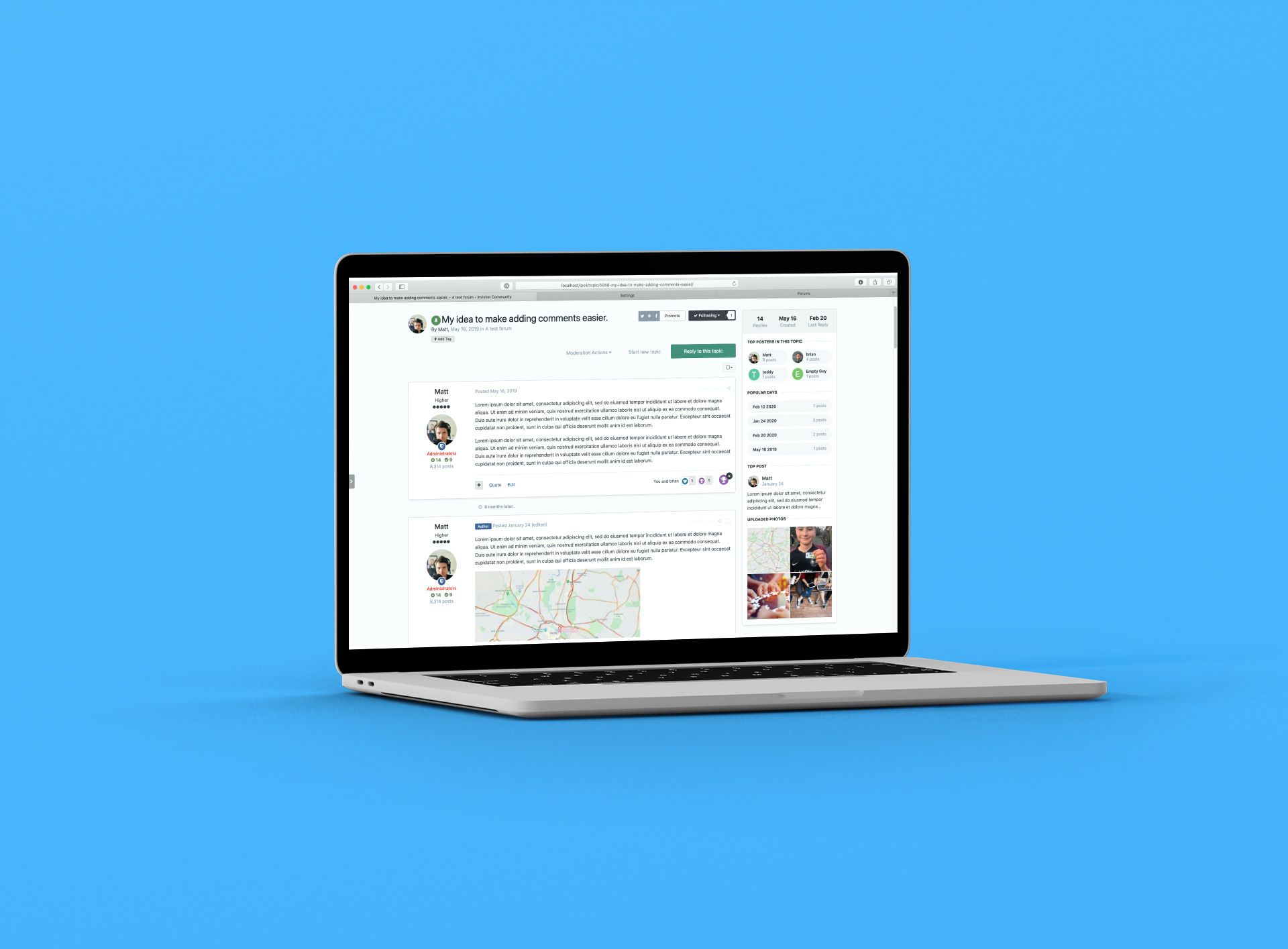 A topic is more than a collection of posts; it's a living entity that ebbs and flows over time. Evergreen topics can see month-long gaps between posts and longer topics spanning numerous pages can end up hard to navigate through to find useful content. With this in mind, we've added numerous improvements to the topic view to bring context and summaries key areas within the topic. Topic view updates Topic Activity The first thing you likely spotted in the above screenshot is the new sidebar. This acts much like a summary of activity within the topic. It very quickly lets you know how old the topic is and how long it has been since the last reply. This context is essential if you are unwittingly replying to an older topic. Most topics are driven by a handful of key members. The topic activity section shows you who have been most active, which may influence which posters you give greater authority to. Likewise, popular days lets you dig into the 'meat' of the topic which may have evolved quickly over several days. More often than not, a single post attracts more reactions if it is particularly helpful or insightful, and this is shown too. Finally, a mini gallery of all upload images allows you to review media that has been attached to posts. The topic activity summary under the first post This activity bar can be shown either as a sidebar or underneath the first post in a topic. If you enable it for mobile devices, then it will show under the first post automatically. The topic activity summary on mobile As with many new features in Invision Community, you have several controls in the Admin CP to fine-tune this to your communities needs. AdminCP settings Other improvements The eagle-eyed among you will have spotted a few other changes to the topic view. The first is the badge underneath the user's photo. The shield icon notes that this poster is part of the moderation team. Of course, this badge can be hidden for communities that do not like to draw attention to all their moderators. You will also notice that when the topic starter makes a reply to a topic, they get an "author" badge as their reply may carry more authority. When you scroll down a topic, it's not often apparent that there has been a significant time gap between replies. For some topical topics (see what I did there) this may alter the context of the conversation. We have added a little identifier between posts when a period of time has passed between posts. These changes add a little context to the topic to give you more insight into how the replies direct the conversation. The new topic activity summary gives you an at-a-glance overview of key moments and posters to help you navigate longer topics. We hope that you and your members enjoy these new features coming to Invision Community 4.5!
 -
 We are currently living through one of the most turbulent times in history. A once-in-a-century pandemic has a grip on all of us. Whatever the outcome, come the end of the year, few of us are going to be the same again. We will have to sacrifice our personal freedoms, and some of us much more. Like you, I'm worried about my family, my friends and neighbours. I'm watching the news, scrolling through social media and consuming articles from scientists, scholars and doctors. The news coming out of Italy is truly heartbreaking. Doctors and nurses have to make life and death decisions daily as they wage war with the virus. Those of us in the UK and the USA are nervously watching the graphs climb in lockstep of Italy from just a few weeks ago. It would be easy to succumb to fear and withdraw completely. But as community leaders, we cannot. Let us take some inspiration from the brave people of Italy who have suffered much with an overstretched health care system and enforced quarantine yet still sing from their apartments in a display of resolve. In a time where we have to remain apart, we must come together. We have to keep showing up and leading. We must focus on what we still have and not what is being taken away. Now more than ever, we are needed to keep the world connected. To bring comfort; to support and to love each other. This year is going to test every one of us. But whatever comes our way, I know that we are stronger together. "Their faithful and zealous comradeship would almost between night and morning clear the path of progress and banish from all our lives the fear which already darkens the sunlight to hundreds of millions of men." Winston Churchill
 -
 The news is currently filled with anxiety over coronavirus and workers are being encouraged to work from home where possible to limit or delay its spread. For many people used to commuting daily and working in shared offices, this is a huge upheaval which will take a while to adjust. How do you stay motivated and productive when you're not at your desk and held accountable by your colleagues next to you? Remote working has become popular over the last few years. The internet has transformed how we work, and improvements to connection speeds, authentication systems and cloud architecture make working home a viable alternative for many office workers. Working from home certainly doesn't suffer the same stigma it did years ago when it was synonymous with sleeping in late, daytime TV binges and excessive time in pyjamas. A good number of years ago, I was getting my hair cut. It was about 11 am on a weekday, and we had the usual small talk as she attempted to tame my unruly mop. The question I was waiting for dropped a moment later "so, is this your day off?" My reply was that I work from home so have some flexibility in my day. Usually, this gets a nod, and we move onto the weather. I'd not met this hairdresser before. She processed my reply, stopped snipping and locked eyes with me via the mirror. "Do you really work from home, or is that you don't have a job?" Fears over reduced productivity from remote workers have proved to be unfounded. A large-scale experiment was conducted with 16,000 employees of a Chinese call centre. Workers were randomly assigned to either work from home or at the office for nine months. The home workers enjoyed a 13% performance increase due to fewer breaks and sick days. At Invision Community we not only make a product designed to bring people together online, but a good number of us also work remotely. Our HQ is in Virginia, USA but we have team members in the UK, Europe and Australia. Remote working allows us to hire the best people we can find, and not just those who are within a few miles of our HQ. I spoke with our team to get their tips and strategies for working from home and still getting work done. Rikki, lead UI designer Get out of the house every day It's easy to fall into the trap of being a hermit for days on end. Particularly in the summer, I like to take a walk to get lunch every single day. It gives me a chance to get some fresh air, a little exercise and most importantly get away from my office properly (instead of just being in the next room, which doesn't feel like it's really taking a break). Don't take your work home downstairs with you Another easy trap to fall into is working every waking hour because you're always 'at work'. Set fixed work start/end times and stick to them. Leave your office at the end of the day and consider the work finished. If you do need to hop back to work later because something cropped up, go back to your desk to put yourself in work mode - don't be tempted to start working from the sofa. Olivia, Customer Success Manager Organize your workspace You may not be lucky enough to be able to repurpose a dedicated room in the house, but that doesn't mean you can't find a good spot to work from. Choose a place that is free of clutter and well lit. Organize your work I'm a big fan of to-do lists. Keeping my lists organized helps me stay on track and prevents me from drifting too far from what's important. I like the "To Do versus To Get Done concept." Organize yourself Plan in breaks away from your screen. There's always one more email to write, but setting times to take a break is vital to keeping your energy and focus. Working from home means that you cannot rely on others to remind you! Check-in often with teammates At Invision Community, we use Slack to keep in touch and recreate the 'water cooler' moments where we discuss our favourite TV shows, movies and more. Reframe "my office is always open" to "I'm always available for a call". Remind your colleagues often that they can start a voice call if they need to talk. Stuart, developer and migration specialist Minimize human distractions When you're working from home, it's easy to get distracted, especially by other people! Remind your family and friends that during your work hours you're working. As much as you'd love to spend the day drinking tea (or beverage of your choice) and chatting, you do have a job. Stuart's work area How we do it There's no doubt that we're fortunate to have a team that is self-motivated and responsible. Remote working can allow individuals to drift, and productivity suffers. We use a combination of software platforms and a few simple strategies to keep us all informed, organized and feeling part of a greater team. We use Slack to not only onboard new clients, but also to organize product development, feedback and support. These channels are well used, but without a doubt, our 'general' channel is used the most. This is where we hang out socially and chat during our breaks. It's easy to see this as unproductive or distracting, but I feel that it helps build us as a team and helps forge relationships with each other. We use a private Invision Community as an intranet hub which does the heavy lifting for organizing releases. It also acts as a repository for feedback, new feature ideas and development discussions. We encourage breakout groups to voice call to resolve hot topics and pressing issues. It's amazing what you can get done in a few minutes by voice. We hold a stand up voice meeting weekly where we organize the week, discuss anything pressing and run through development tasks. This call is developer-focused, but it's held company-wide, so it is inclusive. We try and avoid human information silos where possible. Daniel's workstation Above all, just keep talking It's just as important to share your personality as it is your work. Make sure you check in on quiet colleagues to make sure they're OK. Not everyone is super-chatty, and some prefer to switch off and focus. However, it's easy to feel a real sense of loneliness and isolation if you don't have a partner or family living with you. It's essential to put effort into maintaining relationships online. Working remotely means less interaction with your colleagues, and it's easy for multifaceted personalities to become a flattened disembodied persona online. Without the office 'vibe' and body language cues we often take for granted, it's easy to lose that personal connection. Build depth by asking how your colleagues weekends were. Ask about their hobbies and pets. Work at keeping a connection with the person behind the computer. In our team we have little sub-groups that focus on our hobbies. There's the running/workout club where we share our training plans and give each other virtual high-fives. I've actually found it easier to stick to a running plan knowing that my colleague is running too (and beating my times!). If you only take one thing away from this, maintaining strong relationships with your team is key! If your team isn't keen on video calling, then make sure you voice call regularly. I can't stress how important it is to verbally talk to your colleagues. We start each call off with some light hearted chat and listening to the inflections in other's voices and have them laugh at your silly jokes recharges your soul. Take advantage of technology Apart from using Invision Community as a hub and company-wide information repository, there's a lot of apps you can use to make your work time more productive and avoid the constant distractions partners and children rattling about the house can cause. I work from home and have two young children. School holidays can be challenging when the house comes alive during the day, and there's a constant stream of potential distractions. I use "focus music" with noise-cancelling headphones when I want to knuckle down and write code or blog articles. Right now, my kids are at school, and I'm listening to Metallica at an unreasonable volume through my Homepod speaker. For some reason, loud metal music helps me concentrate. There are only so many power chords you can take, and I've found Brain.fm to be very useful. Brain.fm uses "neural phase-locking" via music to help you focus. I have no idea what that means, but it does help me get into the zone on days where I struggle with productivity. I have the attention span of an anxious squirrel. It can take me a long while to get into the zone and mere seconds to pop back out. When I'm writing code, it's less of a problem. I just put on Brain.fm or some music, and I get lost in time and space as I build complex constructs in my mind before bringing it together in my code editor. However, when I'm writing articles, helping support, hopping between tasks, or doing general administration work, I rely on a Pomodoro timer. The idea is that you work in sprints of 25 minutes, followed by a short break, usually 5 minutes. You repeat this cycle four times and take a longer break. Many apps can track your time in this way, including web-based tools such as the amusingly named Tomato Timer. Using this technique helps me get into the flow by giving me "permission" to take breaks but only once the work block has finished. I might pop out of focus and think about checking up on our community or Facebook and get back to work when I realize I've still got 12 minutes of work left. Where I work. Can you guess my favourite TV show? Work/life balance doesn't exist You'll often hear people talk about their work/life balance. You are better off thinking in terms of work/life integration. Now, I'm not suggesting that you work all day and night. I'm not one of those "sleep when you're dead" people. I like to sleep. I have a partner and two kids I want to enjoy and passions outside of my computer (although my guitars are gathering dust again). The reality is that when your workstation is just a door away from the rest of your life, you're going to work outside of the traditional 9-5 routine despite how rigorous you may want to define a working day. This might be because you took the morning off to watch your kid's school play or you may have booked a haircut during the day as it's much quieter. My advice would be to look for pockets of time that won't impact the rest of your family or free time. I tend to earmark an hour once the kids have gone to bed as potential "work overflow" time. This allows me to integrate my work schedule with my home schedule without it taking over my life. Avoid Coffeeshops Working with your laptop in a coffeeshop is a massive cliché. Every single time I've walked into Starbucks, there have been dozens of people at tables squinting at laptop screens. It's an attractive idea. You get to mingle with fellow humans. You get a change of scenery and a decent cup of coffee. You also get a constant source of distractions, poor quality and insecure Wi-Fi and sideways glances from staff who'd love to free up your table. Also, what do you do with your laptop when you need a restroom break? Do you take it with you? What if someone sits at your table while you're gone? It's just not for me. Jim's work area Exercise and movement I won't lecture you about health and fitness, but I do want to highlight one downside of having no commute and office building to move through: being super-sedentary. If you used to clock up 10,000 steps walking to the train station, walking to your office and then clocking up steps as you moved between meeting rooms and social areas, then expect that number to drop sharply. There are days where my Apple Watch tells me I've done less than 1500 steps during the day. To combat this, I make time during the day to go for a walk or to exercise. I'm fortunate that I have a treadmill in the garage along with some weight lifting equipment. If you don't have any equipment, then a short walk is better than nothing. As a bonus, you'll get some fresh air and vitamin D from the sun. I also have a standing desk so that I can get on my feet during the day and an exercise bike I can use while working with the desk at its highest position. Find ways to incorporate movement into your day for your own mental and physical health. Conclusion Despite the many challenges working remotely can cause and the learning curve of taking your work home, the vast majority prefer to work from home. In a study of 100 remote workers, only six said they'd return to the office if given a chance. If you're new to working remotely, then there will be mistakes. There will be days when you feel that you've achieved very little and probably yearn for some human interaction and be told what to do next. It's all part of the process. Keep lines of communication open, check in on your colleagues and embrace the freedom working remotely gives.
 -
 Invision Community has had a question and answer mode for a good few years now. This mode transforms a forum into a formalized way to handle your member's questions. Members can upvote answers, and the topic starter and your community management team can mark a reply as the "best answer". This is great when you want to add rigour to specific forums which encourage your members to find solutions. The existing "QA" mode But how about a way to mark a topic as solved without transforming the look and feel of the forum? We get asked this a lot. Happily, it's now a feature just added to Invision Community 4.5! Those with a long memory will recall we had something very similar way back in Invision Community 3. The new "mark as solved" feature This new feature allows the topic starter or your community management team to mark a post as the solution. This highlights the post within the topic as well as adding an icon to the listing views. The green tick notes that the topic has a solution In addition, it also increases the member's solved count, which is displayed under their name in the post and even in a draggable widget that shows members with the most solutions. We have also added a new filter to the existing post and topic feed widgets to allow only items with a solution to be shown, so you can create a "Recently solved" feed. The new widget Finally, a notification is sent to the author of the post that is selected as the best answer, so they're made aware that their helpful content has been spotted. Let your members know their content was useful We hope you enjoy these changes and look forward to allowing your community to find answers quickly, and to reward the members that provide them.
 -
 Notifications are a crucial feature in enticing members back to your community to read updates and post their replies. It makes sense that there should be as little friction as possible when setting up notifications. We want to encourage members to enable notifications relevant to them. The current notifications form in Invision Community is functional but overwhelming and confusing for new members. Thankfully, we have simplified it to make it clear what notifications are available and which you have enabled currently. This new settings page also includes support for our new mobile app and links to remove all email notifications. Notification Emails Notification emails are essential to re-engage a member. However, we found that when the email contained all of the post content return visits were not as frequent because the email provided all the information the member needed. In Invision Community 4.5, we've added an option to truncate the content of the email to encourage curious return visits and to reduce the chance that a confused member will attempt to post a reply via the email! What does the rest say?! Download's Notifications To receive notifications of new file updates it was previously necessary to follow files. This meant that you would also be notified of reviews and comments even if they were of no interest to you. From 4.5 we have added a separate button (send me version updates) so you have more control over the notifications you receive. Send me version updates We've plenty of new features yet to announce for Invision Community 4.5, but improvements to common features make our lives a little easier and are just as welcome! Are you looking forward to finally making sense of notification choices? Let us know below!




