

Everything posted by Matt
-
Indeed, there's a more technical sister blog here: https://invisioncommunity.com/developers/devblog/blog/ic5-theme-tools-r14/?
-
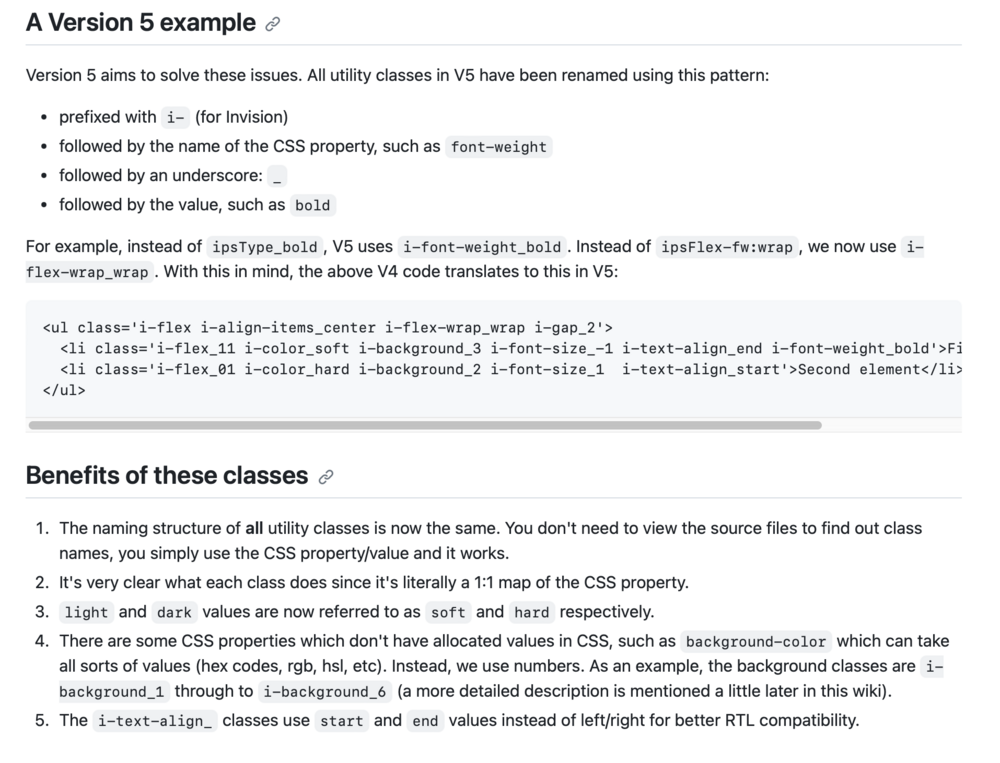
We have an internal wiki that is quite basic, but we'll eventually get an improved version out to the public (this is a little out of date but you get the idea).
-
Pages is its own thing, I'd imagine more complex templating for databases will be retained for that. Yes, theme export still works as you'd expect containing theme editor settings, any custom CSS from the admin and any designer CSS/JS. Yes, they are retained. The default theme does not have any custom settings, so the tab isn't shown. Yes, you can use existing template syntax in the custom templates.
-
Ehren will go into more details but things like ipsType_ no longer exists, it's much more structural now.
-
When Ehren talks about the new CSS structure, you'll see how it all goes together. The new CSS framework is remarkable.
-
CleanShot 2023-10-19 at 15.29.27.mp4
-
 Theming has been a core component of Invision Community since its inception, and this continues with Invision Community 5, but in a very different way. If you haven't already seen Ehren's blog on the new Theme Editor, please do take the time to watch it. The all-new theme editor reduces the complexity of theming by taking complex concepts like HSL CSS variables into a pretty slick UI that almost any Invision Community owner can use to personalise or brand match to any existing properties. Ehren will talk more on the technology behind the theme editor in another developer blog soon, but the short version is that the CSS framework has been completely rewritten from scratch with a new approach to how CSS classes interact with page elements. Of course, if you're reading this, you'll want to know what tools you have for more advanced theming in v5. Custom templates and template hooks Invision Community 5 merges the concepts of custom templates and template hooks into a single feature. In the past, you could edit templates directly and create theme hooks. With Invision Community 5, these features are replaced with the new custom template system. You can create new templates, which you can use in other custom templates via the short tag: {customtemplate='key'}. You can also hook into specific areas with a custom template allowing you to insert code before the opening tag, after the opening tag, before the closing tag or after the closing tag. CleanShot 2023-10-19 at 13.17.16.mp4 For example, if you wanted to add something custom before the reply editor when viewing a topic, you would target that area like so: The result, when viewed on the front end, is as follows: These hookable areas are defined by a special tag that we add to the core templates. We would expect a lot of requests through the beta release and will likely create a request form so we can process them. We will try and accommodate as many areas as possible. While direct template editing is no longer possible in Invision Community v5, the new custom template and hook system allows you to add new functionality, while the new CSS framework makes it easier to target and change elements without the need to edit templates. We also added a suite of new development tools to enable you to target menus, data attributes and other areas where developers commonly had to edit templates before. The good news is that now custom templates are not built on top of our 'master' template engine; they are virtually upgrade-proof and do not require manual merging. Theme Designer Mode Those who create themes for others have some extra tooling to enable them to build truly custom themes. Even though the theme editor has space for custom CSS, there is always a need for CSS that your customers cannot edit, and Invision Community 5 has a special area for that once Theme Designer Mode has been enabled. You also can add any ad-hoc javascript for when you want to hide elements or provide custom interactions. As direct CSS editing and direct template editing are no longer possible with Invision Community 5, there is no need for a 'sync' tool to copy from the filesystem. Conclusion The new front-end theme editor is now the primary way to manage themes. This is where you upload logos and toggle settings. As you can see, theming may look different in Invision Community v5. Still, the new custom templates, theme designer tools and UI extensions provide a lot of functionality that means you can do nearly everything you did in v4, but often in an easier way. I'm sure you'll have many questions, so please add them below, and we'll do our best to answer them for you.
-
That'll be staying.
-
It is likely that some after market developers will leave, nothing stays static and change is inevitable. One of the main themes coming through v5 is reducing the complexity for things that used to require developers so there will be less opportunity to sell expertise in certain areas. It's why we moved forward with the directory approach. There is a strong future in providing bespoke development services.
-
It's also worth noting that the removal of JS and CSS removes render blocking items, whereas cover photos are additional bandwidth but do not stop the page from rendering until loaded.
-
AdminCP theme settings 🤔 Where we're going, we don't need no ACP theme settings. Next week's blog should really help clear up what theming looks like in v5. Spoiler: It'll be very different.
-
Getting some great quotes for the marketing material, thanks!

-
That quote is going straight into the top of our marketing. Also, may I recommend: Honestly, though during the initial building phases back in early summer we used to have a weekly sync meeting with Ehren as he's in Australia and everyone else is not and he'd take us through concepts, and ideas and we'd all just say 'wow' for about 20 minutes. Now I just send him badly annotated screenshots and broken HTML I mangled at 2am his time while he's sleeping.
-
A final supported release is unlikely before 2024 just because we are heading into three consecutive months where there are holidays (Thanksgiving, Christmas, New Year) so releasing a brand new version would increase workload at a time where we want our team to relax and enjoy those holidays. I've patched releases on Christmas Day before and it's not the best time. 🙂 I think we can expect a public preview and some beta releases before then, though.
-
I'll be doing a dev blog on the significant changes in how you create and edit themes in v5.
-
I agree. We server a wide variety of communities, some having quite literally hundreds of forums with robust silos of information but there is a growing need for smaller more bespoke communities with a handful of forums. After spending so long on my development installation of v5, I really crave the feed-like view of v5 on the forum index. I find it quite frustrating to only discover the most recent reply. I do find it quite interesting that most regular members live in the streams of latest posts more than clicking through various forums to see what is new. It goes back to that concept of serving past you, current you and future you. Past you is new to the forum and needs the organisation to find a way into what could be an overwhelming amount of content, current you is still involved but likely hangs out in streams to just read the latest content and move on, and future you visits less so is less familiar but still wants to catch up as quickly as possible.
-
The sidebar menu gives you more space to organise your navigation. The current system of it being in the header means a lot has to be hidden to make it fit, which isn't the best onboarding experience nor does it help highlight important areas of the community. The thought behind the node menu item was to make it easier to add specific forums (or gallery albums, etc) so you can better design your community. You may want to highlight a few key areas (we might choose to feature Community Insider, Support, Feedback) making those areas easy to reach wherever you are and to help new visitors to your community discover what is important. Likewise, you might wish to enable fluid view and list your individual forums in the sidebar so you have the best of both worlds, a feed view index and then easy access to specific forums. The theme for Invision Community 5 is optimising the minutes you spend on a community to make them more impactful. We are considering the various lifecycles of a topic. The initial burst of energy that crackles with noise and distractions and also in the future where future visitors come to it cold and want to extract key information quickly.
-
Only when using a smaller screen where it drops into the menu button on mobile view. There's no way to hide it using desktop (unless you choose to use the classic view where there is no sidebar!)
-
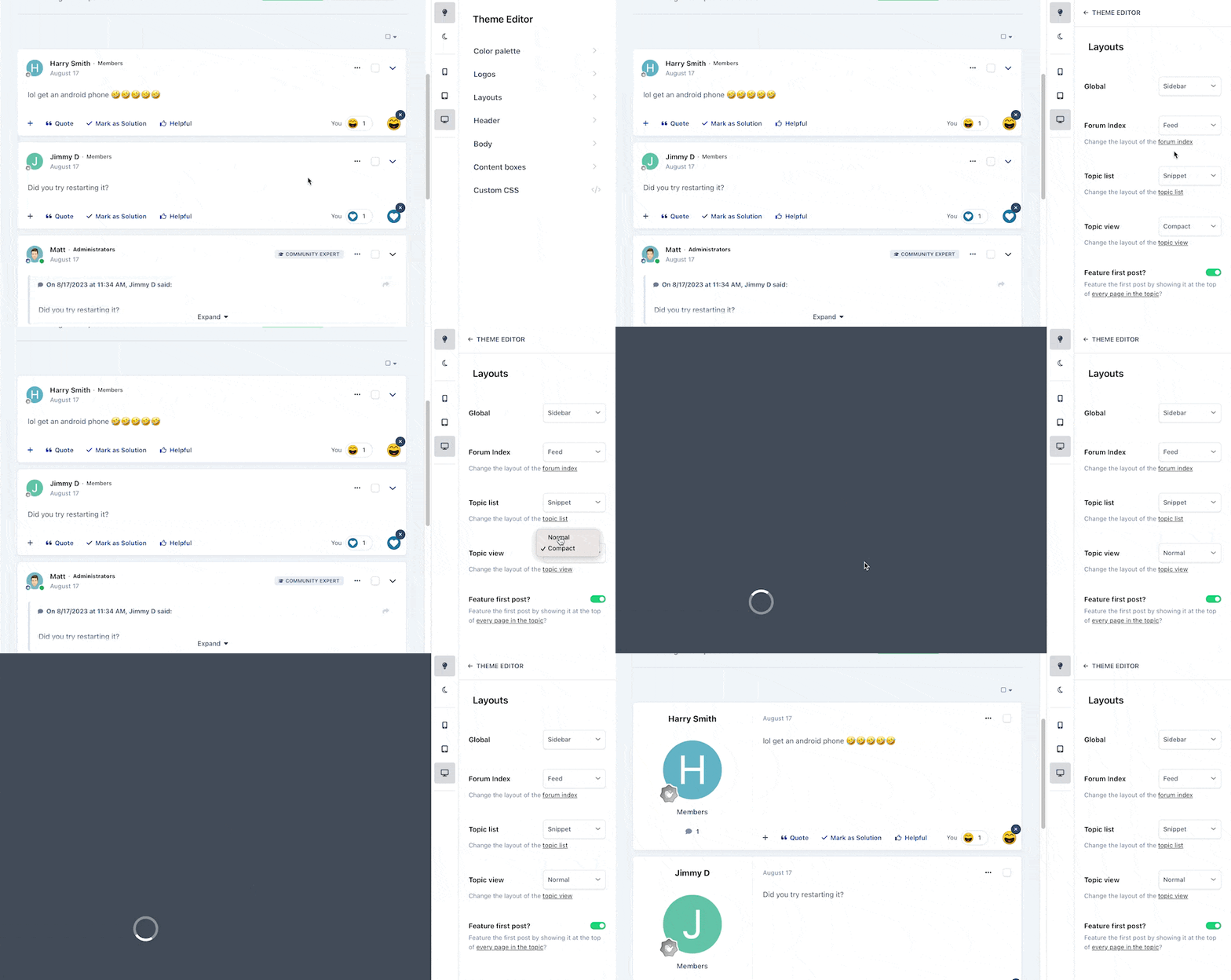
Ehren will be covering the theme editor in more depth very soon. I stole a little of his thunder with that gif but I see a lot of concern about new views and how they fit in with their community, so I wanted to show just how easy it is to toggle between them. It's also worth mentioning that these layout options are per-theme and not global as they used to be, so you can mix and match across your community as you see fit.
-
It is indeed an option.
-
No two sites are the same, which is why we've made it very simple to switch between layout types. More on that very soon.
-
Ehren is a superstar, he's barely scratched the surface on what he's been working on for the past six months. I'm really excited by these new views and the sidebar mode gives a very desktop app like experience, whereas the new mobile view is truly fit for purpose and not just a squished desktop view.
-
Anything significant will be for v5. We have two code bases which have diverged significantly, so it's a fair bit of work to merge v4 code into v5. I currently do this manually with patch files.
-
We've released some news on Invision Community Five, but third party developers won't have enough information to get started on updating their apps. We're at the peak of the mountain now and ready to start showing more in the coming weeks. I am really excited to start showing off the culmination of just under six month's work from our team.
-
No dates, but we're unlikely to release a major new version around a public holiday when our team are enjoying time away with their family. You'll definitely see more of Invision Community 5 this year. In terms of the JS bundling changes, the answer is 'no' but not 'never'. We want Invision Community 5 to be the start of something new, and we'll be converting JS over to native and changing how things are bundled over the early part of its lifecycle. We didn't want to add another 6-9 months onto its development schedule to rewrite all the JS which is a massive undertaking and offers very slim benefits to almost everyone outside of Google speed tests.