




Matt
Management
-
Joined
-
Last visited
Everything posted by Matt
-
Long ago, back in the dark ages, forums used the number of posts a member made and how long ago they joined to demonstrate trust and experience. Is simply posting a lot and being a member for a long time the best way to know which community members are experts? And is there a better way? We think so. What makes an expert, and why are they important? Community experts are the keystones to any thriving community. You probably recognise a handful in your community. They tend to be active regularly, are often the first to try and help others with their questions and help set a positive example within the community. Wouldn't it be great if newer community members could discover who these super users were a little easier? These members trying to find their feet in a new community could follow trustworthy individuals, absorb the positive tone of the community, and even get help a little quicker. In the past, forums have shown trust and experience through basic metrics like post count and the years since they joined. However, these metrics only show that the individual has been around a long time and posts a lot. It doesn't show that they are potential role models or helpful and trustworthy. Community Experts with Invision Community 5 Invision Community 5 identifies these experts through metrics such as the number of solutions they have, the volume of 'helpful' votes on their replies, the speed of answers and more. Each forum will have its own experts, so if you have a very broad community, someone who is very helpful in a particular area will show as an expert in that area only. When a member has been picked as an expert, they'll receive an email thanking them, and they can then opt-in to be shown as an expert along with a regular notification or email with any unanswered questions in forums they are experts in. I'm absolutely killing it in the Test Forum Every few months, the experts are recalculated to reflect the organic way communities grow and change. After all, there's little point in showing that a non-active member is an expert. It might even encourage new community experts to keep up the great work and remain active longer. Community experts have a badge shown with their posts, along with the option to follow them. Encouraging new members to follow trusted community members should be a core part of any community strategy. Settings and control Of course, not everyone should be labelled as a community expert, and perhaps, in very rare circumstances, an existing community expert could have a bad day and not represent the community well. Invision Community 5 gives you the ability to set which groups experts can be picked from and offers you the opportunity to block existing experts, ensuring they won't be selected again in the future. Over to you All communities have to be purposeful and provide value. That value may be in close friendships, or it may be in getting answers for problems you have. Either way, locating the most helpful members will help develop trust, provide guidance and increase knowledge within your community. For transactional communities such as support-based communities, experts are vital in providing timely answers and demonstrating credibility and expertise to others. As always, we'd love to hear your thoughts. Please let us know in the comments. View full blog entry
-
At a fundamental root, every activity we partake in begins with the desire to add value to our lives. Mastering a second language or instrument takes a lot of time but the value is adding ability or knowledge. We join communities to add value. It might be making friends all over the world who love running when you don't have much support for that activity in your 'real-life' friends, or it might be finding the best ways to use a piece of software you love. Back in the 2000s forum communities were founded to bring people together over a shared interest forming small villages in a landscape of rolling hills and pasture. Forums were really successful because they were peerless. If you had an interest in ABBA, opening up a forum about ABBA gave people a space to talk about Swedish 70s pop and take deep dives in platform shoes and crumbling marriages. They gave an outlet for a passion that your friends in the pub had no interest in. Other's in similar situations would flock to this site, delighted with a space to talk about their disco obsession. As the community owner, you didn't need to try too hard, it was all Gimme, gimme, gimme! 20 odd years later and we have crowded mega-cities of non-stop conversation about every topic you want to know, and many you don't. Social media is better designed for informal conversations and finding like-minded people due to its huge reach and focus on personalities over topic. Forums still very much have a place but they need to provide immediate value to keep and grow membership. That doesn't mean social forums will fail, there are many good examples of them but it means for a new community there needs to be a strong reason to visit and once you have a visitor, you need to give them what they want as quickly as possible. We're all time-poor on the internet with so many apps and dopamine hits to have. You can build a social community around a support community, or a community that is designed to solve a problem later. Content may be king, but value is definitely (the dancing) queen. Get those both right, and the winner takes it all.
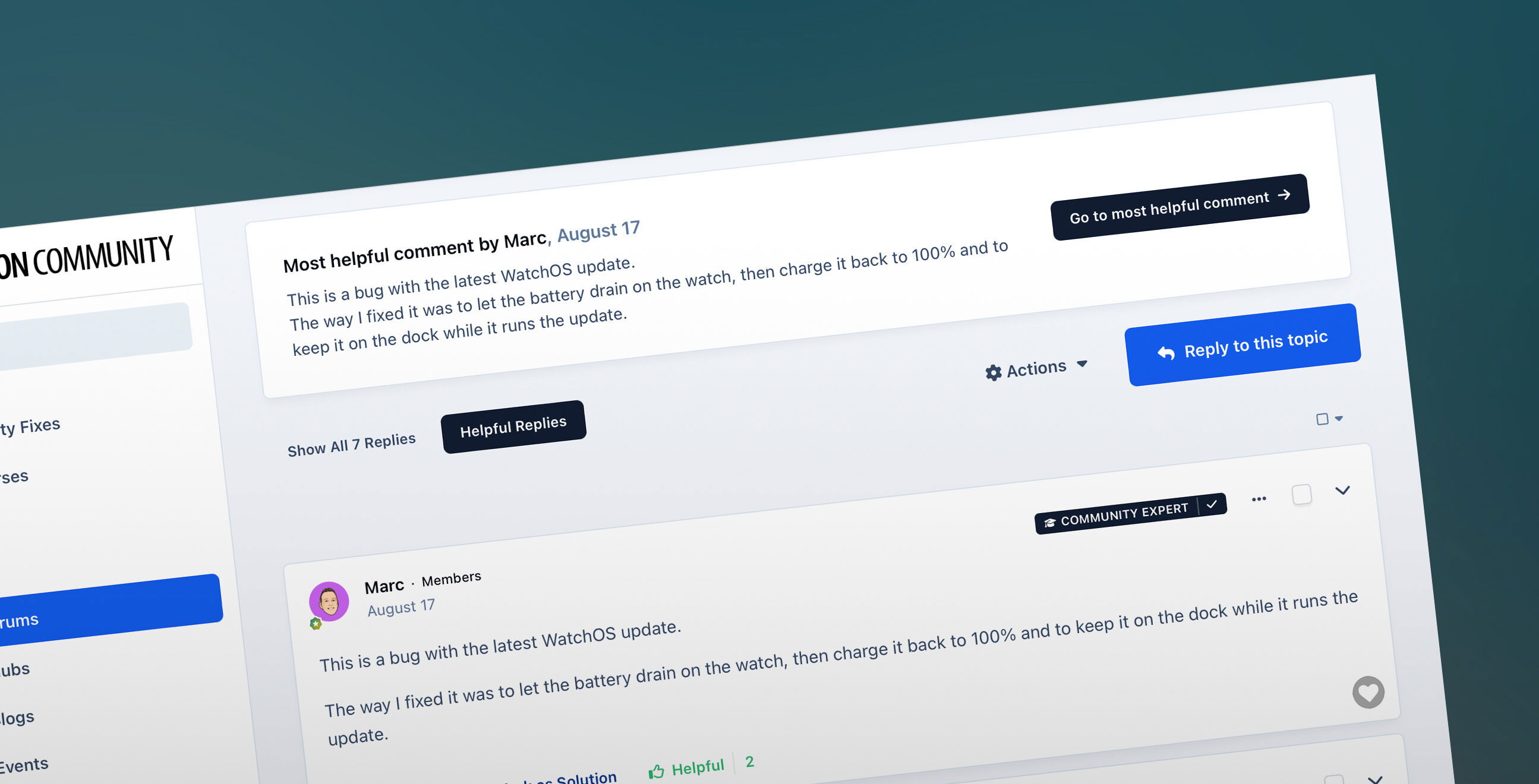 Forum platforms have a wide range of uses, from helping with support to sharing knowledge, ideation and social interaction. Topics can span years, and once the initial explosion of replies has passed, the topic lives on in local search and search engines for future viewers to discover and get value from. However, it's not always easy to get the best content from a very long topic. You may have noticed that when you come to a topic seeking an answer, some replies are less than helpful. How do I fix my Apple Watch? Like this! It's common to find a lot of social content mixed in with useful replies. Jokes, GIFs and off-topic musings are all great while the topic develops organically in real-time. Having fun is critical to feeling a sense of belonging in a community. However, those coming to the topic a little later, say from a link Google has suggested, just want to get the useful content in the fastest way possible. That's where 'helpful' voting comes in. A very helpful reply Invision Community can already mark a single post as the best solution for that topic. Still, not every topic gets a definitive answer, and some community strategies resist quickly marking a post as the best answer to encourage more discussion rather than effectively ending it. Even when you have a definitive answer, there is often value in other highly rated posts offering more context, alternative solutions and more thorough explanations. With Helpful voting, your members are encouraged to flag which posts they find helpful in the topic. When enough votes are added to a single post, they are suggested as a possible answer. You can also tune out the noise and view the most helpful replies only. This is a powerful way to get the very best content from a topic in a short space of time. Want to just view the most helpful replies? No problem. If you eventually choose to mark a post as the definitive answer, the suggested post will be replaced with the answer you choose, but you can still see the posts voted as helpful to gain further context. The helpful voting works independently from reactions, which tend to cluster around social content. Social media conditions us to add a like or funny reaction to content that gets an emotional response. Indeed, a lot of the most highly reacted content is funny content. Social reactions are valuable when building connections between community members but often don't reflect what is the most useful content. The suggested most helpful post threshold is configuration via the Admin Control Panel. Helping your members find the best content within topics helps them do more in your community with less time. Forums continue to evolve, and while social content helps develop the community, content that solves problems and helps others is the rocket fuel you need to keep members and attract new audiences. Helpful voting also feeds into picking Community Experts, a new feature for Invision Community 5, but we'll talk about that in a future blog. A sneak peak at the new Community Expert badge I hope you found this update ✨helpful✨, and if you have any questions or comments, let me know in the comments!Forum platforms have a wide range of uses, from helping with support to sharing knowledge, ideation and social interaction. Topics can span years, and once the initial explosion of replies has passed, the topic lives on in local search and search engines for future viewers to discover and get value from. However, it's not always easy to get the best content from a very long topic. You may have noticed that when you come to a topic seeking an answer, some replies are less than helpful. How do I fix my Apple Watch? Like this! It's common to find a lot of social content mixed in with useful replies. Jokes, GIFs and off-topic musings are all great while the topic develops organically in real-time. Having fun is critical to feeling a sense of belonging in a community. However, those coming to the topic a little later, say from a link Google has suggested, just want to get the useful content in the fastest way possible. That's where 'helpful' voting comes in. A very helpful reply Invision Community can already mark a single post as the best solution for that topic. Still, not every topic gets a definitive answer, and some community strategies resist quickly marking a post as the best answer to encourage more discussion rather than effectively ending it. Even when you have a definitive answer, there is often value in other highly rated posts offering more context, alternative solutions and more thorough explanations. With Helpful voting, your members are encouraged to flag which posts they find helpful in the topic. When enough votes are added to a single post, they are suggested as a possible answer. You can also tune out the noise and view the most helpful replies only. This is a powerful way to get the very best content from a topic in a short space of time. Want to just view the most helpful replies? No problem. If you eventually choose to mark a post as the definitive answer, the suggested post will be replaced with the answer you choose, but you can still see the posts voted as helpful to gain further context. The helpful voting works independently from reactions, which tend to cluster around social content. Social media conditions us to add a like or funny reaction to content that gets an emotional response. Indeed, a lot of the most highly reacted content is funny content. Social reactions are valuable when building connections between community members but often don't reflect what is the most useful content. The suggested most helpful post threshold is configuration via the Admin Control Panel. Helping your members find the best content within topics helps them do more in your community with less time. Forums continue to evolve, and while social content helps develop the community, content that solves problems and helps others is the rocket fuel you need to keep members and attract new audiences. Helpful voting also feeds into picking Community Experts, a new feature for Invision Community 5, but we'll talk about that in a future blog. A sneak peak at the new Community Expert badge I hope you found this update ✨helpful✨, and if you have any questions or comments, let me know in the comments! View full blog entryTheme settings still exist.Those aren't theme settings as you're used to, those are CSS variables and are exported along with the theme, so you can just export/import the theme between installations.Indeed, there's a more technical sister blog here: https://invisioncommunity.com/developers/devblog/blog/ic5-theme-tools-r14/?We have an internal wiki that is quite basic, but we'll eventually get an improved version out to the public (this is a little out of date but you get the idea).
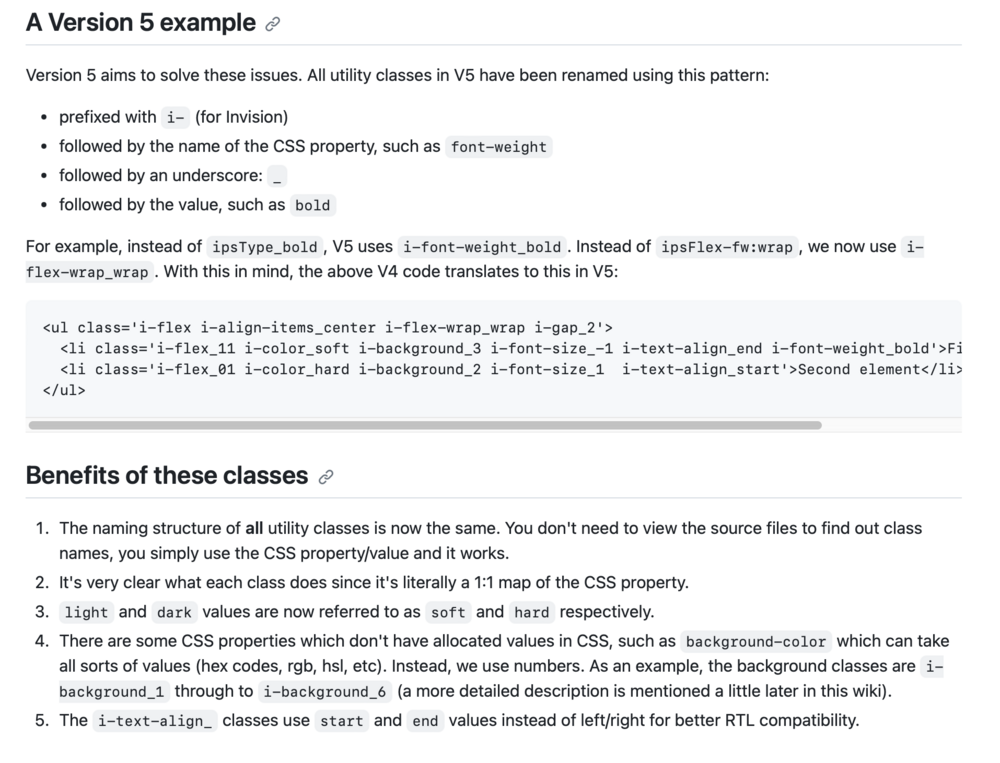 Pages is its own thing, I'd imagine more complex templating for databases will be retained for that. Yes, theme export still works as you'd expect containing theme editor settings, any custom CSS from the admin and any designer CSS/JS. Yes, they are retained. The default theme does not have any custom settings, so the tab isn't shown. Yes, you can use existing template syntax in the custom templates.Ehren will go into more details but things like ipsType_ no longer exists, it's much more structural now.When Ehren talks about the new CSS structure, you'll see how it all goes together. The new CSS framework is remarkable.CleanShot 2023-10-19 at 15.29.27.mp4
 Theming has been a core component of Invision Community since its inception, and this continues with Invision Community 5, but in a very different way. If you haven't already seen Ehren's blog on the new Theme Editor, please do take the time to watch it. The all-new theme editor reduces the complexity of theming by taking complex concepts like HSL CSS variables into a pretty slick UI that almost any Invision Community owner can use to personalise or brand match to any existing properties. Ehren will talk more on the technology behind the theme editor in another developer blog soon, but the short version is that the CSS framework has been completely rewritten from scratch with a new approach to how CSS classes interact with page elements. Of course, if you're reading this, you'll want to know what tools you have for more advanced theming in v5. Custom templates and template hooks Invision Community 5 merges the concepts of custom templates and template hooks into a single feature. In the past, you could edit templates directly and create theme hooks. With Invision Community 5, these features are replaced with the new custom template system. You can create new templates, which you can use in other custom templates via the short tag: {customtemplate='key'}. You can also hook into specific areas with a custom template allowing you to insert code before the opening tag, after the opening tag, before the closing tag or after the closing tag. CleanShot 2023-10-19 at 13.17.16.mp4 For example, if you wanted to add something custom before the reply editor when viewing a topic, you would target that area like so: The result, when viewed on the front end, is as follows: These hookable areas are defined by a special tag that we add to the core templates. We would expect a lot of requests through the beta release and will likely create a request form so we can process them. We will try and accommodate as many areas as possible. While direct template editing is no longer possible in Invision Community v5, the new custom template and hook system allows you to add new functionality, while the new CSS framework makes it easier to target and change elements without the need to edit templates. We also added a suite of new development tools to enable you to target menus, data attributes and other areas where developers commonly had to edit templates before. The good news is that now custom templates are not built on top of our 'master' template engine; they are virtually upgrade-proof and do not require manual merging. Theme Designer Mode Those who create themes for others have some extra tooling to enable them to build truly custom themes. Even though the theme editor has space for custom CSS, there is always a need for CSS that your customers cannot edit, and Invision Community 5 has a special area for that once Theme Designer Mode has been enabled. You also can add any ad-hoc javascript for when you want to hide elements or provide custom interactions. As direct CSS editing and direct template editing are no longer possible with Invision Community 5, there is no need for a 'sync' tool to copy from the filesystem. Conclusion The new front-end theme editor is now the primary way to manage themes. This is where you upload logos and toggle settings. As you can see, theming may look different in Invision Community v5. Still, the new custom templates, theme designer tools and UI extensions provide a lot of functionality that means you can do nearly everything you did in v4, but often in an easier way. I'm sure you'll have many questions, so please add them below, and we'll do our best to answer them for you.That'll be staying.It is likely that some after market developers will leave, nothing stays static and change is inevitable. One of the main themes coming through v5 is reducing the complexity for things that used to require developers so there will be less opportunity to sell expertise in certain areas. It's why we moved forward with the directory approach. There is a strong future in providing bespoke development services.It's also worth noting that the removal of JS and CSS removes render blocking items, whereas cover photos are additional bandwidth but do not stop the page from rendering until loaded.AdminCP theme settings 🤔 Where we're going, we don't need no ACP theme settings. Next week's blog should really help clear up what theming looks like in v5. Spoiler: It'll be very different.Getting some great quotes for the marketing material, thanks!
 That quote is going straight into the top of our marketing. Also, may I recommend: Honestly, though during the initial building phases back in early summer we used to have a weekly sync meeting with Ehren as he's in Australia and everyone else is not and he'd take us through concepts, and ideas and we'd all just say 'wow' for about 20 minutes. Now I just send him badly annotated screenshots and broken HTML I mangled at 2am his time while he's sleeping.A final supported release is unlikely before 2024 just because we are heading into three consecutive months where there are holidays (Thanksgiving, Christmas, New Year) so releasing a brand new version would increase workload at a time where we want our team to relax and enjoy those holidays. I've patched releases on Christmas Day before and it's not the best time. 🙂 I think we can expect a public preview and some beta releases before then, though.I'll be doing a dev blog on the significant changes in how you create and edit themes in v5.I agree. We server a wide variety of communities, some having quite literally hundreds of forums with robust silos of information but there is a growing need for smaller more bespoke communities with a handful of forums. After spending so long on my development installation of v5, I really crave the feed-like view of v5 on the forum index. I find it quite frustrating to only discover the most recent reply. I do find it quite interesting that most regular members live in the streams of latest posts more than clicking through various forums to see what is new. It goes back to that concept of serving past you, current you and future you. Past you is new to the forum and needs the organisation to find a way into what could be an overwhelming amount of content, current you is still involved but likely hangs out in streams to just read the latest content and move on, and future you visits less so is less familiar but still wants to catch up as quickly as possible.The sidebar menu gives you more space to organise your navigation. The current system of it being in the header means a lot has to be hidden to make it fit, which isn't the best onboarding experience nor does it help highlight important areas of the community. The thought behind the node menu item was to make it easier to add specific forums (or gallery albums, etc) so you can better design your community. You may want to highlight a few key areas (we might choose to feature Community Insider, Support, Feedback) making those areas easy to reach wherever you are and to help new visitors to your community discover what is important. Likewise, you might wish to enable fluid view and list your individual forums in the sidebar so you have the best of both worlds, a feed view index and then easy access to specific forums. The theme for Invision Community 5 is optimising the minutes you spend on a community to make them more impactful. We are considering the various lifecycles of a topic. The initial burst of energy that crackles with noise and distractions and also in the future where future visitors come to it cold and want to extract key information quickly.






