


Jordan Miller
Clients
-
Joined
-
Last visited
Everything posted by Jordan Miller
-
Love to hear this 🥲
-
👏😭
-
Happy Hump Day, fam! Before we dive into the goodness, I just want to say thank you for being a part of Invision Community. It's been really fun to see community members and the IC team become even more unified as we've rolled out 4.6. 🥲 Speaking of...(!!!) 4.6 Beta 2 is now live! 🎉 It's worth reminding you this is the third Beta version (it follows Beta 1 and Beta 1.1). We collected a roundup of changes needed and spent the last week implementing updates. Not only did @Matt write an epic blog post about what you can expect to see in 4.6, he also relayed this list of fixes 🤯 Added a no search results message when searching Pixabay and Giphy. Added truncated views for status updates. Added a new check to make sure a datastore method is working before using it. Clarified that a template must be saved when editing template variables/attributes. Fixed an issue with an alert message not showing when selecting ‘Administrators’ as Secondary Group for Members. Fixed an issue when an anonymous online status doesn’t persist across logins when using button log in methods. Fixed an issue where it wasn’t possible to grant access to the email stats page to a limited Administrator. Fixed an issue where the Standard login handler title isn’t saved on edit. Fixed some admin control panel live search results linking to the wrong page. Fixed an issue where text when using the visual language editor could be white on a white background. The last post date in fluid view will no longer extend beyond the browser width on mobiles. Fixed an issue where JSON-LD data was badly formatted for Question/Answer forums or when “Enable Solved” was enabled. Fixed an issue where phrase searches containing stop words could return no results. Added an option for members to cancel expired subscriptions to be able to purchase another subscription. Fixed an issue where PayPal Billing Agreements / Subscriptions may not include sales tax. Fixed an issue when approving a held Stripe transaction if the payment has already been captured. Fixed an issue where an empty donations page was visible creating a soft 404. 4.6's official release date for all is set for the first half of June. Beta versions are available for Cloud clients (by request), or can be downloaded if you are self-hosted (proceed with caution and please make a backup!). Have YOU been testing out 4.6? What are your overall thoughts now that you've had a minute to soak it all in? Sound off in the replies!

-
We love a cross promotion 😅
-
Another fine Hump Day, folks! Hope you're having a great week. Yesterday, we announced 4.6.0 Beta 1. We've already added a few updates/fixes, and in less than a day we rolled out 4.6.0 Beta 1.1 (which is now available for download! Per the sound advice of @Nathan Explosion, I'd like to remind you that this is a Beta; please make a backup of your community and all its data before updating). I want to give @Pavel Chernitsky a shout-out for saying this in the announcement post: The team worked really hard on this release, so that is greatly appreciated! 🥲 Last week when I shared that precious photo of @Charles and I working together in Vegas on our forthcoming website refresh, I didn't include a roundup of bug fixes per usual. So please sink your teeth into this updated list: - Fixed the position of the queued content badge in fluid view, which was overlapping the topic stats. - Removed browser caching for "upgrade in progress" page. - Fixed an issue where a cached Widget returned the wrong timezone based time. - Changed the email in the profile hovercard into a mailto link - Fixed an issue where the Privacy Page does not redirect to an external link. - Fixed an issue where the first step may be skipped during checkout even if custom fields are required. - Fixed an issue when an anonymous online status doesn't persist across logins when using button log in methods - Fixed an issue where merging members could leave members as alternative contacts for themselves. - Added a no search results message when searching Pixabay and Giphy - Added truncated views for status updates. - Added an option for members to cancel expired subscriptions to be able to purchase another subscription. - Fixed an issue where PayPal Billing Agreements / Subscriptions may not include sales tax. Thoughts? Have you tried out the Beta version yet? We'd love to hear from you in the replies!

-
I like where your head is at! Yes, we will definitely be taking a look at the Help Guides and documentation, but not in tandem with the website revamp. We will need to sit down and focus solely on that project in the near future as it'll be a relatively big (but awesome) undertaking. This feedback is valuable though thank you!
-
Update // September 14, 2021: WE MADE IT! After months of hard work behind-the-scenes, we launched our newly-refreshed website and community theme. We have a formal blog post about it on the way, but we wanted to share this soft launch with you first 🤫. Feel free to share your feedback in the comments; we're here for you and are chatting! Earlier // May 12, 2021: Hey all, Happy Hump Day! @Charles and I joined forces here in Las Vegas this week because we're planning something super exciting. 🤐😎 After 4.6 rolls out, we're focusing on freshening up our homepage/subsequent pages and match that branding with this community. That may or may not be an understatement, but if there's anything to take away from this teaser it's that there some slick visual changes on the way! If you guys have any websites/homepages which are clean & minimal that inspire you, we'd love for you to drop some links in the comments. We already do have a firm idea/concept planned out, but your opinions matter to us! We'd like to hear from you.
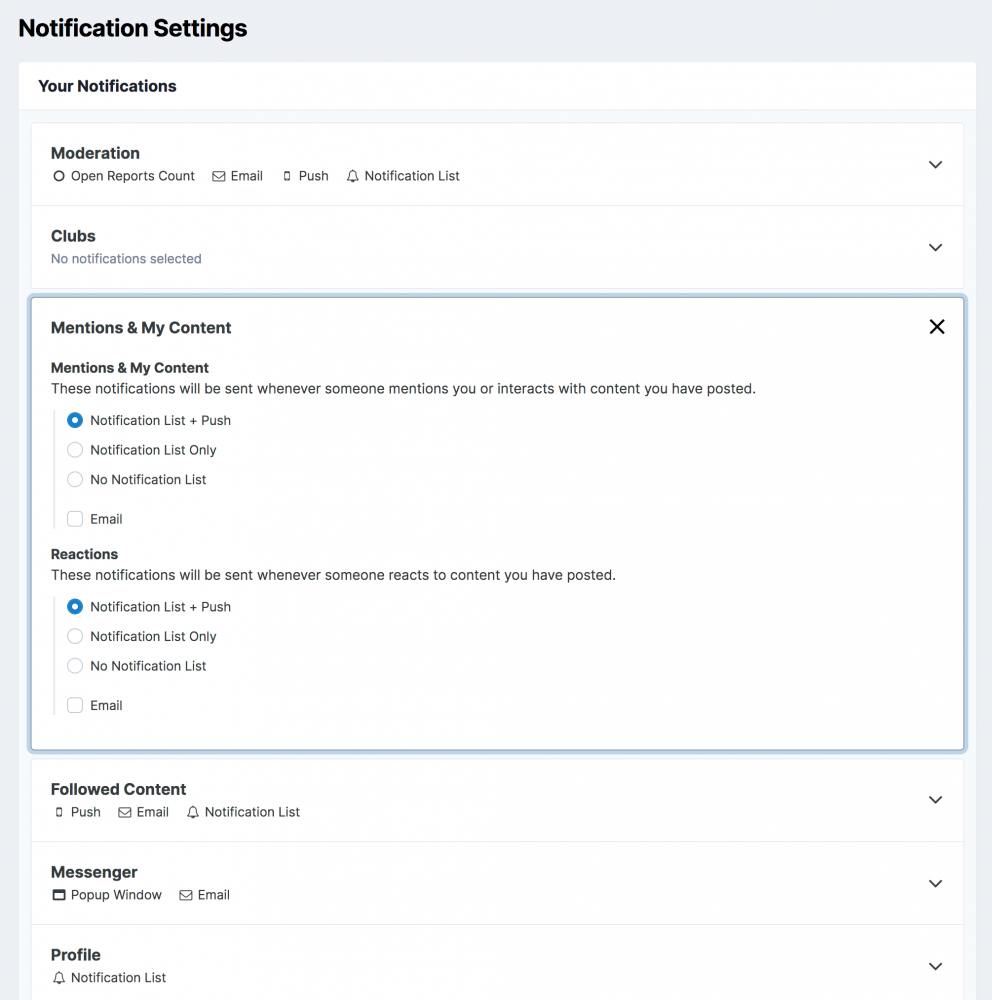
 Love where your head is at! And thanks for the kind words. 🙏I feel ya. It's a tough line for us to straddle between being transparent with our Community and letting you all know what we're up to and being more secretive. We'd rather let you guys in and be subject to some criticism (like the wait time for 4.6 & Achievements) versus us doing our thing and our community having no idea about what's going on. Don't be angry 🙂 Be happy! Once it's out I suspect you'll be grateful we took an extra bit of time to improve things versus rushing it.Happy Hump Day, fam! Been receiving a lot of messages about 4.6 and Achievements. We're near the finish line (I know that's annoying to hear but we're close!). Why the wait? We absorbed a ton of useful feedback from you and are implementing it 👏 Achievements is turning out even more epic than what we launched here a few weeks ago 😭. It'll be worth the wait (again, annoying I know, but sit tight). Our talented team of Code Yodas™ (aka our developers) implemented some cool additions that'll make their red carpet debut in 4.6. 📸 The ones we're highlighting today are the improved appearance of Notifications Settings and Top Files reporting in the ACP. Shout-out to YouTube Short URLs being fixed as well. Improved appearance of Notifications Settings You'll notice we're adding more flexibility to control what kinds of notifications show, and incorporating them with the Push notifications feature. 😍 . Thanks to @Rikki for hooking up the screen shot preview! Most Downloaded files statistics in the ACP And for the data junkies, we've also added statistics for the most downloaded files in the ACP. Shout-out to @Matt Finger for this implementation! Our full list of changes made in the last week: - Fixed an issue where changing table filters could cause the table to be stuck in loading state due to an underlying error. - Fixed an issue where Stripe webhook events may fail in some circumstances. - Account settings will no longer prompt for re-authentication if the account does not have a way of re-authenticating. Applies mostly to custom SSO integrations. - Fixed an issue where Youtube Shorts URLs would not embed. - Fixed an issue where API requests may cause an error if referencing transactions from deleted members. - Improved the appearance of the Notification Settings screen. - Added support for converting Markdown formatted posts in Vanilla. - Fixed some issues when converting from Vanilla and your files used to be in S3. - Added statistics pertaining to the most downloaded files Lots of exciting things going on here. What's your favorite from the list? Sound off in the comments - we'd love to hear from you!
.thumb.png.40ed1beb9eca0584f89fa4e7a6792ec8.png)
.png.038ede909359fa7180021627c15d3a0e.png) Love this reply 😭 🙏Never too late!HAPPY Hump Day! A lot has gone down in the last week or two. In case you need a little refresher, we recently soft-launched Achievements. It'll be available for all in the coming weeks, but for now you can get a taste of it here in our own community. The response has been insanely epic 👏 The feedback even more so 🤯 I personally took notes of all the feedback provided. We've already started implementing some key changes (shout-out to our super talented development team!! Show them some love in the comments), including: Explanation for how you earned a badge Current position / max number of ranks shown so you know how far you have to go Added tooltips on rank badges Added lazy loading Optimized rebuild routine Fixed a bunch of bugs I know that only scratches the surface, but keep in mind we'll continue better Achievements over time! 🤠 Lots to absorb here. Now that you've had some time to digest Achievements, how are you feeling about it? Sound off in the replies below! 🥳 PS - here's a short-list of some of the 4.6 fixes we worked on in the last week: - Added a confirmation pop-up when mass approving account withdrawals. - Added an option to limit Withdrawal requests to one per currency at any time. - Fixed an issue where the AdminCP livesearch results link to categories instead of blogs. - Removed Aggregate rating from JSON-LD structured data - Worked around a bug in MySQL when viewing statistics in the AdminCP. Related:
Love this reply 😭 🙏Never too late!HAPPY Hump Day! A lot has gone down in the last week or two. In case you need a little refresher, we recently soft-launched Achievements. It'll be available for all in the coming weeks, but for now you can get a taste of it here in our own community. The response has been insanely epic 👏 The feedback even more so 🤯 I personally took notes of all the feedback provided. We've already started implementing some key changes (shout-out to our super talented development team!! Show them some love in the comments), including: Explanation for how you earned a badge Current position / max number of ranks shown so you know how far you have to go Added tooltips on rank badges Added lazy loading Optimized rebuild routine Fixed a bunch of bugs I know that only scratches the surface, but keep in mind we'll continue better Achievements over time! 🤠 Lots to absorb here. Now that you've had some time to digest Achievements, how are you feeling about it? Sound off in the replies below! 🥳 PS - here's a short-list of some of the 4.6 fixes we worked on in the last week: - Added a confirmation pop-up when mass approving account withdrawals. - Added an option to limit Withdrawal requests to one per currency at any time. - Fixed an issue where the AdminCP livesearch results link to categories instead of blogs. - Removed Aggregate rating from JSON-LD structured data - Worked around a bug in MySQL when viewing statistics in the AdminCP. Related:
 One of the overarching goals for any community leader is to shine a bright light on your members. Their contributions should be publicly recognized. Now with Invision Community’s new Achievements system... you can! Achievements is Invision Community’s native gamification system baked into our latest update, 4.6. We’ve dreamed up innovative actions for community leaders to publicly recognize members who show up and participate in meaningful ways. Award Points and badges based on conditional Rules! Here’s what you need to know... Points Our Achievements Points system keeps a running tally of Points. Members may earn Points in a multitude of ways. Essentially, it’s achieved by participating in the community. Create a topic? Points! Post a reply? Points! Follow another member? Nothing. Just kidding… Points!!! This is done through creating Rules. Rules Rules are actionable processes set up in the admin panel. Here are what members can earn Points for: When a... Member joins a club Reaction is given New poll is created User follows a content item Review is posted Member logs in for the first time that day New club is created Content item/comment is promoted or featured Comment/reply is posted User follows a forum, blog, gallery, category etc User votes on a poll User is followed New content item is posted Post is marked as best answer There are also corresponding When/Then Rules for each item listed above. When this action happens, then this subsequent action happens. Example: when a member posts 10 times, then this Badge is awarded. Badges Community leaders can also create specific Rules when deciding what actions earn Badges. For example, reward your members with a Badge for visiting your community for 20 days. Once a member reaches 20 visits or more over 20 days, the Achievements system will automatically award them a ‘20 Visits’ Badge you’ve previously created. Ranks In 4.6, we’ve completely revamped our Ranks system to communicate with Achievements. Achievements’ Ranks system will replace our previous Ranks system* Set up different Ranks based on how many Points a member earns. Ranks display a members’ perceived value to the community. The higher a members’ Rank, the greater their influence because the more they’ve participated. Ranks are currently for prestige at the moment. Here's our example for a pretend Coconut community: There’s a lot of information to absorb here, but if there’s anything to take away from this blog post it’s this: empower your contributing members with Achievements and watch your community grow. It creates an immersive and elevated experience for your die-hards. And hey, who doesn’t love to earn? When 4.6 and Achievements is officially released for all, we’ll hold a live Q&A event for you to join and ask any questions you may have. Props? Concerns? Comments? Questions? We’d love for you to sound off in the comments! Not only because we want to hear from you, but because it’ll earn you some sweet, sweet Points, too!Let's GOOOOO 🔥Hey team! Another hump day is already upon us. We have a bunch of 4.6 goodness in development still. We're aiming to have it released in the coming weeks. I want to share a little teaser of a new implementation in our forthcoming Achievements application. You'll be able to reward members for getting a subscription to your community! Subscriptions are a super powerful way to promote community and engage with your VIPs. Here's a little screen shot: While I've got ya... below are a list of fixes, improvements and updates we made for 4.6. Also, there's a bunch of great topics in the Suggestions forum. I'm going to review some with the team this week and circle back there, so keep an eye out! Any of these catch your attention in particular? Have a question about the new Achievements mini-announcement? Drop us a reply! - Improved rich embedding to support embedding of short links provided by the TikTok app (vm.tiktok.com links). - Fixed a niche issue where _really_ old vBulletin avatars may not be converted. - Fixed an IN_DEV error editing Pages templates that was thrown for applications without any Pages Templates. - Improved soft deleting comments/reviews to remove code duplication. - Fixed an issue where review ratings are not recalculated properly when a review is deleted. - Updated the ModCP content restore (soft delete) to use the built in `restore()` method instead of using its own code. - Fixed importing members from CSV to Date custom fields not importing properly. - Improved performance of the Vanilla converter. - Fixed some issues when converting from Vanilla and your files used to be in S3. - Fixed an issue where editor contents may be lost or incorrect when paginating through a topic and using the editor on different pages. - Fixed an issue where canceling an ad purchase would result in an error.

 Community sharing is community caring. Take it from me: prominently curating your members’ content will profoundly accelerate growth. It’s also pretty darn fun. I’ve run my company, BreatheHeavy, since 2004. While many online businesses shuttered because of social media’s looming presence, mine thrived because of the community. Full disclosure? I had no idea creating a community back in 2004 would become the not-so-secret ingredient to staying alive. Ahh, if only I knew then what I know now. Hindsight is 20/20 (that number gives me anxiety, am I right?), but I never fully understood or appreciated how immensely game-changing community building is. Related: The Importance of Moderation, err... Community Guidance (New Video!) In the past, I focused my efforts on writing news articles (in Wordpress) while my Invision Community community ran rampant. I felt my presence needed to take center stage. That cast a shadow on my community and thus my members. I unintentionally muted their voices by exclusively promoting mine. That was a colossal mistake, but the greatest learning lesson. One year ago, I decided to pivot and shift all my energy towards fostering my community; the results were astounding! I saw more than a 100% increase in unique visits compared to the previous year. The most powerful change I made was shining a light on the content my members created. My website went from being a news site to a community. I constructed a new homepage that featured topics created by myself AND my members. This not only manifested a dynamic, constantly varied homepage, but also incentivized members to post thought-provoking and engaging topics in the hopes their content gets featured. In my community, topics that are featured on the homepage are considerably more viewed and commented on than topics that aren’t. I suspect you’d find similar results. Here’s how I set up my new homepage: I utilized Invision Community’s custom blocks feature. It’s available with the Pages application. I created a new block plugin, selected “topic feed” from the list, then set the permissions in the Feed Configuration tab to only show “featured” topics from members. I also used @opentype's SuperTopics plugin to give a more-polished look. Might sound a bit complex, but it’s rather intuitive. Community leaders can “feature” members’ content by selecting their topic and in the moderation panel, tap “Feature.” Our Picks “Featuring” content isn’t the only powerful tool Invision Community has baked into its software to highlight your members’ content. We’ve also carefully crafted a promotion option to manually select content that’s included on the “Our Picks” page and corresponding block. This is another powerful method to curate community content. We created a guide on how to set up promotion/our picks. With great power comes great responsibility The ability to “feature” content is a privilege only moderators in your community should have access to – at least in the beginning. Avoid giving any member the ability to freely feature their own content onto the homepage - instead, focus on manually curating the content. Be selective and choose what topics you want to represent your community. By creating a standard, your homepage won’t feature any and all content. Instead, it’ll display items you believe will pack the greatest punch. Featuring your members' content visibly shows your desire to embrace your community. It’s one thing to comment on members’ topics, it’s another to feature and promote them for all to see. That’s the secret sauce of curation. Do you agree? Disagree? Have any suggestions? Curate content in your own community? How many questions can I ask in a row? Drop us a line in the comments below!
 Moderation feels a bit like an outdated term created pre-social media, but it stuck. We’d like to re-frame your thinking in terms of guiding your community versus moderating it. Guidance is an essential component to any thriving community because it creates structure and boundaries for the community. Oftentimes, people think community guidance is about restriction, but in reality it allows your community to express itself in a healthy way. All communities run into issues unless there are clear guidelines laid out for all members. It only takes a couple of toxic trolls to bring down an entire community of thousands of members. As a community leader, it's important to find the balance between allowing freedom of speech and restricting what people can and can't say. An Internet troll tends to want to see what they can get away with and push the boundaries to the brink. They’ll claim that they are not allowed to speak their mind, but I want to stress the importance this: Freedom of speech has some limitations. For instance, you can't just shout ‘FIRE!’ in a crowded room because you believe you have the right to freedom of speech (though some would argue you can, which is why guidance is imperative). There are certain rules that everyone needs to follow in order for an online community to function. The first thing you'll want to do when guiding your community is... to create community guidelines. These guidelines must be visible and easy to access. There, you can lay out all the nitty-gritty rules you want, but essentially it should boil down to this: Be kind. Treat people with respect when posting and remember that there’s a person behind the user name. It's important not to hide behind anonymity just because you can. Being a part of the community means that all members must abide by these guidelines. Now what happens if someone "breaks the rules” or ignores these guidelines? As your community’s leader how do you proceed? You do so by creating actionable rules that can adversely affect a member’s standing in your community if they break them. I know that sounds kind of threatening, but it's important to establish to your community that you're there for them and that your priority is to hear them out, but at the same time you must take action to keep the peace. Invision Community has automatic moderation tools and a warning system section baked into the software. Below is a snapshot of Invision Community's administration panel where community leaders may set up custom automatic moderation rules: Tap here for more specific information on how to implement community guidance/moderation to your community. One important component to these rules is that you enforce them across-the-board to all members and do so consistently. If you leave the door open for one member and not another, it's going to create an unwanted hierarchy and instigate chaos. One of the best ways to be consistent is by walking the walk. Show your community how you want them to post by posting and contributing that way yourself. What that does is it sets a visible precedent. From there, you'll begin to notice other community members contributing in a way that is similar to you (lead by example). This is a great opportunity to consider them to join a new moderators team. Whether they are paid moderators or are volunteering their time, you still want them to be mini leaders inside your community. It's important that you are a positive role model for them. Watch the video up top, then drop us a line in the comments! And hey, while I've got you... check out what our own community has to say about moderation (aka community guidance 😉). Remember, guiding your community starts from the top (a.k.a. you!). Now get out there and moder-... guide! Stay tuned for more Invision Community video content coming soon!
 Harness the force as a community leader. A long time ago in the Interwebs far, far away... I proudly signed off all my posts and emails with the title: Owner, Administrator. Anyone in a 10-mile digital radius from me was made well aware: I AM AN OWNER AND ADMINISTRATOR. I AM IMPORTANT I PROMISE. I OWN AND ADMINISTRATE!!! Granted I held off on the all-caps, but still. My assertion permeated throughout all areas of my online presence. Though well-intentioned, my identity as an administrator pushed me away from the community I fostered. I focused more on growing the group rather than being part of the group, thus creating an unspoken hierarchy that placed my members below me. Recognizing your members are living, breathing, sentient people is one of the most important aspects of community building, but I couldn’t see the forest from the trees. Part of me enjoyed the authority and power attached to my role as the website’s administrator. But with that power came isolating separation – the dark side if you will. A community I unknowingly built was unrelatable to me because I was unrelatable to them. Is it possible to remove “me” and “them” from the equation entirely and replace it with an “us?” Our community members aren’t naive to the fact that someone does technically own the community, and that part of your role as a community leader is administrating. It’s less about the title and more of the mindset. How can you connect with your community? By being relatable and approachable. Better yet? Leading by example. Become a community leader Shifting your interpersonal narrative from administrator to community leader can profoundly change your community’s culture for the better. As a community leader, you’ll inevitably perform administrative tasks, including the nitty gritty like group promotions, moderating and reputation (all critical functions for a high-functioning community). However, it’s possible to execute said functions while cloaked under anonymity that the administrator title can provide (that’s not necessarily good or bad, it just is). An important component to community leading is visibility. For many years, I made sure my Invision Community software was up-to-date, licenses paid, the registration system worked, spam defense was light-saber slicing the plastic-surgery-gambling bots to Tatooine. I was a fantastic administrator, but my presence from my community, the very place I worked tirelessly to keep running, was sorely missed. The moment I went “all-in,” meaning I decided to become an integral part of my community outside of the administrator role (by commenting on members’ topics, responding back in private message group chats, reacting to content, listening to feedback and opening up about real-life success and failures) is the moment I evolved into a community leader. I wanted to be seen. My deliberate change of self perception produced exponential growth in terms of traffic and new registrations. More importantly, I became a better community leader. I feel compelled to not only share pop music news with my community, but also what’s going on in my life. It wasn’t a comfortable transition, but a necessary one. Upon stripping away my title from administrator to community leader, I became a role model. I became someone my members came to for more than just technical forum advice. They wanted to see how I was doing. They wanted to share their wins and losses with me after seeing me succeed and fail in public. They saw me as a person; a leader. At the end of the day, community leading means forging connections, sharing your highs and lows and showing up for your members. That starts from within, which may feel incredibly awkward at first, but get comfortable with discomfort and watch you and your community blossom. Thoughts on transforming from administrator to Jedi community leader? Sound off in the comments! And may the +1 be with you.
 Invision Community customers can create automated workflows between Invision Community and over 3,000 other apps including Google Documents, MailChimp, Facebook and Twitter with just a few clicks. If you haven’t integrated your Invision Community with Zapier yet, you’re leaving organic growth on the table! It’s been a wild year, so we’d like to refresh your memory regarding the very powerful Invision and Zapier marriage (hey, remember when weddings were a thing?). Zapier is a service that allows you to connect over 3,000 web apps. Last year, Invision Community released the 4.5 update, and with it a beta service of Zapier integration. Zapier is the first smart community enhancement available for Cloud and Enterprise Community customers exclusively. It’s worth it’s weight in gold. Or, crypto? However we quantify value these days, Invision Community and Zapier together creates real value and has the potential to elevate your community (and bottom line). If you haven’t yet set up Zapier, you can follow our guide to creating your first ‘Zap’ with Invision Community. As @Matt previously mentioned in our announcement post, the Invision and Zapier integration can communicate with some of the Internet’s most wide-reaching platforms, including Google Docs, Twitter, Facebook, Slack, Trello, Facebook Ads, ActiveCampaign, Zendesk, Asana, Salesforce, Hubspot, Discord, Stripe and more. There are three key items we want to highlight: Triggers Actions Self-integration Triggers: Invision → Zapier A “trigger” takes place when there’s a specified signal in your community. For instance, a member registering or a topic being posted. A trigger can be sent to Zapier to then run actions in other apps. Here are a few examples: When a member registers, add their email to a Mailchimp list. When a moderator posts a topic in a news forum, share it on Facebook, Twitter and other social platforms. When a member posts something that requires moderator approval, send a message to a Slack channel for your moderators. Actions: Zapier → Invision An “action” is similar to a “trigger” in that there’s movement, but it happens by setting up an action in Zapier first which then tells your community to perform X action. Whereas a “trigger” happens by setting up an action in your Invision community first, which then tells Zapier to perform X action. Here are some examples to wrap your mind around: When you add an event in a Google Calendar, create a Calendar Event on your community. When you receive an email to a feedback email address, create a topic on your community in a forum for moderators. When you create a task in Trello, add a record to a Pages Database on your community. When a new member registers, add them to your mailing list via MailChimp, ActiveCampaign, etc. Self-integrated: Invision → Invision We also included a self-integrated option that allows community owners to connect an Invision Community trigger to an Invision Community action. For example: when a member registers, create a topic in a welcome forum. In a nutshell: Triggers = Invision talks to → Zapier, then Zapier takes action. Actions = Zapier talks to → Invision, then Invision takes action. Self-integrated = Your Invision community talks to → your Invision community, then your Invision community takes action. If you have any questions, please feel free to comment below! I’m here to help you transform your Invision community into an engaging and efficient world with automated systems powered by Zapier. Already on Zapier? What’s been your experience? Sound off and let us know what features you’ve utilized thus far and which triggers or actions you’d like to see for the future.
 Promote kindness and foster interpersonal relationships through the power of vulnerability to outshine toxicity in your online community. Before my time as a Community Advocate with Invision Community, I focused all my attention on my own online community, BreatheHeavy. Pop music and Britney Spears news are the bread and butter of BreatheHeavy. As you can imagine, fans of pop stars are energized, vocal and unapologetic. There’s real potential for conversations to slip into negativity. 16 years ago when I launched BreatheHeavy, I hadn’t realized I took the first steps towards becoming a community leader. It never occurred to me such a role existed. My mission evolved from forum administrator to community leader, and during that process, I discovered a love of community building. Along the way, I’ve learnt invaluable lessons about toxic community culture (shade a pop star then let me know how that goes for you). What is online community building? It’s the act of cultivating culture and creating connections on the Internet. It’s an essential aspect most businesses don’t focus on enough because it’s hard to quantify its value A.K.A. the bottom line. I spent the majority of my career writing news articles. My resources went into content creation on my company’s blog section while my community members, completely segregated from my news posts, ran rampant. I recall thinking, “negative comments are better than no comments!” That thought eventually led to the demise of my community. The trolls had infiltrated and won. Credit: Unsplash A mob of toxic commentators had free reign, thus scaring away quality members. Freedom of speech is imperative, but it also has limitations (screaming “fire!” in a crowded theater is not applicable to free speech). To better understand how we can combat negativity in our communities, let’s first define what makes a community toxic? When a member or group of members devalue the community. Their negativity permeates throughout the community in such a profound way that it repels others from contributing, engaging and worst of all: not returning. As much as I hate to admit it, toxic members are powerful. They can influence your community, albeit in the opposite direction of what community owners want. Their role deteriorates the community they call home. The compounding effect of flippant responses, snide remarks, indifference, arguments and attacks ultimately creates chaos. The sad thing is... they’re usually unaware their behavior is adversely affecting the community. If they’re oblivious, there’s no opportunity to turn things around. In an effort to better understand their motivation (and avoid smashing the ban hammer), I personally reach out to these members in a private message. Call me a sap, but I’m a firm believer that people can change if you communicate with them. This is a great opportunity to send them a private message. People just want to be heard. When someone exhibits toxic behavior... ask yourself why, and more importantly... can you help them? Typically, a troll’s demeanor stems from what’s transpired in their real life, and it manifests onto your community (lucky you!). Know there’s a motive behind the negativity; a harsh reality they may not want to face. You’re not necessarily required to reach out, and a suspension is a lot easier, but taking this upon yourself as a community leader to uncover what’s really going on is an unrequited and selfless act that’ll set your community apart. In other words: it’s a very kind thing to do. Credit: Unsplash Kindness in communities The most profound way to fight toxicity in an online community is by not fighting at all. It’s by offering kindness to those who need it the most. That’s done through outreach and personal displays of vulnerability. Members on the other end want to know they’re talking with another person. A person who also encounters struggles in life, but found ways to not only overcome those hurdles, but lean into them as they forge mental fortitude - an important component for successful community leaders. Your past challenges can inspire change in peoples’ futures. A powerful way to do this is through being vulnerable. Dr. Brené Brown, who’s extensively researched what it means to be vulnerable, said it best: “The difficult thing is that vulnerability is the first thing I look for in you and the last thing I’m willing to show you. In you, it’s courage and daring. In me, it’s weakness.” It’s easy to expect others (in our case toxic members) to share with you some real life hurdles they’ve encountered. It’s much more difficult for us (the community leader) to shine a light back on ourselves and share that vulnerability back. However, it’s the secret ingredient to creating a perfectly baked community cake. The act of opening up to an anonymous person in need not only can inspire them to change, but it opens a door towards further self-discovery. Being vulnerable with your members empowers them and you. So the next time you notice a toxic member’s pattern regarding how they post, take a pause. Remember there’s more behind the curtain, that hurt people hurt people, then take the opportunity to be kind, practice being vulnerable and watch your community garden blossom. How do YOU battle toxicity in your Invision communities? Sound off in the comments below. Hero Image Credit: Unsplash









.png.3a9c63d2c7078b9f1b0be8f85049dd9e.png)
.png.038ede909359fa7180021627c15d3a0e.png)


