Drewfus
Clients
-
Joined
-
Last visited
Everything posted by Drewfus
-
Have you uploaded the v5 files to your root then you go to https://yourdomain/admin/upgrade Make sure you backup your site just in case you need to go back.
-
Admin , system , get support you can update from there.
-
I have updated to 5.0.17 beta 1 and do not see workflow in my admin is this for cloud users only? This is what I see.

-
I assume font scale size%.
-
Can't seem to apply the patch the spinner just keeps spinning.
-
Already a topic on this issue
-
nope it was not just downloaded and its still beta 1 plus there is no upgrade in my ACP
-
Don't see 5.0.10 beta 2 in client area yet
-
Did you try from you ACP? system ...get support
-
@David N. It will work if you upload as an attachment test.mp4
-
-
-
-
-
I think he meant the database itself where you would go to your database then display all content , custom something like the image below. I may be wrong .
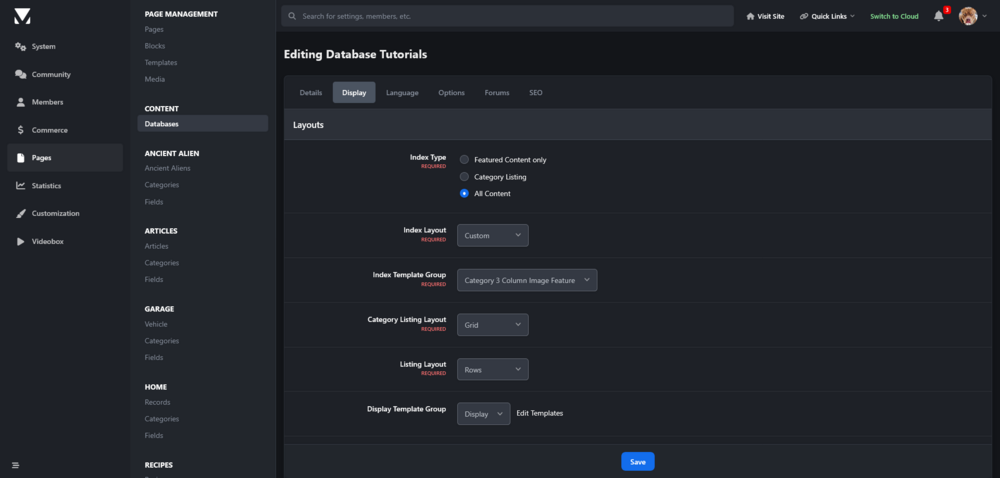
-
same deal on localhost xampp downloaded 5.0.8 beta 1 fresh install and have modified files how dose this happen and how do I fix it? I have not modified any files its a fresh upload from my client area. Some of the source files for Invision Community have been modified. C:\xampp\htdocs\5.0.8/applications/convert/sources/Software/Core/Smf.php C:\xampp\htdocs\5.0.8/applications/convert/sources/Software/Forums/Smf.php C:\xampp\htdocs\5.0.8/applications/convert/sources/Tools/Quill/output.php C:\xampp\htdocs\5.0.8/applications/convert/sources/Tools/Quill/src/Lexer.php C:\xampp\htdocs\5.0.8/applications/convert/sources/Tools/Quill/src/Line.php C:\xampp\htdocs\5.0.8/static/templates/core_front_clubs.php C:\xampp\htdocs\5.0.8/static/templates/core_front_global.php C:\xampp\htdocs\5.0.8/static/templates/gallery_front_global.php C:\xampp\htdocs\5.0.8/static/templates/gallery_front_view.php C:\xampp\htdocs\5.0.8/static/templates/nexus_front_clients.php You should download an unmodified copy of those files and upload them to your server. Once that is done, check if the problem persists.
-
I uploaded a fresh install yesterday to my xampp then uploaded the security patch for 5.0.7 no idea why I got this issue all my sites seem to work fine without this issue upgrading from admin.


-
@LemonGrenade Beta 2 will be out today.
-
You can with theme editor global, sidebar, turn off sticky sidebar
-
I would like to know also I got the same issue.
-
Do you have any other backups you can use like a prior or previous backup?
-
is it enabled in your constants file define( 'USE_DEVELOPMENT_BUILDS', TRUE );
-
The calendar has changed the overview is now monthly if you go to eventss on this site it is the same overview is not there. https://invisioncommunity.com/events/ The view below is what it should look like.

-
He is right calendar seems to only have monthly view when you click overview it is the same here on your site.
-
this is what Matt said yesterday Invision Community 5.0.4 Beta 3 is now out. This fixes a bunch of stuff, including the various issues with URLs that have index.php in them (aka, not using .htaccess rewrite). Full list here: https://invisioncommunity.com/release-notes-v5/504-beta-3-r37/ If all goes well, we'll release the final version on Wednesday.