Gary
Clients
-
Joined
-
Last visited
Everything posted by Gary
-
Progress report. I have deleted that row. Images aren't showing up yet (even after clearing system caches), but I'll wait until the database has a chance to recognise the change I guess.
-
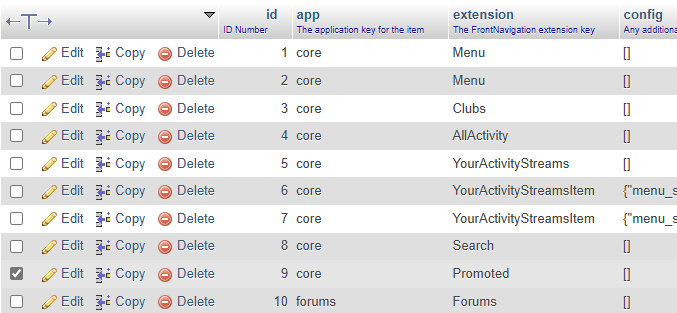
Yeah, I'll have to get someone to look into this for me. My host has advised that customer databases are not in the scope of their support. 😅 I go to my database in phpMyAdmin -> core_menu. Is it as simple as deleting the one I've marked, or is there more to it? Thanks for your help, Daniel. I appreciate it mate.
-
Thanks, Daniel. I’ll delete that item in the morning and let you know whether it fixes everything. 👌
-
That was my first stop, no luck after clearing system caches.
-
Is there any chance the topic title can be updated to "My Beta upgrade experience on a production site"? Some other issues that have popped up since upgrading my community to Beta 1. Some images are not loading as pictured below, including images I have posted in a topic. When hovering over the image, the link ends with 'spacer.png'. Any areas with text, including topics, posts, guidelines, etc, show up with huge spaces between content. They do display correctly when posted/saved however.



-
Will do, thank you very much Marc.
-
I have received a response from my hosting provider. I thought I'd pass the information on in case others experience this after upgrading. Might I say v5 is so nice! Again, well done to the Invision Community team. You all deserve a trip to Sydney so I can shout the first few rounds. 😉
-
Would either of these links be useful for you? There have been significant changes to theming between v4 and v5. It might be worth the read.
-
HI @Baian007, Welcome to the best community software around! 🥳 AdminCP -> Customization -> Appearance -> Themes -> Edit (little pencil icon) -> Open Theme Editor (top right-hand side of the page). That's as far as I can assist right now (I'm out and using my phone).
-
PHP: 8.2.23 - MySQL: 10.6.19 - Browser: Microsoft Edge 129.0.2792.89 Completely vanilla installation of Invision Community. No third-party applications, I am using the default theme and there are no advertisements. The only customisation I have made is adding the English (Australia) language (no other language installed), but I don't think that's what's causing the issue. The uploading of files and upgrade went smoothly without an issue. I can access the AdminCP too, however when I visit my community, I am met with a HTTP ERROR 500. File permissions and ownership look to be correct, and I temporarily renamed my .htaccess file in case there was an issue there to no avail. I have also cleared the system caches, no good. Here is a screenshot from the System Logs. My host is currently investigating so I'll provide an update once they get back to me with the solution.


-
I'm about to take the plunge too, on my production site! 😈
-
Welcome to the next generation, thank you Invision Community! P.S. If you have concerns regarding licence pricing, please submit a support request to the team via your Client Area. This is a topic for celebration! 🥳
-
Have a read through this topic on the Alpha community. 😉 https://preview.invisionalpha5.com/topic/202-alpha-16-released-beta-next-week/
-
That's gonna be a great read and will allow many community administrators to get set up once version 5 has launched! Great opportunity too, @Jimi Wikman. I'm looking forward to it! I might even steal some of your ideas! 😈 The tools are all there and can be taken advantage of for a truly powerful community.
-
And a testament to all the hard work put in by the Invision Community team! Once again, a job well done mate.
-
That’s actually a great example of version 5 and its capabilities, @Jimi Wikman. Well done mate! How long do you think it’s taken you to get it to this? You’ve given me some good ideas to implement in my community once the software is available for us all.
-
To my knowledge, you can still have physical products listed in your store with Commerce, you will just lose the whole shipping capability. This would have to be organised by yourself as opposed to the software having this functionality, otherwise you can try out alternatives such as Shopify as has been suggested on the Deprecation Tracker.Hi @superaven, Reading through the blog posts that have come up over the past few months would be your best bet to get prepared. Things such as: Closer of the Marketplace (more information on this link too) Various layout, interface and theming changes Introduction of community experts Changes to tagging I don't think there is an official "list to be prepared for v5", however you are likely to find more through topics like this one. Not everything may be an issue or specific to your community. I would also look are what plugins/customisations you have implemented in your community as some may be null and void; v5 is proving to be a powerful bit of kit created to benefit all of our communities as a whole. Naturally, there is no universal solution to meet every niche or subject, but the tools are there to make for a powerful community regardless of your niche.v5 is gonna take the game to a whole new level that’s for sure. 🥳The Invision Community Team have confirmed in various topics that Pages will be receiving some love too. 😉Huge update and an awesome touch to the video, Ehren. On ya mate! 🦘No problem at all. You can always make a suggestion to include more payment services in the Feedback forum (after doing a search for similar requests already suggested). If there are enough clients requesting these same payment services, you might be in luck. The team do look at all requests and considerations. Bear in mind there is a big update with the Commerce application once v5 arrives. You might find the donation feature beneficial if it is one of the many amazing features being worked on.Hi @Fernando Mercês, I know I may be stating the obvious, but there is a donation feature built into Invision Community. AdminCP -> Commerce -> Payments -> Donations You could always obtain the donation button from PayPal, add it to your topic/post as an image and simply add a link to it. That's how I have done it for many of my communities in the past and never had an issue. A community I recently launched uses the default donation feature and despite it not being used yet, it does look seamless.