Gary
Clients
-
Joined
-
Last visited
Everything posted by Gary
-
Hi @Egorkin, You can read about the new version in the topic below. I would consider it a completely new version considering all of the features that have been introduced, and the changes to the existing software to make the whole package work seamlessly. But you can be your own judge once it has been released. On that note, there is no confirmed release date as of yet. 😉
-
There is no release date confirmed for the next version yet.
-
Simply amazing. Well done @Matt Finger. You’ve done a superb job mate. Can’t wait to use these new features.
-
Welcome to this week's Invision Insight! The changelog has had a significant hit this week with bug fixes by the amazing dev team, and a special thanks to @Ehren for all the amazing UI changes! The majority may go unnoticed by the odd individual, but it has definitely made things look so much nicer. We have had a very productive week and ran a live preview of Live Topics right here on Invision Community! 🥳 More on that below. Live Topics In a nutshell, Live Topics is a hosted live chat and question and answer event that is converted into a forum topic upon completion. Check out the blog post below for more info! And if you were one of the lucky few to participate, the IPS Team came together to give a live preview of this new feature; the very first time Live Topics has been shown and used by our community. Check it out and give us your feedback. New Beta Version Invision Community 4.7.8 Beta 1 is here, bringing you an array of improvements for your communities! For those of you interested in trying it out, please follow the steps below. There are instructions for both Invision Community Platform and Classic clients. Please ensure you backup your communities. It's better safe than sorry. 😉 For a full list of what's new, you can visit the official Release Notes. Upcoming Event A reminder on next month's March 2023 Release Chat. There are quite a few questions coming through already which is great to see everyone, keep it up! Changelog See you in the community and next week right here for another Invision Insight! I look forward to hearing from you all. Thank you everyone! 🦘
-
Hi @tzrtim, I'll be sure to post about them as they pop up on the weekly Invision Insight. Thanks for your input. 🙂
-
I'll take note of that, @Luuuk. Thanks!
-
Appreciate the plug, but Spacious ACP includes many more things than just a patch notification.
-
Hi @sound, Thanks for your input! I will definitely be including them in topics such as the Invision Insight, the only thing is they're separate topics so you would have to follow each one individually which may not be ideal as you would already be checking the forum for a new topic and that kind of defeats the purpose. You can follow me too, but that may send you notifications of things you may not be too interested in. 😅
-
There are no plans to add a notification to the AdminCP for patches. I am just starting the discussion to see how many people are in the same boat and would like to see a notification like this added. Thanks for chiming in. If there are others also keen to see this, please let us know.
-
Thank you, @Luuuk. I've already got this noted down but I will make sure to add that someone from the community has suggested it as a possible improvement.
-
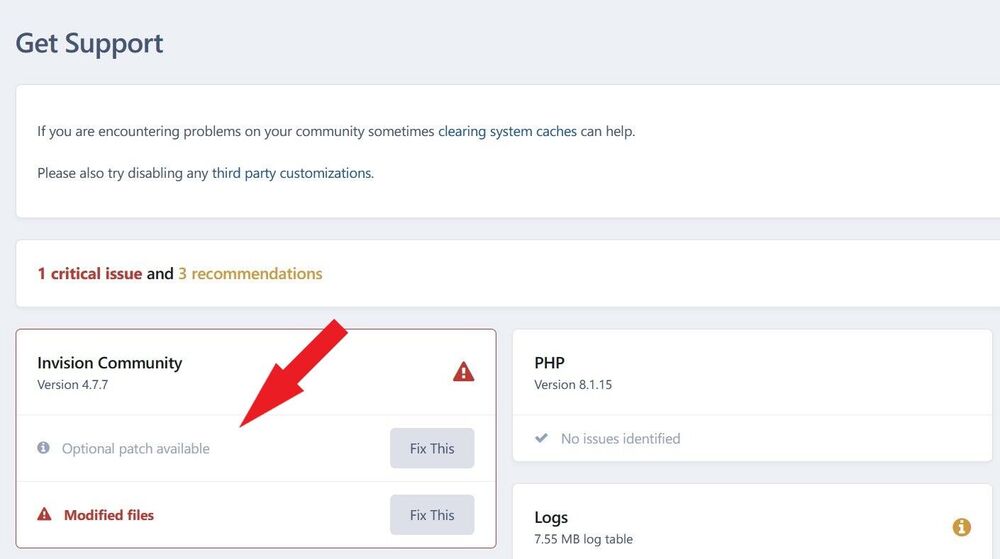
Welcome to this week's Invision Insight! I'm keeping things short and sweet this week! The majority of our work has been on getting Live Topics closer to a beta release. We are very excited about this feature and can't wait to share it with you! If you haven't done so already, please check out our sneak peek. Patches I have noticed some discussions lately regarding patches, and in some instances, they may be missed by community managers. Not all patches seem to be a critical issue or security risk, but it is definitely ideal to action the patch to ensure your community continues running smoothly. There are no notifications for patches at the moment, however any available patches can be found just under your version number in your AdminCP. Let us know if you have some ideas on how we can improve this. Upcoming Event Our next event will be the March 2023 Release Chat, scheduled to commence on the 1st of March. We will be discussing everything about this release so please let set a reminder and get your questions ready! Changelog Here's what the dev team have been working on over the last seven days: See you in the community and next week right here for another Invision Insight! I look forward to hearing from you all! Thank you everyone! 🦘
-
Hi @NZyan, Live Topics will be a feature available to clients on our Cloud platform only.
-
Hi @Afrodude, Thanks for highlighting this once again for me. I have updated the release notes so you will not see a duplicate of this any more. 🙂
-
Welcome to this week's Invision Insight! It's been another great week here at Invision Community! Our February release is out and we are looking forward to the next great thing. Speaking of that, I shared last week that our Live Topics feature is shaping up and nearly ready for its beta release. Interested in our first sneak peak? Go ahead, check it out! 🙂 We are excited to hear your thoughts! This feature will be available on select plans. New Release With new features, squashing bugs and the usual amazing work put in by the Team, 4.7.7 was released earlier this week! This release officially welcomes the long-awaited Gallery refresh and GraphQL support. Take a look at all the changes in detail below. And as usual, if you are experiencing any issues upgrading, please don't hesitate to post up a topic in the IPS Team and community operated Help & Support forum. Upcoming Event Are you like me and care about the stats and reports on your community? Or are they just not your thing? No matter which side of the fence you are on, next week's event is sure to give you useful information to broaden your community management knowledge. Tune in and join the team for the upcoming event! If you have a question or would like something more specific addressed, please let the Team know below. Changelog Here's what the dev team have been working on over the last seven days: That's a wrap for this week! See you in the community and next week right here for another Invision Insight! I look forward to hearing from you all! Thank you everyone! 🦘
-
I may have generalised the current global usage, however, its roots stemmed from the gaming industry/community. To stay relevant and appeal to other audiences they have had to adapt their platform.
-
It may be the same core software, but the technology used for some Cloud-only features are not easy to implement for the average Joe wanting to start up a community and requires more than just uploading Invision Community files to your server. Thank you for your kind words. It's what we strive for. There are always considerations that need to be taken into account of course. You've got to see what direction most benefits you and/or your community and go from there. Sometimes others beat us to it. We have team members from all around the world and we try our best to reply in a timely manner, but if someone else decides to chime in, then that helps us too (I mean this more specifically in the Help & Support forum as you are referring to paying for support). If we feel certain individuals need to be pulled up on something, we have no hesitation in going down that path too. Discord appeals mostly to the gaming sector as they build their platform to support gamers. Much like Twitch is to the gaming industry. They can use YouTube (in fact a lot started that way) but have opted for Twitch as it provides them with the right tools to engage with their followers/subscribers. That's their niche market in my opinion having used both platforms for a few years now. Create a channel -> Invite friends or other fans -> Play and stream the game for others to join, watch or engage. I have had many websites and communities in the past. I would always start with the free options, but as you get older and earn a living, you have some money aside where you can invest in something that you were not able to do before. You are more open (or able) to taking risks. If it doesn't work out, then so be it. I'm sure if Invision Community wanted to cater to a single market, their product suite would be targeting that market alone. Fact of the matter is we are not, so whilst we do our best to cater to a wide variety of audiences, industries, the small community, larger enterprise clients, etc, it's just impossible to make everyone happy.
-
I appreciate all the feedback you are sending through. It gives me an idea of what people want to read about so I can do my best to provide the information you want to know. Without having the bug fixing knowledge that the rest of the team possess, it goes without saying that some bugs are just more complex than others. And I know it's another obvious point to be making, but some of the features we have released recently have been in development for many months too. It is a combined effort of different departments in our Team to bring these into fruition. We try and balance things with bug fixes and new features, and there will be times where one becomes slightly more important than the other. At the end of the day, we are not here to make excuses or side-step through bugs that are reported and make it into our scope. We do treat bugs based on priority over general quality of life. If there is something we can improve on where our community provide constructive ways to rectify something, it doesn't fall on deaf ears. I believe my weekly topics provide a consistent level of bug fixes occurring weekly via the Changelog; some bug fixes more recent than others. On a side note, let's chill and be a bit more patient with each other. We don't all share the same opinion and that's completely okay. I'm sorry if you have been misled. I did make it clear that I would have more details soon. My intention here was purely a teaser to mention the feature, not to give the nitty gritty about it. Since joining the Team and reading through Invision Community topics, blog posts, etc, I haven't stumbled upon a feature that wasn't specified to be Cloud only, self-hosted only, or both. I don't see a benefit in keeping things quiet... If we are complacent from time to time, then let us know! We're human too, and we can fix it to make things crystal clear. 🙂
-
Welcome to this week's Invision Insight! How's everyone liking the new look to Gallery?! We want to hear all of your feedback, so please visit this topic and take advantage of the testing phase so we can keep it all centralised for easy reference. On other news, Live Topics is almost ready for its beta release! In December last year we mentioned this new feature coming to the suite and it is definitely something many communities will benefit from. I promise we will provide more details soon! New Version We have released a new beta version of Invision Community, 4.7.7 Beta 4. For those that would like to try the beta on their communities, please follow the link below. Last week I wrote about how you can opt-in to beta releases for both Cloud and self-hosted clients. As always, please back up your communities before upgrading to any beta releases. GraphQL The GraphQL API is here! GraphQL describes itself as a query language for APIs that gives clients the power to ask for precisely what is needed and nothing more. I won't go into too much detail here of course; but @Daniel F has got you covered and went into great detail to explain this new addition to Invision Community. Recent Event Our February 2023 Release Chat happened this week, but if you missed it, don't stress as you can watch the recording below. Please post your questions and we'll do our best to answer them. Changelog Here's what the dev team have been working on over the last seven days: See you in the community and next week right here for another Invision Insight! I look forward to hearing from you all! Thank you everyone! 🦘
-
Thanks for letting us know. 🙂
-
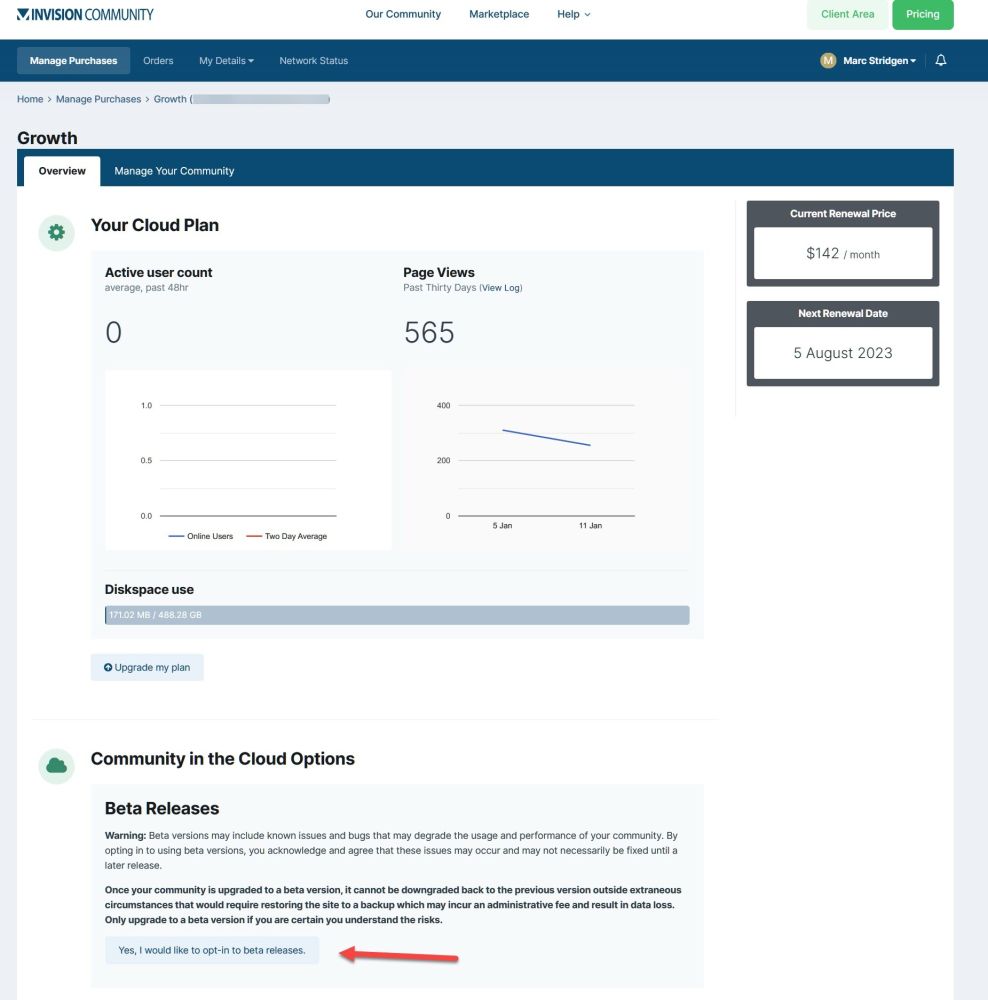
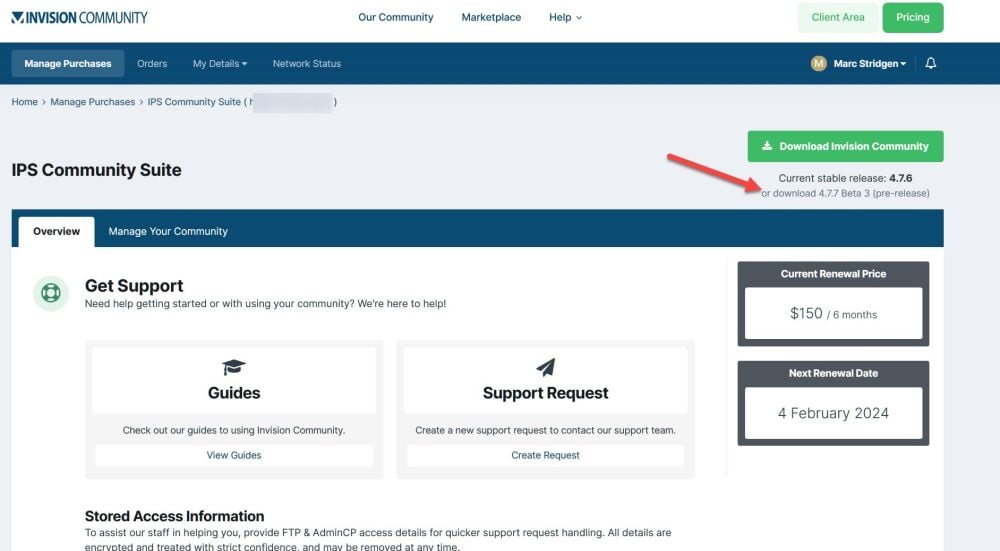
Welcome to this week's Invision Insight! The Team have been hard at work finishing up the Gallery refresh, which is now available for testing (more on this later). I am in the process of drafting up a new edition of community tips; publishing date yet to be confirmed. I do hope these are helpful not only to those communities that are starting out, but also to the larger and more established communities out there that are looking for ways to adapt and grow. If you haven't yet read the blog entry, I have linked to it below. If you have something you would like me to write about specifically or have subject matter you'd like me to talk about, then by all means let me know. I am always open to your suggestions. 🙂 New Version We have released a new beta version of Invision Community, 4.7.7 Beta 3, moving us one step closer to the stable February release. As with all beta releases, upgrading your community is at your own risk. Please make sure you backup before pressing that button! There are also some changes affecting third party developers and designers to take note of. Never tried out a beta before? We've got you covered. 😉 Cloud If you are a Cloud client, you would firstly enter your Client Area and click on Manage this purchase, scroll down the page and click on Yes, I would like to opt-in to beta releases. Go to your AdminCP -> System -> Applications and click on Check for Updates, and the beta version will become available for you to upgrade in the normal way you would perform any other upgrade. Your community will show you all future betas while that line is in the constants.php file. You can opt out once you no longer wish to use beta versions in the same way. Self-hosted If you are a self-hosted client, there are two ways to currently do this. One option is by using the automatic upgrader, the other is manually. Automatic Upgrader Backup your community. Create a constants.php file if you haven't already done so (use the guide below for assistance).Add: <?php define( 'USE_DEVELOPMENT_BUILDS', TRUE ); Then go to your AdminCP -> System -> Applications and click Check for Updates, and the beta version will become available for your to upgrade in the normal way you would perform any other upgrade. Your community will show you all future betas while that line is in the constants.php file. You can opt out once you no longer wish to use beta versions by simply removing the above code from your constants.php file. Manual Backup your community. Enter your Client Area and click on Manage this purchase, scroll down the page and click on Yes, I would like to opt-in to beta releases. Under the usual Download Invision Community button, there is a download x.x.x Beta x (pre-release) link. Download and upload those files and perform a manual upgrade from '/admin/upgrade' in your browser. I cannot stress enough to PLEASE backup your community if you intend to run betas on a production community. Gallery After last week's announcement of the new-look Gallery, we have officially opened up testing to our community! Follow the topic below to stay in the loop and give it a go yourself. Upcoming Event Our February 2023 Release Chat is scheduled for next week. @Charles will be front and centre discussing all the latest features due in our next release. Lock in the date and make sure you tune in! Changelog Here's what the dev team have been working on over the last seven days: See you in the community and next week right here for another Invision insight! I look forward to hearing from you all! Thank you everyone! 🦘
-
Welcome to this year's first Invision Insight! And welcome to 2023 everyone! 🎉 After a very busy 2022, we have so much more coming to you this year! There has been so much work happening behind the scenes and I can't wait to share some of it with you in this edition. For those keen eyes, we would like to introduce a new forum in our community called Invision Insider. In an effort to keep our clients more informed on everything Invision Community, we thought it a great idea to provide a central place for all news and updates including Invision Insights, beta announcements and release webinars. You may recognise the majority of topics already in this forum, but as times goes on, we hope to fill it up and give everyone a go-to space to know the latest. If you have any suggestions on how we can improve or evolve on this, please don't hesitate to let me know. New Version: 4.7.7 Beta 2 Our February maintenance release is now available. This brings some key changes including the Gallery refresh and GraphQL support which I'm sure everyone is very excited to hear about! Please bear in mind that it is a beta, so using it on your main community is at your own risk. There are also some changes affecting third party developers and designers to take note of. Take a look through the full release notes below. What's New in Gallery? The Invision Community team have been hard at work giving Gallery a bit of a refurb... Well, not a bit, I mean HUGE! @Ehren has done an absolutely stellar job bringing Gallery into the 21st century, and what an awesome update it is! I'm not going to take the limelight off @Andy Millne though, so please read his thorough blog post discussing the many new features and visual refresh below. We are very thankful to all that worked on this product and hope that our community takes full advantage of everything Gallery has to offer. How are you implementing Gallery in your community? Community Security Thanks to those that joined us for our Community Security event. Some of the key action items @Charles spoke about included enabling two-factor authentication, staying up to date with the latest version and ensuring your host uses secure practices. For those that missed it, you can still watch a recording by clicking below. We'd love to hear more about what you do in your own communities. Knowledge is power, and the more we share these practices, the more secure all of our communities will be. Upcoming Event This is something you definitely don't want to miss out on! Our February 2023 Release Chat has been announced! We will be talking about all the significant changes that have been made to Invision Community, a key item being our Gallery revamp. If you have some spare time or need an excuse to take your mind off work for a few minutes, make sure you tune in! Changelog Here's what the dev team have been working on over the holiday season since our last Invision Insight (beware, it's a long list!): See you in the community and next week right here for another Invision Insight! I look forward to hearing from you all! Thank you everyone! 🦘
-
Welcome to this week's Invision Insight! Whilst the weather gets warmer Down Under and colder to those in the northern hemisphere, we are nearing the end of our 20th year of Invision Community! So much has been achieved through the years and 2022 specifically is no exception. I felt it couldn't be a better time to approach our team to participate in this week's Invision Insight. I'll share their take below. Before we get to that though, if you didn't get a chance to attend yesterday's Content Curation event, don't fret! You can watch the video and discuss your thoughts below. Invision Community Team Insight During the week I took it upon myself to annoy our busy Invision Community staff members and take them away from their work (momentarily of course). All for good reasons! 😇 I asked them to weigh in on one of three questions. This gives us a glimpse into their minds and is a fun opportunity to hear directly from those that make Invision Community great. As usual, we are all very proud of the work they have produced; the results really do speak for themselves. Team, a huge thank you for playing along and taking the time to get your answers to me. What is your favourite thing or feature we delivered this year? @Jim M - My favourite feature we delivered this year was the real-time viewing/typing. I feel like this added a whole new level to our software to know in real-time that someone is viewing/replying the same time as you. Really helps with continuing the conversation, as if I reply and see someone else replying back, I'll stick around a few more seconds rather than moving on. For our support usage, it is also nice because we can see if another staff member is already replying and follow up with them internally before going to the client if we have something to collaborate. @Lindy - The new Image Scanner (https://invisioncommunity.com/news/invision-community/our-new-image-scanner-and-discoverability-ai-keeps-your-community-safe-video-r1263/) is my favourite feature/service that we've rolled out in 2022. I have been in the technology sector for 30 years (ouch!) and have watched the evolution of so many incredible technologies, but AI-driven technology continues to blow my mind, truly. I love that we are among the first to begin developing AI-based features within community platforms and I look forward to our brilliant team incorporating more of this technology as we move forward. @Mark H - I'd have to say my favourite enhancement was the "Who's Typing/Viewing" feature that others have already mentioned. It encourages more engagement among both members and staff, and for us techs, also reduces doubling up on an issue. A runner-up favourite would be the Image Scanner feature. It's quite effective when pre-moderation of content is a necessity and reduces the workload of community managers. @Marshall Slemp - My favourite feature that was delivered this year has to be the Live Features (Who's Typing and Who's Viewing). It's really cool seeing new technologies being introduced into the platform and being leveraged to add that real-time experience. I think it's been mentioned before that even though the outcome seems simple, there is a lot of work involved in getting to this point and this is just the beginning. The devs (not me) have been working tirelessly to further utilize these new technologies to bring more real-time features such as Live Topics. Also, JavaScript is heavily involved and who doesn't love JavaScript? @Matt Finger - Obviously Live Topics. It has taken up like the last third of the year for me and I am super excited for it to go live. This year though, I think my favourite thing as a developer was the existing real-time stuff; Who's Viewing and Who's Typing. From the user's perspective, they seem small and simple, but from my perspective we had to put in place a lot of newer technologies (new to IPS at least) such as Node.js, WebSockets, and dozens of AWS tools. With that robust, performant and secure foundation it opens up all sorts of avenues for where we can take our software in the future. @Olivia Clark - We have such a great team! Our ability to work and deliver great product and service with togetherness only continues to improve. I know that sounds cliche but we are improving processes, getting the software is ready for those next great things, and testing new waters - together. Our customer support team serves our customers so well and is always looking for ways to do that better. It is fun to hear the developers working on projects that they cannot wait to sink their teeth into, areas that have been a paint point of theirs for years and areas where they see potential. I love the enthusiasm, the willingness to help those of us that are not as technical and the genuine passion for Invision Community. So, that's my favourite 'thing' delivered this year - greater cohesion and even more enthusiasm amongst our team. What are you most excited for in 2023? @Ehren - Funnily enough, one of my favourite features from this year is something that'll actually be available in early 2023, our refreshed Gallery. Andy and I spent a few months giving the Gallery a much-needed makeover, deleting a bunch of redundant code and replacing it with a far more modern approach; one example is the new masonry grid, powered completely by CSS! We worked on a new UI with a better focus on features images, we improved support for videos and added some nice new features such as a NSFW filter. My very biased opinion thinks we've made some really nice improvements that our customers will love, so fingers crossed they agree! Just like a Spring clean, I've always found it quite satisfying diving into an old framework and refactoring it using modern techniques. Looking towards 2023 and beyond, I'm really excited to take things even further with not only other application updates (I'm looking at you Downloads and Commerce), but Invision Community as a whole! @Marc Stridgen - I'm looking forward to that next jump forward in look for the suite. It always amazes me that just as you think the software looks modern, that next evolution comes along and makes everything before it feel old. It gives a real feeling of moving forward and can pump a new lease of life into every community. @Ryan Ashbrook - I think I am most excited for our infrastructure improvements we have planned for 2023. Our development of things like live community, real-time trending content, image scanning and so forth has allowed us to learn and grow how we deliver new features efficiently. But, in addition to that, I am looking forward to improvements to the overall software as a whole - such as the upcoming Gallery refresh. I'm really excited to see all of the applications get the same treatment as Calendar did (which is also one of my favorite things we've done this year). @Stuart Silvester - The most exciting thing for 2023 for me is the new Live Topics feature, it's really awesome. The team working on that are doing a great job and I cannot wait for us to share it with you. Besides that, I feel like 2023 is going to be another great year, we've got lots of things coming to the software in the foreseeable future and I'm excited to be able to get new features out to our customers. What was the most challenging obstacle you overcame this year? @Andy Millne - It seems like more than a year ago but implementing Trending Content was challenging. We wanted to make sure trending items were not just ranked on dumb count of views. What we came up with is really quite clever and takes account of a number of metrics like replies and reaction but also recency. Doing this in a way that reflected real time results and was still performant was challenging but rewarding when it was proven to work. @Matt - The biggest obstacle we overcame this year was the PHP 8 transition which impacted our self-hosting clients. Invision Community is built upon several server level software languages, and occasionally there are major updates which cause breaking changes. PHP 8 is a significant upgrade from PHP 7 as it is stricter on how to work with it. Given the size of the Invision Community codebase and the flexibility it affords for after-market code additions, it was a step we had to plan well for. We built tools to assist third party developers and created a multi-step process over many months to ease into the final step of cutting off PHP 7 support. It took a big, coordinated approach with several Invision Community teams and our third-party authors. Forum Showcase Prune In an effort to ensure we give our community the most accurate examples of the Invision Community product suite in practice, I spent a few hours going through this topic. All links to communities that have since moved on to another software and/or contained links to blatant advertising and explicit content have been hidden or removed (I went the extra mile and removed the same links from quoted posts). If you find something that isn't quite right that I may have missed, please do shout out so I can sort it out. Otherwise, feel free to post a link to your own communities below! We would love to see what you have done! Going through the topic made me realise just how far some communities have come from the very beginning, sharing links to their communities for the first time. Changelog Here's what the dev team have been working on over the last seven days: See you in the community and early in January right here for another Invision Insight! I look forward to hearing from you all! Have a great Christmas and a Happy New Year! 🎄 Thank you everyone! 🦘
-
Well, you do. Just kidding! 😁 It's never a wrong thing to voice your opinion. It's the way you do it that makes all the difference. I have no hesitation in giving credit where credit is due.
-
My pleasure! I knew it would help people go straight to what they were interested in if there were other parts of the video they already knew about or didn't want to watch. That's why I'm here. 😉 Thanks again for your suggestion. I really think timestamping longer videos like this one will benefit quite a few people. I know, right? Considering 2020 and 2021 are basically write-offs due to COVID-19, this year has gone in the blink of an eye. Onto bigger and better things in the new year. 😁
-
Welcome to this week's Invision Insight! Well doesn't time just fly by?! We are a little over two weeks away from Christmas and well into the holiday season! I hope everyone's got their presents ready or at least has an idea of what to buy for their loved ones. I'm a last-minute man so I have so much time left before joining the crowds... 😅 For those following the World Cup ⚽, despite Australia being knocked out of the tournament by Argentina, my equally supported team from my roots, Portugal, has made it through to the quarterfinals! 🎉 I would love to hear what you are up to and are most excited about this time of year. To keep you in the loop with Invision Community... December 2022 Chat - In Summary We received some feedback from the chat we hosted last week, (shoutout to @jesuralem), so I thought I'd provide a summary of key items discussed to offer everyone an opportunity to catch up on the latest from the team! For those that can, though, give the video a watch to get the full context. I hope you've got your reading glasses on... Intro Improved the software and user experience. Collaboration through our clients, community and the team, we identified needs and delivered additions and improvements. We planned to pivot where it made sense regarding feature requests and suggestions. Industry and client needs have changed, including during and post COVID-19. Goals for this year was content engagement and also on support communities, which have been a big driver of growth. Factor in time to fix bugs, do updates such as PHP 8 and build the tools needed to get people through the transition. Security and performance problems which we have to prepare for. It's a balancing act with new exciting features and necessary things required to ensure the software functions correctly. Refactor language system, which is time intensive, however required for functionality. Delivered 6:11 minutes into the video: New Alerts System was launched in July 2022, with version 4.7. Engage with single users or multiple member groups with a message that must be acknowledged and dismissed before further engagement with the community. 11:51 minutes into the video: Webhooks and Integrations was initially launched in April 2020, with version 4.5. Webhooks implemented in February 2022 with version 4.6.10. Enhancements and more apps released in July 2022, with version 4.6.10. 18:57 minutes into the video: Live/Smart Community was launched in July 2022, with version 4.7. Includes trending content, who's typing and who's viewing, image processing for discoverability and moderation, this is an immediate function and not cached and it changes the dynamic of a community in a positive way. 26:36 minutes into the video: Improvements Solved/Unsolved filter for Activity Streams was launched in July 2022, with version 4.7. Schedule topics to be published on a future date was launched in August 2022, with version 4.7.1. Marking posts as solutions was launched in September 2022, with version 4.7.2.1. 28:39 minutes into the video: Applications: Revamp, Refresh, Repurpose Calendar, renamed to Events, was launched in October 2022, with version 4.7.3 (additional updates deliver in November 2022, with version 4.7.4). 32:00 minutes into the video: Gallery revamp preview - Coming in 2023! 37:11 minutes into the video: Full list of key features we delivered in 2022 (including over a massive 800 bug fixes!). 40:15 minutes into the video: Community questions asked and answered live. Coming 47:18 minutes into the video: Summary of what we have planned for 2023, including (but not limited to) Gallery, Live Topics, GraphQL and other integrations, an Invision Community style update, statistics and reporting, email balance management on the Cloud platform, more enhanced security backends, tech improvements such as OpenSearch and Elasticsearch, removing some JavaScript for efficiency on the frontend, Commerce and Pages. Closing 1:01:50 minutes into the video: Closing comments and sign off. Expectations of a forum as a platform, the mindset of a community and the human component. 1:05:50 minutes into the video: Some reminders, including slow-down of development over the Christmas and holiday period. No new release in January, but back to our monthly release cycle thereafter. If you missed the event or video altogether, I'll link it below. Fast track to the above timestamps if you want to skip straight to what you are most interested in hearing about. Feel free to below on this topic or the December Year in Review and 2023 Preview (Video) topic. Upcoming Event The Invision Community team has been at work organising another event, this time delving into the world of automated and manual curation methods available for you to implement in your very own communities. Please don't forget to RSVP and mark yourself as going (or at least a maybe) so you don't miss out! Anyone that hasn't RSVP'd will not receive the Zoom link. Changelog Here's what the dev team have been working on over the last seven days: See you in the community and next week right here for another Invision Insight! I look forward to hearing from you all! Thank you everyone! 🦘