


Hisashi
Friends
-
Joined
Everything posted by Hisashi
-
Excellent professional, works within the stipulated deadline and provides great support. If you use IP.Pages, be sure to purchase the "Favorite Page Records" feature from the developer store, your users will thank you.
-
Perhaps this would be the perfect time to come back with the "Requests Forums"? @Matt Honestly, I feel it's too intrusive to have to message each developer. Creating a topic telling about your project and letting a developer be interested in it is more pleasant for both sides.
-
This is interesting, could publish some guides for customers to identify malicious codes in third party applications. Of course, this requires some experience, as it is not literally exact, but some information would be a good start.
-
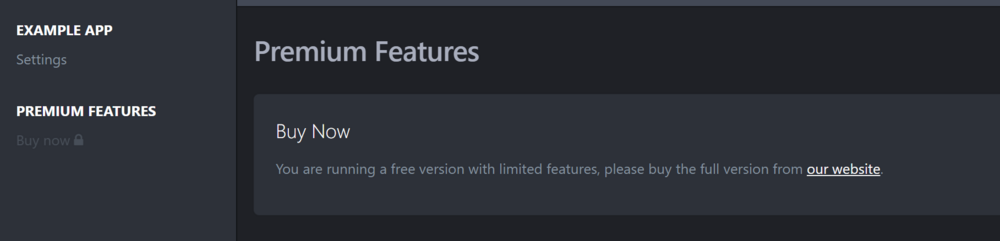
@Lindy I sincerely see other ways for you to do this. As I said earlier, the marketplace is a great showcase that connects developers to IPS customers without leaving here. Having this removed makes life difficult for your clients in trying to find resources quickly without having to go to thousands of developer websites. My idea is, remove the paid market and keep a free market so that developers can maintain this showcase, so they start offering two versions of the product. A free one, where the user could get it directly from the IPS website, and the paid (full) version that would be described within the product and the user would be redirected to the developer's store. Where he would have all financial responsibility for the product. Example 1 Example 2 IPS could go another route, which in this case would be to charge a small fee to developers who publish resources with a limited free version. And keep the market for developers who support the community with completely free resources. Many of these resources are made with good heart and are freely available in the market, such as translations that connect people all over the world, and all of these will be "lost".

-
That's the biggest rewind I've seen from IPS in years of service. 🤯 The marketplace is an excellent showcase for small and big developers to publish their work that would have a potential chance of being bought, you've killed every chance for these products to be discovered. There are many small modifications that enrich the IPS, and now they will no longer have visibility. People will now have to apply for paid service one by one, for features that were already available in marketplace.
-
Looks like it's been fixed.
-
Please, I hope this is really it.
-
Will views now only show to moderators? I handle this feature in a different format on my website, this would be a concern. {$record->record_views}

-
This is extremely important, for the security of hacked accounts or if the user gives up deletion within a period of time. An example of this is google, facebook and twitter. Ways to do this... The administrator has the ability to set the revoke time. During the period of exclusion, the content remains anonymous only with the ability of the moderators to identify. After the deadline, the administrator can set an automatic action for the account (or manually if desired). It would be great to remove this obligation from the administrator having to evaluate everything, if he wants to make everything automatic and use his time for other matters.
-
Good thing they improved the design, I was deeply worried.
-
Great professional! When I looked a little lost he helped me improve the idea. Excellent support and started service immediately as soon as he accepted.
-






