Jump to content
View in the app

A better way to browse. Learn more.

Invision Community

A full-screen app on your home screen with push notifications, badges and more.

To install this app on iOS and iPadOS
  1. Tap the Share icon in Safari
  2. Scroll the menu and tap Add to Home Screen.
  3. Tap Add in the top-right corner.
To install this app on Android
  1. Tap the 3-dot menu (⋮) in the top-right corner of the browser.
  2. Tap Add to Home screen or Install app.
  3. Confirm by tapping Install.

Invision Community Blog

Invision Community has been going strong for over sixteen years now. Many of those who work for us were customers first before they signed away their souls and became staff. This month, we part the mists of time and ask:
How did you first come across Invision Community?
Andy (Developer and man of mystery)
Way back in 1998 I was involved with an online investment club in the UK (of course you were - Editor) and we set up a directory of national share clubs with a threaded “bulletin board”. This was based on a freely available perl script (as everything was back then (did they claim it would always be free? - Editor)) but it just wasn’t up to the job. This was my first exposure to writing web based software as I started customising it for our needs. Soon after, we switched to UBB which moved away from messy layouts and to a more structured forum, topic, post experience. With the release in 2004 of Invision Community 1.3 we switched again and I’ve been working with Invision Community software ever since (and you had such a promising life planned out - Editor).
Around the same time the investment club moved to Invision Community, I also started up two other sites, one for modified cars which was an extremely popular niche at the time and one for my home town of Bedlington which is still running to this date. When developing for Invision Community I find it very useful to have that historical experience and real world insight. A lot of my input when we discuss new features as a team comes as a direct result of this first hand experience.

I was part of this Investment Club when I was younger
Marc (Support and fan of bouncy castles)
My first real experience trying to set up forums/communities for myself was somewhere around 2000 (lol slow down grandpa - Editor). Me and a few friends used to host gaming servers for Return to Castle Wolfenstein, and wanted something for storing stats on, so I set up UBB which I remember thinking was really cool at the time. I never really did much with it other than setting it up for people to use, and remember at the time backing things up on a 1mb hard drive (can't even fit a picture on that these days (need a push on that rocking chair? - Editor)).

Over the years, I ran a few more sites and the software at some point became vBulletin (cant recall when, but just seemed to happen) which I ran through version 2 and late into version 3. At that point I was starting to add things for myself, usually learning from other peoples "FIND abc, AFTER ADD, xyz" which is how we all used to add our own modifications at the time. The thought of an upgrade at the time, I know used to make me cringe.
At some point during vBulletin 4 release, I was becoming a little disillusioned with the whole community software scene in general (other disappointing platforms are available - Editor), and hadn't really used Invision Community before, but ended up using that for a site for my wife.
I was using Invision Community more and more. Purely because it was the site that was most active at the time. This led me to becoming very interested in the new Invision Community 4 release, and was becoming a bit of an social addict on the alpha forum that was released, helping out people who weren't sure of things, and generally asking questions. It was around this point I was asked to join the team here at Invision. And you guys have had to put up with me ever since! My sincere apologies for that. (apology accepted - Editor)

This has nothing to do with Castle Wolfenstein but it's late and I need this blog entry done
Mark H (Support and keeper of Dropbox)
The internet was in its infancy in 1985 (and there goes 80% of our readers - Editor), and I was using BBS's on a dial-up 1200 baud modem. In 1986 I took over a BBS from a friend, running it on a 2400 baud modem and single phone line. It was just a few years later that I got my first look at the real "Internet", using Netscape and now a 9600 baud modem (we just lost another 10% - Editor). At some point I discovered online communities, then only "Forums" with perhaps photo gallery software similar to Coppermine.
My focus was gaming at the time, so I gravitated to forums for such things as (like Marc) Castle Wolfenstein, Doom, Quake, and the first RPG-type text-based games.  I also joined a number of MUD's (multiplayer real time worlds - Editor), and am a (now retired) staff member of the MUD, Ancient Anguish.
I've seen the progression of technology and software which, today, we take for granted. But back then if someone had told me where we would be today, (oh boy, here we go - Editor) I'd have been...... skeptical. Over the years, I've used a verity of "forum software" but well over a decade ago started using Invision Community version 1.3a. Today I am a partner with another person running a site using Invision Community software, and it's the highest-ranking result at Google for its (admittedly niche) speciality.
Since I was using Invision Community, having purchased it at version 2.3, and given that background, it seemed a natural progression to join Invision Community as an employee when the opportunity arose, and I have never looked back! (must be dangerous when reversing - Editor)

Actual footage of Mark listening to an internet podcast back in 1985
Jennifer (Designer and sock fanatic)
Communities, for me, started on AOL. The chat rooms was where I started. I evolved to javascript chat rooms later and eventually into Neopets clubs followed by a community software called Avidgamers and eventually stumbled across InvisionFree forums. It was while I was adventuring through Avidgamers that I discovered an art type called "pixel" art which truly explains my passion.
I was personally never good at it but I found a community called "Eden Enchanted" where all these really awesome pixel artists were. So I started to develop my own Pixel art community (because back then I thought I might eventually get good at it so I should admin). I started on the free community software of "SMF" but envied the ease of use and the beauty of Invision Community (which this awesome pixel community used (they have outstanding taste - Editor)).
After what felt like forever, which mind you was really only like 2-3 months, I bit the bullet and purchased an Invision Community license. I wanted this gorgeous piece of software and I couldn't live with the second rate free stuff anymore (there's our new advert slogan - Editor). So I bought Invision Community 2.3 and delved in (this was back in 2007). I really haven't looked back since. I've been developing skins since I got it and I've made a few mods/applications on it back in the 3.0 days.
I've owned and ran many communities, and roleplays, on Invision Community since. My current community, which has officially been running on Invision Community since December 2013, was transferred from InvisionFree (not my choice but god were we happy when we left).

Ah the memories. Terrible, terrible memories
Brandon (Developer and XP log in screen enthusiast)
Back in roughly 2004-ish I got into customizing Windows XP (specifically I created custom login screens (this was actually a thing? - Editor) but knew a lot of people who did the full alternative to Windows Blinds by hacking dlls) and eventually opened a site to host my work and to allow others to share theirs: bfarber.com.
I used Invision Community v1.3 which was free at the time (2.0 was just getting into beta testing as I recall) and needed a file manager to share my work and to allow others to do the same. I downloaded a free file manager by a modder named 'parkeet' and after installing it on my site (which required those good ole "find X and replace with Y" PHP file modifications) I found that it was lacking in a few areas, so I set out to customize it.
From this desire I taught myself PHP (I was already familiar with HTML, CSS and javascript) and learned how to modify the modification. Eventually, the original author left the mod scene (this was back in the ibmods days for those of you who have been here a while (I have - Editor)) and turned the work over to me. I was hired by IPS back around 2006 and shortly after I came on board I built a new Downloads manager from the ground up as a core offering for the company (Now I know who to assign all Download tickets to - Editor). While I don't run my own site anymore (especially a third party hack site for Windows XP), I do have fond memories of my roots. This was both my start with web development (beyond building a few static HTML pages in the early days of the web) as well as my start with forums specifically.

Never used this, apparently it was OK
Stuart (Developer and owner of large computers)
My story is rather similar to the other ones here (selling this story from the off - Editor). My story starts around 2000 when I started a car club with my brother, being the technical one, one of the first things to do was to set up a forum. We started with Ikonboard (imagine Perl & flat-file databases etc), we swiftly followed Matt over to his new PHP-based project "Invision Power Board" (pretty sure the restraining order prohibited that - Editor). With the introduction of the new licensing structure unfortunately with being very low budget we had to then move over to WBB (er... - Editor). Soon after we moved back to Invision Community (It was the best and totally worth it! (I made him say that - Editor)) and I started to get interested with PHP (up to this point, I had only really used HTML/CSS) and learning how to make some changes that we needed for working with 'members' and tying our website in with our community. -- A really simple SSO type approach where the main website would show the user that's logged in and save data they submit, such as a tech spec and images of their vehicles.
That community is still using Invision Community and in the meantime I've also converted (and run) some other car club communities that I've been involved in over the years. From there, I was asked to start writing SSO (single sign on, you're welcome- Editor) integrations in early 2014 for Invision Community and soon after became a full member of staff.
I still run a number of communities to this day which gives great insight into how end users interact with the software and generally what their feelings of the platform is. Quite often, I'll deploy Alphas to these communities to gather feedback. 

Oh, he said Car Club...
 
Jim (Support and his name is a bit like the lead singer from The Doors)
The first community I really heavily participated in was around 2003. Being a nerd and liking wrestling at the time (Ultimate Warrior FTW- Editor), I joined a wrestling forum that ran a very beginning version of IPB. A lot of time was spent on this website and after becoming a moderator, I really feel in love with IPB.
A sub-forum on this community that was pretty active was around graphic design. Feedback/showcases and competitions with the main point of focus around the wrestling world. This really took my interest and while my interest in wrestling kind of faded, graphic design led to the next step in my life and naturally joining graphic design communities.
After being a part of quite a few graphic design forums (that were ran quite badly (honesty is always good - Editor)) came time for me to try my hand at this. Being technically inclined, I thought I could run a better show. We started out on PHPBB due to cost but after some frustrating moments, I persuaded the move to Invision Community.
Come sometime around 2008 or 2009 and my new passion around cars had reached its peak, I came back onto the forum scene. In 2010, my favorite brand had become defunct so I decided to open a community dedicated to keeping its memory alive. First and only choice was to come back to Invision Community! (Believe early version 3 at the time) This community is still alive and I still have a lot of fun with it!

I've been waiting months to post this GIF
Rhett (Hosting and boasting)
My time on forums started in the late 90's, with a few motorcycle and photography forums I visited often. During the years as time progressed some of these went astray from what the core members wanted, so I started a few of my own Motorcycle forums with the core members following, that lead to other online communities such as Android (is that the cheap iOS knockoff? - Editor) in the late 2000's, and a few other communities. In about 08-09 I had enough of the main platform we were using and made the move to Invision Community (a man of fine taste - Editor). I started digging in, converting all the sites to Invision and haven't looked back (seriously, how do you guys get out of parking spots? - Editor). It's a great product, a great team, that I'm proud to be a small part of.

Instagram in the 80s
Daniel (Developer and owner of a shop and spa in Arendelle)
My Journey started 2003 at an Austrian electronical music forum which was also written in perl.
After years where I was only a member, the owner lost interest and a handful of people(incl. myself) took it over (hopefully you asked nicely first - Editor), but we realized that perl was such a pain to work with (I could have told you that - Editor), so we restarted the whole project with phpBB.
This was also the time, where I got really interested into coding and customizing stuff.
After a long journey from phpBB, to vBulletin(2006), and others, I landed finally here (the best one of course (someone's getting a bonus - Editor))
The forum doesn't exist anymore , I blame facebook and all the european laws, but TBH, I'm just too busy to run one ?

Probably not Daniel
Those are our stories, but we'd love to hear about your first experiences with Invision Community. Let us know below!
 
  • 11,035 views
Are you a member of a busy Facebook Group? Do you find it overwhelming trying to sort through all the posts to find something posted the day before? Are you now missing new posts and only seeing them a few days later?
Facebook Groups are tempting to use as they are free to set up but is this the best decision for the future of your business?
At the beginning with just a handful of members, things may fun fine. But fast forward to where your group becomes busy with thousands of members posting and reading.
Your group becomes overwhelming. You find it hard to locate posts made on previous days and search is of no use. It is getting harder to keep on top of troublesome and spamming members.
Worse still, Facebook's changing algorithms mean that your members are not seeing every post you make. You do as Facebook asks and link your page to your group to find that you must now boost posts to reach your members.
This is getting to be a very common scenario.
Even more worrying are rumours that Facebook is bringing advertising to groups. Will this allow your competitors to target your hard won membership?
Will Facebook roll out the "Discover" tab across all continents? This alone has destroyed organic reach for many brands.
What would you do if Facebook blocked your account for a week? Would your sales suffer?
There is a way to take back control of your membership and secure your business' future. Building your business on your own land is a powerful way of retaining complete control over your community regardless of what happens to Facebook longer term.
Created in 2002,  Invision Community has always adapted to the changing habits of the internet. Our latest product is clean, modern, mobile ready and equipped to integrate with social media. It can power your conversations, website and shopping cart. It features single click Facebook sign in and tools to promote scheduled content to your Facebook page.
We recently wrote why you shouldn't settle for a Facebook Group when building a community.
The benefits of an owned Invision Community are:
You own your own data. Your data is not mined for Facebook's benefit. Make it yours by branding it your way You're no longer boxed in by the Facebook format Seamless integration to your shopping cart for more monetization opportunities Set up permission levels to better control what your members can see Lets dig in a look at some of the tools you can leverage to make the migration easier.
Mobile Ready
Invision Community works great on your mobile. It resizes the page perfectly to match whichever device you are using. You don't need to install special apps or mess with themes. It just works out of the box.

 
Facebook Sign In
The first thing you'll want to do is turn on Facebook Sign In. This adds the familiar Facebook button right on the sign in page and register form. Clicking this logs them into your new community with their Facebook account. It even imports their profile photo so they are familiar with other members.

 
Make use of embeds
A great way to keep incorporating content from your Facebook Group or Page is to use embeds. Post a link to your content on Facebook and it transforms into a rich media snippet.

 
Social Promotions
Share your community content with your Facebook Page. Click the "Promote" button on any content item and you can customize the text and images shared. The promotion system offers a full scheduling system much like Buffer or Hootsuite. This is all built in at no extra cost.

 
Find Your Content
Unlike a Facebook Group, your Invision Community makes it easy to find older content. A powerful feature is activity streams. These are customizable "feeds" much like the Facebook News Feed but completely editable to you and your members needs. You can even make this the first page your members see for easy content discovery.

 
Use Clubs
Clubs allow sub-communities to run inside your main community. Let's look at a real world example.
A FitPro has several different fitness products for sale. Each product is a Facebook Group. She posts daily workouts and answers member's questions.
Using many groups can be very time consuming to manage.
Clubs puts these sub-communities right on the page making it easy to drop in and update.
These Clubs can be private and members invited to join allowing full privacy. This is like a closed Facebook group.

 
We're only scratching the surface of what Invision Community can offer you. You can take back control of your membership and be free from the fear that Facebook will change something that will impact your sales.
We're experts in this field with 16 years of experience. We've helped grow thousands of communities from the very biggest brands to the smallest of niches.
We'd love to talk to you about your needs.
  • 10,358 views
We're thrilled to announce that Invision Community 4.3 Beta is available to download now.
After months of development, over 2500 separate code commits and quite a few mugs of coffee you can now get your hands on the beta release.

You can download the beta from your client area.
Be sure to read the full information on support and service limits that go along with beta releases. You will see this in client area prior to downloading.
If you need a recap of what was added, take a look at our product updates blog which takes you through the highlights.
If you you find a bug, we'd love for you to report it with as much detail as you can muster in the bug report area.
We'd love to know what you think, let us know below.
  • 10,084 views
Cue the music; switch on the dramatic lighting, we've got fantastic news!
We're now running Invision Community 4.3 on here for some advanced testing before we unleash the first beta release.

There's a subtle hint above
If you need a recap of what was added, take a look at our product updates blog which takes you through the highlights.
As this is a pre-beta release, expect some funkiness as we scurry around and tidy up our custom theme wrapper and other areas as we spot them.
If you you find a bug, we'd love for you to report it with as much detail as you can muster in the bug report area.
We'd love to know what you think, let us know below.
  • 13,568 views
We, at Invision Community, love nothing more after a relaxing day writing PHP code, making commits in git and fighting with jQuery to indulge in a little therapeutic "me time".
Given that we've all chosen to work in a nerdy industry (nerds are cool now, we checked) it's no surprise that our down time is spent on nerdy pursuits.
Here's how our team spent their allotted and begrudgingly given free time.
Ryan (Developer who loves of loud noises)
I'm an audio nerd. I go out of my way to hand pick each individual component whenever I'm building a an audio system. My computer, for example, currently has 4 satellite speakers (two Bose, two DCM models which are no longer in production - what is a shame, they are better than any I've ever had), and a sub-woofer (Bose). My living room system is my pride and joy - everything currently runs through a Sony 7.1 channel surround sound system, with a Polk Audio center channel, two Kenwood JL series tower speakers (before JL Audio was it's own thing - each contain a 1.5" tweeter, 5" Midrange, and 12" Subwoofer), two side-surround satellites that need replacing, and will soon have two rear-surround Bose satellites. Each system has specifically been fine-tuned and equalized to my specification.
(Editor: I'd be happy with a HomePod)
The same applies to my guitar amps - I've spent years fine-tuning my amps to perfection, and constantly adjust and tweak various settings to get different sounds.

Still not loud enough, we checked
Jennifer (Designer who loves board games)
As everyone likely knows I do a lot of pretty nerdy things, from cosplaying to video games to play by post roleplaying (collaborative writing) to collecting nerdy-shirts and playing board games but I think one of my more nerdy things would be that I collect socks and intentionally mismatch them (aka I'm Bi-sockual). I collect socks of all shapes and sizes to have for any occasion including socks with capes, leg warmers and more. I have a pretty nerdy collection including a ton of super hero socks, some Power Puff girls and more.
(Editor: Socks with capes. What a time to be alive)

These are clean, we checked
Daniel (Developer who loves amusing English words)
It all started several years ago as a present.. I fall in love with this hobby and got some nice trees from my ex-wife. The collection grew and grew.
That's my "poor mans" bonsai collection.. I once trashed a 1000€ plant, then I sold all other which were worth more then 500€ except one and now I just have these left, but it's enought to keep me busy... and to not cause any sadness if something happens to them...Now i really enjoy trying to create my own stuff instead of taking care of bought stuff.
(Editor: Daniel is hands down the most interesting person I've ever met)

These are legal, we checked.
Brandon (Developer who loves movies)
I haven't done one in a while, but I like to have movie marathons sometimes. For instance, I'll plan to sit down one day and do nothing but watch Star Wars movies (or Harry Potter, or LOTR or whatever) all day in order. You then have to make the ever important decision of putting the prequels first, or after the originals, but otherwise it tends to be a fun experience watching the continuity from one distinct movie to the next (or, alternatively, looking for broken continuity). When I do this, we tend to eat popcorn, milkshakes and candy for lunch and dinner. Most of my family cannot sit still that long and will just bounce in and out during the marathon.
(Editor: I'm in, when do you want me to pop over?)

Spongebob lives under the sea, we checked
Marc S (Tech who loves things that crash)
I guess other than coding, the nerdiest thing I do is watch Formula 1 racing. Whilst this doesn't seem that nerdy, I do go a little overboard with it (as my wife reminds me regularly). This should give you a bit of an idea.
At present we are approaching pre season testing. For those not familiar with formula 1, this is a testing phase before the new season, for teams to test their new cars. This means that the new cars are just being shown to the world for the first time. I will watch for these to see them as soon as they come out, then will take a look at what new parts I can see on the car in comparison to last year. Today for example saw the first glimpse of Mercedes, and at 3pm Ferrari will show off their new car online.
In addition to that, I've been looking at the stats from last year, along with the know changes this year in engines. I have my own analysis of who I think will be the winners and losers, through the changes from last season in drivers, engine suppliers, and even paddock staff. 
Testing starts on the cars on Monday in barcelona. Whilst this is not on TV, I will be keeping myself updated with the latest events on there. My daily routine whilst testing is on consists of.
Testing live stream running throughout the day during testing
Teds notebook in the evening - An show which analyses the days testing
F1 show - Another show which analyses each days testing
Autosport review - Article online with analysis
Sky news site - Usually some good analysis on there
BBC Sport - Again, some good analysis and different points of view
Motorsport.com - Pretty good website for analysis
And of course the formula 1 website itself.
Boring to many (Editor: yep), but I guess everyone has to have a hobby. For me its formula 1 analysis. Would love to have a go in one, but to do so it hugely expensive! (Editor: given your history with crashing things, you'd never get insurance)

John Woo directed this clip, we checked
Andy (Developer who loves to follow instructions)
Following a recent project we worked on for LEGO, I rediscovered a love for the brick with the Saturn V. Since then I’ve also started a nice little collection of cars including the incredibly geeky 2704 piece Porsche 911 GT3 RS with functional PDK gearbox and the VW campervan. My family bought me a few more sets for Christmas and I’m toying (no pun intended (Editor: Puns are my thing, it's the only job I have left)) with building a city with the larger modular sets. I’d say that was fairly geeky but I really enjoy the downtime of sitting down and building. I’m not terribly creative so following a set of instructions and seeing things come together appeals to me more than free building.

Andy did build this, we checked
Right, that's enough of that, everyone back to work!
How do you spend your spare time? Let us know below!
  • 12,635 views
There are many different reasons to build a community. It might be based on your business or a hobby. It may be to talk about your favourite sports team. Whatever the content, the key to success is to engage your community.
We've been helping successful communities for over 15 years. During that time, we've picked up a handful of tips that we are going to share with you today.
Pick one to try this week and let us know how you get on.
Welcome every single member
A great way to make members feel welcome at your community is to post a daily or weekly topic welcoming your new members. Post a short message asking them to introduce themselves and tag new members.
This will encourage them to start a discussion that others can get involved with. It won't be long before friends are made and what may have been a passing member will be part of your core community.

 
Host a "lurker week"
Every few months, host a "Lurker week" where you encourage non-posting members to join in. You can explain the benefits of the community and encourage them to say hello. It's a great way to get people to introduce themselves.
Suzi Nelson pioneered this over at Digital Marketer. She created a lurker themed week and was able to activate 44% of her previously inactive members in only five days!
Spotlight members you want others to model
Often you will see a member do something amazing in the community. Maybe they posted a really good question or perhaps they have been very active and helped many other members.
Create a topic about it. Highlight how and why they are an asset they are to the community. This sends a positive message to other members that these kinds of actions will be celebrated.
You can even turn this into a weekly or monthly ritual where you celebrate the member of the week or month.
Educate about notifications
The notifications system in Invision Community is the best way to get return visits.
Why not put up a pinned topic in a visible area reminding your members how to get the best from the notification system, and asking them to enable them and follow any interesting forums or topics.
This way they won't miss out of any discussion while they're away and as a bonus, they're more likely to return to catch up.

 
Regular Interaction
This is a very simple but often overlooked tip. As the community manager your purpose is to facilitate discussion. Make sure you show up regularly and create new discussions as well as reply to existing ones.
People are more likely to post if they feel they will get a reply. Often your reply will send off a cascade of more interaction as different facets of the conversions come out.
Ask for feedback
Members love to be involved in brainstorms and to share their thoughts. Asking for feedback works on two levels. You get great ideas on how to improve your community. It is also a great tactic to get discussion going.
Taking action on feedback makes that person feel more invested in your community and will champion it to others.
Try and be specific when asking for feedback. Try "How can I increase the level of activity" or "Do you need any articles or topics written on specific subjects". The more specific, the easier it will be for your members to narrow down their thoughts.

 
Be persistent
These tips might give your community a short burst of engagement. To build a long lasting and highly engaged community, you have to be persistent and keep at it.
The key to building a community is simple: put in the work and care about your members. If your members see how much you care and that you are showing up every day, they are more likely to show up too.
Which of these tips are you going to try this week?
  • 10,366 views
As we come close to wrapping up development of Invision Community 4.3, we wanted to let you know of a few smaller improvements we've made to increase engagement to your community.
Email
Despite fancy new things like social media and push notifications, trusty old email has been proven to be highly effective at getting repeat visitors to your website.
It's one of the reasons Invision Community has built in email support for notifications that can be sent instantly, or via daily or weekly digests.
Email should form a part of every community marketing strategy but curating content and building newsletters can often be a labor intensive task.
With Invision Community 4.3 we have added some additional automated email tools to help your users discover more of your carefully crafted content.
Highlight the best content from throughout your community
In 4.2 we introduced the concept of curated content with promotions and “Our Picks”. With 4.3 we’ve taken this a step further and these promoted items will now appear directly in your content related emails. 
This allows for your audience to be enticed back to your community with items that they may not have read but holds interest.

Capture return visits with interesting content
Social media links in email footers
If you look closely in the image above you will also see that you can now optionally include links to all of your social media sites within the footer of all of your outgoing emails.
Both of these new features are enabled by default but can be disabled in the email settings section of your admin control panel.
Email may be as old as the web itself, but it is a very powerful medium to get your audience coming back for more.
Respond to Reviews
We added the ability to leave a review to Pages articles, download files, calendar events and in other areas early on in Invision Community 4. The concept was to allow your members to engage in new ways with your content. Reviews on Commerce store items and purchasable downloadable goods is a great way to inspire others to purchase.
New to Invision Community 4.3 is the ability for the content creator (be that a download file, store owner, etc) to respond to a review. This is a great way to address reviews that may be considered unfair or extreme.

Matt is talking to himself again
One more thing...
Not content with resurrecting the Subscriptions manager from 2009, we've brought back a small detail from previous versions of Invision Community. The famous "this person is typing a reply" indicator in the online list.

 
We can't wait to release this latest update. With new ways to monetise your community, new ways to engage your audience and better promotion tools, we're excited to see how it's going to benefit your community.
 
  • 12,950 views
We've recently spoken about how we've brought our Gallery and Blog apps up to date with interface overhauls to bring them inline with the high standards our customers expect.
Keeping this in mind, we're thrilled to announce that we've taken Commerce right back to 2009.
This needs an explanation.
Way back in 2009, Obama was inaugurated as the 44th President. Minecraft was put into beta, Slumdog Millionaire was released to critical praise and we had a product called IP.Subscriptions.
IP.Subscriptions was a lightweight member subscriptions manager that allowed members to purchase elevated permissions via a user group upgrade.
It was a fine little app. However, on the horizon we had a brand new eCommerce app in development. Then called Nexus, now called Commerce (we took months to come up with that).
It made sense for us to merge the products into one app given they both had overlapping functionality. They both could create packages to promote members to a new user group. Commerce was much more developed as an invoicing and billing system.
Everyone was happy.
Almost.
Commerce has grown to be an incredibly powerful app. It can sell anything from physical products like t-shirts, to digital products such as license keys and it can even manage your hosting set-up.
We use it for our support and billing systems, so we know how robust it is.
While it's an incredibly powerful commerce system, setting up basic subscriptions packages became a little more complex.
Over the past few years we've received a lot of feedback on this.
We've listened.
Commerce Member Subscriptions
We've built a brand new section into Commerce specifically for membership subscriptions.
Let's take a look at this in more detail.
On the front end, there's a very clear and easy to understand page for membership subscriptions.

The main subscriptions interface
Here you can see all the available packages, which one you're currently subscribed to and the upgrade and downgrade options.

A simple way to upgrade
There's several choices for costing upgrades in the Admin CP, here we have chosen to charge the difference between packages.

Get to your subscriptions easily
Your subscriptions are easily found in the user menu.
If the Admin allows, the package you're subscribed to appears as a badge on your profile.

 
There's also a little widget showing the packages which you can drag and drop to the sidebar for an additional prompt for non-subscribers.

 
This gives Invision Community a very clear and easy to understand interface for subscriptions which lives outside of the Commerce store and its packages.
Now, let's dive into the Admin CP
The main engine for this feature is the package list. This is in a separate area within Commerce.

 
The list also shows the number of currently active and inactive subscribers. This links to the list of subscribers.

 
Other than Bob having a total nightmare, you can easily view which members are currently active. The buttons link you to the Commerce invoice and purchase.
If you wish to add a member to a subscription without charging them (you generous soul, you), then that is easily possible.

 
Creating a new subscription package is very straight forward. We've built a new form which is stripped down to the fundamental items you'll need for a subscription.

 
As you would expect, there are several settings to control the system.

 
A few things worth mentioning here:
You can force new members to purchase a subscription on sign-up You can show or hide the profile badge indicating which package they purchased. You can choose to allow upgrades or downgrades. You can choose how you'd like to charge for upgrades or downgrades Thank you to everyone who has provided feedback over the years. We're really pleased to present this new feature and hope that it'll make your daily lives just a little easier.
Let us know what you think!
 
  • 17,763 views
This month, we turn sweet sixteen!

We made our own card this year.
I know, it's hard to believe with our youthful looks and energetic personalities, but it's true. Charles and I have known each other longer than I've known my own children and we still make each other laugh on a daily basis.
Over the past 16 years we've seen a lot of trends come and go.
When we started, AOL dial-up was the preferred method of choice (and probably the only method of choice). Compuserve were flying high and I think I'll stop this walk down memory lane before I turn into my own grandfather and start talking about how things were better in my day.
A lot has changed. We've seen the rise of social media and how it disrupted habits. We've seen MP3 players become iPods, and iPods become iPhones and iPhones become iPads (other digital devices are also available).
It's crazy to think that our company pre-dates Facebook, Twitter and Youtube.

Click on this image to see it unless you have excellent eyesight
We're still here because we are always innovating and adapting. The software we're working on right now is vastly different from the one we started out with. And that is how it should be. We listen to our customers and we implement the great ideas.
Of course, we'd not have lasted a year without our customers. We're genuinely thrilled to still be doing a job we love and serving customers who have trusted their community with us.
Thank you all for choosing us and we're looking forward to the next 16 years.
  • 11,011 views
We have a very important announcement to make!
There are times where you need to get the attention of your visitors. You might be closed on certain days of the year, performing server maintenance (if you are consider our Cloud Plans, they're excellent) or running a competition.
Invision Community has always had an announcements feature baked in, but we felt it could be improved.
Okay, maybe this feature isn't as flashy as some of the others we're introducing in 4.3, but these useful features should make managing your community easier.
The new look announcement feature replaces the old widgets enabling you to display customisable announcements in any of the following locations;
Top of the page Above the page content In the sidebar
The three new announcement locations
Each location has some slightly different features; the page top banner is dismissible by the member if they no longer want to see it, whereas the banner above the content and the sidebar announcements cannot be dismissed.
Most of the original customisable features are still available, including the ability to select which applications and pages show certain announcements and which member groups can see them. Combining this with the three new locations gives you much more flexibility for different types of announcements and we've also included the option to customise the color of the announcement.

New customisable options
 
The announcements have also been improved to contain more information. Rather than showing an unformatted snippet along side the title, announcements can now be tapped to open a modal showing any further details.

Modal showing announcement content
We hope you'll enjoy these useful improvements in Invision Community 4.3. Stay tuned for further announcements (pun intended)!
  • 13,566 views
"No man is an island" wrote John Donne. He wrote that a good 200 years before computers were invented, but it rings true for any well written framework like Invision Community.
The included REST API allows developers to fetch data from Invision Community and also allows data to be added.
This data can be used to power widgets on your website, or to be used within other applications you  are already using in a very simple way.

 
Several enhancements have been made to the REST API for Invision Community 4.3 that we wanted to let you know about.
These changes are developer-oriented, so if you do not use the REST API with your community please feel free to skip this update.
If you would like to learn more about the REST API available with Invision Community, please see our REST documentation.
Search capabilities
As previously noted, you can now perform searches through the REST API. You can perform searches based on keywords, tags, or both, and you can limit and filter results with parameters similar to when you perform a regular search on the site (e.g. to specific containers, returning only results over a set number of comments, or searching within clubs).
Permission awareness
Several REST API endpoints are now permission-aware when combined with Oauth functionality built into Invision Community 4.3. This means that many REST API endpoints can be called using a specific user's access token, and only results that the specific user would normally be able to see will be returned (and/or they will only be able to submit to areas they normally have permission to). 
Ability to search members
While an endpoint has always been available to retrieve (and add/edit/delete) members, the ability to search for members has now been implemented. You can search by name, email address, and (one or more) group(s), and a paginated response will be returned.
Private conversations
You can now start a new private conversation, reply to an existing private conversation, and delete a private conversation through the REST API.
Other REST API changes
You can now specify member's secondary groups when adding or updating a member through the REST API. You can specify the member's registration IP address through the REST API when adding or updating a member. You can now specify other member properties not directly exposed through the REST API when adding or updating a member by setting the rawProperties input field. You can now specify other member properties to retrieve through the REST API through the otherFields request parameter. The REST API now better logs changes to member accounts (so you will be able to more easily identify how a user's name, email address, password, etc. has changed when looking at the member history). You can now retrieve all content a member is following through the REST API, as well as follow a new container/content item, and delete an existing follow. You can now validate an account through the REST API You can now specify a 'perPage' parameter for paginated responses to control how many items are returned per page.  
Most of these changes were directly culled from client feedback and implemented per specific requests. If there are other REST API changes you would like to see implemented please don't hesitate to leave your feedback!
  • 7,310 views
Social media promotion should be a part of any marketing strategy. Curating interesting content from your community and sharing to social media channels like Facebook and Twitter is a great way to drive traffic to your site.
Invision Community 4.2 introduced Social Media Promotions to allow this. 
You hit the promote button, fill out the text to share with each service, click which photos to include and schedule the promotion or send it immediately.
We use this feature almost every single day to share highlights to our Invision Community Facebook page and Twitter.
This feature has had a significant impact in attracting visitors to our blog. This is now a core part of our marketing strategy.
So what's new in Invision Community 4.3?
Facebook Groups and Pages
A  popular feature request was to allow sharing to Facebook groups that you are an administrator of, as well as Pages you own.
Not only that, but we now allow you to share to many places at once.
When setting up Facebook, you can choose which Facebook properties to be used when promoting.

 
When sharing content, you can choose where to share it to right on the dialog.

 
Here you can see that we're sharing to two of three possible places. "It's a secret" is a Facebook Group (which makes it a pretty poor secret).
The "Lindy Throgmartin Fan Club" is my favourite page on all of Facebook. What it lacks in members, it makes up for in enthusiasm.
You may also notice that the Facebook box is empty. Facebook have very strict guidelines on sharing content. They prefer that you do not auto-populate the content.
You can always access the item's original content on the promote dialog, so you can refer to it.
Setting a custom page title
When you share to social media channels, you also have the opportunity to add to the 'Our Picks' page.
We've made it possible to add a custom title for the Our Picks page so you don't have to use the content item title, although this is still the default.

 
Editing an Our Pick
When editing an item shared to 'Our Picks', you now have the option of editing all the data, including the title and the images attached.


The Our Picks page showing the custom title
Thanks to your feedback, we saw several places that we can improve this already popular feature.
We hope you enjoy these changes which makes your social promotion strategy even easier to execute.
I know we'll be making good use of them!
 
  • 9,214 views
What an exciting month we've had!
The big news is that it's all systems go on Invision Community 4.3, our big update to our apps.
We've already talked about Automatic Community Moderation, Emoji, Sign in from other sites using OAuth, blog updates, Scaleable search and interface improvements, Apple Pay (and more) support, Paid club memberships, and other club improvements and massive gallery updates.
Our team take a short breather to discuss their hidden talents, including the ability to solve a Rubik's cube in under two minutes.
In our community management series, we look at how you can brand your Invision Community in just a few minutes without knowing how to code.

This month's featured articles are:


You can see our full newsletter here.
  • 5,992 views
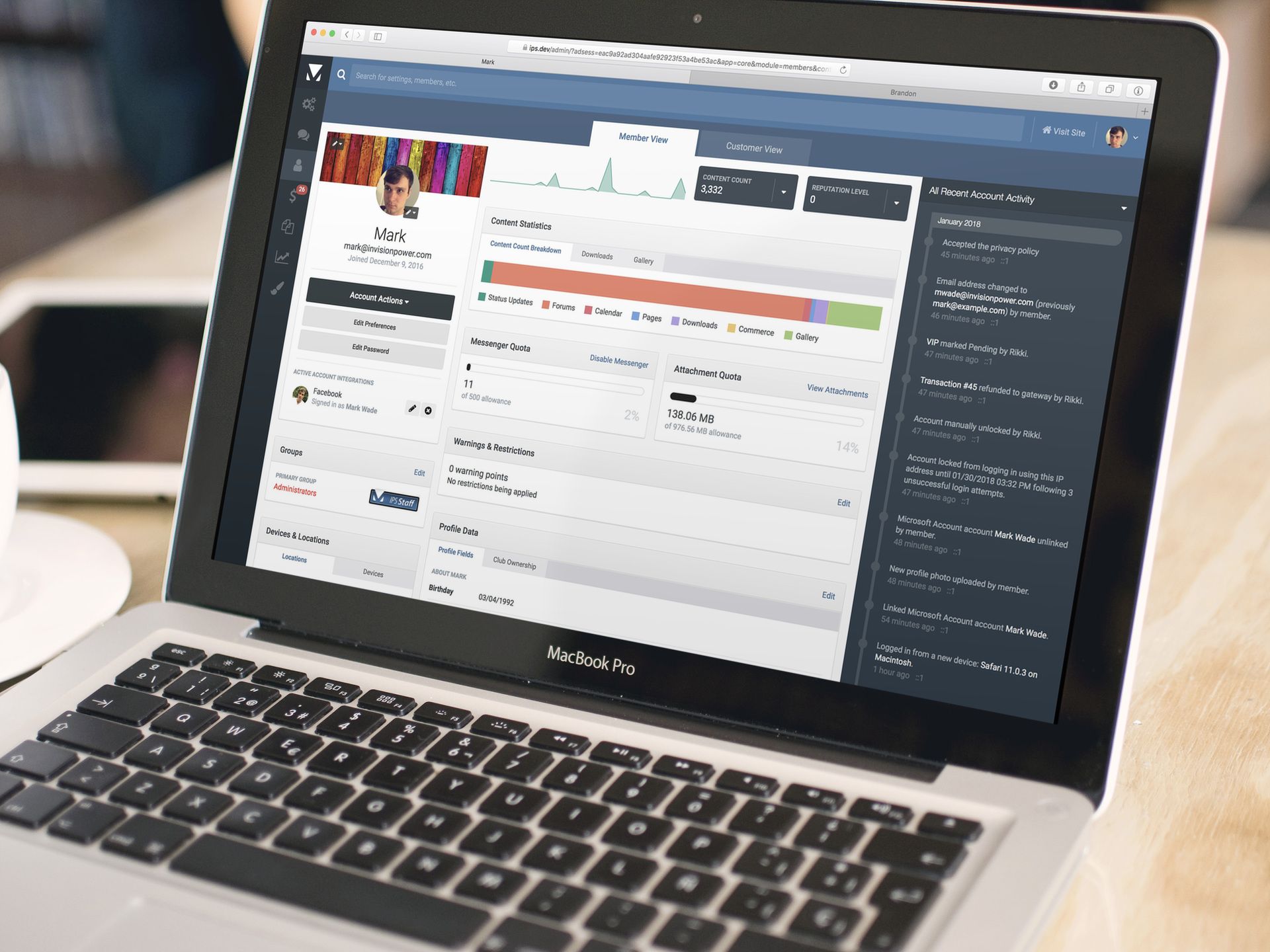
Viewing and editing a member is probably one of the most frequently used features of the AdminCP. With the design unchanged for many years, and the tabbed interface starting to grow unwieldy, it was due for some love. We have not only dramatically improved the design but added many new features.

New AdminCP Member Page
Let's look at some of the improvements:
Easy Toggle between Member and Customer View
If you have Commerce installed, you can now toggle between "Member View" (which shows the screen above) and "Customer View" (which shows the current customer page in Commerce with the user's purchases, invoices, etc.). This makes it much easier to view all of a member's information in one place.
If you don't have Commerce installed, the top tab bar will not show.
Basic Information
The pane in the top-left shows the member's basic information like name, email address and photos. You can now reposition a member's cover photo and crop the profile photo (functions previously not available in the AdminCP). To change the display name or email address, you just click and hold on the information and a textbox appears. The buttons below allow you to merge, delete, sign in as, and edit the preferences or password for the member.
  
Basic Member Information Pane
In addition, this pane lists any social networks the user is logged in with. It shows you the member's profile photo and profile name on that network (for example in this screenshot, it is showing my Facebook profile's photo and name) and for many networks you can click on this to be taken directly to their Facebook/Twitter/etc profile. You can also edit the syncing options for the method and unlink the accounts, features which weren't available previously.
If you have Commerce installed, there is also an indicator if the user has an active subscription.

A member with an active subscription
 
Alerts
If a member is validating, banned, flagged as a spammer, or locked, a large banner will display drawing your attention to this. For validating and banned, it will explain exactly what the status is (for example, if they haven't responded to the validation email yet versus they are awaiting admin approval, or if they have been banned manually versus are in a group without permission to access anything).

A member that has been locked


Other possible alerts
 
Locations & Devices
This pane shows you, on a map, all of the locations the user has been when using the community (based on their IP address) as well as the IP address they used to register and most recently.

IP Address Locations
While the devices tab shows the most recently used devices.

Recently Used Devices
 
Content Statistics
Right in the middle of the profile you can see some statistics about the member's activity. This includes:
A sparkline graph of their recent content. Their content count and reputation count (with tools to manually change or rebuild). A breakdown of the amount of content they have made across all applications. A visual indication of how much of their messenger and attachment storage they have used. If Gallery and Downloads are installed, the existing statistics overview provided by these apps are also available here.
Content Statistics
Warnings & Restrictions
This block shows recent warnings on the account, and also highlights if any restrictions (i.e. content moderation, restricted from posting, or application-level restrictions) are being applied, which previously was difficult to see at a glance.

Warnings & Restrictions Block for an account which has content moderation in effect
 
Account Activity
On the right is a pane which shows all of the latest account activity. While this was available in previous versions (called "Member History") we have made some significant improvements:
The number of things that get logged has been significantly expanded. We now log photo changes, group changes, when a new device is used to login, if an account is locked (by failed logins or failed two factor authentication attempts) or unlocked, password/email/display name changes, when a user links or unlinks a social network login method, initial registration and validation, merges, being flagged/unflagged as a spammer, receiving/acknowledging/revoking a warning, restrictions being applied, two factor authentication being enabled/disabled/changed, an OAuth token being issued if Invision Community is being used as an OAuth Server, enabling/disabling receiving bulk mails, and accepting the privacy policy / terms and conditions, as well as all of the Commerce-related information that is already logged. Much more information is now shown such as who made the change (i.e. an admin, the user themselves, or if it was changed by the REST API or syncing with a social network) and how the change was made (for example, for a password change - if the user used the "Forgot Password" tool or changed it in their Account Settings) and what the data was before and after. This includes being aware of if the change was made by an admin after using the "Sign in as User" tool. You can now filter what information you are seeing to quickly find what you are looking for.
Recent Account Activity
 
Extensibility
The new profile has been designed with extensibility in mind. Third party developers can easily add new blocks our even entire new tabs. Any apps/plugins which are currently adding a tab to the "Edit Member" form will retain backwards compatibility with their tab continuing to appear when clicking the "Edit Preferences" button in the basic account information pane.
  • 15,505 views
Videos are everywhere. We shoot them on our smart phones, share them to social media, messengers and more.
Up until now, the only way to share a video to Invision Community was to use a service like YouTube or Vimeo. If you uploaded a video file it would be treated like an attachment, and if the user clicked the link it would download it to their computer.
In Invision Community 4.3 we've improved this. Now if you upload a video file (mp4/3gp/mov/ogg/ogv/mpg/mpeg/flv/webm/wmv/avi/m4v), it will embed similarly to an image.

Uploading a video
When viewing an uploaded video, if it is in a format that the user's browser and platform natively supports, it will show an embedded player. This will have all of the features supported by the operating system - for example, almost all browsers support fullscreen, and Safari supports Airplay and picture in picture.

An uploaded video
If the video is in a format not supported, it displays exactly as it does now - as a download link.

An uploaded video in a browser without playback support for that format
  • 13,703 views
"The world’s most valuable resource is no longer oil, but data", the Economist wrote recently.
Invision Community software stores a lot of important data that can be leveraged to analyze and improve upon the traffic and interactions with your site.
While there are some various statistics tools in the AdminCP already, we spent some time with 4.3 enhancing and improving upon our existing reporting tools, as well as adding some new analytics tools you may find useful.
Chart Filters
Beginning with 4.3, any dynamically-generated charts in the AdminCP that support filtering will allow you to save those filter combinations for easier access in the future. When you open the Filters menu and toggle any individual filters, the chart will no longer immediately reload until you click out of the menu, and 'All' and 'None' quick links have been added to the filters menu to allow you to quickly toggle all filters on or off.
Here is the 'Sales' chart for Commerce, for example. You will see that the interface is now tabbed.

Commerce's Sales chart
After opening the 'Filters' menu, selecting all of my products named 'test', and saving this filter combination as a new chart, I can quickly come back to this chart in the future.

Specific filter configurations allow you to run reports easily
Note that each user can save their own chart filter configurations independent of other users.
Top income by customer
Speaking of Commerce, we have also added a new chart to the 'Income' page, allowing you to view reports of your top customers. As with other dynamic charts, you can save filter configurations here for easy future access, and you can view the results as a table to get a raw list of your top customers' purchases. Further, we have tidied up the table views for the other existing tabs on this page.

Looks like brandon is my top customer
Reaction statistics
We have introduced several statistic pages to expose information about the Reactions/Reputation system and how your users are interacting with it. For instance, you can now view information about usage of each of the reactions set up on your site.

Yes, I'm definitely confused a lot
You can also see which users give and receive the most reputation (which is the sum of their reaction points, keeping in mind that negative reactions can reduce a user's total reputation score), you can see which content on your community has the most reputation (which might prompt you to promote it to the 'Our Picks' page, promote it to social media, or otherwise continue to encourage interaction with the content), and you can see which applications reactions are given in the most. This could allow you, for instance, to focus more efforts in areas of your site to drive more activity, or to foster activity in areas you did not realize were as active as they are.

Some areas of the community aren't as active as they could be
Additionally, when viewing user profiles on the front end you can now see a breakdown of which reactions each user has given and received when you click the "See reputation activity" link in the left hand column.

Apparently I'm not so much confused, as I am confusing
Tag Usage
Another useful statistic introduced with 4.3 is the ability to review tag usage on your community. As with other dynamic charts, you can filter however you like and save those filter configurations for easy future access.

Not all tags are equal
Trend charts for topics and posts
When viewing the New Topics and New Posts charts, there are now tabs for "New Topics by Forum" and "New Posts by Forum", allowing you to see which of your forums are the most active. Additionally, you will see a trend line drawn on the chart to show you the trend (e.g. whether activity is increasing or decreasing). You can also filter which forums you wish to review, so you can compare your most active forums, the forums that are most important to your site, or the forums that need the most attention/may not be relevant, for instance.

Viewing new topics by forum

New posts by forum, but viewing only a subset of my most important forums
Other Improvements
Some other miscellaneous improvements have been introduced as well, which you may be interested in:
When viewing Member Activity reports, you can now filter by group. We have also added the content count column to the table so you can quickly sort by top posters if this is relevant to the report you are running. Device usage is now also tracked (mobile, desktop, etc.) and can be viewed on a new Device Usage page. Developers: Dynamic charts now support database joins
  • 7,138 views
We're a cool bunch here at Invision Community.
You'll see us around answering support tickets, posting in our community and writing cool new features and hilarious blogs. But, you won't see what we get up to in our spare time.
This month, we asked the question "What is your secret talent?" To which Andy replied "I can't tell you, it's a secret" making me rephrase the question immediately.
Without further ado, lets dive in.
Andy Millne (Developer and owner of quick comebacks)
I can fly a plane, a desire that started as a child being allowed to occasionally take the controls of my parent’s light aircraft. This was then rekindled when the same aircraft fell into disrepair and was in need of restoration and I had the disposable income to take lessons. Unfortunately this is a very expensive hobby and not really one I can still justify though I occasionally fly with friends when possible. I can also fly model planes and helicopters but I’m almost as talented at crashing them as I am flying them. Luckily that skill hasn’t transferred to the real thing.

Editor: Andy lives in a different league to the rest of us.
Mark Wade (VIP Developer and owner of scathing put-downs)
I can solve a Rubik's cube in under two minutes.
Editor: Pfft. Depending on how well the stickers are adhered, I can solve one in under a minute.
Brandon Farber (Developer and owner of impressive tools)
I don't know if I'd call it a talent, but I enjoy woodworking when I have time. I built a swinging day bed for my wife out of a couple of pallets and some misc wood and hardware, I screened in my back patio last year, I built a coffin for a Halloween party, and I built a desk two days before Christmas for my daughter as some recent examples. Right now I'm in the middle of building some planter boxes for our front porch.
Editor: I made an ash tray for my mum in school once. She loved it, even though she has never once smoked.

Desk v1.0
Daniel (Developer, T2 Support and Banksy protege)
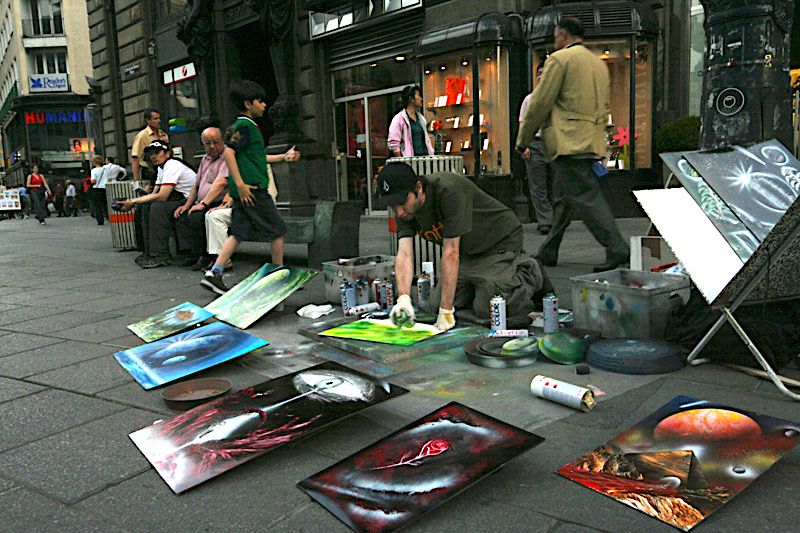
My secret is art. I used to paint art in the streets of Vienna in summer.
Editor: If Daniel needs to work the streets to make ends meet, we should probably give him a pay rise.

Daniel painting

One of Daniel's creations
Jennifer (Designer and owner of cool costumes)
I do custom cosplay for myself and my family and I like to make digital space scenes in photoshop.

Batman was not created by Jennifer
Editor: Our legal department would like to point out that Batman was co-created by Bob Kane.
Ryan (Developer and owner of short hair)
I have an old one I can't really do anymore - I used to be able to do a pretty close Donald Duck impression. I've forgotten how to do it properly, though.
Editor: Interesting thing to share. Ryan has many talents. He can play guitar and bass. He looks a bit like Ethan Hawke. Yet he chose to share the fact he can do a Donald Duck impression.
Marc (Support and owner of things on wheels)
I'm very good on skates (quad skates, not this inline stuff people do now). Me and my cousin used to do freestyle speed skating and half pipe. Stopped doing so once I got to an age whereby I was breaking things more than bouncing. Something I miss doing, so much so that I still have my skates, even though I haven't been on them in about 20 years.

Editor: This is probably not Marc.
That's enough from us. To be honest we were all blown away when we learned that Daniel was a secret street artist and he paints amazing pictures.
We'd love to hear what your hidden talents are. Let us know below!
  • 8,331 views
A picture says a thousand words, they say. If getting those pictures online is troublesome, some of those words might be a little choice.
Gallery has been an integral part of our community suite for just about as long as T1 Tech Mark Higgins can remember (and he has many years of memories). It has seen many interfaces changes as the years have rolled by. The most recent version received a fair amount to feedback on usability.
We've listened. We've re-engineered most of Gallery's key interfaces to make uploading new images to your community frictionless.
Lets take a look through the major changes.
Improved submission process
Submitting images has to be simple or else users will give up and your gallery will be underutilized. We have spent a lot of time simplifying and speeding up the submissions process for your users. The first thing that will be noticed is that the submission process is not presented as a wizard anymore, and the choice to submit to a category or album has been significantly cleaned up and simplified.

 
Choosing a container
Here, I have chosen the category I wish to submit to, so now I am asked if I want to submit directly to the category, if I want to create a new album, or if I want to submit to an existing album.  Choosing one of those last two options will load the appropriate forms to create an album or select an existing album, respectively.
Afterwards, the modal expands to full screen and you will naturally select your images next, and there's a lot to talk about here.
 

Overhauled submission interface
First and foremost, the interface has changed significantly to both simplify the UI and to make actually using the interface easier. When you click on an image, the form is loaded to the right immediately without an AJAX request needed to fetch the form.
In addition to quickly setting the credit and copyright information for all images at once, you can now set the tags for all images quickly and easily without having to edit each image individually.
Images support drag n drop reordering in the uploader here, which means that you can drag n drop images to different positions to control their order. Many users previously would name images "Image 1", "Image 2", and so on, and then set their albums to order images by name in order to control the order the images were displayed in. This is no longer necessary now that you can manually reposition the images.
The default description editor is a pared down textarea box, but you can still use the rich text editor if you wish. The ability to enable maps for geo-encoded images and to upload thumbnails for videos is still supported as well, and those options will show up when appropriate in the right hand panel.
The 100 image per submission limit has also been lifted. You can now upload many more images in one go with no hard limit imposed.
Upon clicking submit images, you will see the typical multiredirector to store all of your images, however you will notice that it processes much faster than it did in 4.2 and below.
Better submission control
Administrators can now configure categories such that can accept only images, only albums, or both. This means you can now create categories that cannot be submitted to directly, and you can create categories that albums cannot be used with. This is a feature that has been oft-requested since the release of 4.0, and we are happy to report that it will be available in our next release.
Additionally, album creators (if permitted) can also now create shared albums.  When you create a new album, you can now specify (under the Privacy menu) who can submit to the album, with your available options being:
Only me Anyone Only the users I specify Only the groups I specify Prior to 4.3, albums have always been owned by one user and only that user could submit to them. Invision Community 4.3 will open up albums so that anyone can submit to them, dependent upon the album creator's preferences and needs.

The choice is yours as to who can submit to your albums
New image navigation
Another major change with Gallery 4.3 is that clicking an image now launches that image in a lightbox to view it and interact with it. This lightbox is context-aware, allowing you to visit the next and previous images in the listing, whether that is a category or album listing, or the featured images or new images listings on the Gallery homepage, for example.
 

The new image lightbox
Firstly, I will note that you are seeing the image here with my mouse cursor over the image area, exposing the title, tags, and some various buttons. When you mouse away from the image those overlays fade away to highlight the image itself better.
As you can see, you can navigate left and right here to view the next and previous image in this context, and you can otherwise interact with the image as you would have if you had visited the older-style image view page (including the ability to rate, review and comment).
The new Gallery release will introduce a new advertisement location in the right hand column to allow you to show advertisements, even in the lightbox.
If you follow a link to a full image view page, the lightbox will automatically launch when the page loads, still allowing you to interact in a familiar manner. Additionally, if you move through enough images in the lightbox to reach a new page (for example, if you click on the last image in the album listing and then click on the next image button), the listing itself behind the lightbox will update for easier usability if the user closes the lightbox.
One final thing to note is that the interface has been made more mobile friendly, particularly through the introduction of swiping support. You can swipe left and right in the lightbox, and in image carousels, to see the next and previous images.
Notable performance improvements
As we mentioned at the beginning, we recognize there is a balance between performance, usability, and attractiveness, particularly with regards to an image Gallery. For that reason, we have made Gallery's performance a major focus in 4.3, and have implemented some changes that bring with them a noticeable performance improvement.
Firstly, we have adjusted the software to only store two copies of an image (in addition to the original), instead of four. In previous versions, we stored a thumbnail, a small copy, a medium copy and a large copy of an image, all of which arbitrarily sized and designed to best meet our layout needs without showing an image too large or too small in a given space. We have simplified this vastly by storing a slightly larger "small" image, and storing a large copy. Diskspace usage is reduced dramatically as a result, and bandwidth usage is actually lowered as well since only two copies of an image need to be delivered to the browser instead of four.
Next, we have implemented prefetching of the 'next' and 'previous' pages when you launch the lightbox image view. This means that when a user navigates to the next image in the lightbox, it loads immediately instead of waiting for the content to be fetched from the server. From a UX perspective, this provides a much snappier and responsive interface, making users more apt to interact with the site.
We have additionally sped up the submission process as previously mentioned. The order of execution for certain events that must happen during submission has been moved around a bit, resulting in a faster experience for the end user actually submitting the images.
Because we know the details matter, we have implemented other smaller improvements as well. For example, the link to rebuild images in the AdminCP previously resulted in a redirect process that rebuilt the images while you waited, but now a background task is launched so that you can continue with what you were doing while the images get rebuilt in the background.
From start to finish, the Gallery UI and UX has been touched on and improved, and we hope you enjoy these improvements when you start using the new version.
  • 17,632 views
One of the advantages of running your own community is that you get to control the branding.
Branding is important as it defines and re-enforces your customer's experience. Branding also promotes recognition, it sets you apart from your competition and it provides motivation and direction for your staff.
Invision Community has many built in tools to change the look and feel of the community. If you are a savvy coder, you can dive right into the HTML and CSS templates to create truly unique themes. You might also look at an off-the-shelf theme from our marketplace. There are some great themes you can use as a base for your branding.
Easy Mode Editor
One tool that is often overlooked is the Easy Mode Editor. It's a great way to make some simple changes to reflect your brand's identity. It offers a great deal of control, but I want to show you how you can brand your community in just a few short minutes without knowing a line of code.
The presentation below takes you through creating a new Easy Mode theme, and using the Easy Mode Editor on the front end to dynamically change the colours. You'll also learn how to upload your logo.

How to brand your community presentation
Email Branding
Another area to consider is outgoing emails. Invision Community leverages emails for notifications, as well as the bulk email system in the Admin CP. These emails look fine by default, but adding your logo and primary color re-enforces your branding.
The presentation below shows you the few simple steps needed to brand your emails.

How to brand your emails presentation
As you can see, Invision Community offers simple tools to change the look of your community without knowing how to code.
We hope you find this useful. If you have any questions, please let us know below!
  • 40,439 views
We released news of Clubs just under a year ago for Invision Community 4.2 and it has been the best received feature to date.
Clubs opens up new ways to run your community by allowing members to create sub-communities away from the central forum area.
Since the feature was released, we've collated an immense amount of feedback on the feature. Here's what we're improving for Invision Community 4.3.
Paid Club Memberships
If you have Commerce installed on your community, 4.3 adds the ability for members to create paid clubs. Users wishing to join the club will be required to pay a membership fee (which can be one off or recurring) which will be paid to the club owner, minus any commission you want to keep for the site. You can choose which groups can create paid clubs.

Paid Club Settings
If enabled, the club directory will show the price for membership in each club.

Club directory with paid clubs
The process for joining works a little differently depending on the type of club...
For open clubs, the user will immediately be prompted to pay the joining fee. Once they have paid, they are added to the club as normal. For closed clubs, the user will need to request to join as normal. Once they have been accepted to join the club, they will then be able to pay the membership fee, after which they'll be added to the club. For private and read-only (a new type in 4.3, which we'll talk about below) users have to be invited to join the club Public clubs have no membership, and so cannot be paid.
Joining a paid club (a closed club in this screenshot)

Paid club after request to join has been accepted

Paying for club membership
Club leaders can also waive the membership fee, allowing certain users to join the club for free.

Waiving fee when approving request to join

Waiving fee when inviting members

Waiving renewal fees on an existing member
If a member fails to pay their renewal charge, they are moved into an "expired" state. The club leaders can see the status and renewal date for all members, and use the filter tools to just see active or expired members.

Club members management
Paying out membership fees works just as it does with paid files in Downloads. Users receive the amount as account credit. If enabled, they can then request a payout of this via PayPal or a manual payout method you want to use.

Viewing an invoice in the AdminCP where some payment has been given to a member

Viewing account credit with options to withdraw funds
 
 
Club content throughout the community
Currently content in clubs is only visible within the club itself. In 4.3 a new setting allows you to show the content from clubs throughout the community - for example, if a club contains a forum, that forum can show in the main forum list.
 
Club forums showing on main forum list
This is a single toggle: if enabled, all content from clubs that each user has joined will show throughout the community, appearing below the normal categories/etc in that application.
 
 
New Club Type: Read Only
In addition to Open, Closed, Private and Public, we have added a new club type in 4.3: read only. In a read only club, everyone can (without joining) view everything in the club, but cannot participate unless they are invited by a club leader.
 
Following
Users can now follow a club, and will then receive notifications about all new content in the club - the same as if they followed every content area in the club.
 
List View
In addition to the current grid layout of clubs, there is a new list-style.

Clubs List View
The admin can choose which views are available and what the default should be.
 
AdminCP Approval
You can now filter the list of clubs in the AdminCP to clubs requiring approval and approve clubs from within the AdminCP.

Approving clubs in AdminCP
 
Deleting Content Areas
Club leaders can now delete content areas within their clubs. This can be useful if, for example, the leader added a club feature by mistake.
Content areas can only be removed if there is no content within it, or if you have granted club leaders the ability to delete content in their clubs (since they would be able to empty it).

Ability to remove features from clubs
 
Other Minor Tweaks
You can now set per-group the maximum number of clubs a member in that group can create. A member invited to join a club can now delete the invitation if they do not want to accept it (rather than just ignoring it).
  • 14,889 views
Often it's the smaller changes that can make a big improvement in the day to day use of your community. We have made quite a few updates that will make your community flow better for you and your members.
Update files in Pages Media Manager
Previously when you wanted to update a file in the Pages Media Manager you actually had to upload a new file and then change the references to that file to the new one. This was obviously not so great.
When you select a file there is now a replace option. We're not sure why we didn't do this earlier but as they say: better late than never!
Tag Input when Optional
On communities with tagging enabled, we have often noticed that people tend to feel the need to tag everything even when it's not really necessary. If your site is about cars you don't really need everything people post to be tagged "car" as that's sort of obvious.

 
So to make it a bit clearer that tags are not required we have hidden the input field behind a Choose link so people have to actively choose to tag if they really think it's necessary. We hope this cuts down on tag noise. If tagging is required then the normal input box will always show.
Google Invisible reCAPTCHA
The new Google Invisible reCAPTCHA allows you to prevent bot registrations without the need for all users to fill out the normal captcha process. As often as possible your members will never notice there is even a captcha happening on the page. It's another way to make the flow from guest to member easier.
Whitelist for Spam Service
The spam defense service Invision Community provides works very well at combatting spam signups automatically. The issue is sometimes it works too well!
Let's say you are at work and all your colleagues share the same public IP. You are excited about your new community (of course you are) and your whole office tries to register at once. Our spam service would probably see your office IP as suspicious with that sudden influx of traffic and may even block it.
The new whitelist tool allows you to specify IPs and email addresses to always allow on your community regardless of what score our spam defense gives it.
Reply as Hidden
Sometimes it would be nice if your moderators could reply to an item with a hidden reply. You might want to leave a note for other moderators or perhaps you have a database and want some replies public and some private.

 
If you have permission you will now see a hide toggle when replying. This works in all apps anywhere you can reply to a content item and have hide permission.
Exclude Groups in Leaderboard
You can now exclude certain groups from being ranked in the Leaderboard. This is very useful if your staff or RSS bot tend to get all the reputation points. By excluding those groups you can focus on your actual member participation which is a better reward to encourage engagement.
On a personal note this will make me very sad as I usually win reputation counts on our site. But, being such a great person, I am willing to make this sacrifice for you.  
Complete Your Profile Order
The Complete Your Profile feature introduced in version 4.2 has been a great success for clients. We have heard many reports of increased engagement as the system can walk people through the sign up process. Not having a big, scary registration form is always a huge plus.
For 4.3 we added the new ability to change the order of completion for your members. This will allow you to stress the items you really want them to complete first and move your less important profile options later in the steps.
Mapbox Support
Mapping has been a feature of Invision Community for quite some time but up until now has been limited to Google Maps integration. For 4.3 we have added support for Mapbox which is based on OpenStreetMap data. The maps are beautifully designed and bring greater flexibility with an alternative look. The groundwork is now laid for some exciting new features still to come!
Some of our existing customers also found Google policies and pricing structure incompatible with their own internal policies which this addition addresses.
  • 10,238 views
Stripe is the most popular payment method in Commerce, allowing communities to take payments by card securely with easy setup.
While there's no doubt that credit cards are still the most popular methods of making a payment, digital innovations such as Apple Pay are increasing in popularity.
For 4.3 we've deepened our integration to support some of their latest features.
Apple Pay & Google Pay
Apple Pay allows users to pay quickly with their iPhone, iPad or Mac (with Safari and either a paired iPhone or using the MacBook Pro with Touch ID) using the card details stored on the device, authenticated with Touch ID or Face ID.
Apple Pay
Google Chrome (on desktop or Android devices) supports a similar feature allowing users to pay with card details stored in their Google account with Google Pay, or stored in Chrome itself.
Paying with card details stored in Google Chrome
 
Both of these features are now supported through Stripe in Invision Community 4.3. Setup is simple - for Apple Pay you simply need to verify that you own your domain by uploading a file you obtain from the Stripe dashboard, and nothing special is needed for Google Pay - and then create the payment method in the AdminCP. Stripe does not charge any additional fees for either option.
Commerce will automatically hide the option if the user's device does not support either method.
3D Secure
Also known as Verified by Visa, Mastercard SecureCode, and other brand names, 3D Secure is a system that is used to verify a customer's identity before purchase is completed and transfers the fraud loss liability from the merchant to the cardholder bank in case of fraudulent disputes.
After the user has entered their card details, they are redirected to their bank's website and asked to provide additional verification.
Our integration with Stripe in 4.3 now supports this process. A new setting allows you to choose if you want to use 3D Secure just for cards which require it (i.e. cards which would decline the payment if 3D Secure is not completed) or for all cards which optionally support it as well.
 
Amex Express Checkout
American Express cardholders can use Amex Express checkout to pay by using their American Express login rather than providing their card information.  This is also now supported through Stripe in 4.3.
Amex Express Checkout
 
Alipay, Bancontact, Giropay, iDEAL, SOFORT
These are popular payment processors internationally (Alipay is popular in China, Bancontact in Belgium, Giropay in Germany, iDEAL in the Netherlands, and SOFORT in several European countries).
The checkout experience is similar to PayPal with the user being redirected to the appropriate site, authenticating the payment, and then being redirected back.
All of these are also now supported through Stripe in 4.3.
 
Dispute/Chargeback Handling
A dispute (also known as a chargeback) occurs when one a cardholder questions your payment with their card issuer, which causes the funds, plus a fee, to immediately be taken from your account until evidence is provided that the transaction was legitimate.
Anyone operating an online store knows how frustrating this experience can be. In 4.3, we've made dealing with this situation a little easier. When a dispute is created, Commerce will now mark the transaction as disputed, which will immediately revoke any benefits from the purchase (for example, if it's for a subscription that moves them into a different group, they will be placed back into their original group; if it's a Downloads file, they won't be able to download it any more; if it's for a physical item that hasn't been shipped yet, the shipping order will be placed on hold).

Disputed Transaction
All transactions with currently open disputes can be accessed quickly from the transaction list. The transaction page will show you the status and reason for the dispute, and links to your Stripe dashboard where you can respond.
When the dispute is resolved, the transaction screen will be updated, with either the transaction being marked as refunded if the dispute is lost, or going back to paid if the dispute is won and the funds returned to you.

A dispute that was lost

A dispute that was won
 
 
Radar
Radar is Stripe's suite of fraud detection tools using machine learning and customisable rules to help detect fraudulent transactions.
Stripe will automatically blocks transactions is considers highest risk already. However, for "elevated" risk transactions, while Stripe would alert you of them so you could review them, Commerce would process the transaction normally.
In 4.3, Commerce will place any transactions which Radar reports as having an "elevated" risk level on hold for manual review, so you can decide whether to approve or not before the funds have been captured.
In addition, the transaction details screen for Stripe transactions now provides some additional information about Stripe's checks on the transaction, including the Radar risk level, if the CVC check passed, and if the billing address provided matches the card's billing address.
If a fraudulent transaction does make it through, you will now have the option to indicate this when refunding the transaction to help Stripe's anti-fraud systems learn.
  • 10,864 views
Search. Let's be honest, it's not the most exciting feature in the world. You ask to find things, and it shows you what it found.
Simple, right?
It's a lot more complex than that. After numerous tests, a few surveys and many discussions with customers, we've decided that there is no "right" or "wrong" way to search. Invision Community is used on many diverse communities and each has its own needs.
The bigger the community, the more of a headache search can be when you start hitting frustrating technical limitations of the database.
Happily, we've addressed all of these issues with Invision Community 4.3 and added a few extra treats.
Searchable Products and Pages
Products in the Store and custom Pages will now show in search results.

Store product in search results
More Customisable Search Experience
One of the most difficult challenges with search is anticipating the scope of the search. If, for example, you're looking for something you know you've seen before, you want the search to be narrow - matching only the exact terms you provide, probably only matching against the title, in the specific area you know where the content is located. If however, you're just doing a general search about a particular subject, you want the search to be wide - matching any of the terms you enter, anywhere in the community, in both titles and content.
For a while, Invision Community has had the option to choose which areas to search, defaulting to the area of the community you're in (for example, if you're in a forum, only that forum will be searched by default). We also provide a number of suggestions on the search result form (in the form of "Didn't find what you were looking for? Try searching for..." followed by a number of options) which adjust the scope of the search.
In Invision Community 4.3, we have a new interface for the quick search feature which makes some of these options more visible so you're more likely to find what you're looking for on the first search.

New Search UI
Along these lines we have also:
Changed the default "Search In" selection to "Everywhere", regardless of where the user is. Added a new setting which controls whether the "Any words" or "All words" option is checked by default. Added a new setting which allows you to adjust how much of a boost results receive for a match in the title, versus the content body, when searching both content titles and body. You can set default and/or operator.

New Search Settings
Elasticsearch
In Invision Community 4.3 we are adding native support for Elasticsearch, a third party search engine which offers a number of benefits over searching your MySQL database:
Elasticsearch, being designed and indexing data in a way optimised for search rather than data storage, is generally able to match and sort by relevancy with better accuracy than MySQL. Elasticsearch is generally faster. One user performing a search doesn't slow down other users trying to read and make posts at the same time (when searching MySQL, the data has to be "locked" from changes when the search is being performed). It scales very well with very large datasets, and runs very easily on multiple servers. Elasticsearch understands language. If for example, you search for "community", it will also return results which contain the word "communities", understanding that these are the same. Supported languages are Arabic, Armenian, Basque, Brazilian, Bulgarian, Catalan, Chinese, Czech, Danish, Dutch, English, Dinnish, Drench, Galician, German, Greek, Hindi, Hungarian, Indonesian, Irish, Italian, Japanese, Korean, Latvian, Lithuanian, Norwegian, Persian, Portuguese, Romanian, Russian, Sorani, Spanish, Swedish, Turkish, Thai. Elasticsearch supports custom functions on the scoring algorithm. In our initial implementation this has allowed us to add settings to allow you to control the time decay (allowing newer results to show higher) and author boost (allowing content posted by the user to optionally show higher in results). Unlike with MySQL, there is no minimum query length and a very small list of stop words.
Elasticsearch Settings
When enabled, both searches and activity streams will be retrieved from Elasticsearch. The core_search_index database table in MySQL will no longer be populated, so you will not have to store the data twice.
To use Elasticsearch, you can either install it yourself on your own server, or use any of the many excellent hosted Elasticsearch options. The minimum required Elasticsearch version is 5.5.
REST API
Developers and those looking to integrate Invision Community features into their own sites will be pleased to learn that we've extended the REST API to accommodate searching. 
  • 13,046 views
Good news!
We've taken Invision Community's Blog app by the scruff of the neck and dragged it into 2018!
There has been a growing trend for imagery to play a very important part of a blog entry. This update reflects that.
Introducing Grid View
We have added a new view that shows your blog entries as cards with space for a cover photo.
We've very visual creatures, and a good photograph can entice readers into your blogs to read more. 
As you would expect, you can disable this mode from the Admin CP for purists that prefer the traditional list format.

 
For those who's sense of adventure runs deep, the new grid mode allows you to show a list of latest blog entries as the blog home page.

 
This puts valuable and engaging content right in front of your audience.
This list view persists when you view a blog's entries giving a consistent feel.

 
Viewing an entry
We've given the blog entry page a little make-over by featuring the cover photo above the content. The slimmed down blog details bar allows your audience to focus on the content.

 
Default Cover Photos
You may have spotted that entries without a cover photo have a rather fetching geometric pattern in different colors.

 
This is a new micro-feature of Invision Community 4.3. Currently, if you do not have a cover photo on a blog, profile or event, the bar is a rather sad shade of black.
The new default cover photo feature makes it much more cheerful. Here's what a profile looks like.

 
Much better.
Here's a few technical details for those that love to know all the things.
The grid view feature can be turned off in the ACP (but doing so will make me very sad) You can choose the default home page view: Latest Entries or List of Blogs. You can still view a list of blogs when you're on the latest entries page. This choice is stored in a little cookie (GDPR friendly, it doesn't contain any identifying data) so navigating back gets you the last view you chose. Let us know what you think! We love it, and hope you do too.
  • 13,021 views

Account

Navigation

Search

Search

Configure browser push notifications

Chrome (Android)
  1. Tap the lock icon next to the address bar.
  2. Tap Permissions → Notifications.
  3. Adjust your preference.
Chrome (Desktop)
  1. Click the padlock icon in the address bar.
  2. Select Site settings.
  3. Find Notifications and adjust your preference.