Everything posted by Matt
-
Invision Community 5: Tagging Reinvented
Added a note on your account, thanks! 😂

-
Invision Community v5: An update, and next steps
I'm unsure how you've drawn that conclusion, I've explained the next steps and why we're doing it that way. It won't be "another year or so" before downloadable betas are available. Current status: The tagging blog has just been posted (it takes a fair while to get the videos and other assets together 😅 ) We found a few issues in v5 with IN_DEV off, which have been fixed this week and just need reviewing and testing. It's likely the limited alpha demo system will be ready next week now. I'll keep you updated.
-
Invision Community 5: Tagging Reinvented
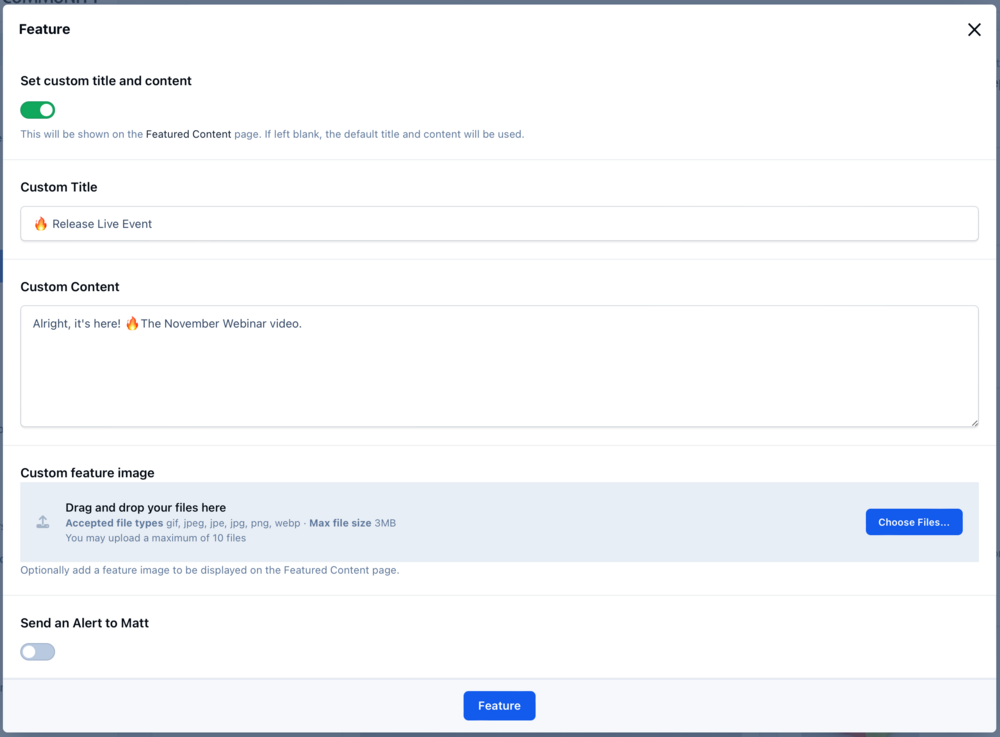
Invision Community v5 takes a fresh approach to tagging and content discovery. It overhauls the concept to bring content across different sections together with a beautiful new tag page. Tagging is a powerful concept but underused with Invision Community 4 due to overly complex interfaces in different areas of the suite, a confusing open tagging model option and no real benefit in content discovery beyond a simple list of content items. A driving force behind Invision Community 5 is the question of how we can help time-pressured community members find the content that most interests them. Invision Community has robust taxonomy through forum and category structures, but what about content in less visible areas such as Blogs, galleries or Events? How can we bring those together to homogenise the type of content and focus on the content itself? Taxonomy via tagging across all applications in the community suite is the answer. However, we needed to re-approach how tagging was implemented in the Invision Community to bring our new vision to life. Out with the old The current tagging system is implemented loosely, allowing open tagging, which is more akin to hashtags than high-level taxonomy. Allowing forums, albums, and blog categories to define their own tags turns tagging into more of a status label, which does nothing to help bring disparate content together. In with the new With a new focus on taxonomy and content discovery, we set about rebuilding tagging for Invision Community 5. The UI to tag items is the same, but now each defined, globally available tag has its own page with cover image and ability to feature items within that tag page. A uniform approach to different content items in the UI breaks down the barrier between content types and focuses solely on the content. Tags featured on its page are automatically displayed on the community Featured Content page. Finally, tags can now be followed, allowing your community to get a daily or weekly digest of all new tagged items, bringing people back to read more of the content they love. Let’s take a closer look In Invision Community 5, all tags are defined in the Admin Control Panel. The ability to use open tagging and per-node tags has been removed, but don’t worry—the upgrade system will offer conversion for those tags. Once defined, the tags are available for all content types and feature on a dedicated new tag page. This page features cover photos and more information on the tag via a description. Content from across your suite will be displayed on this page. If a single piece of content has multiple tags, it will appear on every relevant tag page making it easy to have content in multiple areas. If you want to permanently or temporarily feature individual content, perhaps your latest news or product release, you can do so right from the tag page. Featured content will show on the community’s Featured Content Page. Blurring the lines Now that we have an attractive and focused page for each tag, we can start to blur the lines between applications and, indeed, forums and categories, offering a new way to organise content. For some communities, the need for multiple forums to categorise content is diminished, and instead, tagging can be used to separate and find content from across the community. Tags can be featured in the menu system, offering new ways into your community for new visitors, regular community members, and even those who visit daily. Invision Community 5 is fearless in challenging past decisions or streamlining features to make them stronger and more focused. Our new approach to tagging takes a vague and underutilised concept and pushes it front and centre in any content strategy. How will you use it in your community?
-
Invision Community 5: Tagging Reinvented
Invision Community v5 takes a fresh approach to tagging and content discovery. It overhauls the concept to bring content across different sections together with a beautiful new tag page. Tagging is a powerful concept but underused with Invision Community 4 due to overly complex interfaces in different areas of the suite, a confusing open tagging model option and no real benefit in content discovery beyond a simple list of content items. A driving force behind Invision Community 5 is the question of how we can help time-pressured community members find the content that most interests them. Invision Community has robust taxonomy through forum and category structures, but what about content in less visible areas such as Blogs, galleries or Events? How can we bring those together to homogenise the type of content and focus on the content itself? Taxonomy via tagging across all applications in the community suite is the answer. However, we needed to re-approach how tagging was implemented in the Invision Community to bring our new vision to life. Out with the old The current tagging system is implemented loosely, allowing open tagging, which is more akin to hashtags than high-level taxonomy. Allowing forums, albums, and blog categories to define their own tags turns tagging into more of a status label, which does nothing to help bring disparate content together. In with the new With a new focus on taxonomy and content discovery, we set about rebuilding tagging for Invision Community 5. The UI to tag items is the same, but now each defined, globally available tag has its own page with cover image and ability to feature items within that tag page. A uniform approach to different content items in the UI breaks down the barrier between content types and focuses solely on the content. Tags featured on its page are automatically displayed on the community Featured Content page. Finally, tags can now be followed, allowing your community to get a daily or weekly digest of all new tagged items, bringing people back to read more of the content they love. Let’s take a closer look In Invision Community 5, all tags are defined in the Admin Control Panel. The ability to use open tagging and per-node tags has been removed, but don’t worry—the upgrade system will offer conversion for those tags. Once defined, the tags are available for all content types and feature on a dedicated new tag page. This page features cover photos and more information on the tag via a description. Content from across your suite will be displayed on this page. If a single piece of content has multiple tags, it will appear on every relevant tag page making it easy to have content in multiple areas. If you want to permanently or temporarily feature individual content, perhaps your latest news or product release, you can do so right from the tag page. Featured content will show on the community’s Featured Content Page. Blurring the lines Now that we have an attractive and focused page for each tag, we can start to blur the lines between applications and, indeed, forums and categories, offering a new way to organise content. For some communities, the need for multiple forums to categorise content is diminished, and instead, tagging can be used to separate and find content from across the community. Tags can be featured in the menu system, offering new ways into your community for new visitors, regular community members, and even those who visit daily. Invision Community 5 is fearless in challenging past decisions or streamlining features to make them stronger and more focused. Our new approach to tagging takes a vague and underutilised concept and pushes it front and centre in any content strategy. How will you use it in your community? View full blog entry
-
Invision Community v5: An update, and next steps
As we find ourselves with our toes over the precipice of June; signalling the half way point of the year, I thought it's a good time for an update. Apologies southern hemisphere. Invision Community 5 has been in alpha testing for a while, and a small group have found a good number of bugs, and offered their thoughts and suggestions, some of which we've implemented. During this time we've wrapped up the new editor, a boat load of UI improvements and more. We are now ready for the next stage, which is to give our alpha testers their own Cloud v5 to test with. This opens up testing for the Admin CP, and all areas without using developer mode. v5 has a lot of changes to how CSS, JS and resources are managed. They are now built when we build the apps, and should never need rebuilding. We also store compiled templates now, so lots of slow eval() calls are no longer needed. In brief testing locally, it has made the entire platform super-fast. We are choosing to use a Cloud v5 to test with, rather than a traditional download for two reasons. The first is that using our hosting platform means we don't have to chase down issues with PHP, MySQL and unix versions which can be time consuming in the early stages. The second is that we're still writing the new build code, so we can't actually produce a versioned zip just yet. 😂 But fear not, downloadable versions will be coming at some point. We're aiming to have this alpha demo system ready next week, so if you want to help alpha test, drop a comment below. I want to keep the first round (1-2 weeks) fairly small or it becomes overwhelming sifting through the feedback and bugs but please do register your interest. In terms of functionality, we're wrapping up the tagging changes; I'd expect a blog on that next week. The final parts of the Pages app are coming together. We even tested an upgrade of this site to v5 to see how the Pages built pages looked, and much to all of our relief, it looks great with just a few CSS classes needing updating. It's been a long journey - and a little longer than we'd first hoped but we're getting closer to betas when the fun really starts. We're really proud of v5 and we hope you like what we've created.
-
IC5: Theme Tools
Theming has been a core component of Invision Community since its inception, and this continues with Invision Community 5, but in a very different way. If you haven't already seen Ehren's blog on the new Theme Editor, please do take the time to watch it. The all-new theme editor reduces the complexity of theming by taking complex concepts like HSL CSS variables into a pretty slick UI that almost any Invision Community owner can use to personalise or brand match to any existing properties. Ehren will talk more on the technology behind the theme editor in another developer blog soon, but the short version is that the CSS framework has been completely rewritten from scratch with a new approach to how CSS classes interact with page elements. Of course, if you're reading this, you'll want to know what tools you have for more advanced theming in v5. Custom templates and template hooks Invision Community 5 merges the concepts of custom templates and template hooks into a single feature. In the past, you could edit templates directly and create theme hooks. With Invision Community 5, these features are replaced with the new custom template system. You can create new templates, which you can use in other custom templates via the short tag: {customtemplate='key'}. You can also hook into specific areas with a custom template allowing you to insert code before the opening tag, after the opening tag, before the closing tag or after the closing tag. CleanShot 2023-10-19 at 13.17.16.mp4 For example, if you wanted to add something custom before the reply editor when viewing a topic, you would target that area like so: The result, when viewed on the front end, is as follows: These hookable areas are defined by a special tag that we add to the core templates. We would expect a lot of requests through the beta release and will likely create a request form so we can process them. We will try and accommodate as many areas as possible. While direct template editing is no longer possible in Invision Community v5, the new custom template and hook system allows you to add new functionality, while the new CSS framework makes it easier to target and change elements without the need to edit templates. We also added a suite of new development tools to enable you to target menus, data attributes and other areas where developers commonly had to edit templates before. The good news is that now custom templates are not built on top of our 'master' template engine; they are virtually upgrade-proof and do not require manual merging. Theme Designer Mode Those who create themes for others have some extra tooling to enable them to build truly custom themes. Even though the theme editor has space for custom CSS, there is always a need for CSS that your customers cannot edit, and Invision Community 5 has a special area for that once Theme Designer Mode has been enabled. You also can add any ad-hoc javascript for when you want to hide elements or provide custom interactions. As direct CSS editing and direct template editing are no longer possible with Invision Community 5, there is no need for a 'sync' tool to copy from the filesystem. Conclusion The new front-end theme editor is now the primary way to manage themes. This is where you upload logos and toggle settings. As you can see, theming may look different in Invision Community v5. Still, the new custom templates, theme designer tools and UI extensions provide a lot of functionality that means you can do nearly everything you did in v4, but often in an easier way. I'm sure you'll have many questions, so please add them below, and we'll do our best to answer them for you.
-
Introducing Invision Community 5's development tools
When planning Invision Community 5, we knew we had a unique opportunity to hit the reset button. It's hard to believe, but how we work with the framework has been the same since 2013. The priorities we held a decade ago no longer align with our current vision. The landscape of modern frameworks has evolved, and we have adapted accordingly. When we initially designed the Invision Community 4 framework all those years ago, our goal was to create an open development platform. We aimed to empower you with the ability to extend virtually every function we built, granting complete freedom to shape our UI, workflows, and functionality according to your needs. However, over the decade, we have realised that this freedom has inadvertently become a prison. While monkey patching allowed the overloading of any method we had written, it came at a significant cost. Even the slightest change to our original method signatures could break an entire community, forcing you to update your applications. Ironically, the more we strived to enhance our framework, the less stable your applications became. We dismissed requests for proper workflows like extensions, webhooks, and event listeners, urging you to rely solely on method overloading, often having to copy chunks of code just to add a few lines of your own. Invision Community 5 represents a much-needed reset. It is a moment to reassess everything we know about extending frameworks and construct definitive pathways and workflows that serve you better. Our aim is for you to continue crafting exceptional applications that bring fresh functionality to the Invision Community while protecting the integrity of our core functionality. Change can be intimidating, but let us embrace this opportunity to bid farewell to outdated and fragile tools and pave the way for a collaborative future with precision-designed resources instead. In the coming weeks, we will delve deeply into the new development tools offered by Invision Community 5, but today, I wanted to give you a brief overview of what's to come for code development. We will do a near-future entry on creating themes with Invision Community 5. Out with the old Monkey patching via code hooks was the primary way to add functionality to Invision Community. However, it meant that we could not update our code base without risking breaking many popular applications, a situation that will only get worse as PHP starts to lock down type hinting and casting. Furthermore, IDEs have a tough time working out relationships between classes requiring special tools to create alias files to allow full use of many advanced tools of PHPStorm and other editors. Finally, monkey patching relied on heavy use of eval() which is not a very efficient PHP method. Monkey patching has been removed in Invision Community 5. Your IDE with Invision Community 4. Your IDE with Invision Community 5. Template hooks, as you know them, have also been removed. I only mention this now as they often go hand-in-hand with code hooks to add items to menus, data-attributes to blocks and CSS classes to many areas. We will do a more thorough blog on theme editing soon, but we still retain a way to hook into key areas. In with the new We will write a series of developer blogs to look in more detail at the new systems, but here is a quick overview of the new tools and a brief description of what they are capable of. Content Menus We have removed much of the menu logic for content items and comments from templates and created a simple, extensible way to add links to commonly used menus, such as the item moderation menu and the per-post 'three dots' menu. You no longer need a template hook to perform such a basic task. UIExtension This framework provides you with an easy way to add CSS, data-attributes and even templated HTML into specific areas within nodes and content items/comments. A common reason to create template hooks was to tweak the CSS classes or add data-attributes for client-side scripting. In the same way that we've stripped menus out of templates, we've removed the content item badges (pinned, hidden, etc.) and into the UIExtension making it easy to add your own badges to this area without the need for template or code hooks. Finally, UIExtension can add form fields into Invision Community content forms. Event Listeners The easiest way to describe this is like MemberSync but for content (items and comments), members, Commerce invoices and Commerce packages. Do you need to run your code each time a forum post is made? Not a problem. Do you need to run your code when a topic is locked? Perhaps when an item is viewed? All this and more is possible via the new listeners. The advantage is that you don't need to copy chunks of our code when overloading a single method in a hook. You write your clean code in an object-specific listener. What else? We have also undertaken a long overdue code clean-up. Every single file has been updated to update return types and function signature types and to use aliases instead of fully qualified names (for example, new Url() instead of new \IPS\Http\Url()). Many methods have been removed from the Content classes and moved into traits. Likewise, many interfaces are now traits to reuse code properly, reducing the behemoth-sized classes. Elsewhere, all the search indexing logic that was entwined in content and node classes has now been moved to the extension system, further reducing the noise and volume of key classes. A Quick Recap Generic broad reaching tools such as monkey patching and template overloading have been removed. New precision tools with a specific use-case have been created. There are less opportunities to overwrite and change our UI and functionality but easier ways to extend and create new functionality. The future We have worked hard on these development tools to ensure that most of what you do now can be achieved in Invision Community 5. We have had input from various stakeholders, including those who regularly create modifications for Invision Community to ensure our new tools are fit for purpose. Through the alpha and beta testing phase, we want your feedback, and we will listen to your suggestions. We cannot promise that you can do everything with Invision Community 5 that you currently do, which is intentional, but we are confident that you can still hit all the major beats. We want to protect our UI and functionality a little more but encourage you to build amazing new functionality to work alongside Invision Community 5. Together, we will shape the next era of Invision Community.