SheffieldForum
Clients
-
Joined
-
Last visited
-
-
-
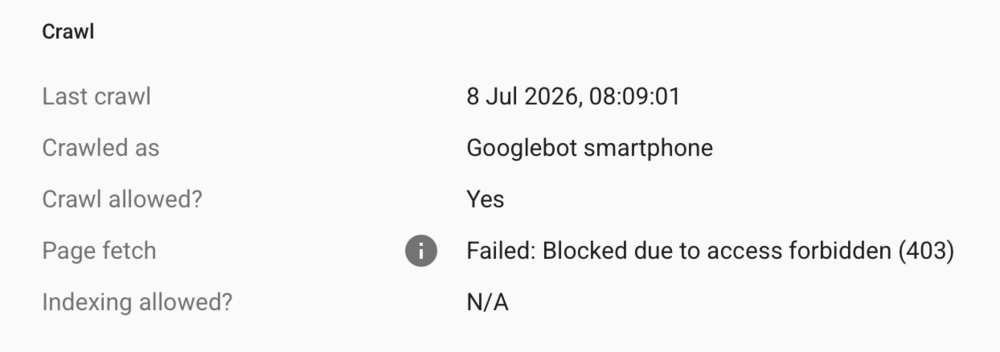
Can confirm this is happening for my site too, across numerous URLs. I suspect this may be due to attempted crawls of URLs during last weekend's DDoS attacks? Requesting recrawling/validating the fix seems to work for some of them.
-
 SheffieldForum reacted to a post in a topic:
Many Gateway Time-outs Error 504 Happening with IC Cloud
SheffieldForum reacted to a post in a topic:
Many Gateway Time-outs Error 504 Happening with IC Cloud
-
-
Thanks for the hard work Matt and team. Hopefully a resolution soon!
-
SheffieldForum reacted to a post in a topic:
Many Gateway Time-outs Error 504 Happening with IC Cloud
-
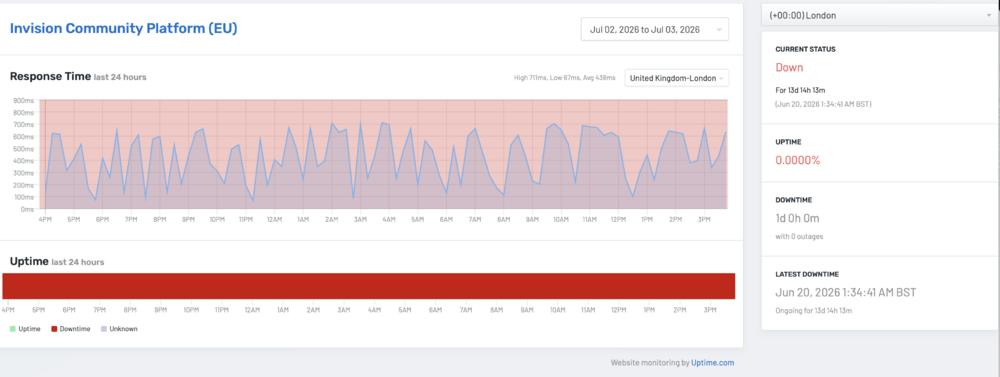
Yes. My site is fully down, and has been for about 8 hours. I did get an initial response to the ticket, but nothing for seven hours despite a couple of polite chases in the ticket, which is disconcerting. I am sure the team are working hard to resolve it. And notice it is a holiday for them in the US too, so there's limited support this weekend 😬! But hopefully there's some resolution sooner rather than later as I'm getting constant complaints from users and we could do without losing the site for the whole weekend, these several hours have hit us hard so far. As an aside, I did check the status pages before submitting a ticket this morning, but I'm not sure how accurate it is for the EU as the uptime detector seems to suggest the platform has been down for the last couple of weeks?
-
-
-
Claude and Gemini tell me they are blocked from accessing pages on my site. ChatGPT is more hit-and-miss. It sometimes reads it, sometimes doesn't.
-
-
-
-
I know I am probably in the minority here, but I would like to see us have a setting to actally ENABLE specific AI bots to our sites if we wish. There's a few reasons, but mostly that AI answers are here to stay now, and with the decline of SEO results we need some visiblity in AI results. We're basically at the position SEO was in very early on and there was lots of 'Google is stealing our web traffic' type alarmist rhetoric back then, with lots of people blocking search engine crawlers from their sites. But those who got on board early with allowing crawlers benefited the most and quickest early on. SEO is slowly dying, forum traffic in general is reducing... and we're actively blocking the replacement (as much as it isn't in a completely ideal place yet). Plus, for us as a ~25 year old community with millions of posts and topics, lots of it used for historical research and cited in peer reviewed studies, etc, I feel that for communities like ours it is important to be an authoritative voice and included in those conversations. We're not in it only for the money (yes, of course that's nice), but I feel more of a custodian of a quarter century of social history (as well as the historical discussions well beyond our operating period) that should be referenced. In fact, it is an operational risk for a site like mine to not be referenced in future outputs, and without being an authoritative voice in future we may not be able to operate to our full potential in a few years. Again, I appreciate this may not be the majority view(!), but I do think we should be allowed the ability to enable it for our specific sites should we choose.
-
Thanks Jim, I assumed that would be the case.
-
As an update: I believe you can do this through Apple for Business, but only for Apple devices/emails. You still need the SPF/DKIM/DMARC set up - but that seems to be it? The URL to set up Apple for Business: https://business.apple.com/ Is there a way for Cloud customers to do this, I wonder?
-
-
Can confirm I can replicate this issue too.
-
 Mick79 reacted to a post in a topic:
Invision Community November: auto-split large topics, welcome email customization and more
Mick79 reacted to a post in a topic:
Invision Community November: auto-split large topics, welcome email customization and more
-
media reacted to a post in a topic:
Invision Community November: auto-split large topics, welcome email customization and more
-
Ody Mandrell reacted to a post in a topic:
Invision Community November: auto-split large topics, welcome email customization and more
-
Would be nice to have a setting in the ACP for cloud customers, etc.
-
Ahh, excellent - thank you!
-
Sorry, I'm still struggling to find any settings for this anywhere?
-
Q: How do these work? Are the in the Mod Panel, or admin settings somewhere?
-
Q) Where can we enable/upload the profile photo gallery? Are there recommended image sizes/formats?
-
Thanks both! Thanks. I was confused as to whether this is something I do via Invision Communtiy support as my DNS is all currently pointed to the cloud instance here, or whether I did it at my registrar? Probably a bsic question, but I wanted to get itright before progressing! 🙂
-
If on cloud I wanted a subdomain to point to somewhere else (i.e. a Shopify instance or external blog), what's the best way of doing this?