Ehren
Invision Community Team
-
Joined
-
Last visited
Everything posted by Ehren
-
Thanks. I’ve unfortunately come across a few Safari bugs in iOS 26 today. I’ll do my best to fix these, but some are caused by the rendering engine in Safari. Hopefully Apple will address these in the next iOS update.
-
Good spot, I’ll have that sorted for you shortly 🫡
-
Yes, that feature hasn’t been added yet. It is on our roadmap for a future update.
-
Android automatically makes splash screens based on the manifest file, there isn’t a separate splash screen image like iOS. Instead, it makes its own using a combination of your site name, theme-color and your app icon. By default, we don’t set a theme-color value since it prevents iOS from having a full-screen layout in the PWA, so I believe you’d need to assign one in the web app settings if you want Android splash screens to work (although I could be wrong here as I haven’t tested it myself).
-
Hi @bradl This isn’t a built-in feature so it would need to be custom made. I’m not sure I’ve ever had to do this for a client so unfortunately I don’t have any tips beyond that.
-
Amazing! Thanks for reporting back - I appreciate it! 🎉
-
Safari 16.4 and 16.5 would crash when color-mix and currentColor were used as values of the color property. This was fixed by 16.6 (so 16.7 never should have had this issue), but I’ve tweaked the code to ensure it works in all versions 🙂
-
Sends me a DM with a list of those pages and I’ll take a look for you 🤝
-
What issues have been happening with 16.7?
-
That’s just the way floated content works unfortunately. There’s no way to say “if there’s only 40px remaining for the text, stop floating this image” The image will simple float, and the text will squash itself into the remaining space. I’d recommend to not use the float feature in that situation, and instead use an image which spans across the entire width.
-
I've just taken a look at that page however it seems as though you've removed the colours, so the issue is no longer happening for me 🙂
-
Open the Theme Editor (via the user menu at the top of your community) and you’ll see the Custom CSS area 🙂
-
This CSS will do it. Editing the post and removing the black color is the best solution, but this will fix any areas which you haven't done yourself 👍 [data-ips-scheme="dark"] .ipsRichText [style*="color:#000000"] { color: inherit !important; }
-
No need for a back button 🙂 Swiping from the left to the right side of your iPhone will take you back (the same shortcut which is used in other apps, including Safari).
-
Hey, In an attempt to keep things a little more consistent, there aren't any built-in classes for reversing the badge colours like that. But you can make your own by setting the background and color values to your own: .ipsBadge--adriano{ background-color: #000; color: #fff; }
-
I haven't been able to reproduce this despite solely using the PWA on my iPhone, so it seems to be fairly isolated. With that said, there is a JS function which can potentially affect the scroll position on iOS PWA's. I've just tweaked the code for this in an attempt to fix it. It's a tough bug to test since I can't reproduce it myself, but I'll aim to have this implemented in 5.0.11 and I'll wait to hear back from you both to see if it's fixed 🙂
-
That implies the PWA didn’t install itself correctly. When a browser logo exists, it means it’s just a browser shortcut/bookmark on your Home Screen. It seems Android has a few requirements when installing the PWA. In your Web App settings in the ACP, make sure you’ve uploaded an app icon and enable the manifest settings (you can keep them blank since the system will autofill them behind the scenes). You’ll also need to be on https but I assume most sites are doing that naturally these days.
-
Just to confirm, your OS settings for the Invision Community app (or whatever your PWA is called), looks like this?
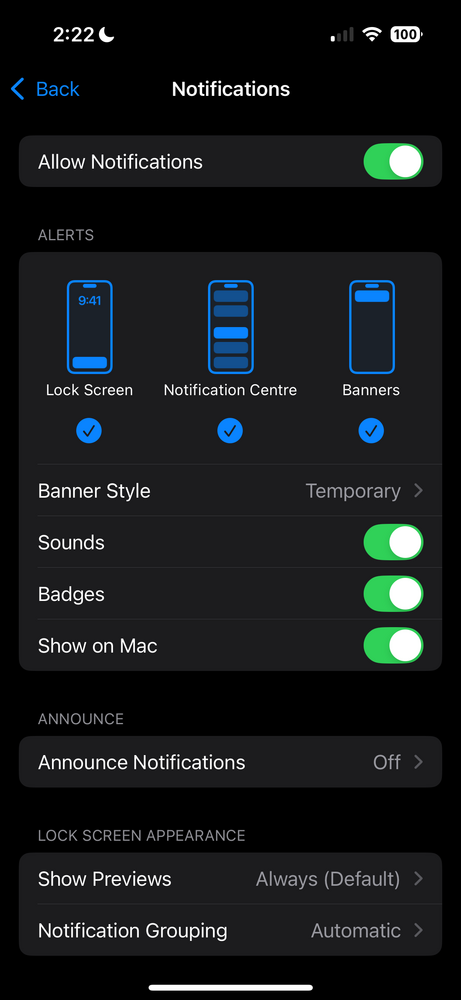
-
This is an Android/iOS limitation unfortunately. The “Allow push notifications” dialog is only allowed to be shown once. After that, there’s no way to display it again so the only way to adjust the permissions is via the settings app on your device.
-
Push notifications need to be enabled from the Notification settings page. There’s a block at the bottom of that page with more information.
-
I was able to reproduce this issue using an iOS 16 simulator and I have fixed it locally. I spent the day testing the modal across a bunch of devices and it now works on all iPhones and iPads running iOS 15, 16, 17 and 18. It'll be patched in the next software update 🤝
-
Are they located in the EU by any chance? It seems like there may be some restrictions implement by iOS due to the DMA which causes the app to open in the browser instead of its own window. Also make sure they’re using Safari since other browsers may not support PWA installation on iOS. I’ll look into this using an iPadOS 16 emulator as it’s working correctly in iPadOS 18.
-
I’ve just tested your site and it’s loading in a dedicated web app for me.
-
Send me a DM with your URL and I’ll take a look for you 👍
-
This was fixed yesterday and will be patched in the final 5.0.10 (non-beta) version 👍 iPadOS 16.6 is quite outdated but it should work fine on that version. Haha I’m glad you like them, they were fun improvements to work on! Thanks for the feedback!