Saurabh Jain
Members
-
Joined
-
Last visited
-
This community is not available MOSTLY AFTER PAYMENT IT RESTARTS ALL THREE COMMUNITIES SHOWING SAME
-
then it does not show video ...earlier we can add cod ein editor...
-
when i paste playlist link it get converted only into first video link ealier we used to ember a vode... how to set up paly list embedding in the new Invsion 5
-
Yes it was - it seems to be issue in hoem page.....I am not able to edit that page
-
The site after upgrade showing white page
-
Hello Invision Team & Community, I’m based in India and would like to request support for Razorpay, a leading Indian payment gateway, within Invision Commerce. Razorpay is widely used here for subscriptions, donations, and product payments, and having it available as an integrated gateway would make Invision more accessible for Indian users. 👉 My questions: Is there any plan to add Razorpay as an official payment method? If not, would the Invision team consider developing it in future updates? Has any community developer already built a Razorpay integration that works with Commerce? This would be very valuable for all Indian Invision users, and I’d be happy to provide more details or assist in testing. Thank you for considering this request. 🙏
-
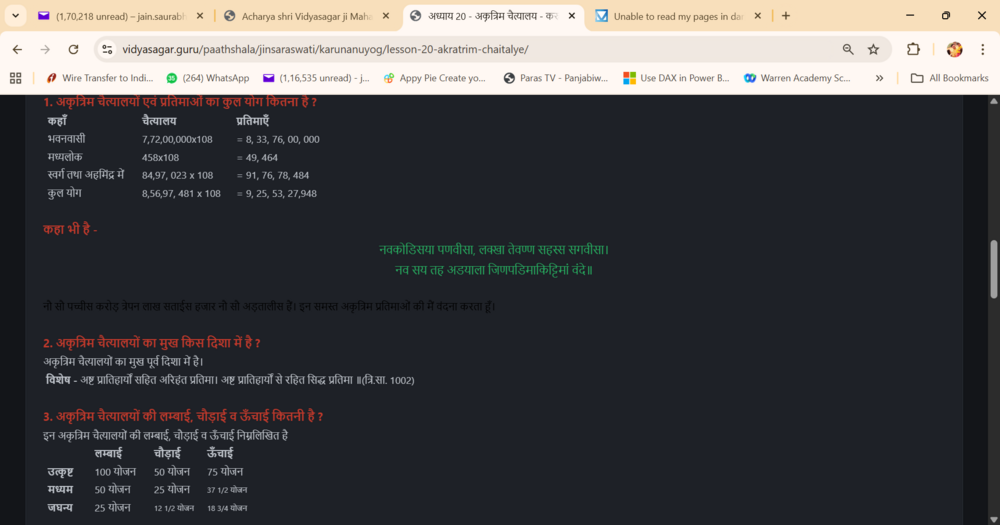
This seems to work at 90% of pages.... not sure why couple of them does not chnaged ..... but all that was black turned white automatically \ Just one line did not turned white in dark mode ... rest all converted
-
 Saurabh Jain reacted to a post in a topic:
Unable to read my pages in dark mode - what can be the best solution
Saurabh Jain reacted to a post in a topic:
Unable to read my pages in dark mode - what can be the best solution
-
Thanks @Ehren can you tell where is the custom css option in v5
-
any way to make it correct with automation or programing script
-
https://vidyasagar.guru/paathshala/jinsaraswati/prathmanuyog/lesson-1-mahamantra-namokar/ An exampole in drak mode the text remains black I just clicked edited and saved then I was able to see in dark mode so above link may not be right example to showcase here is the second example https://vidyasagar.guru/paathshala/jinsaraswati/prathmanuyog/lesson-2-jaindharm-ki-prachinata/
-
vidyasagar.guru It has been more then two hours , the website is down kindly look into the same
-
On one site I ahve been asked many times witha quiz challenge as an admin I want to post fats but it ask me .... on other site there is no such challenge sene however i am not bale to mange spam abd I dont knwo how to do since 2010 I am running that community but could not get right support as well