


OptimusBain
Clients
-
Joined
Everything posted by OptimusBain
-
Thanks a lot Stuart. It worked.
-
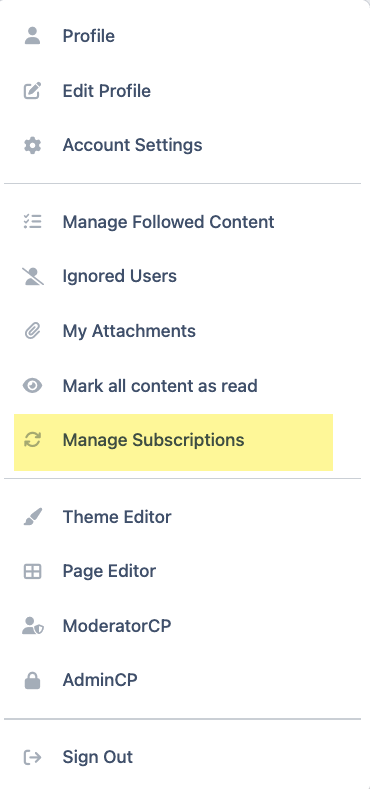
Hello, I wonder if something can be changed in the user's frontend menu options under the username. Why? I can only see "Manage Subscriptions" and my site doesn't use subscriptions — it used products with renewals. So what happens? Many members contact me and tell me that they cannot manage their subscriptions to the community because they can't see it there :( and to be honest, it makes sense. You register the community, to pay a monthly subscription, you see the menu under your profile, and you see "Manage Subscriptions"... Oh nice, I can manage my subscription here. NOPE. Error! You can't. This is causing me a lot of trouble, because my community's members are "subscribed" but they are paying a renewal fee for the products. Why isn't Manage Purchases" there too? Why is it ignored? How can I have "Manage Purchases" instead of Subscriptions there? Thanks
-
Will there be any improvements added to the Commerce module in version 5?? Thanks
-
Sorry, the tag option to mention other users is free to use by everyone. Please don't get mad at me! I did nothing wrong. I asked you about what you were doing, and you never replied. That's why. I won't tag you again, don't worry! If only you had replied to my previous message and other members about this, I wouldn't have tagged you. Have a nice day.
-
Same here! Self-hosted clients are being IGNORED and put aside again. And there is no excuse now; we don't need any special server to run the courses. It's just a premeditated decision to brush aside self-hosted clients. I've been waiting for a long time for a course/LMS in IPS. @Adriano Faria was creating one, but there is no news from him. And now that IPS has released it, I can't use it because I'm not a client using its expensive cloud version.
-
Hello, Can events in the calendar be user-group specific? I want to use the events, but I want to schedule different events for different user groups. Each user group has different privileges to discuss specific topics in my community. I cannot organize an event for everyone because those who do not belong to user group X will not understand what is being explained to other user groups with higher privileges. Is that even a possibility? I can't see that. Thanks
-
That would be perfect in an ideal world. But perfect scenarios do not abound. IPS is clearly focused on cloud clients, that's a fact after reading the latest posts and announcements from IPS staff. As I suggested, filters need to be applied. When we read the comments, it's quite obvious that things could and should be done differently.I am just suggesting what they should do in order to prevent more discomfort from happening. I, am many others, are not interested in reading about great or not so great features if I can't even dream of them. They should be separated from the main self-hosted streams. If this forum was my community and I had read all the comments I've read, I would have turned red, yellow and purple. I would have taken action to at least prevent the discomfort. I don't see IPS caring about any of these comments and opinions because they have already made up their minds about IPS future and it's just a matter of time that other big things happen; and self hosted clients won't probably be on the right side of the equation. You just need to read the comments to read the sentiment of self hosted clients. I can't do anything about it, unfortunately. Those who can (IPS) already made up their minds.
-
It's simple. Since you already know every cloud client of yours, announce these cloud features only to them. Use IPS features and filter those user groups out. Do not announce cloud features to self hosted clients. You are creating discomfort, your clients are not happy (myself included), you just need to read the answers. Use the IPS features to display these announcements to the proper user groups. Create a forum channel only visible to cloud clients, I do that all the time with my community. Your software can do all that and more, just use it the right way. I just don't know why you can't. Maybe you don't want to though.
-
I agree 100%. They have already started to put consider self-hosted clients as inferior by releasing features that are only available to cloud clients. @Jordan Miller I wonder why you are talking about the new features in a global community topic when most of those new features are only for cloud clients. I am sure IPS has cloud-member-only forums. When I read the first post in this topic, I felt disappointed. I am sure many self-hosted clients feel the same way.
-
Jordan, why don't you say what you have in store for your clients instead of playing a quizz game about what we think you might be working on? I know you want engagement, but if you read many of your client's posts, there is a lot of people out there that think IPS is not listening to them, myself included. I would recommend that you were clear and transparent about what new features you are working on. It won't help engaging members, but it will make many of us Happy because we will know what you are working besides working on a shop to sell t-shirts and not using the Commerce module.
-
I agree. Creating a shop outside IPS says a lot about Commerce and what they are doing, well, what they are NOT doing. Crazy! Now IPS is focused on selling t-shirts instead of listening to it's clients @Jordan Miller . You are wasting your resources on selling a bunch of t shirts instead of listening to your clients, those who pay you every year to get your support. This is the last thing I expected to see 😞 IPS is a software developer, not a apparel store.
-
I agree. I hope IPS focuses on fixing known issues for the abandoned Commerce module and adding new suggested and needed features.
