


KT Walrus
Friends
-
Joined
-
Last visited
Everything posted by KT Walrus
-
No. I haven’t coded my Invision app yet as I’m waiting for IC5 GA. I have contracted with Tighten to develop a Laravel app for the backend of my new IC5 app though. This should be finished in the next few weeks. The backend will manage the SQLite databases. Each user that visits my site will have the backend generate the SQLite database for just that session. Dynamically generating these SQLite databases are lightning fast and contain only the data the user has permission to see. You can check out this site that uses Laravel and SQLite in the meantime: https://pinkary.com
-
You could start with SQLite for caching data locally on the server. If settings, compiled theme templates, etc. were stored in SQLite, all those queries that are done on every page load would be lightening fast (even faster than fopen). Because SQLite PDO driver is built into PHP and creating a SQLite database is simply touching a file on the server you don’t really need any admin settings to deploy (you should connect to the database in WAL mode though). You could also use SQLite for the Database or Filesystem Storage Methods for files as a fast, easy to use database (as opposed to the local file system). Backing up SQLite is simply copying the database file (using sqlite3_rsync tool if database is live). Also, SQLite would be a better alternative for sessions than Redis (for installations on a single server) Everything about using SQLite is so easy and so fast. In my Laravel prototype, I was able to eliminate aggregate data about content (like stored in the forums table) to show this data like unread counts, last replier, etc. When you aren’t worried about doing 200 queries per page load, you can really simplify the SQL that you write to get the data for showing to a user and not worry about caching it for subsequent page loads. So, even if you don’t want to support storing everything in SQLite, you could make use SQLite to really eliminate many network round trips to the MySQL instance in the Invision Cloud. I really think you could make a difference that your customers would appreciate especially us self-hosting customers.
-
I just finished paying one of the top Laravel agencies over $100k to prototype this app in Laravel using SQLite (with me on Zoom pairing with the lead programmer for the last 2 months on exploring all my ideas for SQLite at scale) and I am convinced SQLite will scale quite nicely for a large busy site. I am now hoping to apply the knowledge I gained over the last 5 months to an IC5 app using SQLite. I got tired of waiting for Invision to release IC5 so I spent some money on prototyping my ideas in Laravel. Checkout Turso/LibSQL and also Fly.io for more on making SQLite scale for large busy sites. I prototyped LibSQL but ended up going with standard SQLite (with using the newly released sqlite3_rsync tool for syncing to UI servers instead of LibSQL’s embedded replicas). I believe Invision could absolutely replace MySQL with SQLite for Cloud customers and cut your database expenses to a fraction of what you spend with AWS on MySQL and end up with extremely fast queries as a bonus. SQLite queries execute in nanoseconds while MySQL queries take milliseconds.
-
Two biggest possible areas for increased performance is to use SQLite instead of MySQL for app data and to use FrankenPHP in worker mode for the webserver. I’m working on a new Invision app that uses both these technologies and so far, things are very fast. With SQLite being an in memory database, this is a game changer for CRUD apps. Only issue for me is that the rest of IC5 still uses MySQL and it will take me a while to move these queries to SQLite, especially the config and theme templates. I plan to do this gradually over time, until my full site uses only SQLite. I don’t use any of the included IC5 apps so it is easier to use SQLite for my app’s data. I’m using the Laravel’s Illuminate/database composer package for querying SQLite databases in my IC5 apps. Maybe Invision should save lots of money and move Invision Cloud installations to use per installation SQLite databases? Since a SQLite database is just a single file, backups and restores are very easy and lightning fast.
-
That explains it. You aren’t the typical user. Nowadays, most people use a mobile phone as desktop usage is declining very fast. I only use my iPhone or iPad to access this website. I think I’m pretty typical of many users these days. Maybe not most older people though. I’m retired too.
-
I would think the situation would be the same on any mobile device. How do you resize on your phone?
-
How do you do this on an iPhone?
-
I was thinking about Cloudflare not as CDN but as an HTTPS server that really knows how to serve websites most efficiently. HTTP3 connections is only one example. Cloudflare is free to put in front of your site and doesn’t take much setup out of the box. Just flip a DNS switch and Cloudflare just works. If it doesn’t help, just turn it off and use Cloudflare’s DNS. But you can also optimize your site by using some of the many services Cloudflare includes in your account.
-
Have you looked in your browser’s dev tools to see the timeline of where the delay is coming from? Seems to me it would be related to the number of HTTPS requests and whether the browser is doing most requests in parallel. I always use Cloudflare in front of my servers to optimize page loading. Make sure you are using HTTP3 for your site. https://http3check.net/?host=preview.invisionalpha5.com
-
Why more images visible in second screenshot? Maybe this has something to do with lazy image loading in the first test results versus the second. Maybe hitting a case of their browser not wanting to download as many images in parallel for the v5 case. Just my initial thoughts on what might be going on… Or is there only one image for both?
-
Last I tried B2 with IC4, I had exceptions in IN_DEV mode. I assume you have thoroughly tested B2 IN_DEV now and everything would just work? I think the issue was that IC4 was setting an ACL on an object in the bucket when B2 only supports public or private buckets and no ability to set permissions on a path within the bucket. Also, I remember some issues with downloading attachments vs just loading as an image using the Bacblaze file URLs. I worked around these issues by just implementing my own B2 storage method using the AWS S3 SDK which avoided all compatibility issues with Backblaze’s B2 S3 API. Big advantage, especially if uploading multi-gigabytes files to IC4’s chunked uploads and then uploading the temp file to B2. If I had to do it again, I would just use flysystem composer package and flexibly store my files anywhere I wanted. Finally, I should disclose I’m a huge shareholder of Backblaze and Cloudflare since both these services don’t lock you into huge AWS storage and bandwidth bills if you ever get to a scale where infrastructure costs matters a lot. Not currently using IC4 on any of my sites, but hope to deploy an IC5 app sometime in 2025. This app will require long lived files to be stored in one bucket and short lived files (less than 90 days) in another bucket. The files will be uploaded to a 1TB Cloudflare R2 bucket and offloaded to a Backblaze B2 bucket as they age and the Cloudflare bucket cache nears the 1TB limit. Doing this because Cloudflare allows free accounts to serve unlimited bandwidth out of an R2 bucket for no bandwidth charges. Backblaze B2 has free bandwidth up to 3 times the GBs stored so it is very economical for older files that still need to be accessible online.
-
FWIW, I tried Minio yesterday (which is the cheapest S3 storage) and I couldn’t make it work no matter what I tried. Maybe S3 support is broken in beta 6? I had issues moving existing files using the Database storage method too. Got an exception in the move system task, and the system job wiped out my uploads folder so all files were lost. I figured beta 6 just needs more testing to make it production ready. It is possible I did something wrong, but this always has worked for me in v4.
-
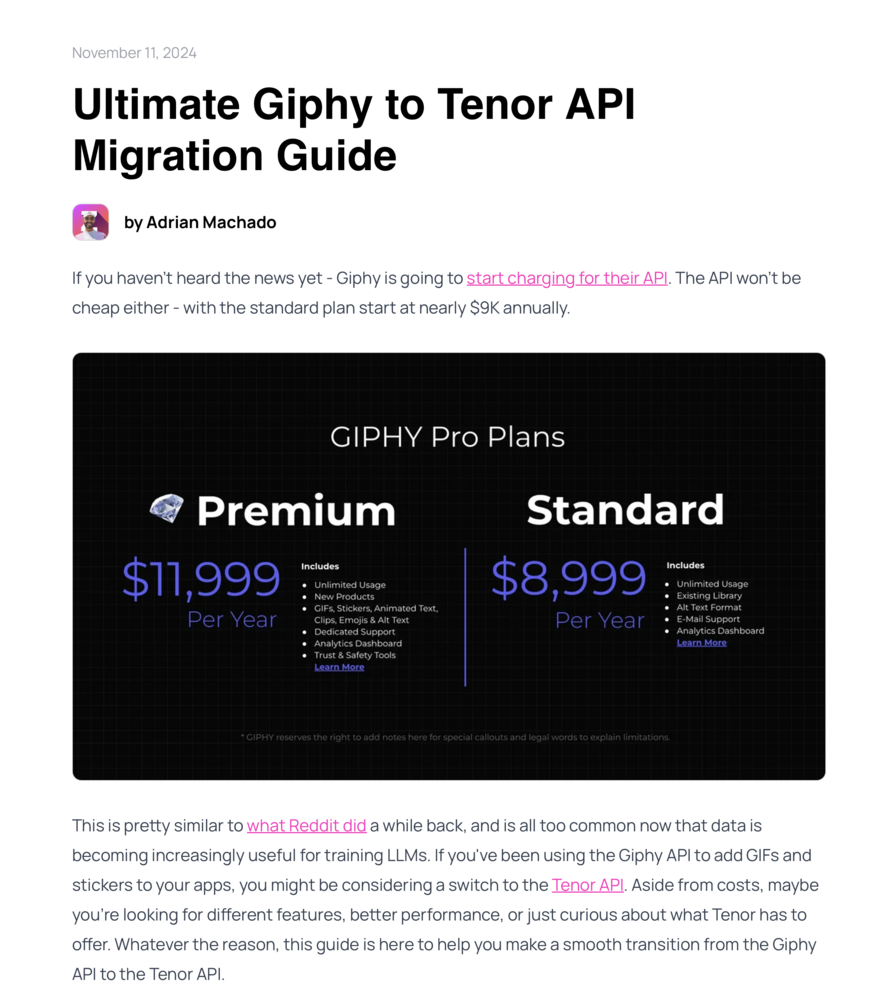
With Giphy starting to charge an annual fee for their API to high usage customers, could Invision add support for the still free Tenor API? https://zuplo.com/blog/2024/11/11/migrate-giphy-api-to-tenor-api
-
Don’t you use only AWS? That would explain why you don’t see a performance penalty for uploading to S3. I won’t use AWS or any big cloud service. I stay away due to cost and vendor lock in. I use Backblaze B2 for user uploaded content and local Minio S3 for everything else (and temporarily storing some user content).
-
Last time I tried to store everything in an S3 bucket, it slowed the site down incredibly since uploading to S3 was incredibly slow. Downloading is fine though in most cases. How slow will it be to upload all those theme/css/javascript files? Is this only an issue IN_DEV or will it affect prod? Or, is most of the uploading done in a cronjob? Maybe I don’t understand how these non-user uploaded files are handled by the framework I suppose Invision has thoroughly tested the performance aspects of storing everything in an S3 bucket before making the huge decision to deprecate multiple storage methods so I should trust that this isn’t going to slow down my site from a user’s perspective. I’m worried that this is a bad decision. I wish Invision would support Flysystem for flexibly storing anything anywhere on a collection basis. Flysystem is fantastic in Laravel.
-
I wish Invision would use the flysystem composer package in v5. I’ve been building apps in Laravel for the past six months and it is fantastic at letting you place your storage items anywhere you want using the league/flysystem package. There are so many great PHP composer packages these days, many of which can be used in any PHP, not just in the major frameworks like Laravel or Symfony. I plan on try to use Laravel’s Illuminate/Database package for Eloquent and Query Builder in my next Invision Community v5 app. This package uses PHP’s PDO driver so hopefully I can use SQLite and Postgres for per user SQLite databases and Postgres for my “source of truth” database.
-
This is very bad news for me.
-
Invision should fix this. BTW, Invision should really be using flysystem for storage like other PHP frameworks like Laravel.
-
Invision should fix this.
-
Switch to Backblaze B2?
-
Could you add built in support for embedding Bunny Stream videos? Bunny is the cheapest video transcoding/hosting/streaming service and I use in my WP blog. Would really be nice to recommend to my IC5 users instead of telling them to just use YouTube. Most users don’t pay for YouTube Premium, so these users will see annoying ads in content posted by others. Or, can you test the new Custom Embeds to make sure I can safely allow users to embed Bunny Stream videos in their content?
-
Will the test sites come with the option of a pre-loaded testing database (like forums, topics, and user profiles already populated)? Or will it be just like a self hosting installation on a new database?
-
Ditto. Seems like I’ve been waiting forever for the self-hosted beta, and now it might be July or August before I can move forward with v5. I’m moving on to the Laravel framework, I think.
-
I'm very curious about the UX improvements made to uploading/cropping profile photos especially when using mobile devices. Perhaps you could do some blogs from the perspective of an iPhone/Android user in the future?
-
I hope you never do AI generated topic summaries. I’d rather use the ReaderView in Safari to read topics. If I want summaries of the topic, I’ll use one of the many AI tools available for MacOS to generate AI summaries of text in the browser. Browser makers are starting to build AI into their browsers to do these summaries. Check out Arc’s AI features. I’m pretty sure that Apple and Google will integrate more AI features in the coming year. As long as IC5 supports Reader View in Safari, I’m pretty sure that AI built into the OS will generate these summaries for the user. Use your developers time supporting ReaderView and properly printing Topics including all replies to a PDF for topic archiving on the user’s device. I bet next year’s MacOS release will build in AI features such as article summaries directly into Siri or ReaderView where they belong. This reminds me of websites that used to build in spell checking which never worked very well. What a waste of developer time. Some features really belong to the OS or browser so they are well implemented and generally available.




