


PanSevence
Clients
-
Joined
-
Last visited
Everything posted by PanSevence
-
I’m still hoping that Beta 3 will be released and fix this issue. https://invisioncommunity.com/forums/topic/486652-critical-issue-with-overwriting-content-in-posts/?do=getNewComment
-
I also believe that information about features available in higher-tier plans should be more clearly highlighted, for example with a badge or some other visual indicator, so that questions like this don’t keep coming up. Small fine print is not a good solution, as these kinds of questions appear with every release. Don’t be afraid to clearly and explicitly state that a given feature is only available in specific packages, it will help avoid unnecessary comments.
-
I think one of the reasons may be to make the cloud offering more attractive, which is understandably more important from a business perspective. Personally, I see the Classic (self-hosted) version as the base version of the software, which the name itself kind of suggests. The higher tier plans then build on top of that by offering additional features and capabilities.
-
Unfortunately, it’s not possible to add a PWA-type application to the App Store. Apple requires the app to be native. This works only for Google Play.
-
@Moestuin It was published 3 hours ago
-
I’m also still experiencing this issue. For defined warnings, it’s not possible to set a time limit (for example, until when the user should require approval for new replies in case of suspected spam). I can’t check this checkbox at all.
-
I am truly impressed by what you have managed to achieve this year, congratulations to the entire team. I’m keeping my fingers crossed that next year will be just as successful as this one.
-
The update went smoothly, thanks for the new release.
-
Where can I find the “send welcome email” configuration?
-
I don’t think it was a priority. I’ve also been waiting for a few versions now for the fix related to showing “0” in the notification count, but sadly not this time either.
-
I’m curious about the new functionality for automatically splitting large topics. A few questions come to mind. How large are these topics supposed to be? Won’t such a split risk breaking the topic’s coherence? How will users know that they should post in the new topic? I understand the purpose behind this, but I’m concerned about the user experience.
-
We’re just waiting for the ability to configure the correct notification icon, as we still have this issue on 5.0.11.
-
LaTeX support (Creator, Creator Pro, Team, Business, Enterprise)
-
This was added in this version and it immediately creates a hidden box. The only thing I’m missing in this option is for it to set the title to 'spoiler' by default.
-
There is currently quite a serious issue that prevents re-enabling disabled applications after the update. I have, of course, reported this bug on the technical support forum.
-
They are still available in the notification settings.
-
I had the same problem at the beginning. Try resetting the permissions for the site, and after opening the notifications, a prompt should appear asking if you want to enable push notifications. Then just click "allow" and they should start working properly at least that’s how it worked for me.
-
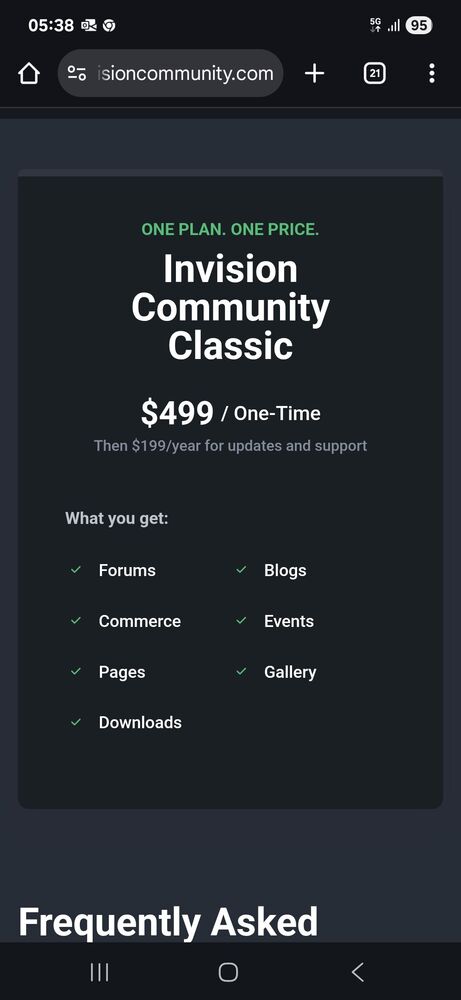
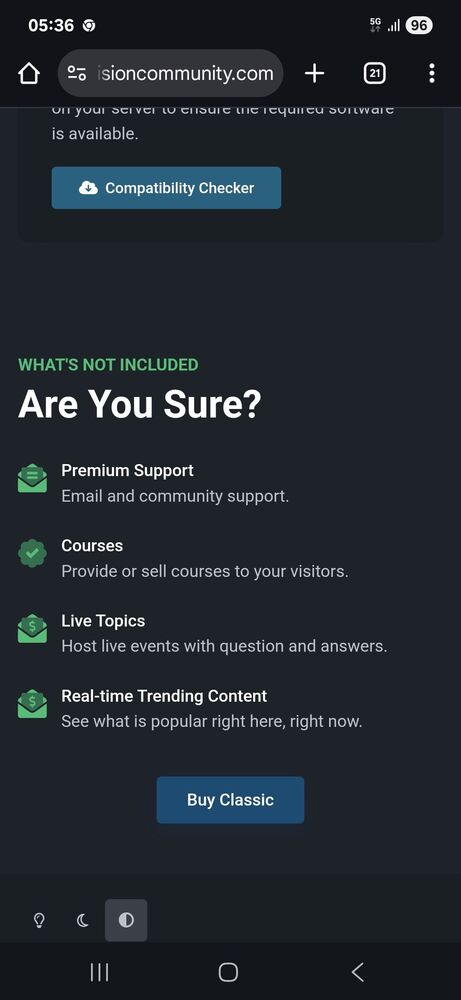
It's clearly stated what is included in the package. There's no information that quest functions are part of it, so why do you think they are available?
-
Topic has been brought up thousands of times. I understand you're frustrated, but you have to accept it. Self-hosted has the lowest priority and makes up only a small part of the business. It's the worst type of customer pays the least and complains the most.
-
I did that a long time ago I mastered the PWA application in TWA. Unfortunately, since Android 35+, there have been issues with edge-to-edge. https://invisioncommunity.com/forums/topic/483975-twa-hides-android-system-ui-bottom-system-navigation-gestures-are-obscured/
-
Now they are also working correctly on my end.
-
Yeah, use Android 15 for me push notifications not works. Have you performed tests on a system other than iOS?
-
Something is probably blocking it. I'm not using Do Not Disturb mode. I've checked almost everything in my profile settings, push notifications are enabled, and I've allowed push notifications both in the app and in Chrome. Still, I'm not receiving any notifications.
-
I did that it's even included in my report with a clip. I enabled push notifications in the app and granted the permissions.
-
Does anyone have issues with push notifications for the app and the badge on the app icon? I'm not receiving anything despite notifications being sent via cron.





