SeNioR-
Members
-
Joined
-
Last visited
Everything posted by SeNioR-
-
Guys, as Gary (former employee) wrote, IC5 introduces many new improvements, from back-end to front-end, it is worth waiting a little longer for the stable version, believe me, I have been operating with IC since 2013 and none of the versions made such an impression on me as IC5.
-
Thank you. That's exactly what I mean. Please take into account that we have just welcomed the new year and before that we had Christmas. During this period, the IPS team always takes a day off to spend this time with family and loved ones. Understand that money is not the most important thing in life, Invison Community is just a business, there are important and more important things. Personally, I would rather wait a few months for a polished product than receive it now and install a patch or security patch every few days. Whatever IPS decides, I appeal to you to respect their decision.
-
Exactly. @Matt is currently on a coffee detox so his productivity has dropped a bit, but expect more betas in the coming weeks.
-
Guys, are you serious? It's better to wait longer for a stable product than to get it now in a buggy form. Look how many bugs were reported in a week.
-
and more about why it's important: https://dequeuniversity.com/rules/axe/4.10/color-contrast
-
I don't know what you think, but I would align the icon with the content next to it and add a separator. .elUserNav_achievements__icon {display: flex; align-items: center;} Before: After:


-
@Code Name Jessica This is a suggestion, not a request for help. I don't need advice from ChatGPT, I know the basics of coding...
-
I don't know what @Ehren thinks about this, but it would be nice to add "position:sticky" here so that the author column is always visible. This will eliminate the empty space.

-
You're right. I haven't checked it. Changing it to 15 should do the trick. Optionally, you can change the layout from 3: .ipsData--mini-grid.ipsData--carousel:has(.ipsData__item:nth-child(9)) { grid-template-rows: repeat(3, auto); } to 2 columns: .ipsData--mini-grid.ipsData--carousel:has(.ipsData__item:nth-child(9)) { grid-template-rows: repeat(2, auto); }
-
It's a bit pointless, because if someone has a higher resolution, the last cell will remain empty, and vice versa, if someone has a smaller one, the cells will be arranged differently. This is how CSS Flex works.
-
That's right, but the fewer images the better, so why not go completely modern? I think that browser icons in settings can be easily added as SVG, the same with the default avatar - especially since in IC5 you can no longer edit it to your own. The default avatar is displayed in many places, I know it weighs little but it is still a resource that loads, and if it were in SVG, there would always be fewer warnings in PageSpeed and a few milliseconds less page loading time 🙂
-
Exactly, the ability to select FA icons here would be a very good addition and could actually fix the bug I reported.
-
Is there any reason not to use a newer and lighter format like avif, webP or even SVG for various icons like: applications/core/interface/logos/browsers/Edge.png static/resources/core_default_photo.png static/resources/core_upload.png static/resources/core_message.png static/resources/core_notification.png Not that I'm nitpicking, but why not add a default avatar in SVG? That's always one less resource to load.
-
Hi IPS Team, please add the option to select the Font Awesome (fa-brands) icon when adding your own login method. Currently, the only way to add an icon is to upload it as an attachment.

-
I miss the "show/hide password" option, it would be nice if this option was added to IC5. What do you think? Example:


-
ACP > Pages > Page Management > Templates > Database Templates > Listing > recordRow Find: {{if $row->showRecordImage()}} <figure class="ipsData__image"> {{if $row->record_image}} <img src="{file="$row->record_image" extension="cms_Records"}" loading="lazy" alt=""> {{else}} <i></i> {{endif}} </figure> {{endif}} Replace with: {{if $row->showRecordImage()}} <figure class="ipsData__image"> {{if $row->record_image_thumb}} <img src="{file="$row->record_image_thumb" extension="cms_Records"}" loading="lazy" alt=""> {{elseif $row->record_image}} <img src="{file="$row->record_image" extension="cms_Records"}" loading="lazy" alt=""> {{else}} <i></i> {{endif}} </figure> {{endif}} Wait 5 minutes for the widget to refresh.
-
With all due respect, Matt has already answered this question in another thread and clearly outlined why the team decided that some features, even if they could be implemented in Self-Hosted, are only included in the Cloud package.
-
What browser are you using?

-
Yep, I've noticed the thumbnail issue on a few IC5 forums already, so it's definitely a bug that needs to be fixed.
-
Any update? I uploaded a GIF as an icon and the image was converted to PNG. The funny thing is that the animation still works 😉

-
I don't want to share this narrative, but I have to admit you're right to some extent. Here we can mention the Marketplace closure or the new Classic license terms, which we accidentally learned about from concerned customers. Communication has never been IPS's strongest point, but I understand that they have to make these decisions because of their business. I also think that by setting this tone, you're giving IPS yet another reason to completely abandon the Classic license and stay solely in the Cloud. I can only imagine that this change would have a quite positive impact on the entire team, because then they could focus more on developing the software and not "waste time" on solving problems that mainly concern the wrong version of PHP and incompatible third-party applications/themes.
-
I have to admit that the new variable naming is much more intuitive and simpler than in IC4 👍 Even if we don't know the exact name of a variable, we can easily guess it.
-
I understand that you used it for Movies and other apps, but the fact that this module was removed shouldn't surprise anyone because Matt or Marc (I don't remember) wrote about it a few months ago. In fact, I think it was even listed in the Deprecation Tracker, although I don't see it now.
-
I agree, most of my users have never used it. In fact, I've had it completely disabled for years, so it seems like an unnecessary module to me. However, I understand that on other communities it could be used for some purpose.
-
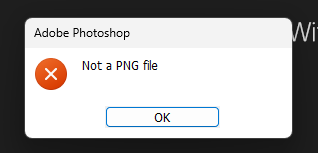
Yes, but if you look at the page source you will see that they have all been converted to PNG even though it shows Webp here. <link rel="icon" sizes="36x36" href="//media.invisioncic.com/a319035/monthly_2021_11/android-chrome-36x36.png?v=1709133612"> <link rel="icon" sizes="48x48" href="//media.invisioncic.com/a319035/monthly_2021_11/android-chrome-48x48.png?v=1709133612"> <link rel="icon" sizes="72x72" href="//media.invisioncic.com/a319035/monthly_2021_11/android-chrome-72x72.png?v=1709133612"> The problem here is that when you send an icon in webP, it only has the name changed from webP to PNG, but the encoding remains unchanged. When you try to open the file, for example in Photoshop, an error is displayed that this file is not PNG, even though it is in this format. As you can see, even though the file has been changed to PNG, it still has the encoding from the original file, i.e. WebP. WEBPVP8