


Daniel Braun
Clients
-
Joined
-
Last visited
-
We operate two instances and are very interested in the new features; we would like to support the process through intensive testing.
-
More IC communities: WirtschaftsPerformance.com TanzMoves.com
-
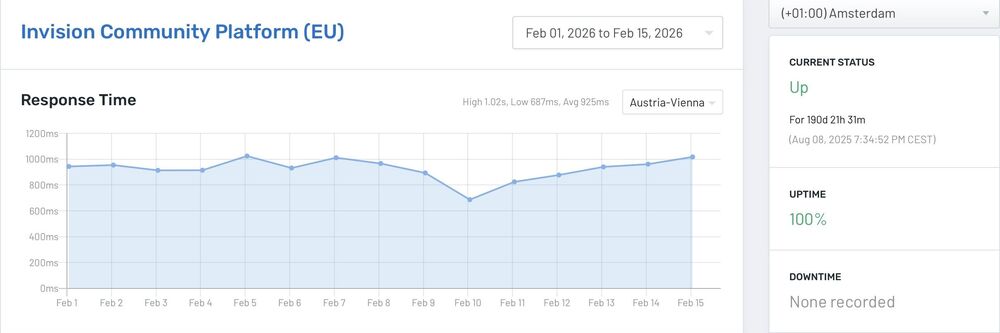
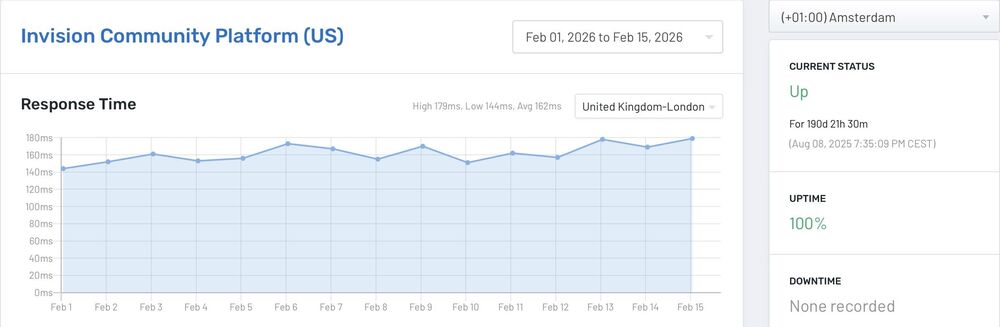
So, what about the speed difference? I'm in the EU and have the option of choosing between the US and EU versions of InVision Cloud. The values shown in the screenshot I posted are from the InVision Community Cloud, not this website! Are the displayed values correct or not?
-
You're absolutely right, we don't currently have any cloud applications running on your system – hence our inquiry. https://status.invisioncommunity.com/ In my customer account – under "Network Status" – I assume your customer applications are displayed there. Are the values I'm seeing here incorrect?
-
Hello, We are considering migrating to the cloud and have been looking at our network status. There are significant differences in response time between the US and the EU. For legal reasons, only an EU location is an option for us. Why is the response time so poor? Thank you in advance for your feedback.
-
 Marc reacted to a post in a topic:
Template nexus/front/global/referralRulesCommission is throwing an error.
Marc reacted to a post in a topic:
Template nexus/front/global/referralRulesCommission is throwing an error.
-
The recommendation title contained a point; after removing it, the error was resolved
-
Hello, I'm getting the following message in the user's account settings under the Recommendations menu in the frontend: [[Template nexus/front/global/referralRulesCommission is throwing an error. This theme may be out of date. Run the support tool in the AdminCP to restore the default theme.]] The module is working, however. I haven't installed any external add-ons/plugins, external templates, or made any other customizations. Even disabling and then re-enabling the recommendation module doesn't solve the problem – the message remains. Best regards OK, it's solved!
-
Hello, It would be very helpful if there were an export function (.csv) for custom databases. We use the database function for many different application scenarios. Best regardsHello, we would love it, if it were possible to export the contents of our own databases as CSV files in the frontend or backend; this would eliminate the need for the MySQL workaround. Best regardsIt would be extremely strange if it were true that the same order would always apply, or that all three subscriptions would always be filed individually.Hello, I receive several booking receipts from „guests“ every day for my subscriptions. I have three subscription packages, and these are the ones that regularly appear in the system (repeating in the same order). I have already manually deleted almost 2,000 from the database. Best regards.



