


Mick79
Clients
-
Joined
-
The index creation was messy and unreliable, but I got there after several attempts (also, the SQL suggested does not work directly with MariaDB). Since the upgrade, the activity feeds take at least 10-20 seconds to render, hopefully that settles down quickly, because my members are really annoyed 🤣Hi all, Is it possible to stop ordinary members from viewing each other’s profile activity / post history, while still allowing profile pictures or generated avatars? I'd like members to be recognisable in threads, but I don't want profiles to become an easy way to trawl someone's whole activity history. I can see that profiles can be disabled more broadly, but I'm not sure if there’s a more granular setting or permission for this. Any pointers appreciated.Great changes! Love the welcome email and the auto-splitting! We tend to lock and start new topics after 2,500 replies (100 pages @ 25 per page) so I'll definitely be doing this - what's the name of the constant? ETA: In a future release it would be great to see this editable and toggleable via the ACP.It was a great plugin to drive more registrations on my community.Previously, I used @Adriano Faria's excellent plugin to do this, and was wondering if there is something similar that has been developed for V5?Yep, my theme fonts are definitely not applying.Update went fine - but I think the font has changed on my themes... I could also be going quite, quite mad, so who knows?I noticed that after the most recent patch that all my reactions had their custom ordering reset. Hardly a big deal, but worth a mention.Yay I can run my ads again! Thanks team!All good here!
 Bug tracker URL is still incorrect in the header @Matt@Matt FYI: the link in the club description (https://invisioncommunity.com/ic5bugs/bugs/) is taking me to an error page: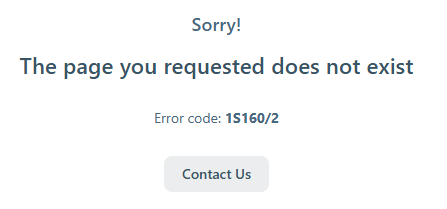



Account
Navigation
Search
Configure browser push notifications
Chrome (Android)
- Tap the lock icon next to the address bar.
- Tap Permissions → Notifications.
- Adjust your preference.
Chrome (Desktop)
- Click the padlock icon in the address bar.
- Select Site settings.
- Find Notifications and adjust your preference.
Safari (iOS 16.4+)
- Ensure the site is installed via Add to Home Screen.
- Open Settings App → Notifications.
- Find your app name and adjust your preference.
Safari (macOS)
- Go to Safari → Preferences.
- Click the Websites tab.
- Select Notifications in the sidebar.
- Find this website and adjust your preference.
Edge (Android)
- Tap the lock icon next to the address bar.
- Tap Permissions.
- Find Notifications and adjust your preference.
Edge (Desktop)
- Click the padlock icon in the address bar.
- Click Permissions for this site.
- Find Notifications and adjust your preference.
Firefox (Android)
- Go to Settings → Site permissions.
- Tap Notifications.
- Find this site in the list and adjust your preference.
Firefox (Desktop)
- Open Firefox Settings.
- Search for Notifications.
- Find this site in the list and adjust your preference.