


Matt Finger
Clients
-
Joined
-
Last visited
Everything posted by Matt Finger
-
If you're referring to the React Server Components CVE, then no since it only uses a react front end.
-
So, for each hour during which a URL is used in the Iframely platform, a hit will be counted, "whether for resolving or displaying content". Since the HTML returned for the embed is really an iframe pointing to Iframely, subsequent views add up to 1 hit per hour as well. Again, please refer to their pricing page for more details.
-
You'll have to confirm package details with Iframely, however there's nothing indicating you cannot stay on the starter plan indefinitely. I believe the 90 days is how long you have before you even need to pick a plan. Please refer to their pricing page for more details. IframelyPricing - IframelyCompare Iframely pricing plans – find the right option for your needs with flexible API limits, features, and transparent costs.
-
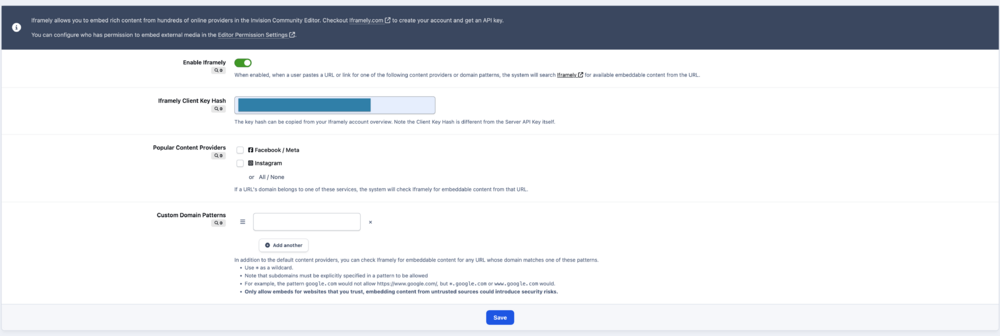
I get where you're coming from, though I'd like to point out a few reasons why the pricing may be more reasonable than some seem to think Existing oEmbed domains still work and will take precedence over Iframely. In other words, sources such as X, Youtube, Reddit and more will not go through Iframely or incur any hits. So if the pricing doesn't work out then you are still going to have access to content from these major providers. When you setup the integration in the AdminCP, Iframely is restricted based on what domains you've whitelisted, so it isn't like every URL/embed causes an Iframely hit. In fact, most embeds will probably not incur hits with Iframely Their free tier currently includes 1000 hits per month and an extra $4 per 1000 hits, while their business tier includes 10,000 hits for $49 per month. This means, if you don't care for the content cards or "Powered By" icon, you can get 10,000 hits for $36, not $50 Managing an oEmbed directory with this many providers and URL configuration options, each individually tested and maintained over time, is no easy feat. While it certainly is not an absolute necessity on every community, from a developer's perspective their pricing seems very reasonable for what they're offering.
-
There are a couple not noted in the changelog which are QoL in regards to the code editor IPS template highlighting is supported in the monaco-based code editors When multiple languages are supported, code editors can dynamically determine which language is used. They will also remember user selections Content in code editors is saved as a draft between reloads before submitting.
-
Yes, the option is inside the editor permissions in the AdminCP
-
So, long story short, if the custom HTML format is a result of a valid Invision Community 5 Editor Extension, then yes quotes can contain any content that can be created with the editor outside a quote. However, if the custom HTML is a result of a ckeditor4 plugin or direct source editing, then yes pretty much all custom formatting beyond basic bold, headings, italics, etc will be lost. (Hence why it's not recommended to edit source directly in v5)
-
Yeah, for the new line arrow vs area feedback please put it in a topic in the feedback forums. As for better docs, this is what we have put together at the moment https://invisioncommunity.com/forums/topic/480617-ic-5-editor-extension-javascript-framework/
-
On our end, nothing has really changed here; certainly not JS interaction with the ads. After investigating your communities, the delay after page load indicates a slow response from the Ad provider as the externally supplied script tags are executed immediately on page load. Yep, I can confirm this issue and see the problematic code. We'll try to get a fix in the next couple releases 🫱🫲.This is actually because the font colors from CKEditor4/IC4 have been preserved. Looks like the original blog post was edited to fix it but for some reason this topic wasn't updated in the process. I shall log an issue for this so that we can address further.I'll create a bug for this. Just to be clear, by "initial scan", do you mean right after exiting the page editor or every time the page initially loads?Can you please share the browser version and machine you are using? Yes, that's is correct. The issue ultimately lies in Chrome itself, but we are addressing it to the best of our ability, applying a fix whenever we identify a source of slowness. That said, it's one of those things that doesn't affect any of the devices used by members of our staff which makes it hard to track down.Yes, it is not currently possible to translate but feel free to create a bug report so this doesn’t get lost.Yes, post in bugs please so we don't get duplicates, but this is fixed already in the next beta.I'm not sure what you mean as v5 will still embed youtube and the like immediately when you paste a link as Youtube runs on the OEmbed system. Additionally, like you mentioned, when enabled OG Embeds are used to replace a URL with a preview automatically. The only case where you need the link panel button is when you are creating a raw iframe... e.g. a basic <iframe> tag that just has a src and no wrappers or anything. The reason we didn't add an auto-embed feature for that type of iframe is it could catch a lot of links, and doesn't really reflect the intent behind pasting a URL. It's also a feature that is not really intended for regular members to use.Yeah, so in case anyone else is confused, the custom iframe feature starts from the link panel directly. Also worth noting, for security purposes, beyond whitelisting the domain, the url needs to use HTTPS protocol to work iframe-embed.mp4Yeah, there are whitespace preservation options in the editor that we need to adjust to support CKEditor4-created content. Hopefully this will be fixed in the next release.Would you happen to have any links to content behaving this way? You can PM me if you don't want to share publicly.Of course!Sure does!
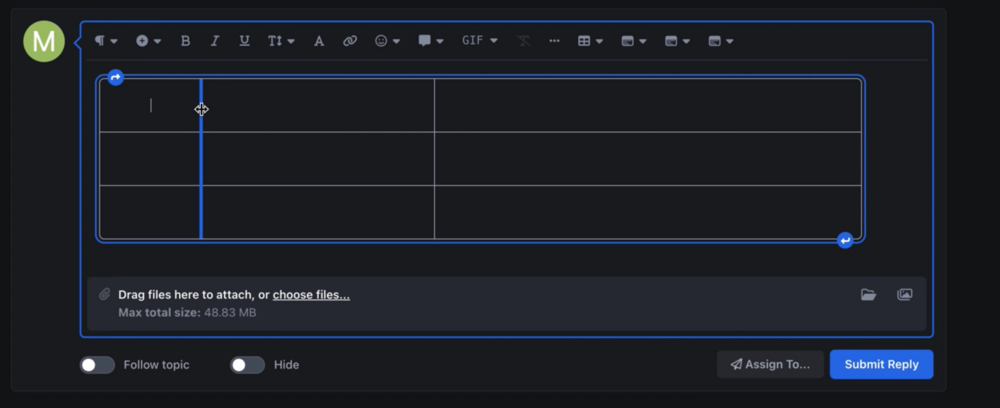
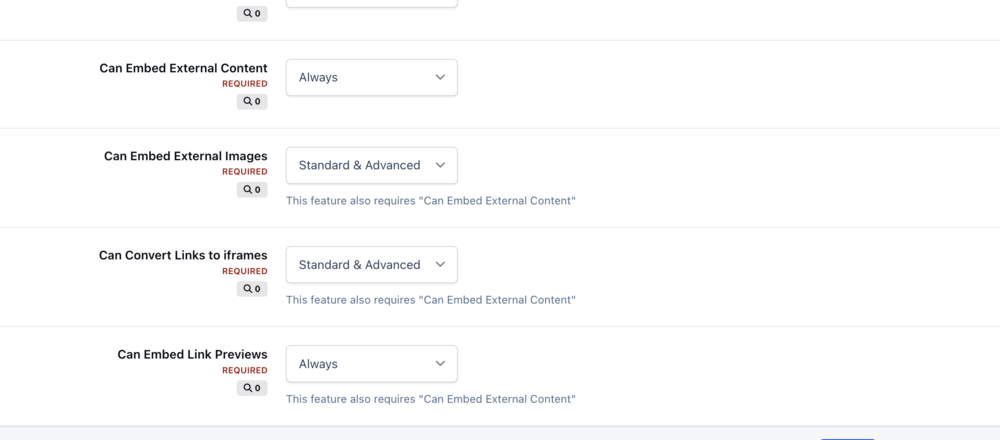 So the "Insert image from URL" button has been removed in 5, and there is a global setting which can prevent this behavior. And, yes, the "embed external content" restriction also prevents external image URIs from being converted to images.These are on our list but will likely not make it in the initial Community 5 release. Tables sound simple enough, but when you factor everything that goes into delivering a powerful table system - background color, border color, border width, what type of content can go in a cell, what to do about overflow, actions applying to the entire row/column etc - and make it not only powerful but easy to use and reliable, the dev time really adds up. 🤔 😉
 You currently have to manually click the embed button in the link menu, but this only applies to the new custom iframes. For the predefined embed types, e.g. other topics, youtube, X, og embeds, it will automatically convert to an iframe.We recently announced the new Invision Community 5 editor which adds many new exciting features such as semantically correct header tags, custom boxes and more. As the new editor is a leap forward in technology, some legacy features had to be left behind. We received a lot of messages about these changes, and have created new tools based on that feedback to ensure you still have the tools you need. The new features are based around restricting some high level editor functionality for specific member groups and enabling an easy way to add custom embeds. Permission Levels Invision Community 5 puts a lot of new tools in the editor, including header tags, boxes and positioning tools. These are useful features, but perhaps you do not want your members changing the semantic structure of the page by adding H1 tags. Or maybe you don't want them being able to add custom boxes with colors. Based on this feedback, we have introduced a permission levels system. At the heart of the system lies three editor permission levels: Minimal, Standard and Advanced. Specific editor features are assigned to one or more levels. For example, you may only want header tags and content boxes to be for the 'advanced' permission level which only administrators can use. These permission levels are configurable via the Admin Control Panel. When is Each Restriction Level Used? Now that we have set up the permission levels, we need to apply them to member groups. We do this by simplying heading over to the Member Groups section of the Admin Control Panel. In the "Content" section of that form, there are two new options: Default Editor Restriction Level: This is the restriction level the group uses by default, for example in Forum Topics and Blog Posts. Editor Restriction Level for Comments: This is the level used for Comments (including Topic Replies) throughout the Community. When a member has multiple groups, they will use the most permissible editor setting out of all groups. Custom Embeds In response to news that the ability to toggle into 'source mode' and directly edit the underlying structure of the editor document was not implemented because editor technology has moved on, many people told us they used that feature to add custom iframes from specific services they use. We understood the need for custom embeds, and we've added the option to create iframe elements with any whitelisted URL from a link. CleanShot 2024-06-20 at 15.49.43.mp4 Additionally, iframes created this way have configurable height and width so you can resize to your liking This feature has two editor permissions: "Can Embed External Content," and "Can Convert Links to iframes". Adding iframes into a post can potentially be a security issue, so strong controls are needed to ensure there isn't abuse of this system. The editor will only allow links to be converted to iframes if the domain has been whitelisted. The whitelist exists in the new tab, Admin Control Panel > System > Posting & Editor > Embeds. The feature can also be entirely disabled from here. That wraps up this round of changes based on your comments. We hope that you enjoy this update to our Invision Community 5 editor and we always appreciate your feedback. View full blog entry







