


Donnie95
Clients
-
Joined
Everything posted by Donnie95
-
-
-
Ok thanks. Concerning the theme editor bug, it occurs when you open the theme editor with this setting is turned off. It was off by default on my upgraded site. You can't use your account until you turn it on again.
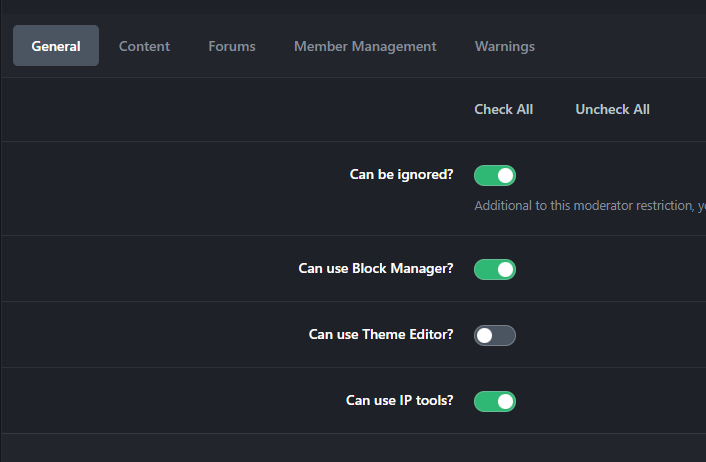
-
Could it be because during the upgrade, the software asked me to manually run the MySQL commands? they already exist because I added them manually.
-
I will do more tests. I did not tried any upgrade before because I was getting HTTP 500 error, so I deleted the files and the database and tried again. The MYSQL user has full permissions.
-
There is also an issue with the theme editor, I can't load it, and the page keeps refreshing with 403 errors. It could be related to my Nginx config idk.

-
I was able to upgrade after trying a second time. I think it was not Redis, but the new files were improperly uploaded. They asked me to alter many database tables, and one gave me an error because it already existed. There are a few upgrade errors in the system logs as well.
-
I'm unable to run the upgrader, HTTP 500. [13-Jan-2025 16:31:19 UTC] PHP Fatal error: Uncaught ErrorException: Class IPS\Dispatcher could not be loaded. Ensure it is in the correct namespace. in /home/testing/htdocs/testing.com/init.php:749 Stack trace: #0 [internal function]: IPS\IPS::errorHandler() #1 /home/testing/htdocs/testing.com/init.php(749): trigger_error() #2 /home/testing/htdocs/testing.com/init.php(816): IPS\IPS::autoloader() #3 [internal function]: IPS\IPS::exceptionHandler() #4 {main} thrown in /home/testing/htdocs/testing.com/init.php on line 749 I made a successful copy of my site, then disabled all custom apps and replaced the files with V5. I may try again with Redis disabled, but it takes a long time to restore a 4GB database on a cheap VPS. If it doesn't work, I'll wait for the final version.
-
What about websites with subscriptions? This could lead to issues like double payments. Is there a method to create a copy of the site while completely disabling the payment gateway on the copy version? (I can’t disable it on the original site before making the copy.) I'm worried that by the time I restore the database and log in to the ACP on the copied site, some subscriptions might renew in the meantime. (Before I delete the gateway)
-
Will this be removed for both cloud clients and self-hosted? Maybe just add a warning in the ACP that changing the storage location could break the site.
-
Can we access the templates via SFTP and edit them there, or will it cause problems? I need to edit the templates to restore the reputation points under the post author's profile picture and also add a custom fonts to my header.
-
Thanks for the suggestions, I'll start implementing them. I think self-hosters should still have the option, as we are responsible for the security of our forum. Also, Instagram and WordPress still allow signing in with a display name, so I doubt it makes a big difference in security.
-
I'm concerned that many of my members have forgotten their email addresses...

-
Update the Status Update feature for a Stories mode similar to Instagram. (Better for quick sharing videos, pics, text.) I would also add swiping support for the Lightbox. Update the font Awesome Icons. Add Hcaptcha by default.
-
Update the status update feature for a more modern story mode similar to Instagram. Stories can be viewed anywhere by clicking on the user profile picture. Users with active story will have a colored border around their profile picture.
-
Great developper! 👍


