Everything posted by Cedric V
-
One thing I'm not wild about is having the active quests widget at the top of the forum. I get why it's there - otherwise people might forget about it -but it would be much better if the widget were customizable. Being able to move it to the sidebar, for example, would be a nice option. Thanks!

-
Just thought I'd also post about the following "design flaw" in the rules pages - As you can see, the dropdown could use some work.

-
I'm having fun! 🤩🥳 This really brings the achievements, badges, and rules to life. It's taking some time to set up, but it's well worth it. Thank you for this awesome feature! ❤️ I did notice two small bugs/design quirks, which I'll be posting separately in the feedback section. Also thanks for fixing the badges creator.

-
@Matt
-
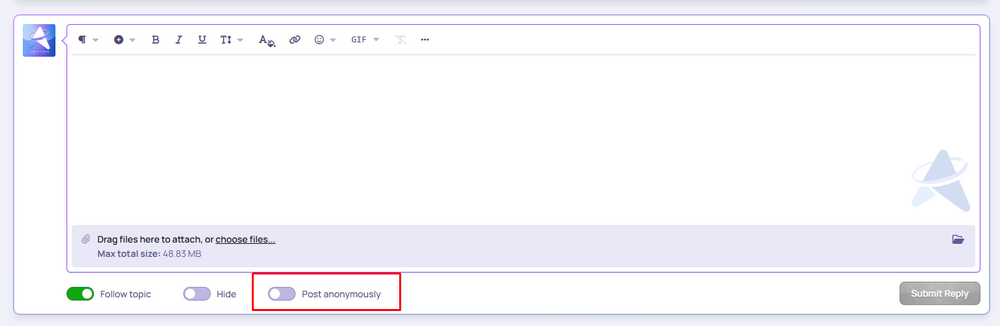
You should be able to continue the thread anonymously: If you don't see this toggle function, check your settings in groups and forums;
 I’ve been self-hosting for almost twenty years now. It’s been a big part of how I’ve run my projects - managing servers, tweaking configs, doing everything by hand. But recently, I’ve made the switch to the cloud, and honestly, I wish I had done it sooner. A lot of folks enjoy the hands-on control that comes with shared hosting or VPS setups. I get it - there’s something satisfying about fine-tuning every little detail. But there’s also real value in letting go of that level of control. You’re not really giving anything up by moving to the cloud; if anything, you’re gaining the freedom to focus on what actually matters: building your community, creating content, and growing your platform. Self-hosting made sense for me for a long time because I had the experience and the technical foundation. But over time, that kind of setup has started to feel more like a burden than a benefit. It’s becoming less relevant, and frankly, a bit of a dying game. More and more, people are moving toward cloud-based solutions - and for good reason. It’s simpler, more efficient, and it lets you put your energy where it counts.It’s a pity this is for Teams and higher plans. I got very excited about this and knew loads of quests to do on our community. But I understand the reasoning why. Great job.By any chance not switching between www and https:// links?Your app should keep working just fine and update itself in the background.That may very well be the only thing.Lovely work as always guys! Very much appreciated. ❤️Oh yes, been there, done that! This is great. 😊 Thank you!I realize the Courses app may not be used by every community, but for those of us who do rely on it, it would be incredibly helpful to have more visibility for our courses on the main forum index. Right now, unless I'm overlooking something, there doesn't seem to be a way to display Courses content via a sidebar or block on the main index - at least not natively. What I'd love to see is a Courses widget (or block) that can be added via the Page Builder or Block Manager, ideally with the following options: Displays one Course at a time in a Grid-style format (matching how it's shown in the app itself). Option to randomize, rotate, or display the latest Course. Ideally usable in the sidebar for visibility on forum index or other pages. This would help drive engagement and make Courses feel more integrated into the overall community experience. Thanks for considering!
 Today?! Please hurry up. I'm excited now! 🤤Man, I'd really like some cheese now.... 😮💨 This is great though. I'm definitely looking forward to this update for my community. Email marketing is a big part!No, they couldn't. But usually spammers do either topics and posts or blog. I haven't had them do both. Or anything else for that matter. In that case, those other apps would still need manual hiding/deleting.Sorry? Didn't understand that.I've only noticed a spam blog entry. Nothing else.When you flag a user as a spammer, their topics and posts are automatically hidden. However, as a moderator, you still see them in the forum listings. What I usually do is select those topics and move them to an archive forum that’s only visible to staff, where we keep other archived posts as well. Suggestion: It would save time and effort if flagged content was automatically moved to an archive forum instead of just being hidden. Ideally, you could set the destination forum in the Spam Prevention → Flagging Spammers settings. I’m aware that you can choose to delete all content when flagging a spammer, but that’s risky - if someone is accidentally flagged, their posts are gone permanently, which isn’t ideal.I really like this feature. I've seen a few members on my community become a community expert, and I love it. Shows that we are a helpful community. But sometimes, community experts are also granted to forums that I don't want to. I already have "Topic Solutions" ticked off on those forums. Besides that, I can't seem to find any settings where we can exclude certain forums. Am I missing something ? TIA. "As far as I know, nothing else seems to be using the basis_300. But I could be wrong and may depend on the actual site.I added something to the custom css: .i-basis_300 { --i-basis: 500px; }Instead of 300px, it will be 500px. Haven't seen any downside effects with this addition so far.