


Baian007
Members
-
Joined
-
Last visited
Everything posted by Baian007
-
Same result

-
@SoloInter, thank you, I am talking about having sub-forums in the same style Jimi did. When I select the feed option in the theme editor, it appears as shown in the attached screenshot. Although all sub-forums are under the parent category of Child Protection Concerns. category.

-
Hi Jimi, Could you guide me on how to create sub-forums like those on your site? It looks so good.

-
Thanks, Chris; I am using IPS v5 and want the same documentation database look (in IPS v4) for IPS v5.
-
I would greatly appreciate it if you could fix it to match the template in version 4.
-
Thank you, dear Invision community team, Successfully upgraded to beta 3 with "0" issues (self-hosted version).
-
Dear Invision community team, Could we explore the option of displaying the files directly from subcategories? Additionally, what is the rationale for having an empty category solely to count the number of files in subcategories without actually displaying those files? I would appreciate your insights on this approach. Thank you.
-
Thanks, Marc. I am going to wait.
-
@Esther E. I don't see any fix in Beta 2. Please say the fix is coming in the next version. Be Well
-
For me (self-hosted ), the upgrade was successful. The package was downloaded manually.
-
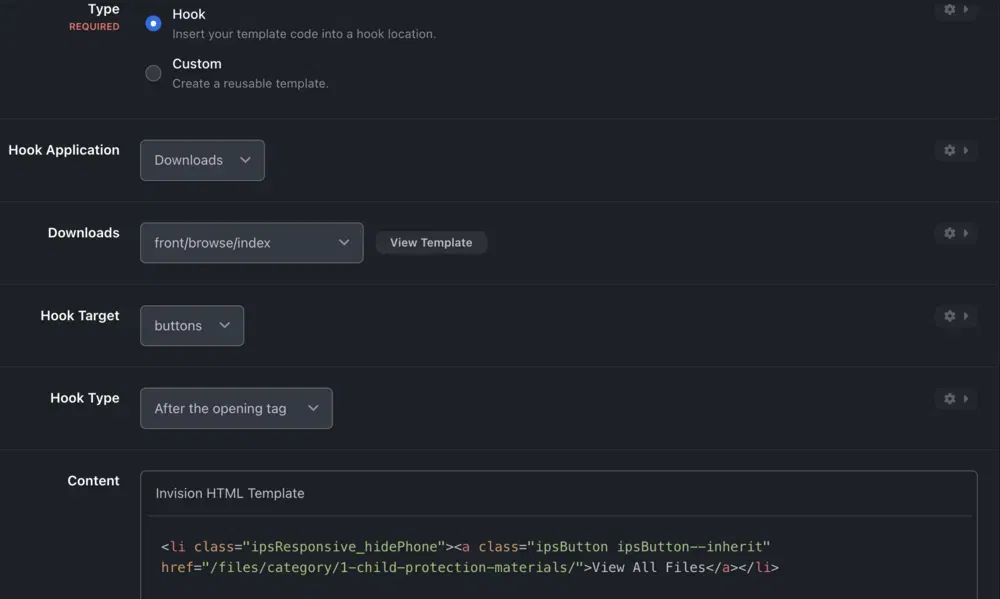
I did the same thing - I created a template and hooked it to the offline page.

-
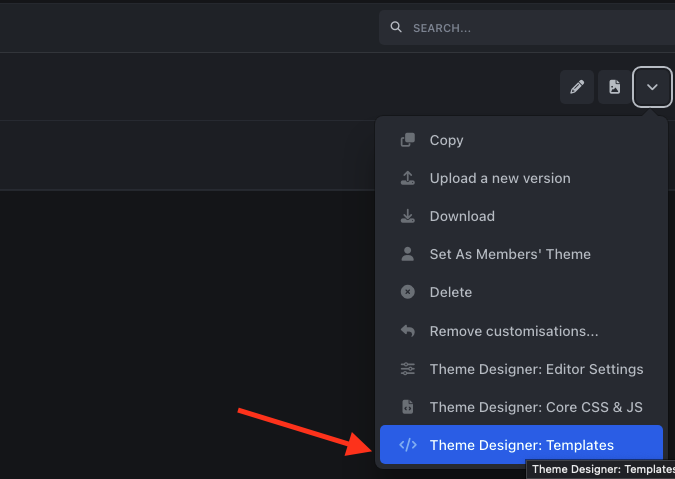
Have you tried adding your code to the Page header or global Template? Check view the template and hook your code to the part you wish.


-
Select your theme and choose the template option. You can create a custom template. Create a custom template and select to hook it to a specific template.
-
I receive this error when clicking on Move after filling out all the requirements. "There appears to be a problem with your Amazon (My Bucket Name) file storage settings which can cause problems with uploads. After attempting to upload a file to the directory, the URL to the file is returning a HTTP error. Update your settings and then check and see if the problem has been resolved" I tried to upload files via CyberDuck and it works. The issue with the Invision Community code is that it only supports AWS S3 and doesn't accept any other storage options.
-
Hi team, The theme editor isn't saving any color values. "/static/css/core_front_framework_framework.css" The file is missing. I have already checked the downloaded package, and it is not there. Best
-
This is unfortunate news. Invision team, please fix this.
-
I've been trying for 4 hours to set up object storage (Contabo) that is compatible with S3, but I've had no luck. I keep getting the same error no matter what I do? The error: "There appears to be a problem with your Amazon (cppro) file storage settings which can cause problems with uploads. After attempting to upload a file to the directory, the URL to the file is returning a HTTP error. Update your settings and then check and see if the problem has been resolved"
-
I'm struggling to figure out how to assign tags or prefixes to specific categories. For instance, if we have Forum 1 or Download Category 1, we want users to only be able to choose from tags or prefixes that are assigned to those specific categories. How can we accomplish this without requiring the user to search through all the tags and prefixes to find the right ones?
-
Thank you Adriano.
-
Hi team, I'm having trouble finding the form type for the questions. Am I missing something or forgetting to activate it somewhere? One more thing: Is there any chance to use object storage (S3) for data?

-
I do appreciate your support. And please, regarding "assign a prefix to a specific category without requiring users to search through hundreds of prefixes to find the right one"
-
It's something like the attached screenshot.

-
I'm truly sorry, and I know you are using your phone. Please feel free to reply back when you can. I want to change the login page template. How is that possible with a hook? Also, if I create a new custom template, how can I add it to a specific template that is not listed in the hook list? How can I assign a prefix to a specific category without requiring users to search through hundreds of prefixes to find the right one? really appreciate any help you can provide.
-
Thank you @Gary I am talking about CSS, JS, and Templates for the theme (similar to v4, like global template..etc)
-
Well, I decided to go with Invision Community, and I purchased a license yesterday. I couldn't find a way to edit the original files of the theme (CSS, JS, templates). Where can I add prefixes for forums and downloads and CMS? How to add object storage for downloads and attachments "S3"? How can we avoid having duplicate titles in CMS, forums, and downloads? Thanks






