Everything posted by The Old Man
-
Dissapointed to find the AdminCP side CSS and JS Theme related bug bugs are still not fixed in 5.0.10 but keeping fingers crossed for future betas.
-
Absolutely 🙂
-
That's a stilly statement, absolute rubbish to make that claim. Personally I have zero plans to move to Cloud and will resist it for as long as I can. It's often slow, unreliable and is overpriced. Still I can see both sides, for and against. It's good there are various tiers available for Cloud customers, that makes a lot of sense for all concerned, but it can also be argued that a lot of these features are basically bloatware if you don't need, want or often use them, so the tiers provide more choice. Clients paying a higher price for Cloud should benefit from new features. Sometimes it can seem that new Cloud-only features are taking precendent, especially when you see a big announcement, get excited, then reach the small print to find out its Cloud only. The seceret is to scroll down to the small print first to avoid dissapointment! Self-hosted have still received some new features though. IPS spends much time developing new things when the basics of IC5 are still not working though (after coming up to 10 full stable releases). The IC5 documentation is lacking and disorganised; I think there should have been some team tasking to make sure it is brought up to date by now, and we're still waiting on the announcements of Commerce's new features, after it was stripped out for IC5?
-
Thanks! That's not very user friendly for average users to figure out the process, why not simply add a spoiler button?
-
Hhhm, daft question but where's the spoiler button? What happens to existing spoilers created in IPS4 upon upgrading to IC5? It may be a developer's wetdream, but it seems unfriendly for average users.
-
Looking big and cheesy! Nice improvements, long overdue! P.S. I'm just glad he didn't advertise that weird Polish Smeat thing again! Finally got it out of my head.
-
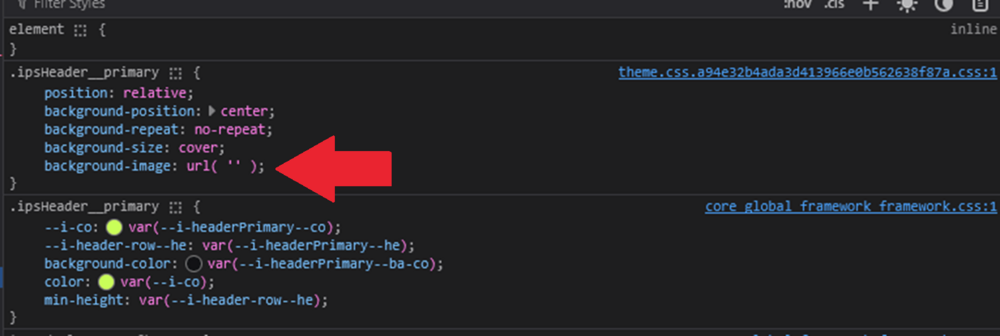
I don't think this has been fully fixed after all. I upgraded from v5.0.8 to v5.0.9 then I moved my custom CSS back to the AdminCP Theme Settings CSS template, and whilst the PHP is now being correctly parsed inside the CSS template (to control what gets output in the generated CSS), the CSS image resources are still not appearing inside the generated CSS. The CSS excerpt: background-image: url( '{resource="custom/moonlight-night-horror-full-moon-703553-2000.webp" app="core" location="front"}' );

-
Fantastic, thanks Ehren!
-
Hi @Ehren I just wanted to double check this is definitely fixed in the next release, as I couldn’t see a bug in the tracker for it. It is so vital that we can parse PHP in the CSS and JS templates in the back-end Theme Designer Mode Settings. Many thanks! Graham
-
This workaround has its hazards!
-
Awesome, thanks @Ehren Confirmed this workaround works!
-
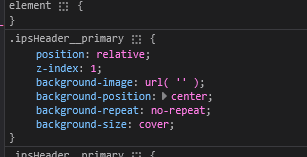
Hi, I've just come acrosss this myself. I think it might be a bug. I assume you are using IC5 from the CSS class name? The code that is generated in Manage Resources won't work when you use it in CSS templates, it appears as empty quotes when you inspect the source code.
-
I noticed that the new IC5 editor is a really good start but doesn't yet handle a few things when you copy and paste from standard HTML formatted posts created in Source mode in IPS4 to IC5: dl definition lists (it pastes them as paragraphs) table captions (pasted as paragraphs) emoji that are size formatted (28px) default to standard font-size when pasted. PRE tags get converted into a text box. text formatting elements including address, cite, abbreviation, dfn, kbd, samp, small elements div elements become paragraphs spoilers - the eyeball open/closed icon is broken I noticed that if you simply paste the HTML and re-open the post afterwards, it does a good attempt at trying to format the raw source you previously pasted.
-
Awesome, thanks Stuart!
-
Just FYI, Upgraded from 5.0.7 Stable to 5.0.8 Stable on 4 localhost testinstalls without any issues except Support section still complains of modified files: Some of the source files for Invision Community have been modified. C:\laragon\htdocs\ips5-theme1/applications/convert/sources/Software/Core/Smf.php C:\laragon\htdocs\ips5-theme1/applications/convert/sources/Software/Forums/Smf.php C:\laragon\htdocs\ips5-theme1/applications/convert/sources/Tools/Quill/output.php C:\laragon\htdocs\ips5-theme1/applications/convert/sources/Tools/Quill/src/Lexer.php C:\laragon\htdocs\ips5-theme1/applications/convert/sources/Tools/Quill/src/Line.php C:\laragon\htdocs\ips5-theme1/static/templates/core_front_clubs.php C:\laragon\htdocs\ips5-theme1/static/templates/core_front_global.php C:\laragon\htdocs\ips5-theme1/static/templates/gallery_front_global.php C:\laragon\htdocs\ips5-theme1/static/templates/gallery_front_view.php C:\laragon\htdocs\ips5-theme1/static/templates/nexus_front_clients.php You should download an unmodified copy of those files and upload them to your server. Once that is done, check if the problem persists. This was a full package download of 5.08, completely stock installs, haven't even opened the theme editor yet. Running PHP 8.2.
-
The new IC5 editor takes some getting used to. I thought the toolbar was supposed to float (be sticky) on long documents to save you constantly scrolling up and down long pages of text when formatting?
-
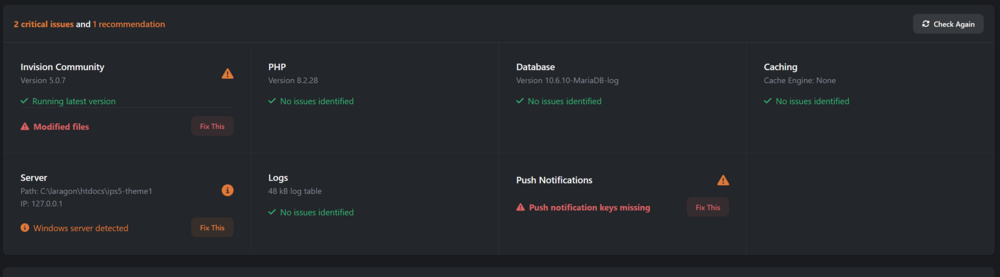
I just installed 4 brand new, clean installs of v5.0.7 on my localhost and everyone of them complains of modified files in the Support Tool once installed. Very strange! Some of the source files for Invision Community have been modified. C:\laragon\htdocs\ips5-theme1/applications/convert/sources/Software/Core/Smf.php C:\laragon\htdocs\ips5-theme1/applications/convert/sources/Software/Forums/Smf.php C:\laragon\htdocs\ips5-theme1/applications/convert/sources/Tools/Quill/output.php C:\laragon\htdocs\ips5-theme1/applications/convert/sources/Tools/Quill/src/Lexer.php C:\laragon\htdocs\ips5-theme1/applications/convert/sources/Tools/Quill/src/Line.php C:\laragon\htdocs\ips5-theme1/static/templates/core_front_clubs.php C:\laragon\htdocs\ips5-theme1/static/templates/core_front_global.php C:\laragon\htdocs\ips5-theme1/static/templates/gallery_front_global.php C:\laragon\htdocs\ips5-theme1/static/templates/gallery_front_view.php C:\laragon\htdocs\ips5-theme1/static/templates/nexus_front_clients.php You should download an unmodified copy of those files and upload them to your server. Once that is done, check if the problem persists. These are minutes old installs, nothing modifed at all apart from constants.php and a .htacess file. There must be something 'off' with v5.0.7 somewhere. EDIT: Just saw the bug report!
-
The problem that first occurred to me (apart from concerns with impacting on site SEO and human search-ability in terms of finding existing content), is that it creates a lot of duplicated content, which goes against the grain in terms of maximising crawl time budget. Matt started to reduce impact on limited SEO bot resources a couple of years back, by overhauling the robots.txt feature for the good bots that comply with it. Do you see a featured content area as kind of a pseudo site map or should it be marked as not indexed to avoid further duplication? 60k of tags is kinda crazy and unmanageable! Tags used to ideally be used to group related content. A tag with only one piece of content is fairly pointless because the search feature should pick that up anyway. Perhaps that’s not the case with tags any more though.
-
Thank you much appreciated. Will keep an eye out for those updates and announcements. 🙂