



Available Services
- Theme Design
About My Services
Hello and thank you for your interest in Invisionary Themes & Design!
My name is Graham and I'm a UK-based freelance web designer, occasional PHP developer and web hosting/server admin. I've been creating websites for more than 25 years, both for myself and also for a small number of special clients.
I've been using Invision Community (IC/IPS) since it launched over 2 decades ago, starting out with the predecessor to IPS known as Ikonboard and also SMF.
Like many IPS community admins, I got fed up with disappearing theme designers who charge annual subscriptions but fail to keep their themes updated with latest compatible versions, so I began developing my own themes for Invision Community and am known for my Halloween Macabre, Christmas Midwinter and Remembrance themes.
Themes for Invision Community 5
Christmas Midwinter theme (IC5):

View more details and screenshots of Christmas Midwinter for Invision Community 5
Christmas Midwinter Red (IC5):
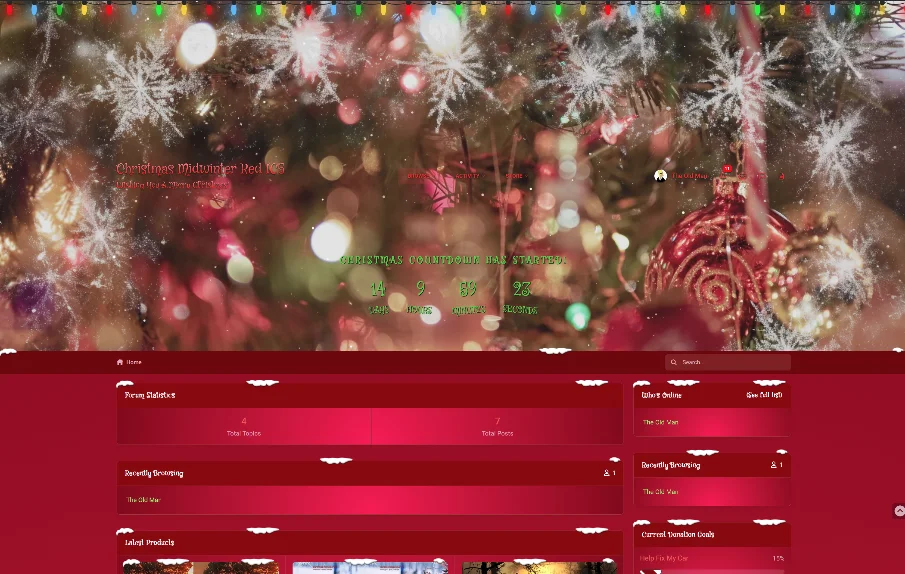
View more details and screenshots of Christmas Midwinter Red for Invision Community 5
Halloween Macabre theme (IC5):

View more details and screenshots of Halloween Macabre for Invision Community 5
Satin Noir theme (IC5):

Satin Noir has various FPS gaming/shooter and racing style headers, or upload your own! View more details and screenshots of Satin Noir for Invision Community 5
Remembrance Pro theme (IC5):

View more details and screenshots of Remembrance Pro for Invision Community 5
Themes for Invision Community 4
Christmas Midwinter Red theme (IPS4):

View more details and screenshots of Christmas Midwinter Red for Invision Community 4
Christmas Midwinter theme (IPS4):

View more details and screenshots of Christmas Midwinter for Invision Community 4
Satin Noir theme (IPS4):

Satin Noir has various FPS gaming/shooter and racing style headers, or upload your own! View more details and screenshots of Satin Noir for Invision Community 4
Halloween Macabre theme (IPS4):

View more details and screenshots of Halloween Macabre for Invision Community 4
Remembrance Pro theme (IPS4):

View more details and screenshots of Remembrance Pro for Invision Community 4
Curious?
Invisionary.tech is the place to experience my themes for Invision Community, to get premium support and purchase from a growing range of innovative, high performance and original themes available for Invision Community (IC/IPS/IPB).
For continued support, updates and access to exclusive client offers, register an account over at Invisionary.tech if you haven't already!
Look out for more themes coming soon!
Graham P. Smith
Standards of Service Disclaimer
Invision Power Services, Inc. (IPS) makes the provider directory available as a convenience to our customers. While we make an effort to maintain a reliable provider directory, we do not review, test or warrant the fitness of any third party resource or service. Use of third party resources is done at your sole risk and it is your responsibility to ensure any resources or services being obtained are compatible and suitable for your individualized use of the software.
Any relationship and/or subsequent transaction established via use of the provider directory is exclusively between you and the provider. IPS will not act as an intermediary in the event of a dispute or claim.
IPS does not provide support for modifications to the software, nor any issues that arise from same. IPS reserves the right to refuse support for communities utilizing what we determine, in our sole discretion, any modifications that hinder our ability to effectively support and/or diagnose issues with your community.